
-
Author: Anindita Barik
-
Updated Date: Aug-05-2026
-
Views: 2 Min Read
A business website needs a redesign when its structure, platform, or user experience limits traffic, conversions, and search visibility. Common warning signs include poor mobile Core Web Vitals, declining enquiries, outdated content, AI search invisibility, platform limitations, security debt, and weak navigation. This guide explains seven practical signs, when targeted fixes are enough, when a full redesign is the better investment, and how to protect SEO performance during a website migration.
Most signs that your website needs a redesign do not look like design problems. They show up as fewer enquiries, rankings that refuse to improve, or a developer charging hours for a change that should take minutes. Those symptoms usually point to deeper issues with the website, not just the way it looks.
The impact of those issues can be surprisingly large. Google and Deloitte found that improving mobile page load time by just 0.1 seconds increased retail conversions by 8.4%. When gains come from fractions of a second, even small usability problems can affect business performance.
This guide covers seven clear signs that your website may need a redesign. It also includes a practical scoring table to help you decide whether a full redesign makes sense or whether targeted improvements will do the job.
Before any design work begins, you’ll have to learn which metrics to capture, along with the migration mistakes that quietly erase hard-earned search rankings. The sales pitch can wait until the final paragraph.
Signs Your Website Needs a Redesign: The Short Version
You need a redesign when the structure, platform, or information architecture holds the website back. You need targeted fixes when the foundation is solid and only specific pages underperform. Those are two very different budgets.
Most businesses get the timing wrong in one of two ways. They redesign too early and pay for an expensive repaint, or wait too long and absorb years of compounding losses that no launch day can recover.
The seven signs below are ordered by what they cost you, not by how obvious they appear.
The 7 Signs, and What Each One Actually Costs
These seven signs reveal where your website is creating friction, reducing conversions, and leaving potential revenue behind.
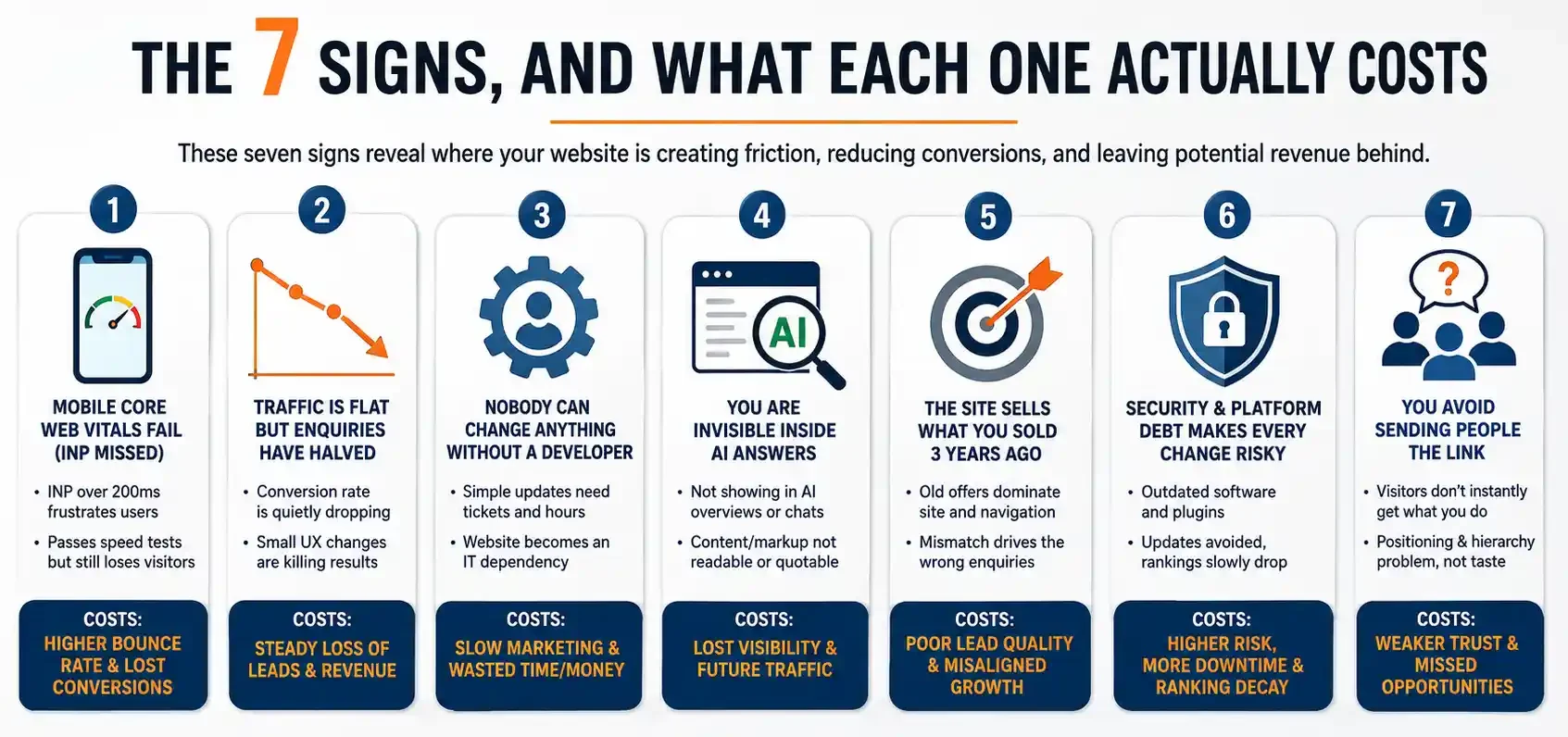
1. Your mobile Core Web Vitals fail, and INP is the one you missed
Everyone checks load speed. Almost nobody checks responsiveness. Interaction to Next Paint (INP) replaced First Input Delay as a Core Web Vital, and Google sets the benchmark at 200 milliseconds or less at the 75th percentile of real-user visits.
INP is where older websites quietly fall behind. A theme loaded with twelve plugins, three tag containers, and a chat widget can pass LCP yet still take 600 ms to respond to a tap. Users rarely see that as a slow website. They see it as a broken one and leave.
Check field data in Search Console instead of relying on a lab score. Lab tools test under controlled conditions on fast machines without ad scripts. Your customers browse on mid-range Android phones over patchy mobile data, and that paints a very different load-speed picture.
2. Traffic is flat but enquiries have quietly halved
This sign costs the most and gets noticed the least. Sessions look normal in GA4, so nobody raises an alarm. Meanwhile, the conversion rate has drifted from 3.1% to 1.4% over eighteen months, and nobody has plotted the trend.
The cause is usually structural rather than creative. Forms pick up extra fields. A consent banner starts covering the mobile CTA. Trust signals sit three scrolls below the hero copy. Baymard’s analysis across 50 studies puts average cart abandonment at 70.22%, much of it driven by checkout design problems that are entirely fixable.
Pull an 18-month conversion trend by device before accepting the explanation that traffic quality changed. It usually didn’t. The site did, one small change at a time. Start with conversion diagnostics before committing to a full rebuild.
3. Nobody can change anything without a developer
If publishing a new service page requires a ticket, a quote, and a two-week wait, your website has stopped being a marketing asset. It has become an IT dependency, and dependencies tend to get avoided.
I have seen a client pay for four hours of developer time just to change a phone number across six templates. That is not a design problem. It is a platform problem, and no visual refresh will fix it.
Here is the test. Can someone without technical expertise on your team publish a new page, add a case study, and replace a homepage banner in under thirty minutes? If not, the CMS itself is the reason to rebuild.
4. You are invisible inside AI answers
Search has stopped being ten blue links. Pew Research analysed 68,879 real searches and found that people clicked a result 8% of the time when an AI summary appeared, compared with 15% when it did not.
The question is no longer just where you rank. It is whether an answer engine can read, quote, and attribute your page. Websites built as JavaScript-heavy single-page apps, or with key content buried inside tabs and accordions, often cannot be quoted at all.
If your brand never appears in ChatGPT, Gemini, or Perplexity answers for your own service terms, you likely have a content and markup problem that a redesign should address. Treat generative engine optimisation as a build requirement, not something to add later.
5. The site sells what you sold three years ago
Businesses change what they do faster than they change their websites. New services get bolted on as pages buried in the footer. The old flagship offering still owns the homepage hero and the main navigation.
Prospects search for the new service, land on a site that talks about the old one, and go straight back to the search results. Google notices that pattern. So does your sales team, in the form of unqualified enquiries.
Compare your top ten landing pages with your top ten revenue lines. If they do not match, the information architecture is wrong, and architecture calls for a rebuild rather than an edit. Weak site navigation is usually the first symptom.
6. Security and platform debt makes every change risky
An unsupported PHP version. A page builder abandoned by its developer. Plugins last updated in 2022. Each issue is survivable on its own. Together, they make nobody in your team want to touch the site.
Once the team stops updating the website, content falls behind, schema never gets added, and rankings decay for reasons that look like an algorithm hit but are not. That decay is slow and easy to misdiagnose.
An SSL certificate is table stakes now, and browsers flag anything without one. The real question is whether your stack still receives security patches.
7. You avoid sending people the link
Every competitor article ends on this point, so here is the version with an actual test.
Send your homepage URL to five people who have never seen it. Ask one question: What does this company do, and who is it for? If more than one answer comes back wrong or vague, you have a positioning and visual hierarchy problem, not a taste problem.
Personal embarrassment is a weak signal on its own. Owners regularly dislike sites that convert well and admire sites that do not. Test with strangers, because strangers are your actual audience.
Redesign or Targeted Fixes? Score It With This Table
Competitors treat every sign as evidence that you need a rebuild because rebuilds are what they sell. In reality, some of these issues cost only a few thousand rupees to fix in place. Work through the table before deciding.
| Symptom | Fix it in place when | Rebuild when |
|---|---|---|
| Slow pages | The site runs on a modern, supported theme and only needs image, script, and hosting improvements | The platform cannot support caching, modern image formats, or code splitting |
| Low conversions | Two or three pages underperform compared with the rest of the site | Every template shares the same broken layout and CTA pattern |
| Weak rankings | A handful of terms need on-page and content work | The information architecture buries service pages four or more clicks from the homepage |
| Mobile problems | A few pages need responsive CSS corrections | The site was never built mobile-first, and patching every breakpoint costs more than rebuilding |
| Cannot ship changes | You need one custom template | The CMS has no reusable component model |
| Dated brand | Typography, colour, and imagery need refreshing | The brand shift also changes what you sell and who you sell it to |
| AI invisibility | Content needs restructuring and schema added | Content renders client-side, and crawlers cannot read the page |
If three or more answers fall into the right-hand column, a redesign is the better option. Patching the same foundation over the next few years usually costs more than replacing it once.
What AI Search Changed About Redesign Briefs
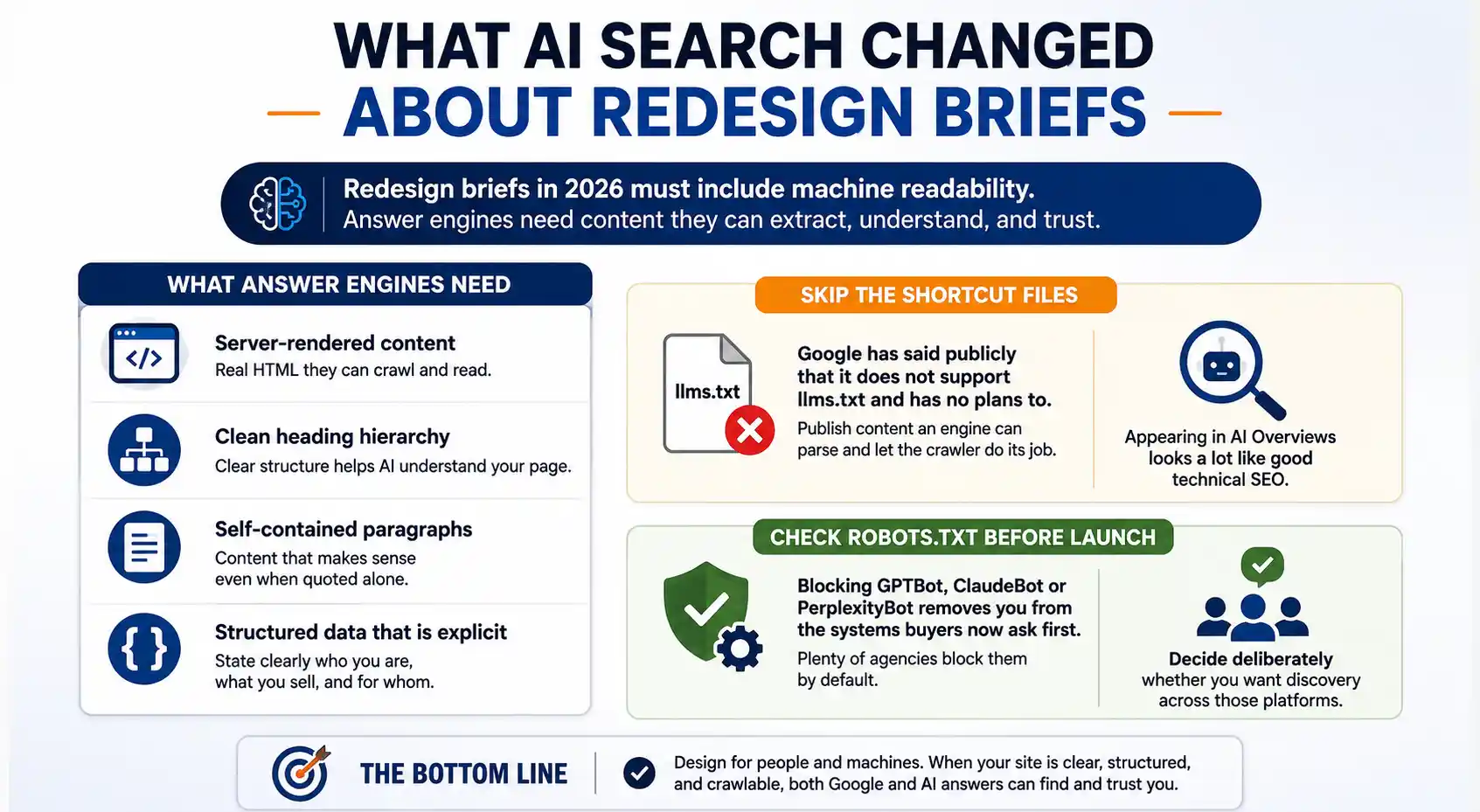
Two years ago a redesign brief covered speed, mobile and conversions. In 2026 it also has to cover machine readability, and most briefs still do not mention it.
Answer engines need text they can extract. That means server-rendered content, a clean heading hierarchy, self-contained paragraphs that still make sense when quoted alone, and structured data that states plainly who you are and what you sell.
Skip the shortcut files. Google has said publicly that it does not support llms.txt and has no plans to. Publish content an engine can parse and let the crawler do its job. The practical work of appearing in AI Overviews looks a lot like good technical SEO.
Check robots.txt before launch too. Blocking GPTBot, ClaudeBot or PerplexityBot removes you from the systems buyers now ask first, and plenty of agencies block them by default. Decide deliberately whether you want discovery across those platforms.
Baseline These Eight Numbers Before Any Design Work Starts
The biggest reason redesigns cannot prove their value: nobody recorded what the old site did. Capture all of this before a designer opens a file, then date it and store it outside the CMS.
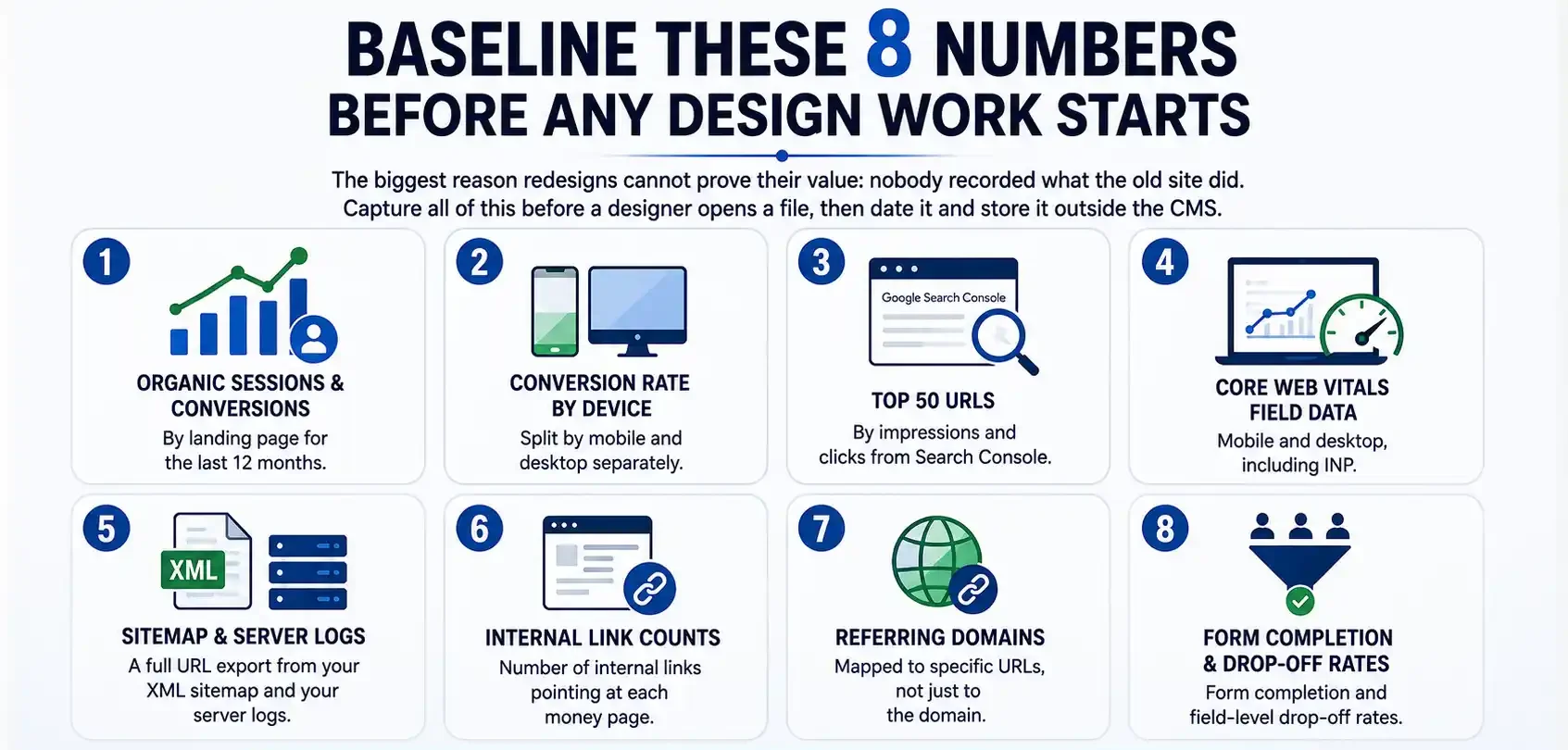
- Organic sessions and conversions by landing page for the last twelve months
- Conversion rate split by device, mobile and desktop separately
- Your top 50 URLs by impressions and clicks from Search Console
- Core Web Vitals field data, mobile and desktop, including INP
- A full URL export from your XML sitemap and your server logs
- Internal link counts pointing at each money page
- Referring domains mapped to specific URLs, not just to the domain
- Form completion and field-level drop-off rates
When rankings wobble in week three after launch, this file is the difference between a diagnosis and a panic. It is also the only honest way to answer the board question about return on the project.
The Migration Mistakes That Erase Rankings
Most ranking losses after a redesign are not design failures. They are migration failures, and every one of them is avoidable with a checklist.
Google recommends server-side permanent redirects and confirms that 301 and 308 redirects do not cause a loss of PageRank. It also advises keeping chains short, ideally under three hops. Map every old URL to its closest new equivalent, never a blanket redirect to the homepage.
The classic disaster is simpler. Staging carries a noindex tag, the team forgets to remove it at go-live, and the site vanishes from search for eleven days. Check robots.txt and the meta robots tag within an hour of launch, not the following week.
Watch internal link equity as well. New designs often drop the footer and sidebar links that were quietly feeding your service pages, and rankings slide with no other visible change. The other redesign SEO mistakes are worth reading before you sign anything, alongside a proper migration strategy.
When You Should Not Redesign Your Website
A website redesign is not always the right answer, even if many agencies present it that way. There are situations where targeted improvements deliver better results for less time and money.
Do not redesign if your website is less than two years old, passes Core Web Vitals on mobile, and converts at or above your industry median. Fix the pages that underperform and invest the remaining budget in content and acquisition instead.
Do not redesign in the middle of a rebrand. You will end up paying for the same work twice. Finalise your positioning, messaging, and brand identity first, then build against a settled brief.
Do not redesign to match a competitor’s aesthetic. Their website may convert worse than yours, and you have no visibility into their analytics. Borrow their structure only if you also know it delivers results.
Finally, do not launch during your peak sales quarter. Some traffic fluctuation during a redesign is normal, and even a normal dip can be expensive during your busiest weeks.
Run the Test This Week
Work through the seven signs on your own website, score the table honestly, and capture your baseline numbers. Within an hour, you will know whether your website needs a redesign or a focused list of fixes. That distinction alone could save you several lakh rupees.
If the answer points to a redesign, the brief matters more than the designer. Include migration planning, measurement baselines, and machine readability in the scope from day one. Learn what to look for in a design partner before you create a shortlist. Our website design and development team follows those principles, and we will tell you honestly when your business does not need a redesign.
Frequently Asked Questions About Website Redesign Signs
-
How many signs mean I definitely need a redesign?
Ans.Three or more signs that point to problems with your structure, platform, or information architecture usually justify a full redesign. One or two isolated signs are almost always cheaper to fix in place. What matters is whether the problem is foundational, not how many signs you can count. -
How often should a business website be redesigned?
Ans.Most business websites need a structural redesign every three to five years. Platform age and business change should drive the decision, not the calendar. Sites running on a modern component-based CMS with active maintenance can run longer. An annual audit catches problems earlier than a fixed schedule. -
Will a website redesign hurt my Google rankings?
Ans.A redesign with a complete 301 redirect map, preserved content, and unchanged high-performing URLs usually maintains rankings, with a two to six week settling period. Rankings drop when teams change URLs without redirects, remove content, or push a staging noindex tag to production. Google states that permanent redirects do not reduce PageRank. -
How long does a website redesign take?
Ans.A 10 to 20-page business website redesign typically takes six to ten weeks from discovery to launch. E-commerce and multi-language websites usually take three to six months. Content readiness usually delays the project more than development capacity. -
Should I redesign or just improve page speed?
Ans.If your site runs on a supported platform and only fails speed metrics, optimisation costs far less than a redesign. If a bloated theme, an abandoned page builder, or plugin sprawl causes the slowdown, rebuilding on a lighter stack usually costs less over three years. -
Does a redesign improve AI search visibility?
Ans.It can, if the brief includes machine readability. Server-rendered content, a clear heading hierarchy, structured data, and crawler access matter more to answer engines than visual polish. A prettier site built as an unreadable JavaScript application can actually reduce AI visibility.
Author Details

Latest Posts
-
 18 / Aug
Google Search Console Google Search Console For Social Media: How To Track Instagram, Tiktok, X And Youtube
18 / Aug
Google Search Console Google Search Console For Social Media: How To Track Instagram, Tiktok, X And Youtube -
 05 / Aug
SEO vs GEO vs AEO SEO vs GEO vs AEO: A Simple 2026 Comparison for Businesses
05 / Aug
SEO vs GEO vs AEO SEO vs GEO vs AEO: A Simple 2026 Comparison for Businesses -
 31 / Jul
Uncategorized How to Build a 90-Day Digital Marketing Plan That Works
31 / Jul
Uncategorized How to Build a 90-Day Digital Marketing Plan That Works -
 17 / Jul
Website Redesign 7 Real Signs Your Business Website Needs a Redesign in 2026
17 / Jul
Website Redesign 7 Real Signs Your Business Website Needs a Redesign in 2026 -
 10 / Jul



Blogs
Journey into Ideas Unveiling Tomorrow's Insights Today.

-
How many signs mean I definitely need a redesign?
Ans.Three or more signs that point to problems with your structure, platform, or information architecture usually justify a full redesign. One or two isolated signs are almost always cheaper to fix in place. What matters is whether the problem is foundational, not how many signs you can count. -
How often should a business website be redesigned?
Ans.Most business websites need a structural redesign every three to five years. Platform age and business change should drive the decision, not the calendar. Sites running on a modern component-based CMS with active maintenance can run longer. An annual audit catches problems earlier than a fixed schedule. -
Will a website redesign hurt my Google rankings?
Ans.A redesign with a complete 301 redirect map, preserved content, and unchanged high-performing URLs usually maintains rankings, with a two to six week settling period. Rankings drop when teams change URLs without redirects, remove content, or push a staging noindex tag to production. Google states that permanent redirects do not reduce PageRank. -
How long does a website redesign take?
Ans.A 10 to 20-page business website redesign typically takes six to ten weeks from discovery to launch. E-commerce and multi-language websites usually take three to six months. Content readiness usually delays the project more than development capacity. -
Should I redesign or just improve page speed?
Ans.If your site runs on a supported platform and only fails speed metrics, optimisation costs far less than a redesign. If a bloated theme, an abandoned page builder, or plugin sprawl causes the slowdown, rebuilding on a lighter stack usually costs less over three years. -
Does a redesign improve AI search visibility?
Ans.It can, if the brief includes machine readability. Server-rendered content, a clear heading hierarchy, structured data, and crawler access matter more to answer engines than visual polish. A prettier site built as an unreadable JavaScript application can actually reduce AI visibility.