
























Your site is slow and you don’t even know it
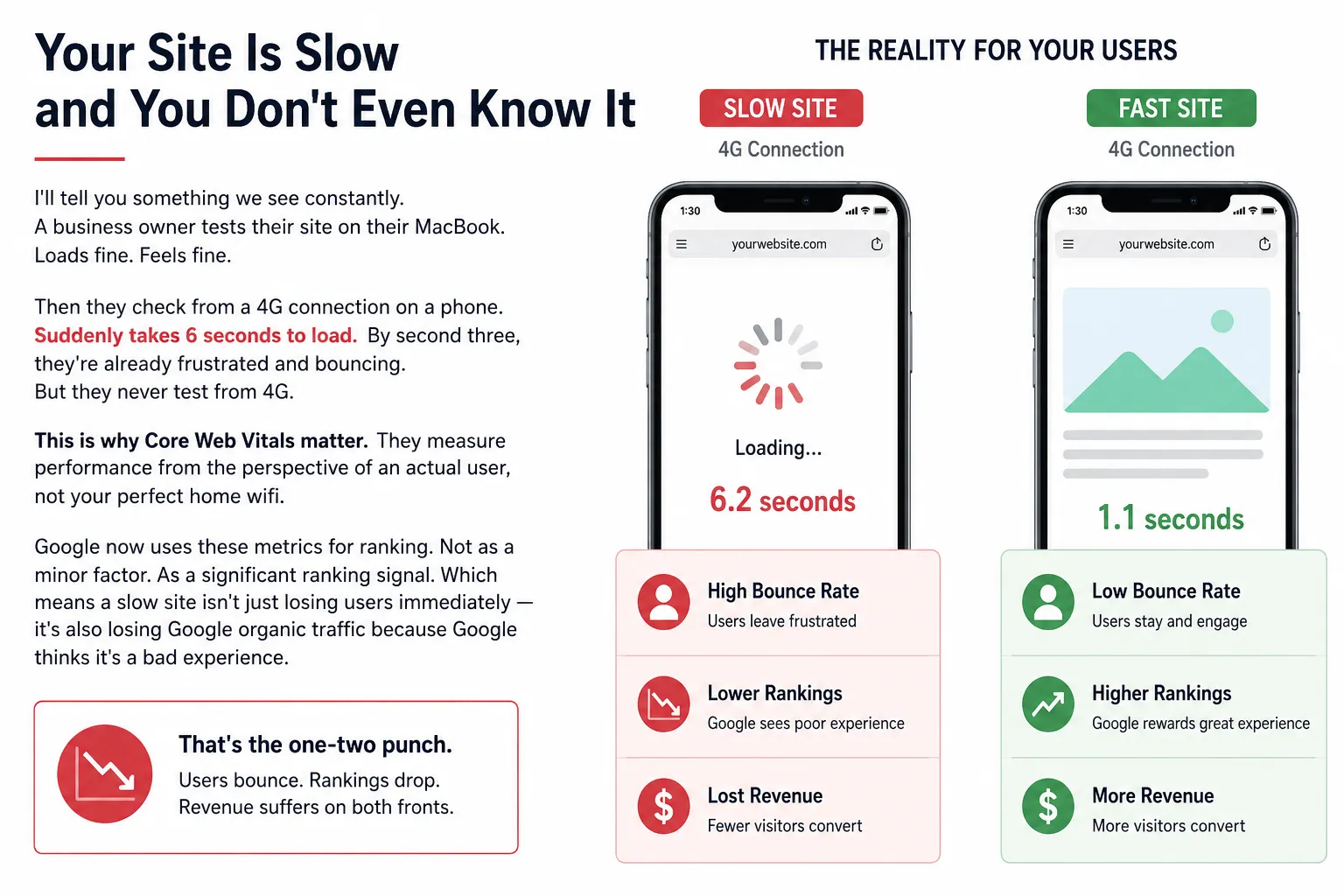
We see this all the time. A business owner tests their site on a MacBook. It loads fine and feels fine.
Then they check on a phone with a 4G connection. It takes 6 seconds to load. By second three, people are frustrated and leaving. But the owner never tests on 4G.
This is why Core Web Vitals matter. They measure performance from the perspective of an actual user, not your perfect home wifi.
Google now uses these metrics as a ranking signal. So a slow site loses users straight away, and it also loses organic traffic from Google, because Google sees it as a poor experience.
Users leave and rankings drop, so revenue suffers on both sides.
A made-up example: a site that lost traffic after a redesign
Here is a made-up example, based on a pattern we see often. A B2B manufacturing company sells industrial equipment parts. The website has a professional design, but it is slow.
They redesign everything: new CMS, new hosting, new theme. All of it is meant to be optimised. But in the rush, nobody tests properly.
After launch, the Core Web Vitals scores drop. LCP goes from 2.1 seconds to 4.3 seconds. That does not look catastrophic, but it is enough.
Organic traffic falls by about 30% over 90 days. The fall is slow, so nobody links it to site speed at first. They think competition has increased or their SEO has stopped working. This is one of the most common website redesign SEO mistakes to avoid: launching without testing performance first.
An audit finds the cause: unoptimised images, no lazy loading, and unused JavaScript running on every page. These are classic post-migration issues.
Three weeks of fixes bring LCP back to 2.2 seconds, and traffic recovers in about 30 days. Performance matters more than most people think.
What Core Web Vitals measure
Here is what Google measures when it crawls your site, without the technical fluff.
1. LCP (Largest Contentful Paint)
How long before the main content of your page appears? Not the whole page, just the biggest visible element, such as the headline, main image or main text block. When does that show up?
Target: under 2.5 seconds. After 3 seconds, bounce rates spike, because people assume the page is broken.
LCP usually suffers from slow server response, render-blocking JavaScript, slow image delivery or heavy CSS.
2. INP (Interaction to Next Paint)
When someone taps a button, clicks a link or types in a form, how long until the page visibly responds? INP looks at the interactions across a whole visit. Under 200 milliseconds is good, and above 500 milliseconds is poor. INP replaced the older First Input Delay (FID) metric.
INP usually suffers from JavaScript running on the main thread, too much parsing at once, and non-optimised third-party scripts.
3. CLS (Cumulative Layout Shift)
Does the page layout jump around while loading? Buttons move, text shifts, and images load and push everything down. That movement is layout shift, and it is very annoying.
Target: under 0.1. Even small shifts are noticeable and frustrating.
CLS usually suffers from images without set dimensions, ads that load late, and embeds like YouTube without reserved space.
How to check your site’s vitals right now
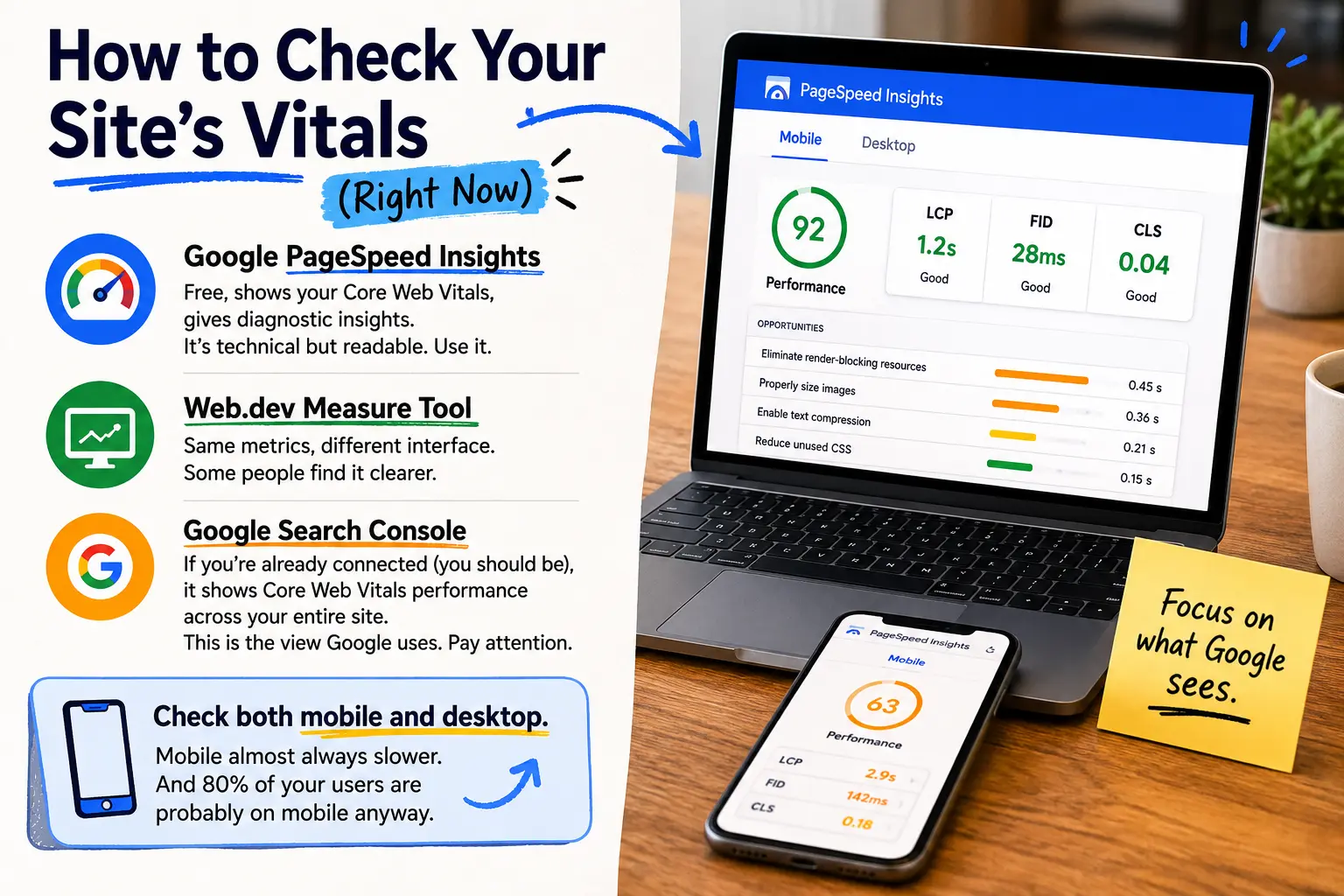
- Google PageSpeed Insights is free. It shows your Core Web Vitals and gives diagnostic tips. It is technical but readable, so use it.
- The Web.dev Measure tool shows the same metrics in a different interface. Some people find it clearer.
- Google Search Console shows Core Web Vitals performance across your whole site, if you are already connected (you should be). This is the view Google uses, so pay attention. Pairing this with the right SEO audit tools gives you a complete picture of what’s holding your site back.
- Check both mobile and desktop. Mobile is almost always slower, and most of your users are probably on mobile anyway.
Fixing Core Web Vitals without losing your mind
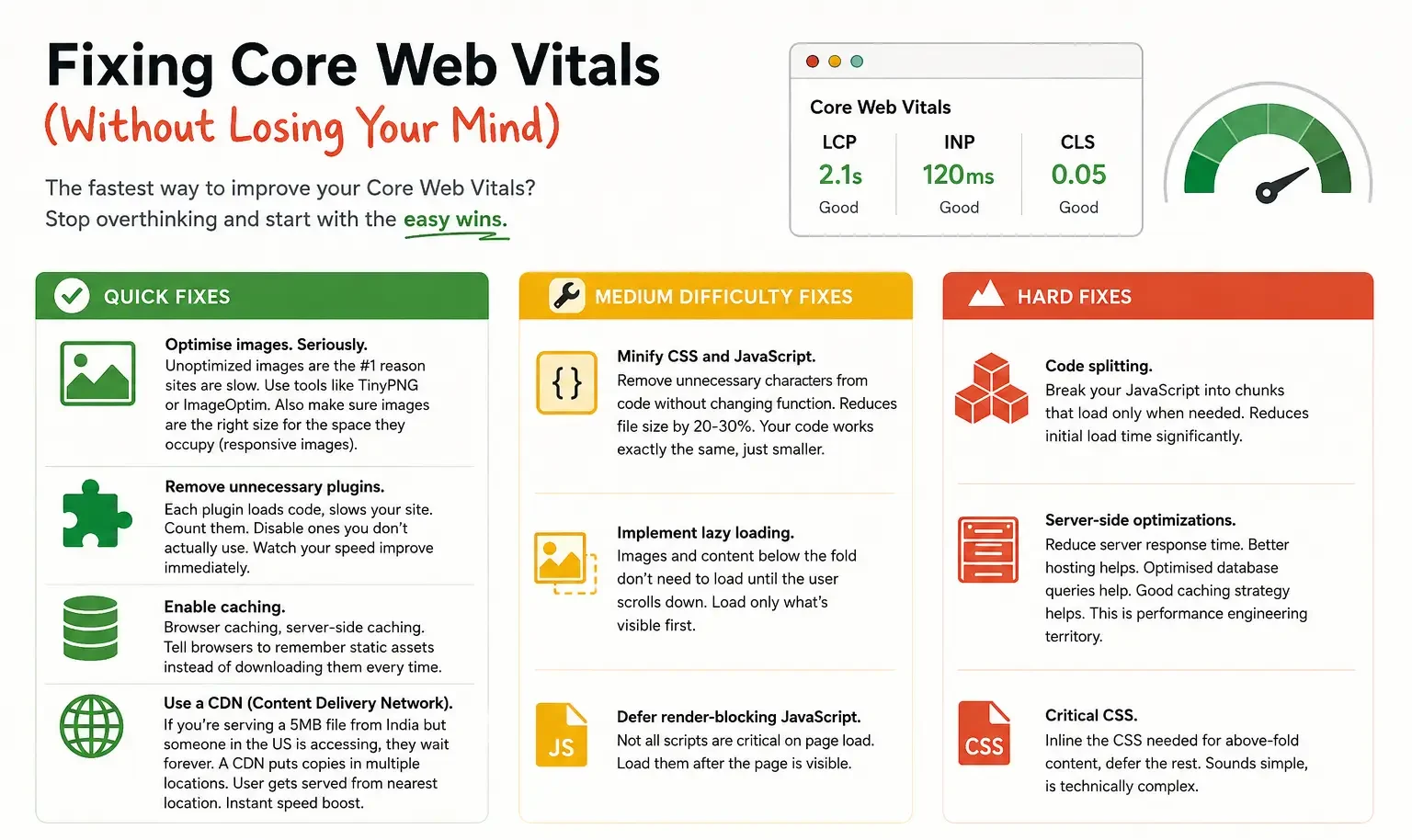
The fastest way to improve your Core Web Vitals is to stop overthinking and start with the easy wins.
- Quick fixes
Optimise images. Unoptimised images are one of the most common reasons sites are slow. Use tools like TinyPNG or ImageOptim. Also make sure images are the right size for the space they occupy (responsive images).
Remove unnecessary plugins. Each plugin loads code and slows your site. Count them and disable the ones you don’t use. You will often see speed improve straight away.
Enable caching, both browser caching and server-side caching. This tells browsers to remember static assets instead of downloading them every time.
Use a CDN (Content Delivery Network). If you serve a 5MB file from India and someone in the US opens it, they wait a long time. A CDN keeps copies in many locations, so each user is served from the nearest one. That gives an instant speed boost.
- Medium difficulty fixes
Minify CSS and JavaScript. This removes unnecessary characters from the code without changing what it does. Your code works exactly the same, just smaller.
Use lazy loading. Images and content below the fold don’t need to load until the user scrolls down. Load only what is visible first.
Defer render-blocking JavaScript. Not all scripts are needed when the page loads. Load them after the page is visible.
- Hard fixes
Code splitting. Break your JavaScript into chunks that load only when needed. This reduces the first load time.
Server-side optimisation. Reduce server response time. Better hosting helps, optimised database queries help, and a good caching strategy helps. This is performance engineering territory.
Critical CSS. Inline the CSS needed for above-the-fold content and defer the rest. It sounds simple but is technically complex.
Which issues matter most
- Not all Core Web Vitals improvements are equal. Improving LCP from 3 seconds to 2.3 seconds is a big gain. Improving from 2.1 to 2.0 makes little difference.
- Look at your biggest offender. Fix that first. Usually it’s images or JavaScript.
- Run PageSpeed Insights. It gives you a priority list. The red items matter most, so fix those before worrying about the orange ones. Understanding how Googlebot crawls and renders your pages can also help you prioritise what gets fixed first.
Why this matters for your business
A slower site ranks worse, because page speed is part of how Google ranks. This is especially important if you are trying to appear in Google AI Overviews, where page experience signals carry real weight.
A 1-second delay can cut conversions by about 7%, and longer delays cost you more. You are leaving money on the table.
Fast sites feel responsive and professional. Slow sites feel broken, and your brand perception takes a hit.
Mobile matters a lot in India, where 4G is common but not consistent. Your site needs to work on spotty connections, and Core Web Vitals measure this. If you are failing, you are failing a large share of potential customers.
The hard truth
Most sites are slow, and most business owners don’t know it. Their competitors are slow too, so nobody feels behind. But the businesses that fix their performance gain an edge in traffic, conversions and rankings.
Start today. Check your score, and don’t worry if it is bad, because most sites are. Pick the biggest issue, fix it, check again and repeat.
Performance is ongoing, not a one-time job. New features, plugins and content can all slow you down. Monitor regularly and make it part of your development process.
If you want help diagnosing and fixing Core Web Vitals issues, whether you are starting from bad or trying to improve something good, let’s audit your site. A quick assessment shows where the problems are and what to fix first.
Is your site fast enough?
We audit Core Web Vitals for free. Five minutes gives you a clear picture of what’s slowing you down and what matters most to fix.


