-
Author: Satesh Shaw
-
Updated Date: Apr-24-2026
-
Views: 2 Min Read
With 2 billion monthly users, YouTube is one of the most powerful search engines for video content. Boosting your video performance comes down to using the right keywords in titles, optimising descriptions, adding relevant tags, using custom thumbnails, and placing cards strategically — small steps that make a big difference.
A client came to us last year with a YouTube channel that had 47 videos, decent production quality, and roughly 300 views per month total. Not per video. Total. Across 47 videos.
They weren’t doing anything obviously wrong. The content was solid. The editing was clean. The topics were genuinely useful. But here’s what they were doing: uploading videos exactly the way most people upload videos — record, export, slap on a title, hit publish, hope for the best.
Nobody had told them that YouTube is a search engine. A massive one. And like any search engine, it rewards content that’s built around how people actually look for things — not just content that exists.
Three months after we reworked their YouTube SEO strategy, they were sitting at 11,000 views a month. Same team. Same budget. Mostly the same types of videos. Just completely different approach to how those videos were set up to be found.
That gap — between 300 and 11,000 — is what YouTube SEO does. And this guide is going to walk you through exactly how to close it.
So What Actually Is YouTube SEO?
Short version: it’s the process of making sure YouTube understands what your video is about and showing it to people who are actively looking for that kind of content.
But that definition undersells it a bit.
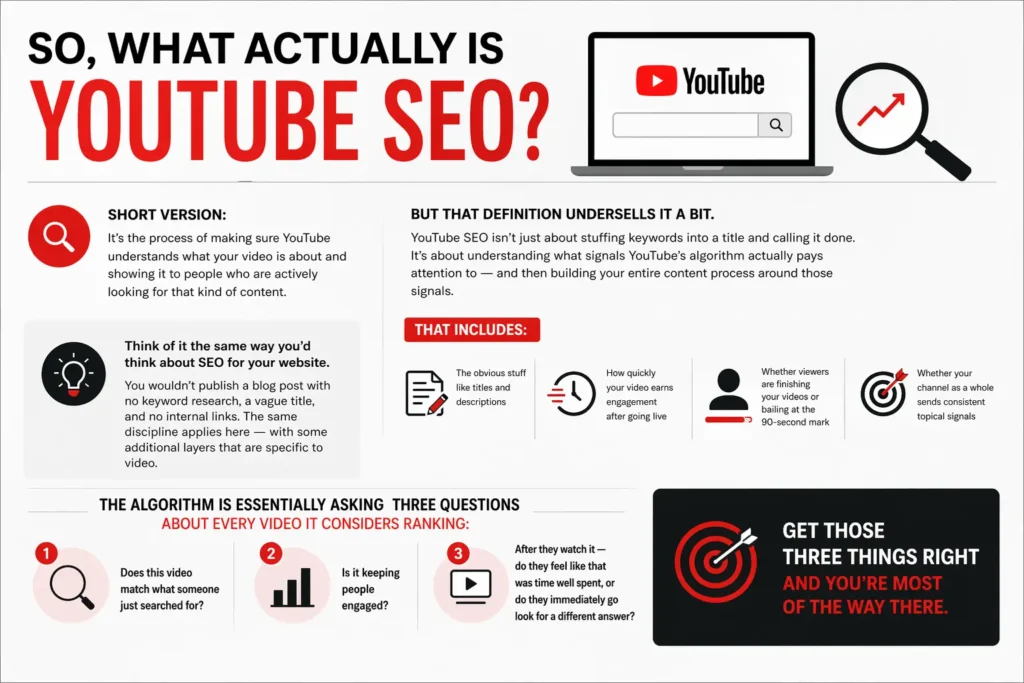
YouTube SEO isn’t just about stuffing keywords into a title and calling it done. It’s about understanding what signals YouTube’s algorithm actually pays attention to — and then building your entire content process around those signals. That includes the obvious stuff like titles and descriptions. But it also includes things most creators completely overlook: how quickly your video earns engagement after going live, whether viewers are finishing your videos or bailing at the 90-second mark, and whether your channel as a whole sends consistent topical signals.
Think of it the same way you’d think about SEO for your website. You wouldn’t publish a blog post with no keyword research, a vague title, and no internal links. The same discipline applies here — with some additional layers that are specific to video.
The algorithm is essentially asking three questions about every video it considers ranking:
Does this video match what someone just searched for? Is it keeping people engaged? And after they watch it — do they feel like that was time well spent, or do they immediately go look for a different answer?
Get those three things right and you’re most of the way there.
Why 2026 Changed the YouTube SEO Playbook
A lot of the YouTube SEO advice floating around online was written when the algorithm was simpler. Back then, you could get reasonable traction just by loading your title with keywords, building out a long tag list, and posting consistently. That still matters — but it’s nowhere near enough anymore.
Here’s what’s different now.
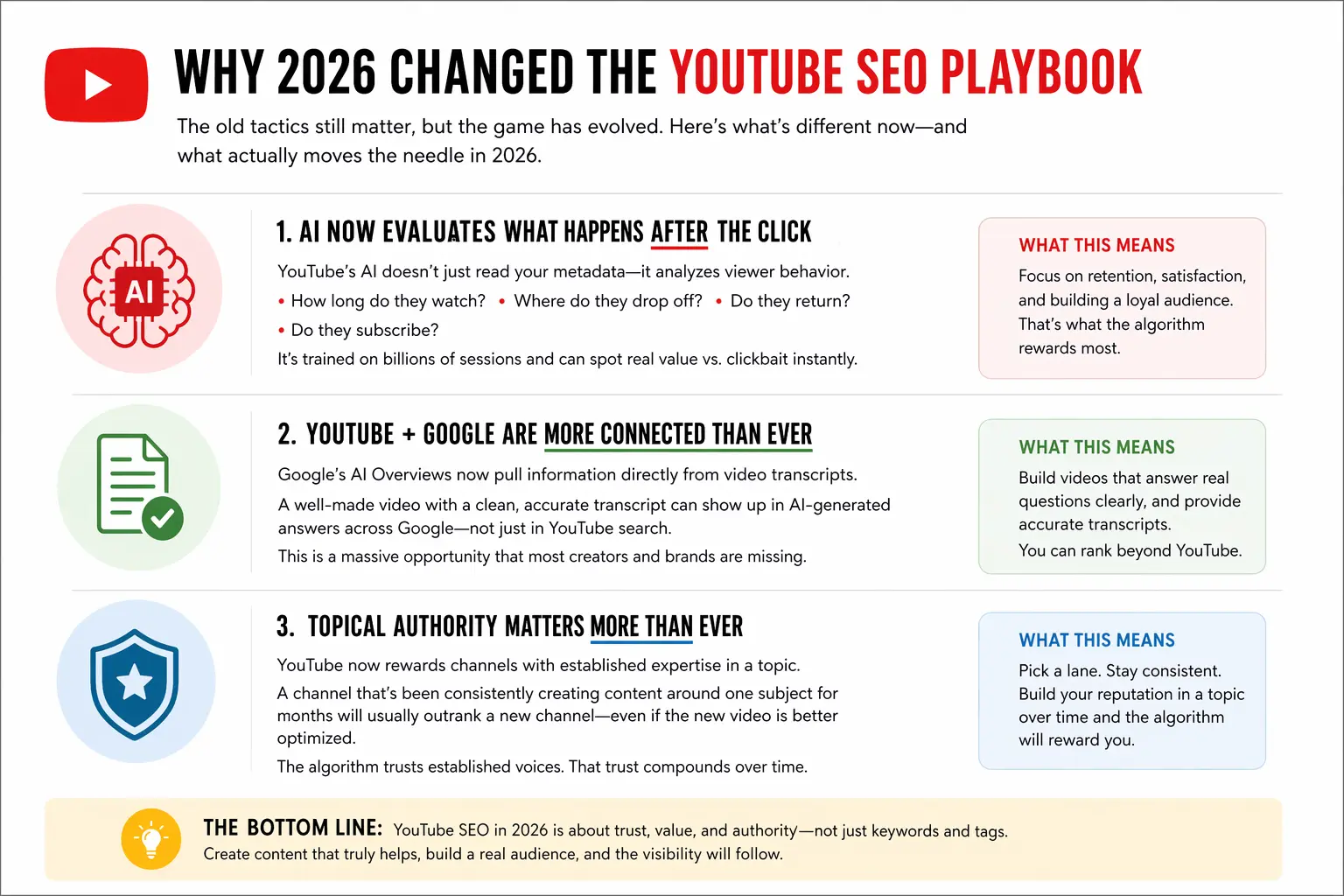
YouTube’s AI has gotten genuinely good at evaluating content quality. It’s not just reading your metadata — it’s analyzing what happens after someone presses play. How long do they watch? Where do they stop? Do they come back to your channel? Do they subscribe? The algorithm has been quietly training itself on billions of viewing sessions, and it’s become very good at spotting the difference between a video that actually delivers value and one that just looks like it should.
The other thing that’s changed: YouTube and Google are more intertwined than ever. In 2026, Google’s AI Overviews are pulling content directly from video transcripts. That means a well-made YouTube video — with a clean, accurate transcript — can show up in Google’s AI-generated answers, not just in YouTube search. This is an enormous opportunity that almost nobody is taking advantage of yet.
And here’s the thing that catches a lot of brands off guard: topical authority now matters on YouTube the same way it does in traditional SEO. A channel that’s been posting consistently about one subject for six months will almost always outrank a newer channel jumping on the same topic — even if the new video is technically better optimized. The algorithm trusts established voices in a niche. You build that trust over time, not overnight.
What YouTube’s Algorithm Is Actually Looking At
Understanding this properly changes everything. So let’s go through it clearly.
YouTube runs two parallel systems that both affect whether your video gets seen.
The first is search. When someone types a query into YouTube, the algorithm matches your video against that query based on your metadata — title, description, tags, transcript — and then layers on engagement signals. A video with mediocre keywords but strong retention will still beat a perfectly keyworded video that people click off in 45 seconds.
The second is discovery — suggested videos, the home feed, what shows up after someone finishes watching something else. This is where most YouTube views actually come from. It’s not driven by keywords. It’s driven by behavior patterns. YouTube essentially asks: who watches content like this, and what else do those people watch? If your video fits naturally into an established cluster of viewer behavior, it gets pushed. If it doesn’t fit anywhere, it sits.
The specific signals you need to care about:
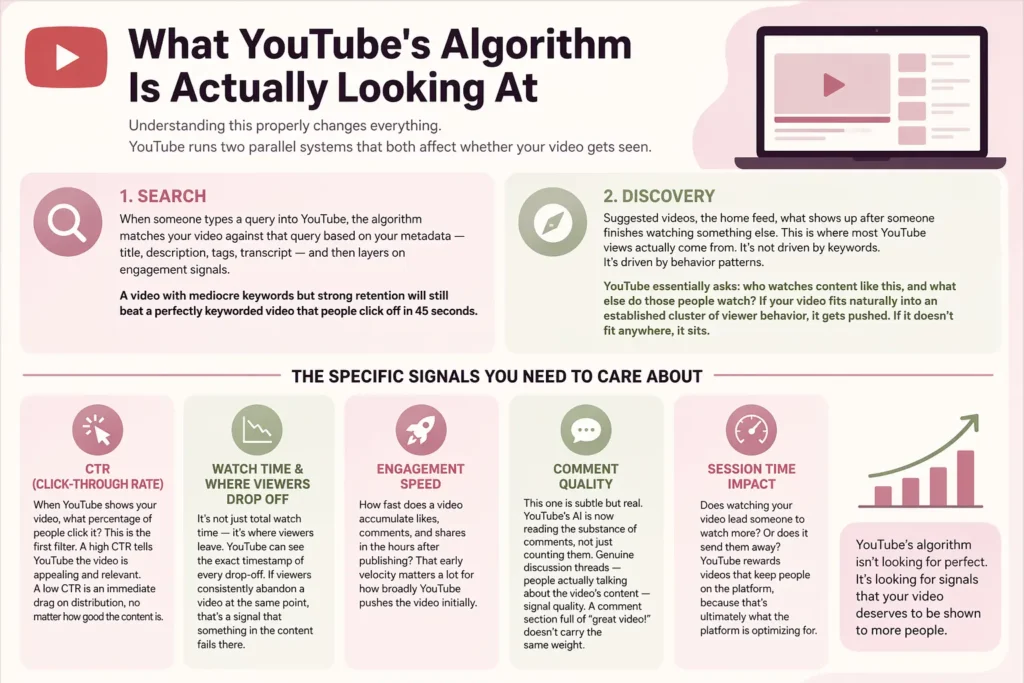
1. CTR (click-through rate) : When YouTube shows your video, what percentage of people click it? This is the first filter. A high CTR tells YouTube the video is appealing and relevant. A low CTR is an immediate drag on distribution, no matter how good the content is.
2. Watch time and where viewers drop off : It’s not just total watch time — it’s where viewers leave. YouTube can see the exact timestamp of every drop-off. If viewers consistently abandon a video at the same point, that’s a signal that something in the content fails there.
3. Engagement speed : How fast does a video accumulate likes, comments, and shares in the hours after publishing? That early velocity matters a lot for how broadly YouTube pushes the video initially.
4. Comment quality : This one is subtle but real. YouTube’s AI is now reading the substance of comments, not just counting them. Genuine discussion threads — people actually talking about the video’s content — signal quality. A comment section full of “great video!” doesn’t carry the same weight.
5. Session time impact : Does watching your video lead someone to watch more? Or does it send them away? YouTube rewards videos that keep people on the platform, because that’s ultimately what the platform is optimizing for.
The YouTube SEO Tips That Actually Move the Needle
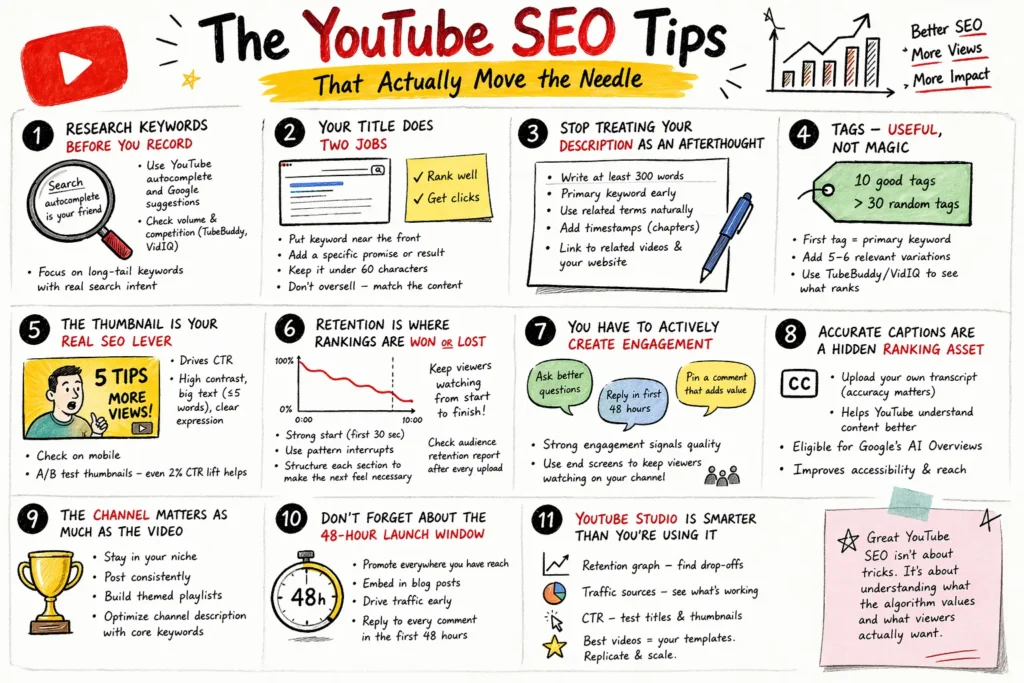
1. Research Keywords Before You Even Think About Recording
This is where most people get it backwards.
The typical approach: decide on a topic you want to cover, make the video, then try to figure out what keywords to attach to it afterward. That’s not keyword research — that’s keyword decoration. And it usually means you’re making content for a topic nobody’s actually searching for in the way you assumed.
The better approach: start with search demand and let it shape your content decisions from the ground up.
Open YouTube and just start typing. Whatever your topic area is — type the first few words and let YouTube’s autocomplete do the work. Every suggestion it shows you is a real search query with real volume. People are typing those exact phrases right now. That’s a content brief sitting right in the search bar.
Do the same thing on Google. If Google is surfacing video results for a keyword — and for most tutorial, review, or how-to searches it will — that’s your signal that a YouTube video can rank on both platforms at once. That kind of double placement is one of the best ROI opportunities in content marketing, full stop.
For volume and competition data, TubeBuddy and VidIQ are the tools most serious YouTube creators use. They give you actual numbers rather than educated guesses, and they’re both reasonably priced relative to what they tell you.
One thing worth noting: long-tail keywords are your friend here, especially early on. “YouTube SEO” is a brutal keyword to try to rank for if you don’t already have significant authority. “YouTube SEO tips for B2B brands” or “how to optimize YouTube videos for small businesses” — those have real search volume, much lower competition, and they attract viewers who are specifically in your niche. That’s almost always more valuable than broad traffic anyway.
2. Your Title Is Doing Two Jobs — Make Sure It Does Both
A lot of title advice stops at “put your keyword near the front.” That’s true — do that. But the second job of a title is to convince a real person scrolling through results to choose your video over everything sitting next to it.
Those two jobs can pull in different directions. The keyword placement satisfies the algorithm. The second half of the title has to satisfy the human.
Think about what makes someone actually click. It’s usually a very specific promise — a concrete outcome, a number, a timeframe, something that tells them exactly what they’ll get. “YouTube SEO Tips” tells them the topic. “YouTube SEO Tips That Got Us 11,000 Monthly Views Without Paid Promotion” tells them a result they might want for themselves. One earns a click. The other is easy to scroll past.
Keep it under 60 characters or YouTube will cut the tail off in search results and suggested videos — which typically kills whatever hook you had in the second half of the title.
And one real caution: don’t oversell. Clickbait was viable once. It isn’t now. YouTube’s algorithm tracks the relationship between your CTR and your retention. If people click and leave fast, the algorithm interprets that as a misleading title — and it punishes distribution accordingly. You can temporarily inflate clicks with a sensational title, but you’ll pay for it in rankings.
3. Stop Treating Your Description as an Afterthought
Genuinely — if you’re writing two or three sentences in your description and moving on, you’re leaving ranking opportunity on the table with every single upload.
The description is where YouTube gets readable context about your video. More context means better topical matching, which means your video gets shown to more relevant searchers. Write at least 300 words. Put your primary keyword in the first sentence or two, since the first 150 characters show up before the “Show more” cut-off.
After that, write naturally. Include related terms and topic variations, but don’t force them. If you’re writing something you’d feel comfortable saying out loud to a client, you’re probably in the right territory.
Add chapter timestamps. Every chapter label is its own indexable piece of metadata. A chapter called “How to Find YouTube Keywords with Free Tools” can rank independently for that phrase. This is one of the least-used YouTube SEO advantages available, which means if you do it properly, you’re immediately ahead of most of the competition.
Use the description to link to related videos on your channel, and to relevant content on your website. If you’re linking to SEO service pages or in-depth guides, you’re building a cross-channel loop that keeps visitors in your ecosystem and reinforces your topical authority signal on both platforms.
4. Tags — Useful, Not Magic
Tags are a secondary signal. Worth doing right, but not worth obsessing over.
Your first tag should be your exact primary keyword. Then add five or six variations — synonyms, slightly different phrasing, a couple of broader topic tags. That’s it. Ten well-chosen tags are better than thirty random ones. Too many irrelevant tags create a mismatch between what the algorithm expects and what viewers actually experience — and that gap can quietly suppress your video.
The fastest legitimate shortcut: use TubeBuddy to see the tags on videos that already rank well for your target keyword. Use the ones that are genuinely relevant to your content. You’re not copying — you’re learning from what’s already working.
5. The Thumbnail Is Your Real SEO Lever
Here’s the connection most people miss: your thumbnail directly affects your CTR, and your CTR is one of the most powerful signals YouTube uses to decide how widely to distribute your video.
A better thumbnail creates a virtuous loop. More clicks tell the algorithm people want to see your content, so it shows the video to more people, generating more clicks. This is why the brands with the strongest YouTube channels spend serious time on thumbnails — not because they’re vain about aesthetics, but because they understand the mechanics.
In 2026, YouTube feeds are chaotic. The competition for attention is intense. Your thumbnail has less than half a second to stop someone mid-scroll. High contrast, large readable text (5 words maximum), and a face with a visible expression all consistently outperform flat, text-heavy, or visually quiet thumbnails.
Check how it looks on a small screen. The majority of YouTube views happen on mobile. If your thumbnail’s text is hard to read at phone size, it’s not working.
And please — A/B test. Both TubeBuddy and VidIQ have testing features. Even a 2% improvement in CTR compounds significantly over the lifetime of a video.
6. Retention Is Where Rankings Are Actually Won or Lost
Everything else on this list matters. This matters more.
Watch time and audience retention are the core ranking signals that override almost everything else. A video with imperfect metadata but exceptional retention will climb. A perfectly optimized video that loses viewers in the first minute will fall. There’s no keyword combination that compensates for bad retention.
The opening of your video is the most critical zone. The first 30 seconds have the highest drop-off risk — always. Don’t start with a long intro, don’t re-explain the title, don’t make people wait. Get into the substance immediately. Give them a reason to keep watching before they’ve even had a chance to consider leaving.
Use pattern interrupts throughout. A change in camera angle, a cut to b-roll, a text graphic, a shift in pace — these reset viewer attention every 60 to 90 seconds. It’s not flashy editing for its own sake. It’s working with how human attention actually functions.
And structure the video so each section makes the next one feel necessary. The best long-form YouTube videos work like a good TV episode — you’re always a little curious about what’s coming, even if you can’t articulate why.
The audience retention report in YouTube Studio will show you exactly where people are leaving your videos. Check it after every upload and take it seriously. If there’s a consistent drop at the same timestamp across multiple videos, something in your structure is failing there. Find it and fix it.
7. You Have to Actively Create Engagement
Engagement doesn’t just happen because your video is good. It has to be prompted.
The creators who consistently get strong comment sections aren’t luckier than you — they’re asking better questions. Generic prompts (“comment below!”) generate generic responses. Specific prompts generate specific conversations.
Something like: “What’s one YouTube SEO mistake you made before you knew what you were doing? Tell me in the comments — genuinely curious what people have been through.” That’s a question with a real answer. People respond to it. And YouTube’s AI, which now evaluates comment quality rather than just volume, scores that kind of genuine engagement much more favorably.
Reply to comments in the first 48 hours. This is both community building and SEO strategy — early engagement velocity has a direct impact on how broadly YouTube pushes the video in its initial distribution window. Every response you write in those first two days is doing double duty.
Pin a comment that adds something. A follow-up resource, an extra tip, a question back to the audience. It gives new viewers who arrive later something to engage with and keeps the conversation alive beyond the launch window.
Set up end screens that point to a related video. Keep viewers on your channel. Their continued watching signals to YouTube that your channel — not just this individual video — is worth distributing more broadly.
8. Accurate Captions Are a Hidden Ranking Asset
Auto-generated captions have improved, but they still get things wrong — particularly with specialist terminology, product names, brand-specific language, and anything that doesn’t sound like standard broadcast English. When those errors happen, they go directly into the metadata YouTube uses to understand your video.
Upload your own transcript. It takes extra time. It’s absolutely worth it. A clean, accurate transcript gives YouTube the clearest possible picture of your video’s content and helps it match your video to a wider range of relevant searches.
There’s also an angle here that very few brands are capitalizing on in 2026: Google’s AI Overviews are pulling content from video transcripts. A video with an accurate, well-indexed transcript becomes eligible for inclusion in those AI-generated answers — which is rapidly becoming one of the most valuable visibility opportunities in search, especially as more searches resolve without a click. If you want your brand to appear in AI-generated answers, your video transcripts are one of the most direct paths to get there.
Clean captions also expand your reach to mobile viewers watching on mute (which is most of them) and make your content accessible to audiences in markets where subtitles are expected rather than optional.
9. The Channel Matters as Much as the Video
Individual video optimization is necessary. But channel-level authority is what creates compounding growth.
When YouTube sees a channel posting consistently about one subject, with strong engagement across multiple videos and a growing audience, it starts treating that channel as an authority in that topic space. Once you have that status — even informally — the algorithm distributes your content more broadly, even before individual videos prove themselves.
This means two things practically.
First, be specific about your topic cluster. A channel that jumps between five different subjects will always struggle to build the topical authority that a focused channel earns. The more tightly you define your niche, the faster you build algorithmic credibility in it.
Second, publish consistently. Not frantically — consistently. A video every week for six months does more for channel authority than ten videos in January and nothing until June. The algorithm learns to expect you, and so does your audience.
Organize videos into themed playlists. Playlists auto-play related content, which extends viewer sessions and sends a strong signal that your channel has depth in a subject. A viewer who watches three of your videos in a row is dramatically more likely to subscribe than one who watches a single video.
Make your channel description work. Use it to clearly state what your channel covers and include your core keywords naturally. This functions as a kind of homepage meta description for the algorithm — don’t leave it blank or vague.
10. Don’t Forget About the 48-Hour Launch Window
You’ve done the optimization work. The video is live. Most creators stop here.
The launch window is where a lot of views are either won or permanently lost. YouTube pays close attention to how a video performs in the hours immediately after publishing, and it uses that data to calibrate how widely to distribute the video going forward. Strong early performance leads to broader distribution. Weak early performance leads to quiet burial, from which it’s genuinely hard to recover.
The moment your video goes live, push it everywhere you have reach. Email list. All social channels. Relevant Slack groups or forums where you have a presence. If you’re running social media campaigns across platforms, coordinate the video launch with a social post driving traffic to it.
Embed the video in a blog post that targets the same keyword. This captures search traffic from Google, serves the portion of your audience that prefers reading, and creates an inbound link from your own domain pointing to the video. All of which helps.
Reply to every comment that comes in during the first 48 hours. Your engagement in that window is part of the signal too.
11. YouTube Studio Is Smarter Than You’re Using It
Most people check their view count and subscriber number and leave. But YouTube Studio has data that can fundamentally change how you make content — if you actually use it.
The retention graph is the most valuable thing in there. It shows you exactly where viewers drop off. Find the timestamp. Go watch your own video at that point. Something is happening there — a slow section, a topic switch, a pacing issue, a moment where the value proposition isn’t clear. Once you see it, you can fix it in future videos and sometimes go back and fix it in the current one by trimming or restructuring.
Traffic source breakdown tells you where growth is actually coming from. YouTube Search means your SEO is working. Suggested Videos means the algorithm is picking you up organically. External means your promotion is driving traffic. Each one points toward a different kind of optimization response.
CTR by video is your fastest feedback loop on creative decisions. Low CTR on a well-ranked video almost always means the thumbnail or title is underperforming relative to competitors. Test a new thumbnail. Try a different title angle. These aren’t permanent decisions — you can keep adjusting until the number moves.
And your best-performing videos by watch time and CTR are your templates. Don’t treat them as happy accidents. Figure out what they have in common — format, topic type, opening structure, thumbnail style — and systematically replicate those patterns.
That’s how you build a growth strategy rather than hoping lightning strikes twice, and it’s the same analytical approach you’d apply to any solid content and SEO effort.
Pre-Publish Checklist — Run This Every Time
Before you hit publish on anything:
- Primary keyword placed toward the front of the title
- Title is 60 characters or under
- First 150 characters of description are keyword-rich and readable
- Description is at least 300 words, naturally incorporating related terms
- Chapter timestamps added with keyword-optimized labels
- Tags include primary keyword + 5 to 8 closely related variations
- Custom thumbnail uploaded — not an auto-generated still frame
- Accurate transcript or caption file uploaded
- End screens configured and pointing to a related video
- Launch plan ready: social posts, email, blog embed — all within the first 48 hours
Mistakes That Keep Channels Stuck
A rambling intro : If the first 30 seconds of your video don’t give the viewer a concrete reason to stay, a meaningful percentage of them won’t. That early drop-off data tanks your distribution. Get to the point fast.
Two-sentence descriptions : Every time you do this, you’re handing ranking opportunity back to competitors who take the description seriously. It costs nothing extra to write a proper one.
Trusting auto-captions : They make errors that matter — particularly with any vocabulary that’s industry-specific or non-standard. Wrong captions mean wrong indexing.
Posting inconsistently : Two videos in a week, then nothing for six weeks, then a burst of three — the algorithm doesn’t reward that pattern and neither does an audience trying to build a habit around your content.
Never going back to old videos : Refreshing a title, description, thumbnail, or tags on a video that underperformed isn’t giving up on it — it’s giving it another chance. YouTube doesn’t penalize updated metadata. It often re-indexes and re-distributes. Your back catalogue is almost certainly sitting on traffic you haven’t captured yet.
Running YouTube as a separate island : The strongest YouTube presences we’ve seen are always part of an integrated strategy — connected to the blog, the social channels, the website SEO. One channel feeding the others. That’s what sustainable growth looks like.
To Wrap This Up
The client with 47 videos and 300 monthly views isn’t a fringe case. It’s extremely common. Good content, invisible execution.
YouTube SEO isn’t complicated in principle — but it requires being intentional about every stage of the process, from the moment you choose a keyword to what you do in the 48 hours after a video goes live. Most creators skip steps because nobody told them the steps mattered. Now you know they do.
The brands that grow consistently on YouTube treat it as a proper channel within a connected content and SEO strategy — not a side project, not an afterthought, not a place to dump repurposed social clips and hope for the best. They research before they record. They optimize before they publish. They promote when they go live. They study what the data tells them and adjust.
That’s the whole thing. Done consistently, it compounds.
If you want help building that kind of system for your brand — or want to audit what’s holding your current YouTube channel back — the team at PromotEdge has done this across industries and can put together a strategy that actually fits your situation.
If you’re looking to scale results faster, partnering with a performance-focused SEO agency can help align your YouTube strategy with broader search growth.
-
Why is the video title important for YouTube SEO?
Ans.The video title is critical for YouTube SEO because it tells both viewers and YouTube's algorithm what your video is about. Placing your target keyword naturally in the title improves your chances of appearing in search results and suggested videos, driving more organic views to your channel. -
How does a custom thumbnail help YouTube video performance?
Ans.A custom thumbnail significantly improves click-through rates. According to YouTube's Creator Academy, 90% of the best performing videos on YouTube use custom thumbnails. A well-designed thumbnail grabs attention instantly and encourages viewers to click — directly boosting your video's overall performance and visibility. -
What are YouTube cards and how do they help SEO?
Ans.YouTube cards are interactive elements that appear during a video, represented by a small circular icon. They help boost SEO by directing viewers to other videos, channels, external links, or polls — keeping viewers engaged longer on your channel and increasing overall watch time and views. -
How many types of cards can you add to a YouTube video?
Ans.There are 6 types of cards you can add to a YouTube video — channel cards, fan funding cards, link cards, poll cards, video cards, and cards that direct viewers to similar content. Each type serves a different purpose to increase engagement and expand your channel's reach. -
How do I optimize my YouTube video for SEO?
Ans.Optimise your YouTube video by placing the target keyword naturally in the title, writing a keyword-rich description with relevant information in the first two lines, tagging your video with popular relevant keywords, using a custom thumbnail, and adding cards to promote related content within the video.
Author Details

Latest Posts
-
 03 / Apr
Digital Marketing What Google Says About Website Crawling in 2026
03 / Apr
Digital Marketing What Google Says About Website Crawling in 2026 -
19 / Mar
-
18 / Feb
Web Solution 12 Website Redesign Mistakes to Avoid Losing SEO
-
11 / Feb
Digital Marketing What is 7P and 7C of Digital Marketing?
-
22 / Jan

Blogs
Journey into Ideas Unveiling Tomorrow's Insights Today.

























































































-
Why is the video title important for YouTube SEO?
Ans.The video title is critical for YouTube SEO because it tells both viewers and YouTube's algorithm what your video is about. Placing your target keyword naturally in the title improves your chances of appearing in search results and suggested videos, driving more organic views to your channel. -
How does a custom thumbnail help YouTube video performance?
Ans.A custom thumbnail significantly improves click-through rates. According to YouTube's Creator Academy, 90% of the best performing videos on YouTube use custom thumbnails. A well-designed thumbnail grabs attention instantly and encourages viewers to click — directly boosting your video's overall performance and visibility. -
What are YouTube cards and how do they help SEO?
Ans.YouTube cards are interactive elements that appear during a video, represented by a small circular icon. They help boost SEO by directing viewers to other videos, channels, external links, or polls — keeping viewers engaged longer on your channel and increasing overall watch time and views. -
How many types of cards can you add to a YouTube video?
Ans.There are 6 types of cards you can add to a YouTube video — channel cards, fan funding cards, link cards, poll cards, video cards, and cards that direct viewers to similar content. Each type serves a different purpose to increase engagement and expand your channel's reach. -
How do I optimize my YouTube video for SEO?
Ans.Optimise your YouTube video by placing the target keyword naturally in the title, writing a keyword-rich description with relevant information in the first two lines, tagging your video with popular relevant keywords, using a custom thumbnail, and adding cards to promote related content within the video.