
























Your first campaign will probably fail
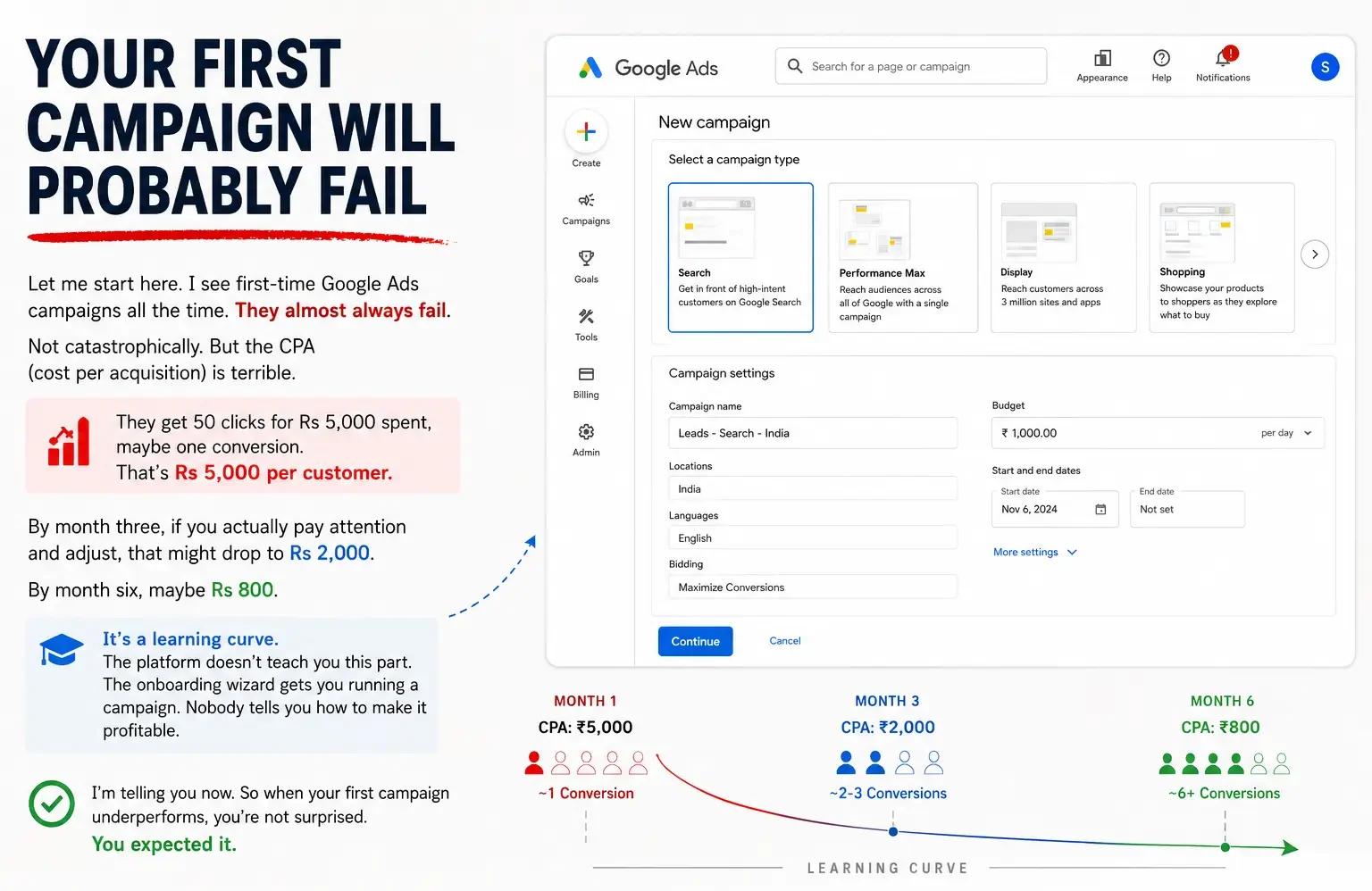
First-time Google Ads campaigns often struggle. Not catastrophically, but the CPA (cost per acquisition) is terrible. They get 50 clicks for Rs 5,000 spent, maybe one conversion. That’s Rs 5,000 per customer.
By month three, if you actually pay attention and adjust, that might drop to Rs 2,000. By month six, maybe Rs 800. It’s a learning curve. The platform doesn’t teach you this part. The onboarding wizard gets you running a campaign. Nobody tells you how to make it profitable.
I’m telling you now. So when your first campaign underperforms, you’re not surprised. You expected it.
Before you create anything
Before diving into campaign settings, there’s groundwork that determines whether your ads succeed or flop. Skip this part, and you’ll be optimizing a campaign that was set up wrong from day one.
- Know what you are selling
Sounds obvious, but here it means knowing your business model. Are you a consulting firm? Are you an e-commerce store? Are you a real estate developer? Are you a SaaS product?
Different businesses need different Google Ads strategies. A consulting firm wants form submissions. An e-commerce store wants purchases. A SaaS company wants free trial signups. A real estate business wants qualified leads who call or email.
Google Ads has different campaign types for each. Use the wrong type and you’ve wasted your budget before you started.
- Define your target customer
Who exactly are you trying to reach? Not “people who need my product.” Specific. Geographic location? Age range? Interests? Job title? Income bracket?
A financial services company targeting “people interested in investing” is too broad. Rs 20,000 spent with that targeting gets clicks from people casually reading about mutual funds, not people actually ready to invest. Narrow it: “men aged 30-45 in tier-1 cities earning 10+ lakhs annually.” Suddenly your Rs 20,000 reaches the right people.
- Figure out your budget
How much can you actually spend monthly without it tanking your cash flow? Minimum realistic spend is Rs 5,000-10,000 monthly to get any meaningful data. Less than that, you’re flying blind.
Ideally, you have budget for at least 2-3 months because the first month will show you what doesn’t work. Month two you can pivot. Month three you’re actually optimising.
Setting up your Google Ads account
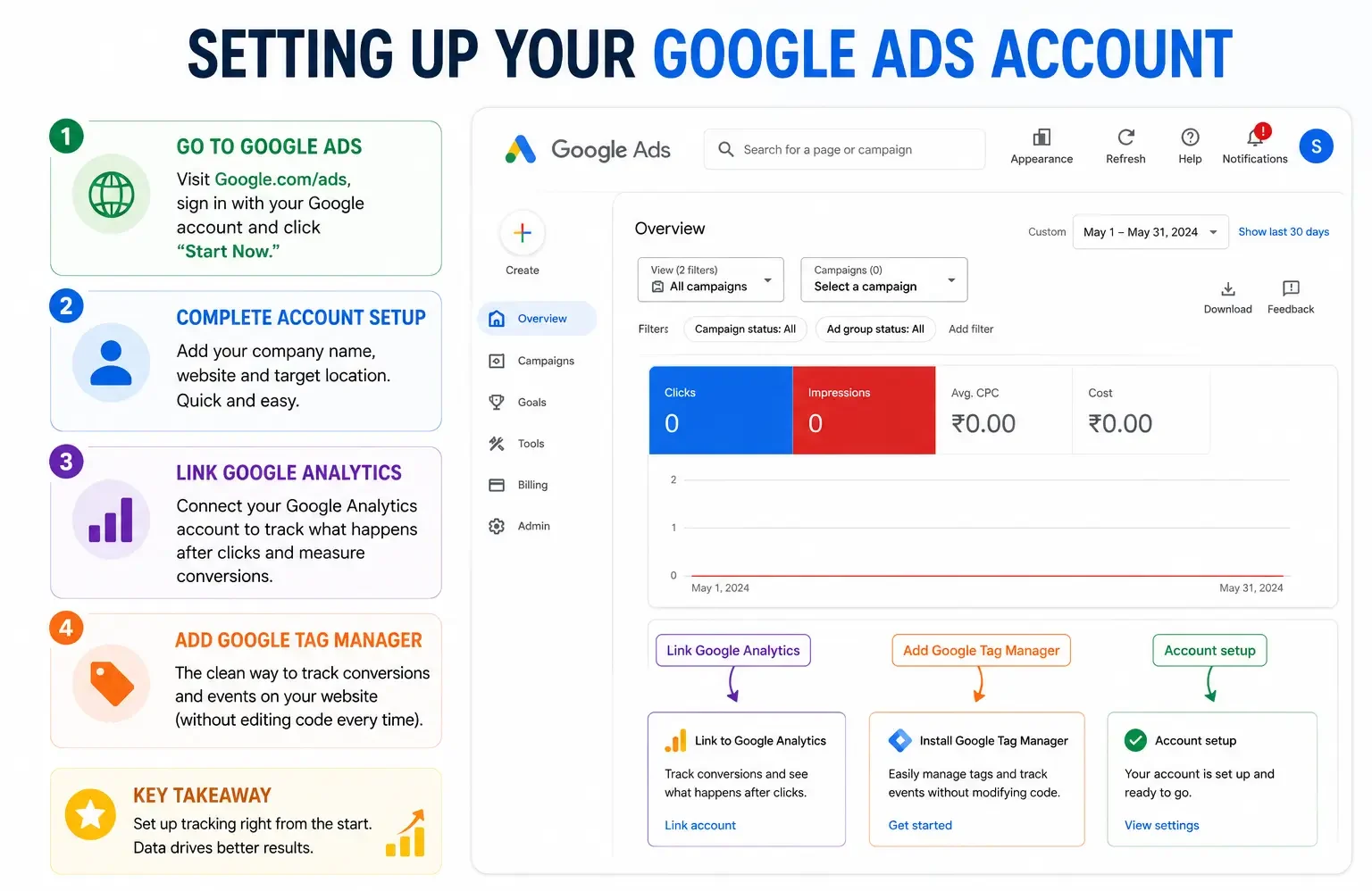
Straightforward. Go to Google Ads (Google.com/ads). Sign in with your Google account. Click “Start Now.”
Google walks you through account setup. Company name, website, target location. This is mostly self-explanatory.
One important thing: link your Google Analytics account to Google Ads. This is how you’ll track what happens after someone clicks your ad. Did they buy something? Did they fill a form? Without this connection, you’re blind to conversion data.
Also add Google Tag Manager to your website if you’re serious. (Not critical for beginners, but it is the clean way to track conversions without touching code every time you want to track something new.)
Choosing your campaign type
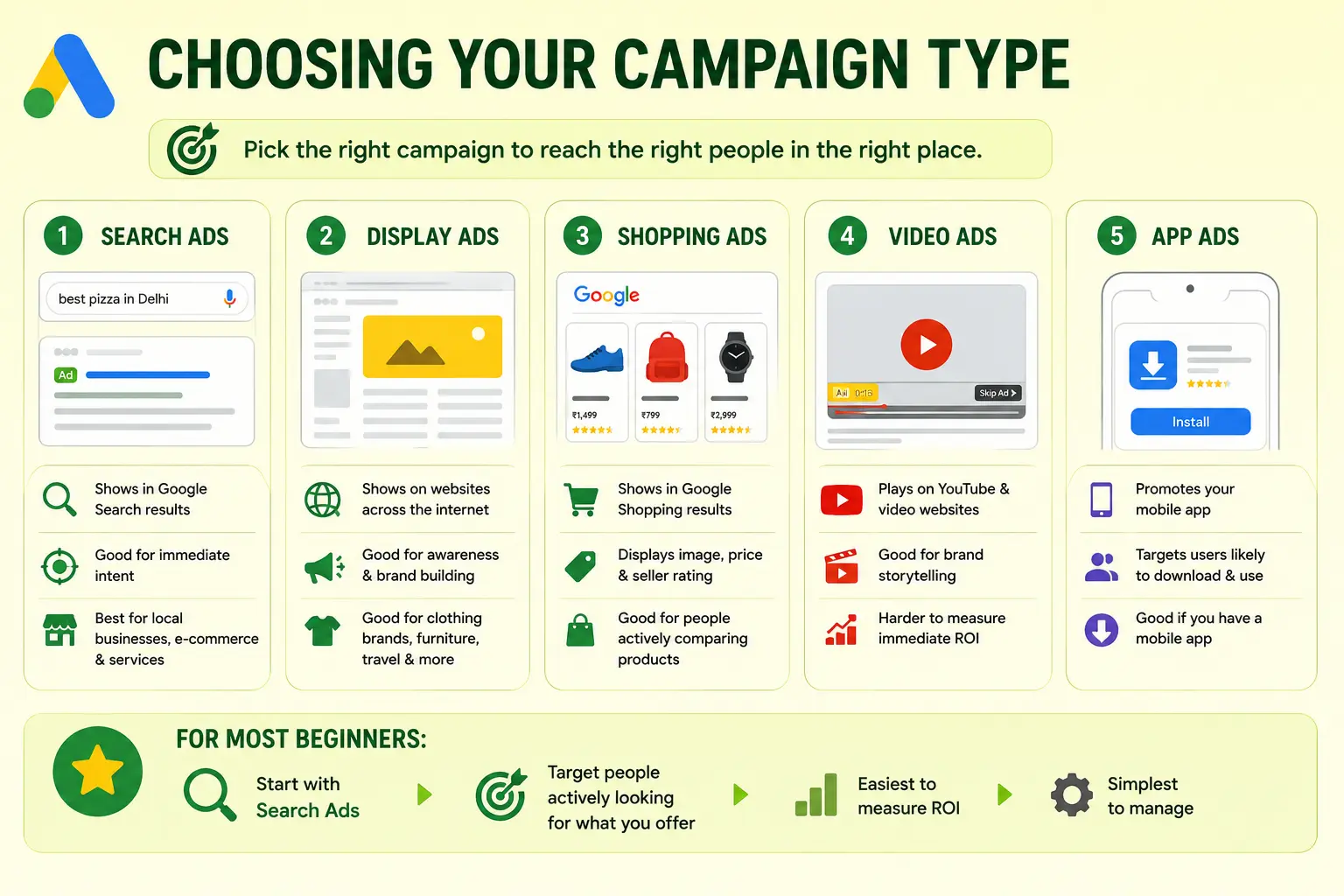
Google Ads offers several campaign types. Pick wrong and you’re targeting the wrong people in the wrong place.
1. Search Ads
Your ad shows up in Google Search results. Someone types “best pizza in Delhi” and your pizza place’s ad appears. You pay per click. Good for immediate intent: someone is actively searching for what you offer right now. Best for local businesses, e-commerce with specific products, and services.
2. Display Ads
Your ad shows up on websites across the internet (not Google Search). Like a banner ad on a news website or blog. Good for awareness: someone wasn’t searching for you, but your ad appears and reminds them you exist. Better for brand building than immediate sales. Good for clothing brands, furniture, travel companies. To understand how search advertising and display advertising differ in strategy, it helps to know when to use each.
3. Shopping Ads
Your product shows up in Google Shopping results with image, price, and seller rating. Only works if you have an e-commerce store. Good for people actively comparing products before buying.
4. Video Ads
Your video plays before or during YouTube videos, or on websites with video content. Good for brand storytelling: you have a 15-30 second video and want to build awareness. Harder to measure immediate ROI compared to search ads.
5. App Ads
You want people to download your app. Google targets people likely to download and use it. Good if you’ve built a mobile app and want users.
For most beginners: start with Search Ads. You’re targeting people actively looking for what you offer. Easiest to measure ROI. Simplest to manage.
Keyword selection: getting this right matters
This is where most campaigns fail. People pick keywords based on what “sounds right” instead of actual search data.
Use Google Keyword Planner (free tool inside Google Ads). Type variations of what customers might search for. The tool shows you monthly search volume and estimated CPC (cost per click). Understanding why keyword research is important before you start can save you significant budget.
Example: You’re a personal finance consultant in Bangalore. Customer searches might be:
- “Financial consultant Bangalore”: 200 searches/month, Rs 50 CPC
- “Best mutual fund advisor near me”: 500 searches/month, Rs 30 CPC
- “Tax planning consultant”: 1,000 searches/month, Rs 80 CPC
- “Retirement planning India”: 2,000 searches/month, Rs 120 CPC
See the pattern? More competitive keywords cost more. High-volume keywords might not be the best fit. A niche keyword like “Fee-only financial advisor in Bangalore” might have lower volume but get you more qualified leads.
Pro tactic: include keywords where you’re actually different. If you specialise in startup founder finances, target “personal finance for startup founders” not just generic “financial consultant.”
Also use negative keywords. If you don’t want clicks from people searching “free financial advice,” add “free” as a negative keyword. Your ads won’t show for those searches. Saves money on irrelevant clicks.
Writing ads that get clicks
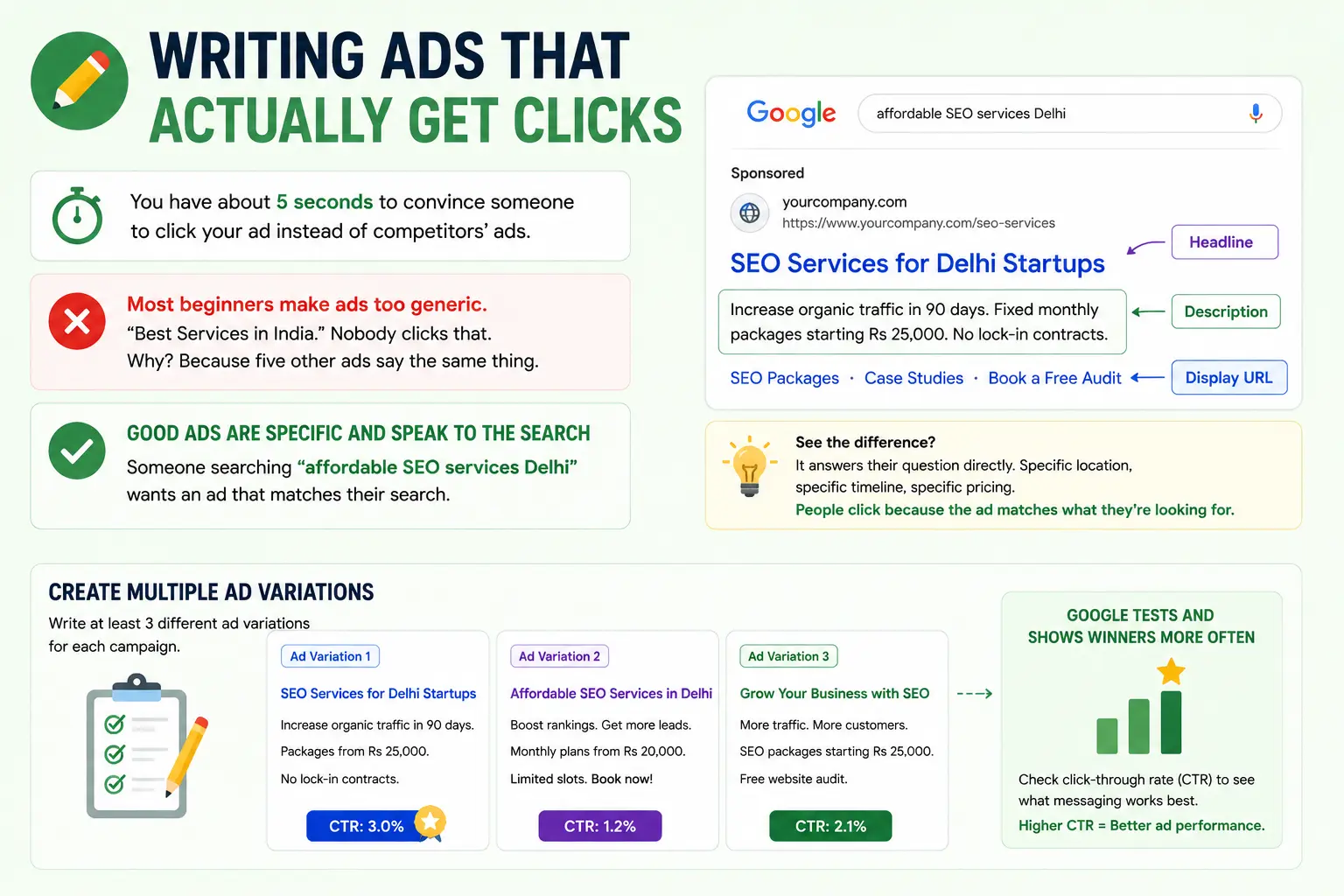
Your headline and description are everything. You have only a few seconds to convince someone to click your ad instead of a competitor’s.
Most beginners make ads too generic. “Best Services in India.” Nobody clicks that. Why? Because five other ads say the same thing.
Good ads are specific and speak to the search. Someone searching “affordable SEO services Delhi” doesn’t want a generic ad.
They want:
Headline: “SEO Services for Delhi Startups” (specific to their search and problem)
Description: “Increase organic traffic in 90 days. Fixed monthly packages starting Rs 25,000. No lock-in contracts.”
See the difference? It answers their question directly. Specific location, specific timeline, specific pricing mention. People click because the ad matches what they’re looking for.
Write at least 3 different ad variations for each campaign. Google will test them and show the winning ones more often. You’ll learn what messaging resonates by looking at click-through rate. One ad might get 3% CTR. Another gets 1%. The 3% winner is doing something right: a better headline, a better description, or both.
Setting your budget & bids
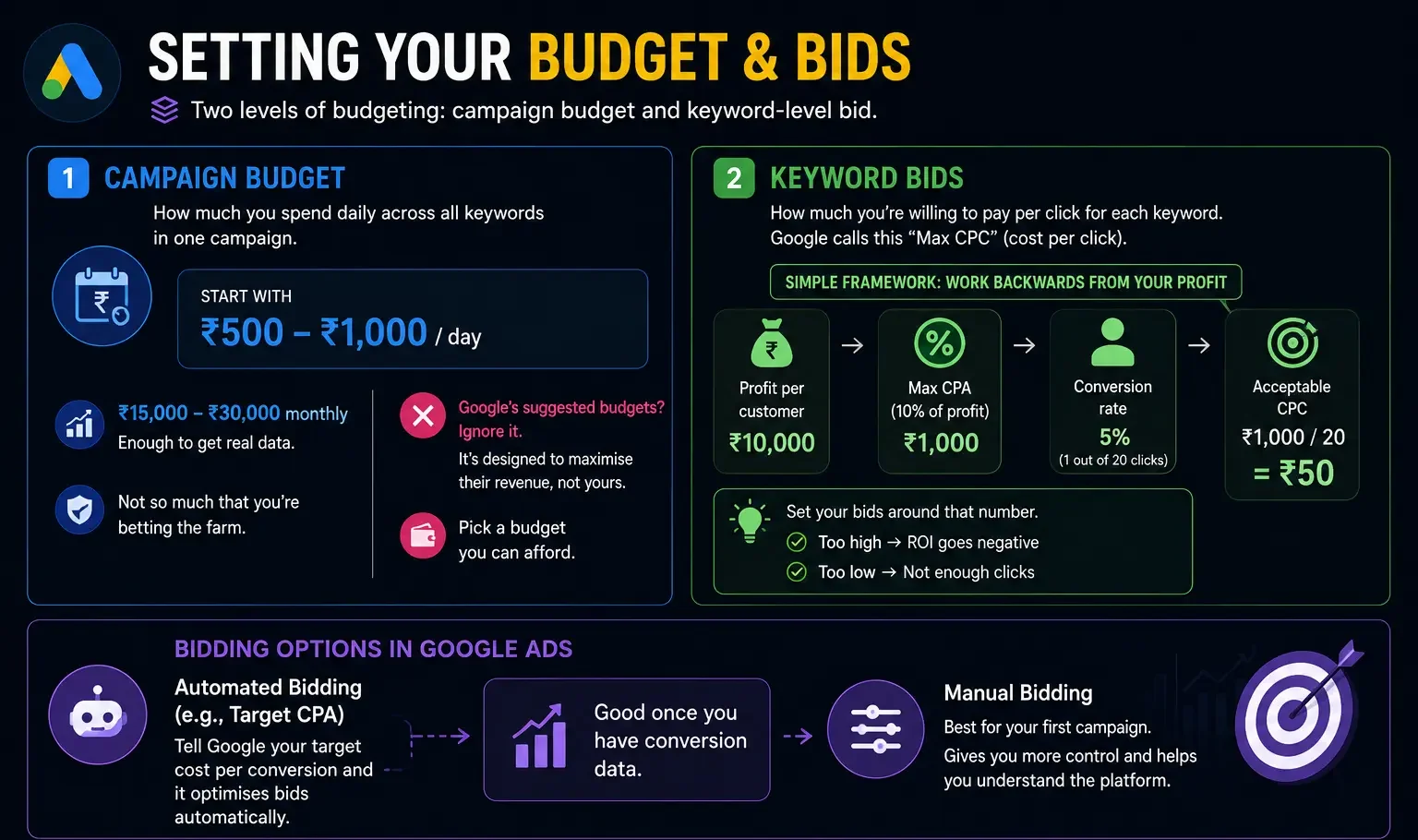
Two levels of budgeting: campaign budget and keyword-level bid.
Campaign budget
How much you spend daily across all keywords in one campaign. Start with Rs 500-1,000/day. That’s Rs 15,000-30,000 monthly. Enough to get real data. Not so much that you’re betting the farm.
Google will suggest budgets based on your industry and location. Ignore it. That’s their suggestion to maximise their revenue. Pick what you can afford.
Keyword bids
How much you’re willing to pay per click for each keyword. Google calls this “Max CPC” (cost per click).
Simple framework: Work backwards from your profit. If you make Rs 10,000 profit per customer, what’s your maximum allowable customer acquisition cost? Let’s say 10% of profit. That’s Rs 1,000 max per customer.
If your conversion rate is 5% (1 out of 20 clicks converts), then your acceptable cost per click is Rs 1,000 / 20 = Rs 50.
Set your bids around that number. Too high and your ROI is negative. Too low and you won’t get enough clicks.
Google Ads has automated bidding options (like “Target CPA”, where you tell Google your target cost per conversion and it optimises bids automatically). Good once you have conversion data. For your first campaign, manual bidding gives you more control and helps you understand the platform. Our detailed guide on how to run profitable Google Ads campaigns covers bidding strategies in more depth.
Setting up conversion tracking
Without this, you are spending money blind.
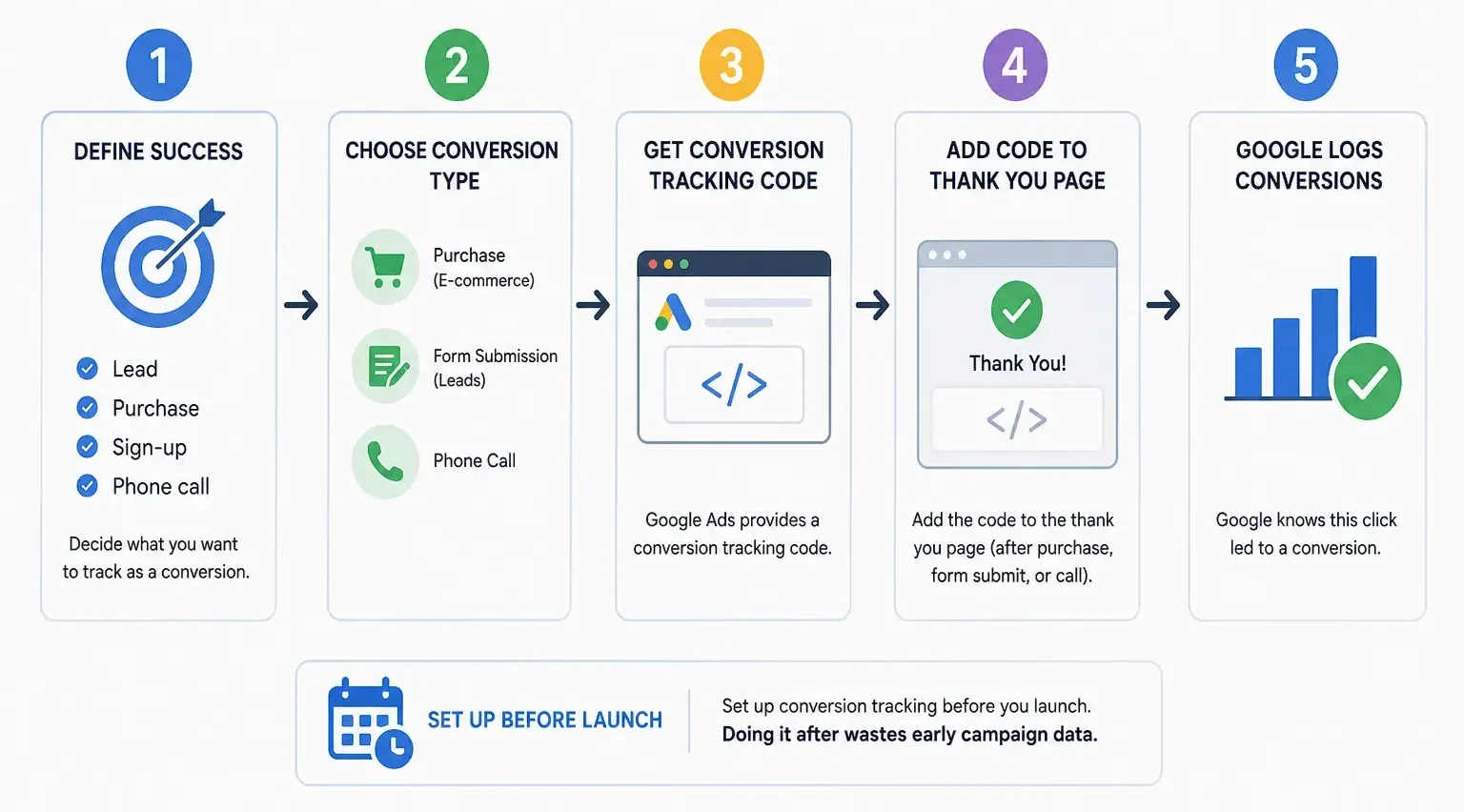
Define what “success” means for your business. A lead? A purchase? A sign-up? A phone call? Whatever it is, track it in Google Ads.
For e-commerce: track purchases. Google gives you a conversion tracking code. Add it to your “thank you” page that appears after someone buys. Now Google knows “this click led to a purchase.”
For lead generation: track form submissions. Same idea. Someone fills your contact form, gets redirected to a thank you page with the conversion code. Google logs it.
For phone calls: you can track phone calls directly through Google Ads using a special phone number in your ads.
Set up conversion tracking before you launch. Doing it after wastes early campaign data. Google won’t retroactively track conversions from before the code was installed.
Launching your first campaign
You’ve built everything. Now you launch.
Double-check before going live:
- Landing page is actually relevant to your ads. Don’t send “SEO services” traffic to your homepage general services page. Send them to your SEO services page. A well-optimised landing page design that converts into leads can improve your campaign results from day one.
- Conversion tracking code is installed on your thank you/confirmation page.
- Your website loads fast. If your page is slow to load, many clickers leave before it even loads. Google knows this and charges you for useless clicks.
- Your phone number is correct. Test it.
- Your contact form actually submits. Some campaigns run for days with forms that never actually sent.
Then click launch.
Within minutes, your ads go live. Within an hour, you’ll probably get your first impression. First day, first clicks. Don’t obsess over this. Let it run for at least a week before judging.
First week: what to expect
Your ads are showing. You’re getting impressions and clicks.
Watch for early warning signs: if your click-through rate is under 0.5%, your ads or keywords might be misaligned. If your cost per click is 3-5x what you expected, your bids might be too high or your keywords too competitive.
Don’t make major changes yet. Let data accumulate for 5-7 days. Google’s algorithm needs time to learn which ads work best. Early data is noisy. After a week you have 50-100 clicks. That’s enough to see patterns.
But honestly? Most people panic if they don’t get a conversion in the first week. This is normal. Expect 2-4 weeks before you have meaningful conversion data.
First month: optimising based on data
Now you have data. Time to optimise.
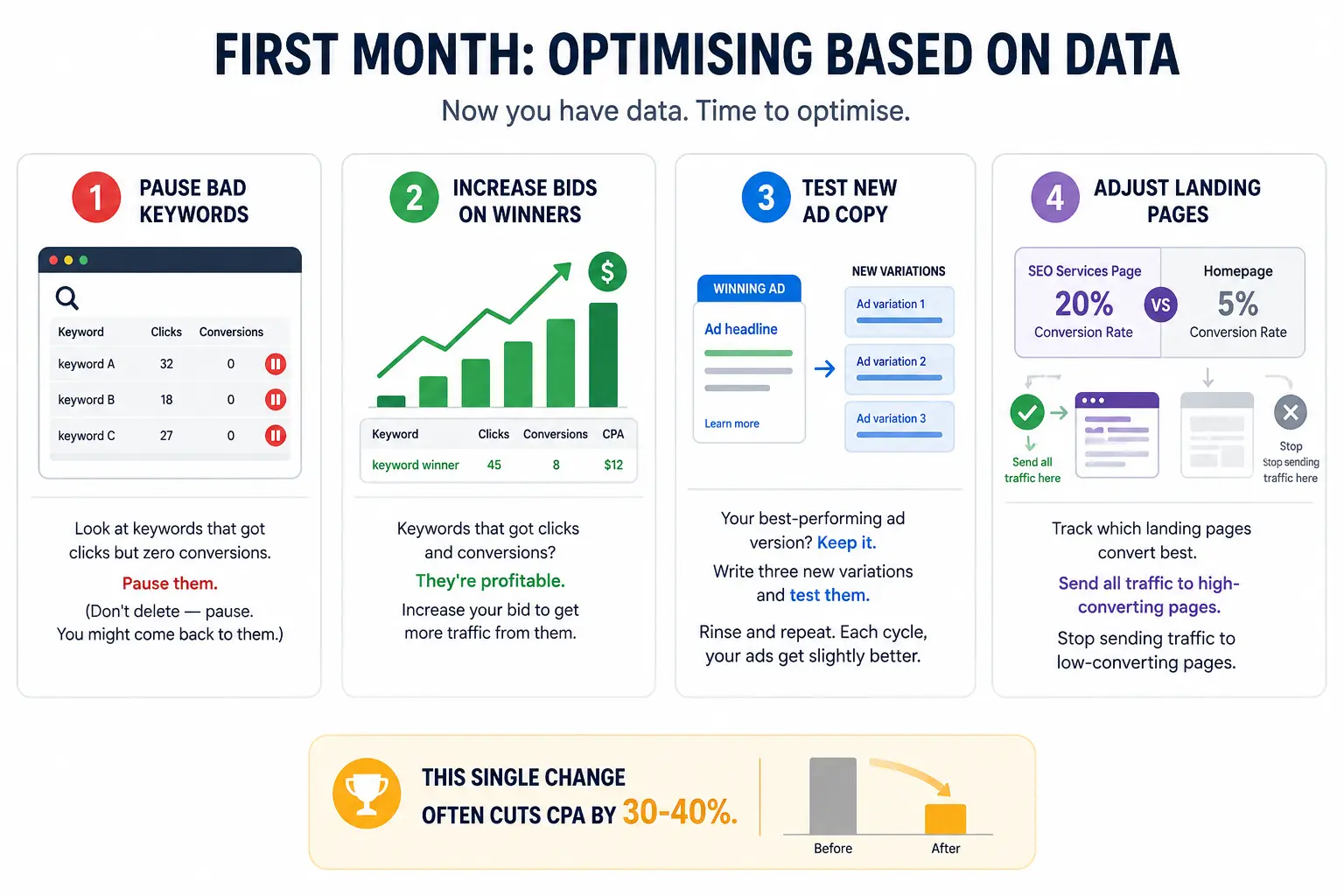
- Pause bad keywords
Look at keywords that got clicks but zero conversions. Pause them. (Don’t delete, just pause. You might come back to them.)
- Increase bids on winners
Keywords that got clicks and conversions? They’re profitable. Increase your bid to get more traffic from them.
- Test new ad copy
Your best-performing ad version? Keep it. Write three new variations and test them. Rinse and repeat. Each cycle, your ads get slightly better.
- Adjust landing pages
Track which landing pages convert best. If 20% of clicks to your SEO services page convert but only 5% of clicks to the homepage convert, send all traffic to the SEO services page. Stop sending traffic to low-converting pages.
This single change can cut CPA noticeably.
Measuring what matters
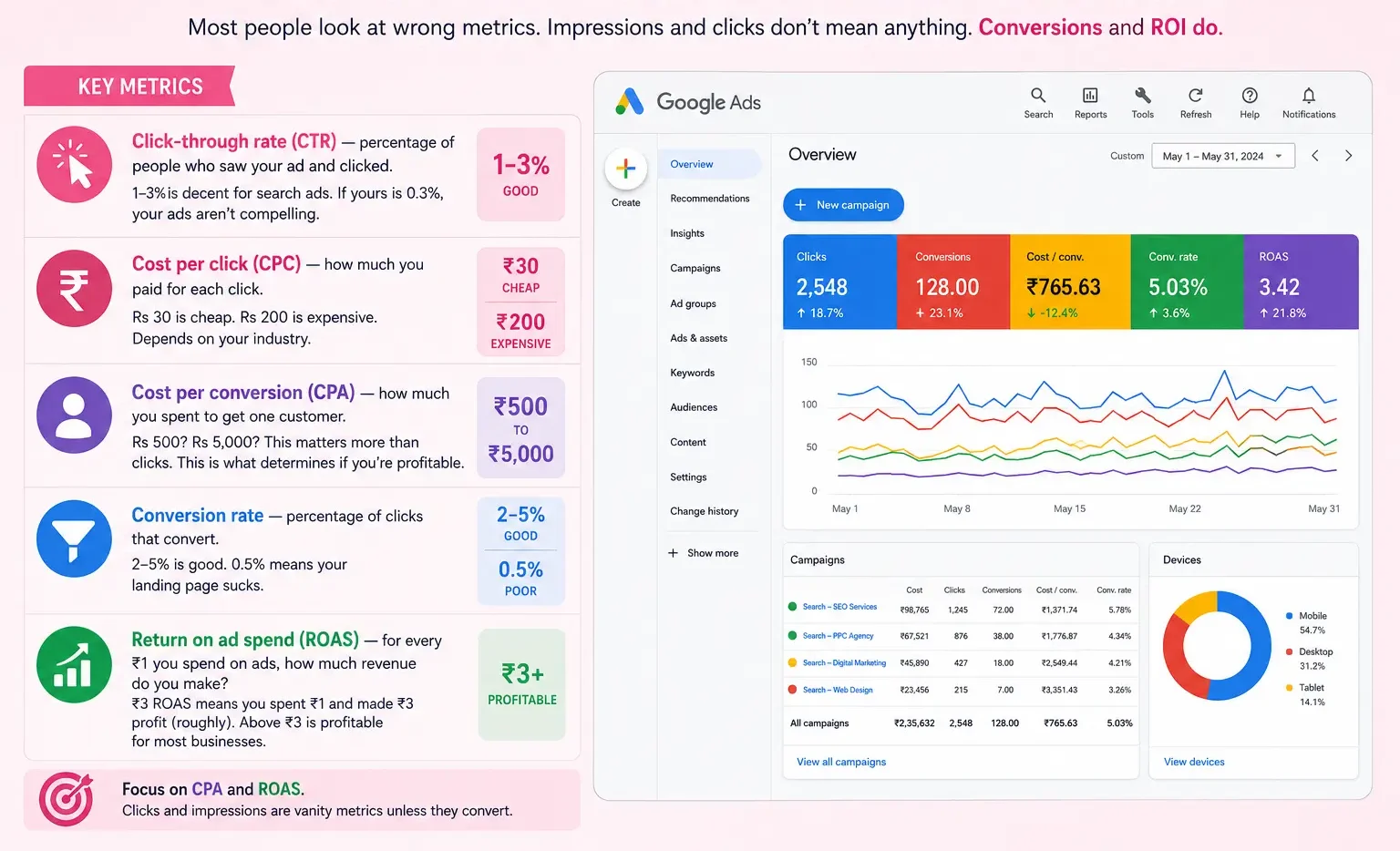
Most people look at wrong metrics. Impressions and clicks don’t mean anything. Conversions and ROI do.
Key metrics:
- Click-through rate (CTR): percentage of people who saw your ad and clicked. 1-3% is decent for search ads. If yours is 0.3%, your ads aren’t compelling.
- Cost per click (CPC): how much you paid for each click. Rs 30 is cheap. Rs 200 is expensive. Depends on your industry.
- Cost per conversion (CPA): how much you spent to get one customer. Rs 500? Rs 5,000? This matters more than clicks. This is what determines if you’re profitable.
- Conversion rate: percentage of clicks that convert. 2-5% is good. 0.5% means your landing page needs work.
- Return on ad spend (ROAS): for every Rs 1 you spend on ads, how much revenue do you make? Rs 3 ROAS means you spent Rs 1 and made Rs 3 profit (roughly). Above Rs 3 is profitable for most businesses.
- Focus on CPA and ROAS. Clicks and impressions are vanity metrics unless they convert.
Common mistakes that kill campaigns
- Not optimising based on data. You launch a campaign, get 500 clicks, zero conversions, and think Google Ads doesn’t work. The real issue is wrong keywords, a bad landing page, or ads that don’t resonate. Fix these instead of giving up.
- Blaming the platform. “Google Ads is expensive” usually means you are bidding too high for your industry. “Google Ads gets clicks but no conversions” usually means your landing page doesn’t match your ad promise. These are execution issues.
- Not tracking conversions. You spend Rs 50,000 on ads, get 500 clicks, but don’t know if any converted to sales because you didn’t set up tracking. Now you’re flying blind and making decisions on incomplete data.
- Spreading budget too thin. Rs 500/day across 100 keywords means each keyword gets Rs 5 spend daily. Too small to optimise. Concentrate budget on 10-20 best keywords and give them real spend.
- Not adjusting landing pages. Your ads are good. But you send everyone to your homepage. Of course conversion rate is terrible. Send people to a page that matches their search intent.
When to run Google Ads
Google Ads works best when customer intent is high. Someone searching “buy laptop online” is ready to buy. Google Ads works well here.
Someone searching “how to learn web development” is in research mode. Google Ads gets their click but they’re not ready to convert. Might be a waste.
Google Ads works for: immediate intent products/services. Lead generation. E-commerce. Local businesses. PPC advertising generally. SaaS free trial signups.
Google Ads works less well for: brand awareness (Display Ads can help, but it’s not their strength). Commodity products with razor-thin margins (cost per click might exceed profit per sale). Products that need long sales cycles. B2B where decision makers aren’t the ones Googling.
When combined with other Google Ads strategies and performance marketing broadly, Google Ads becomes a powerful channel.
Our take
Google Ads is learnable. You don’t need an agency if you have time to test and optimise. If your business is simple (one product, clear target customer, decent conversion rate), you can absolutely run this yourself.
Most people either don’t have the time or don’t have the patience to test for 2-3 months before profitability. They launch, get discouraged after week 2, and quit.
If you want hands-on learning, do it yourself. Budget Rs 20,000-30,000 monthly for experimentation. Track obsessively. Adjust weekly. By month 3-4, you’ll understand what works for your business.
If you want faster results and don’t want to learn the platform: hire someone who does this daily. They’ll compress that learning curve from months to weeks. Understanding what agencies hide about performance marketing first will help you ask the right questions before signing any contract.
Either way, Google Ads done right builds up over time. The first month is often unprofitable. Later months can pay off. The difference is testing and optimisation.
Want professional help with your Google Ads?
We manage Google Ads campaigns for brands across India. From setup to ongoing optimization, we focus on measurable ROI.


