
























Your business should consider a headless CMS in three cases. You publish content across multiple digital platforms. You need custom front-end experiences. Or you need a scalable solution for future growth. For most small businesses with a single website, a traditional CMS like WordPress remains the more practical and cost-effective choice. However, businesses with complex digital ecosystems and dedicated development teams can benefit from the flexibility and scalability of a headless CMS. This decision sits at the intersection of website design and development strategy and content operations. Getting it wrong in either direction costs time and money that’s hard to recover.
The Restaurant That Served Content Everywhere
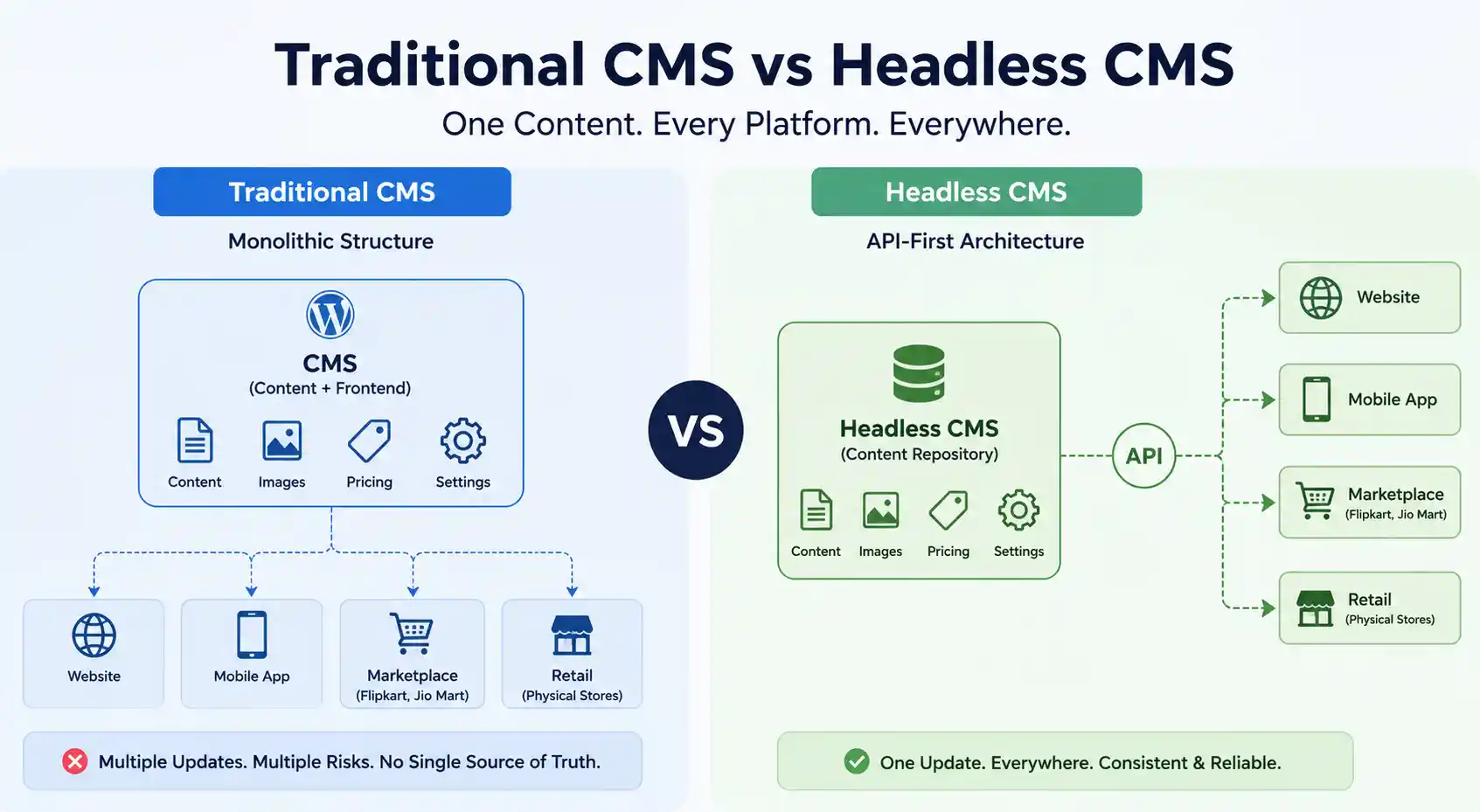
One of our e-commerce clients, a food company distributing through their own store, marketplace apps, and physical retail locations, had a problem.
They used WordPress. Great for the website. But to update product descriptions on their Flipkart store, their Jio Mart store, their own app, and their website? Five different places, five different admin panels, five chances to mess something up.
A product would have the correct image on the website and the wrong description on Jio Mart. Or pricing would update on the app but not on Flipkart. Content was everywhere. Nobody had a single source of truth.
That’s where headless CMS comes in. One content management system. Feeds content to the website. Feeds it to the app. Feeds it to the marketplace. Everywhere at once. Consistent. Reliable.
Sound complicated? It is. But also powerful. Let’s talk about whether you actually need it.
What Is a Headless CMS
Traditional CMS like WordPress are “full-stack.” They handle everything. Content management. How it looks. How it’s displayed. All built together. The “head” is the presentation layer, the part your visitors see. The “body” is the content management part.
A headless CMS removes the head. It’s just the body. The content management part. No presentation layer at all.
WordPress decides “here’s how your blog post looks.” A headless CMS just says “here’s your blog post content, you figure out how it looks.” It delivers content via APIs. Your website pulls the content and displays it however you want. Your mobile app pulls the same content and displays it differently. Your smartwatch pulls the same content and shows it in a completely different format.
Same content. Infinite presentations. That’s the promise.
Simple Example
WordPress: You write a blog post, WordPress formats it, styles it, displays it on your website automatically.
Headless CMS: You write a blog post, the CMS stores it. Your website code says “fetch the blog post, display it with my design.” Your app code says “fetch the blog post, display it with mobile-friendly design.” Your email tool says “fetch the blog post, send it as a newsletter.” Same content, different presentations everywhere.
How Headless CMS Actually Works
The mechanics are simpler than you think.
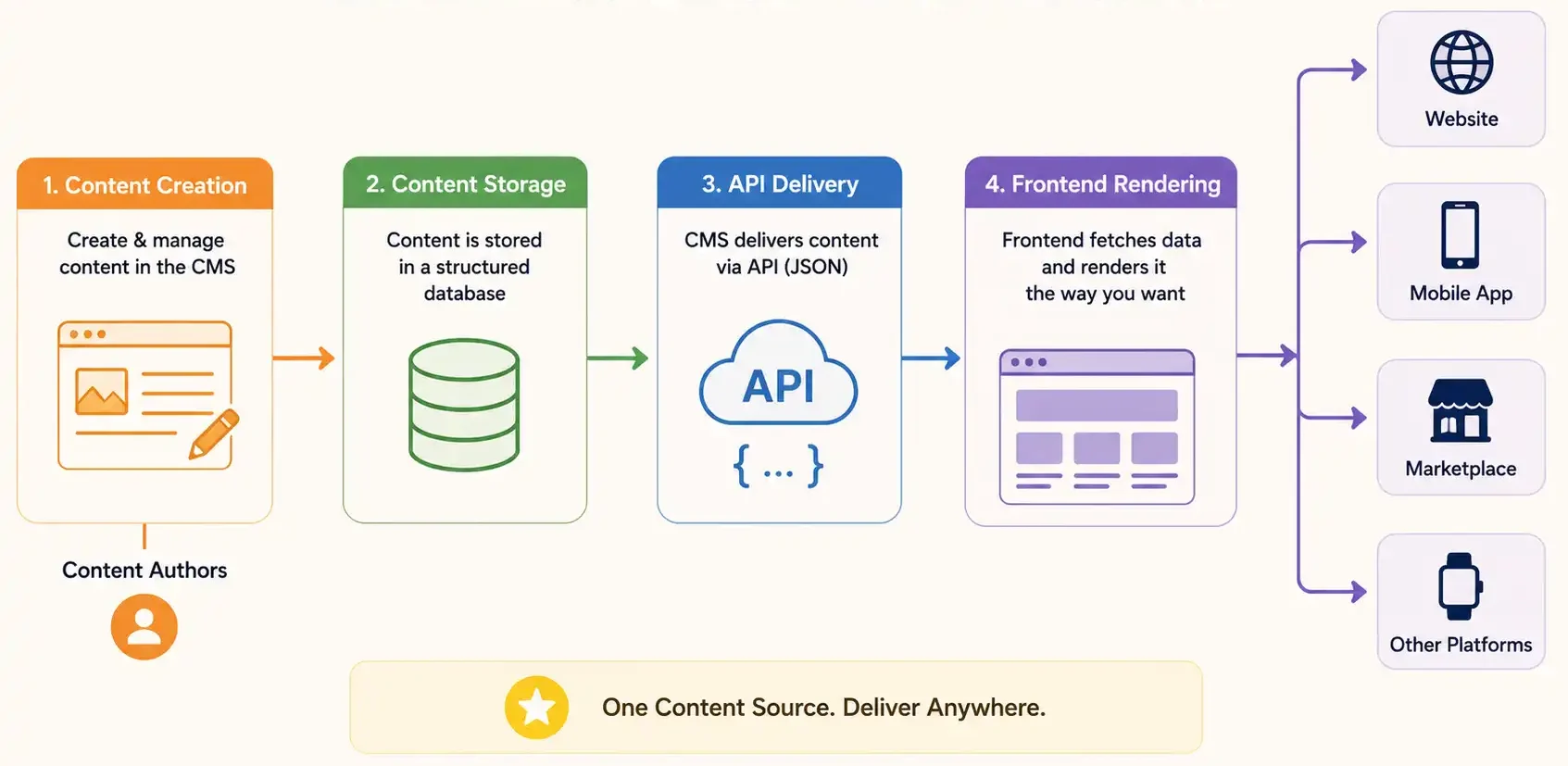
Step 1: Content Management Interface
You log into your headless CMS (like Contentful, Strapi, or Sanity). You create content. Fields like title, description, image, category. You don’t see any design. No themes. No WYSIWYG editor deciding how things look. Just structured data.
Step 2: Content Storage
That content gets stored in a database. Structured, organised, ready to go.
Step 3: API
Your CMS exposes an API. Your website, app, or any other system can call that API and say “give me the blog post with ID 42.” The CMS responds with the data. JSON format, usually.
Step 4: Frontend Rendering
Your website (built in React, Vue, Next.js, or whatever) receives the data and renders it however your developers want. Completely separate from the CMS.
That separation is the whole point. Your marketing team manages content. Your dev team manages presentation. They don’t step on each other’s toes.
Headless vs Traditional CMS
Let’s be honest about the tradeoffs.
Traditional CMS (WordPress)
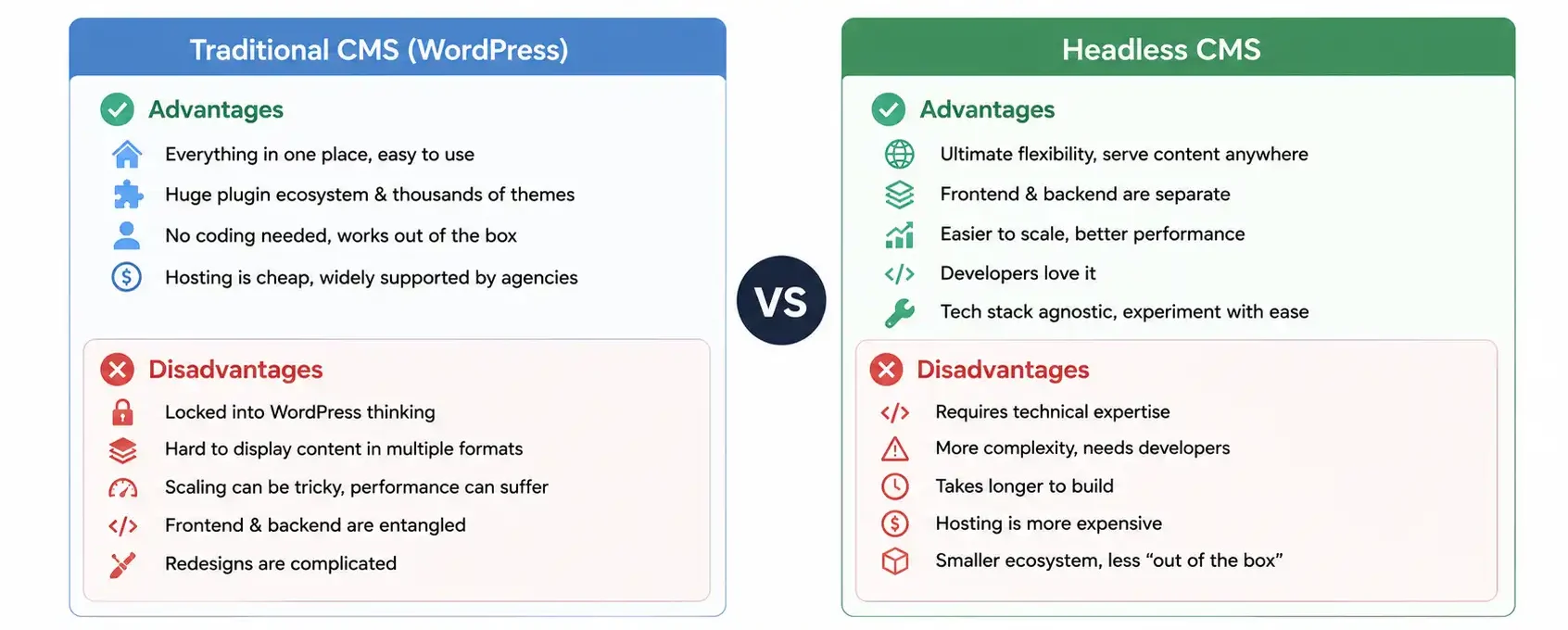
Advantages: Everything in one place. Easy to use. Huge plugin ecosystem. Thousands of themes. You don’t need to know code. Works out of the box. Hosting is cheap. Thousands of agencies know how to build with it.
Disadvantages: Locked into WordPress thinking. Hard to display content in multiple formats simultaneously. Scaling can be tricky. Frontend and backend are entangled. If you want to redesign, it’s complicated. Performance can suffer because PHP generates pages on every request.
Headless CMS
Advantages: Ultimate flexibility. Serve content anywhere. Frontend and backend are separate. Easier to scale. Developers love it. Performance can be better (pre-rendered static pages). Easier to experiment with multiple frontends. Tech stack agnostic, use whatever tools you want.
Disadvantages: Requires technical expertise. More complexity overall. You need developers. Building a site takes longer. Hosting is more expensive. Smaller ecosystem. Less “out of the box”, you build more from scratch. Requires more infrastructure knowledge.
Rule of thumb: If you’re a solo business owner or small team, WordPress usually wins on simplicity. If you’re a larger organisation with multiple products or channels, headless might win on flexibility.
The Real Benefits of Going Headless
Beyond the theory, here’s what actually happens when you implement headless CMS.
1. Multiple Channel Publishing
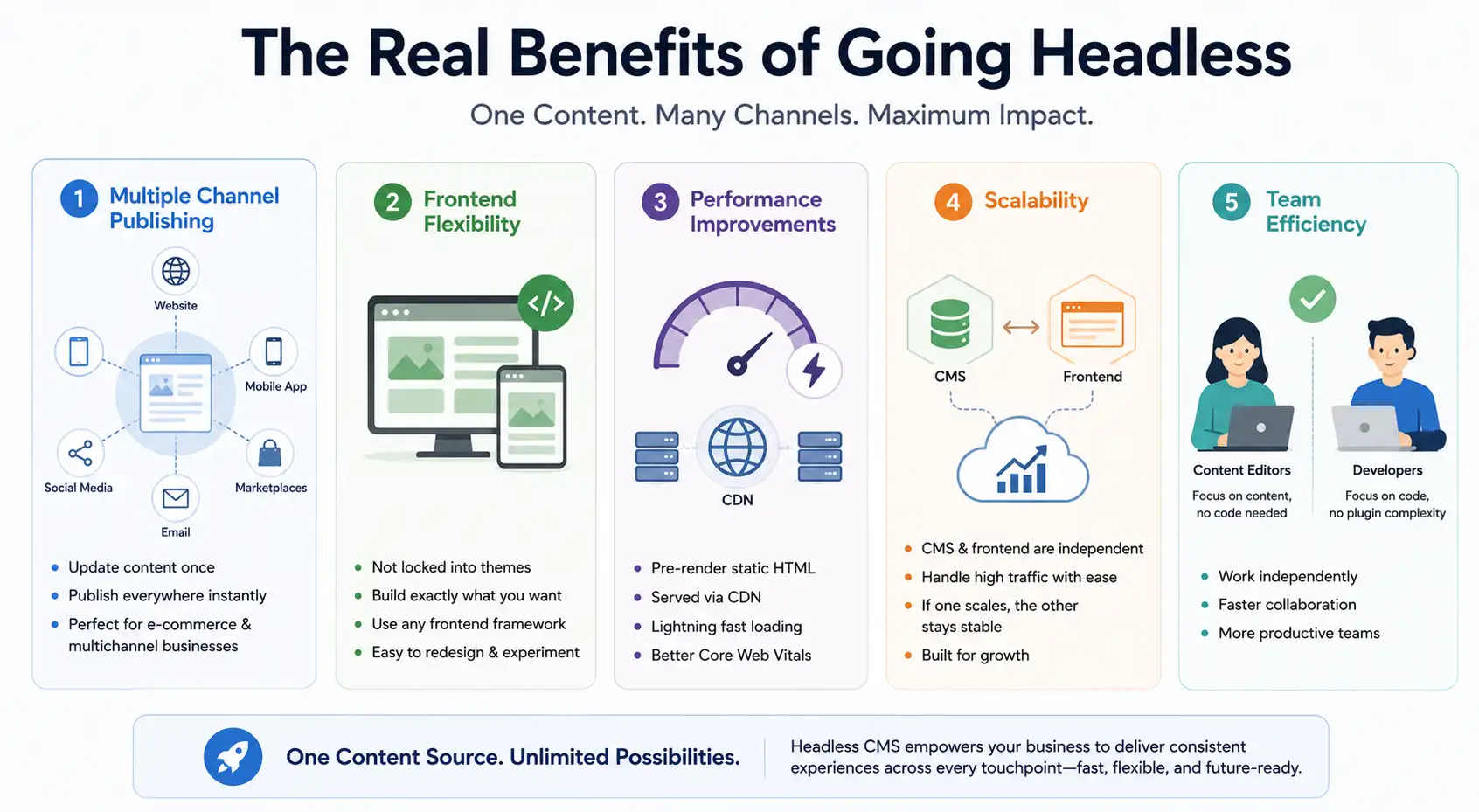
This is the big one. Update content once. It appears on your website, app, marketplace listings, email campaigns, social media, everywhere. E-commerce companies especially benefit because product information stays synchronized across all sales channels.
That food company I mentioned earlier? One update to product description flows to their website, app, Flipkart store, and Jio Mart automatically. No manual syncing. This kind of operational efficiency is exactly what digital marketing for FMCG and FMCD brands needs at scale. When you’re managing hundreds of SKUs across multiple channels, a single source of truth isn’t a luxury. It’s a requirement.
2. Frontend Flexibility
You’re not locked into WordPress themes. Your dev team can build exactly what you want. Try out new designs without touching the CMS. Use React today, Vue tomorrow. No problem.
3. Performance Improvements
Traditional WordPress generates pages dynamically on every request. Headless CMS can pre-render static HTML at build time. Serves from a CDN. Lightning fast. Static files load faster than PHP pages every time.
4. Scalability
Headless architecture scales better. The CMS and the frontend are independent. If one gets hammered with traffic, the other isn’t affected. WordPress, when it gets slammed, the whole thing slows down.
5. Team Efficiency
Content editors don’t need to know code. Developers don’t need to understand WordPress plugins. They work independently. Faster iteration.
The Real Drawbacks
But headless CMS isn’t magic. The tradeoffs are real.
Development Complexity
You need developers who know modern frameworks. This isn’t a WordPress plugin scenario. You’re building a custom application. That takes skill and time and money.
Setup Time and Cost
A WordPress site can launch in a week. A headless CMS setup might take 2-3 months. You need to build the frontend from scratch. Integrate APIs. Set up hosting infrastructure. It’s more work upfront.
Hosting and Infrastructure
WordPress hosting costs Rs 200-1,000 per month. Headless CMS infrastructure costs Rs 2,000-10,000 per month or more depending on scale. You’re managing more moving parts.
Smaller Ecosystem
WordPress has plugins for everything. Need a form builder? Plugin exists. Need an SEO tool? Plugin exists. With headless CMS, you sometimes need to build these things yourself or integrate external services. More work.
Requires Continuous Developer Attention
WordPress, you install updates and move on. Headless CMS needs ongoing development. APIs change. Dependencies update. You need a dev team, not just hosting.
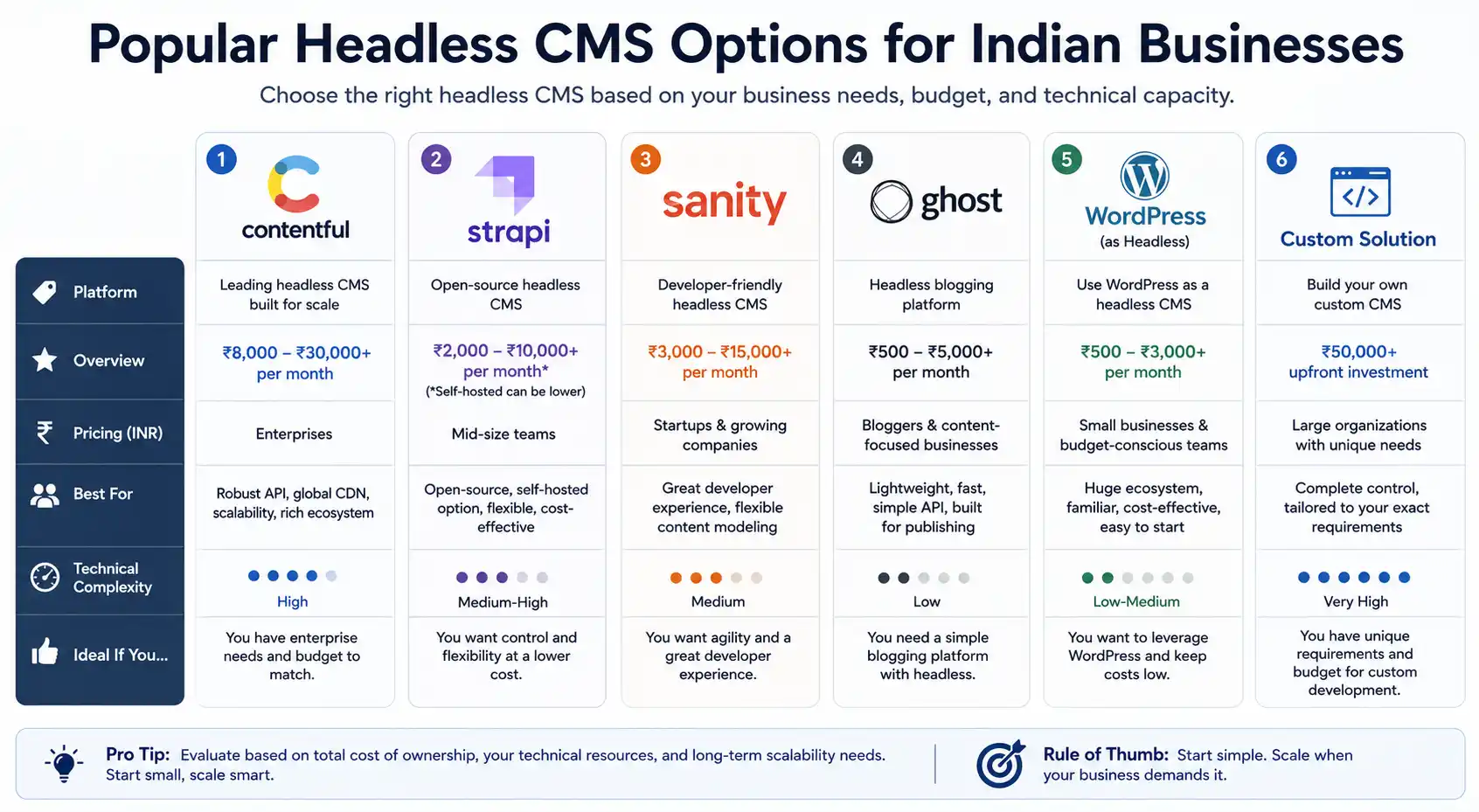
Popular Headless CMS Options for Indian Businesses
If you decide to go headless, here are the main choices.
1. Contentful
Most popular. Designed specifically as headless. Professional-grade. Good API. But expensive. Rs 8,000-30,000 per month depending on content volume. Best for enterprise.
2. Strapi
Open-source. Self-hosted or managed. More affordable. Good for mid-size teams. You can host it on your own infrastructure for less money. Requires more technical setup but gives you control.
3. Sanity
Really good developer experience. Flexible content modelling. Pricing starts low and scales. Good for startups and growing companies.
4. Ghost
If you just need a blogging platform with headless capabilities. Lightweight. Rs 500-5,000 per month. Not as flexible as Contentful but simpler.
5. WordPress as Headless
You can use WordPress as a headless CMS. Install WordPress, don’t use any theme. Use only the APIs. Deploy your frontend separately. Cheaper than dedicated headless platforms, but not ideal design-wise.
6. Custom Solution
Build your own. Sometimes for large organisations, a custom CMS built to your exact specifications makes sense. Expensive upfront but gives you complete control.
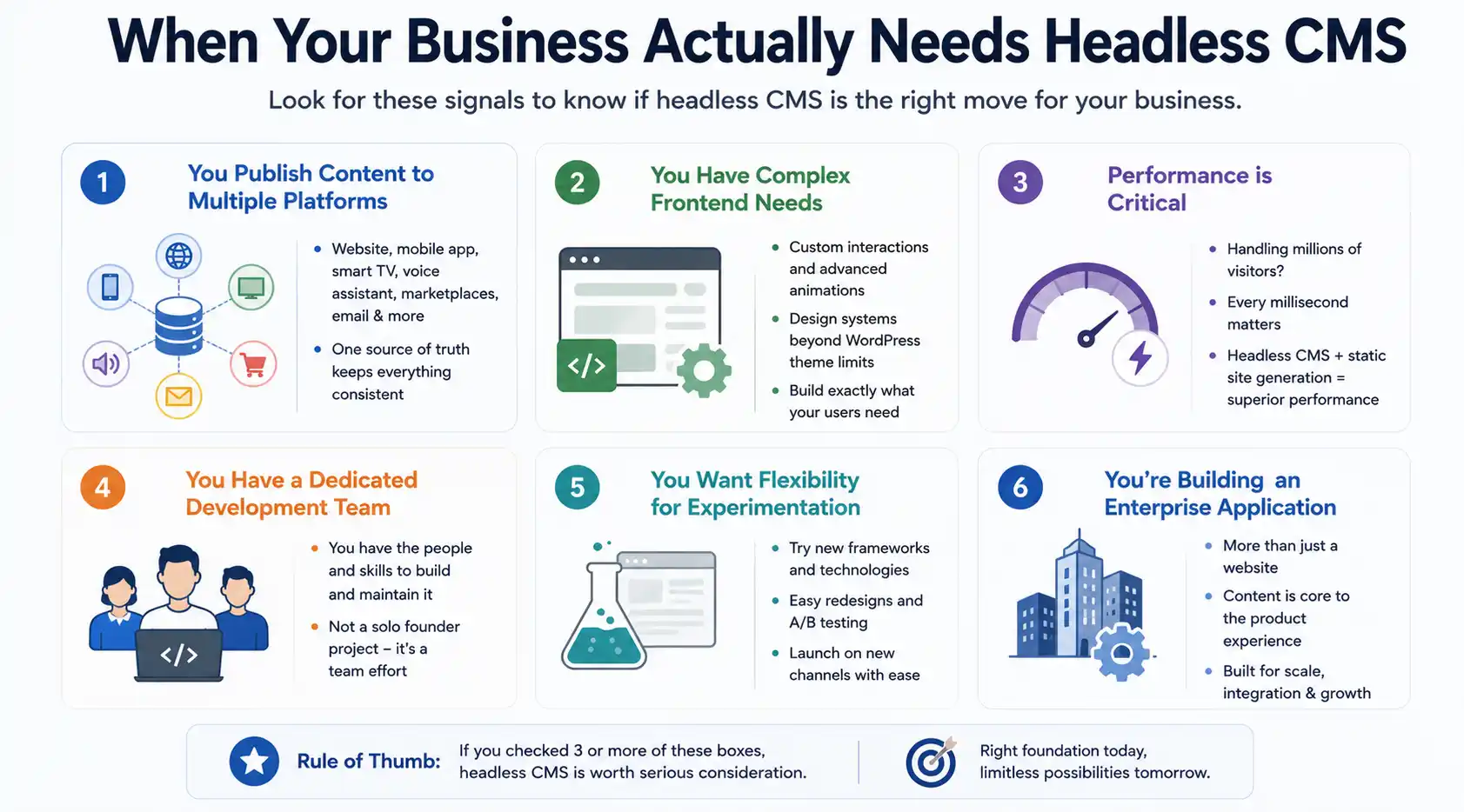
When Your Business Actually Needs Headless CMS
Not every business should go headless. But some should. Here are the signals.
- You Publish Content to Multiple Platforms
Website, mobile app, smart TV app, voice assistant, marketplace listings, email. One source of truth needed. Headless CMS makes sense.
- You Have Complex Frontend Needs
Custom interactions. Advanced animations. A design system that WordPress themes can’t accommodate. Building a custom frontend is worth it.
- Performance is Critical
You’re handling millions of visitors. Every millisecond matters. Headless CMS with static site generation will perform better than WordPress.
- You Have a Dedicated Development Team
You’ve got the people to maintain this. It’s not a solo founder’s project. It’s a team effort.
- You Want Flexibility for Experimentation
You want to try new frontend frameworks, redesigns, different channels. Headless CMS makes experimentation easy.
- You’re Building an Enterprise Application
Not just a website. An actual product where content is part of the experience. Headless CMS is more suited to this.
When You Should Stick With Traditional CMS
Be honest with yourself. Headless is overkill for:
- Small businesses with one website
- Solo founders or small teams
- Blogs, portfolios, simple content sites
- When you need something quick and cheap
- When your team isn’t technical
- When you want minimal ongoing maintenance
For these situations, WordPress (or other traditional CMS) is the better choice. It’s simpler, faster to launch, cheaper to maintain.
The Decision Framework
Ask yourself these questions.
Question 1: Do I need to publish content to multiple platforms simultaneously?
Yes → Headless CMS wins. No → Traditional CMS is fine.
Question 2: Do I have a technical development team?
Yes → Headless is feasible. No → Stick with traditional CMS.
Question 3: Is my website truly unique and complex?
Yes → Headless lets you build it exactly right. No → WordPress themes are probably good enough.
Question 4: Do I have budget for ongoing development?
Yes → Headless CMS is sustainable. No → Traditional CMS is cheaper.
Question 5: Am I planning to scale significantly?
Yes → Headless CMS scales better. No → WordPress can handle growth fine.
If you answered “yes” to most of these, headless CMS is probably right for you. If you answered “no” to most, stick with traditional CMS.
Our Recommendation for Most Indian Businesses
Start with WordPress or traditional CMS.
It’s the right call for the vast majority of businesses. Get your website up, attract customers, prove the business model. As you grow and your needs become more complex, then consider a headless CMS migration.
The few businesses we’ve helped transition to headless CMS? They were e-commerce companies selling on multiple marketplaces, apps with complex content needs, or growing platforms that outgrew WordPress. Not beginners.
WordPress isn’t a limitation until it actually becomes one. Don’t solve problems you don’t have yet. We’re professionals.
Wondering If Headless CMS Is Right For You?
We’ve helped Indian businesses evaluate, design, and build headless architectures. Let’s talk about your specific needs.


