-
Author: Anindita Barik
-
Updated Date: Sep-19-2026
-
Views: 2 Min Read
Schema markup for local business is a practical way to provide search engines with structured information about your business. From your address and phone number to opening hours and location-specific details, the right markup can remove ambiguity around your business information. This guide explains how LocalBusiness schema works in India, how to handle reviews and multiple locations, what mistakes to avoid, and how to validate your implementation. It also explains why keeping your website schema and Google Business Profile information consistent matters.
Got a physical location? Your website doesn’t know about it. At least, Google doesn’t think it does. Most small businesses in India build websites that are basically invisible to their own local search results because they skip one thing: schema markup. I’ve audited over 400 sites, and roughly 65% were missing Local Business schema entirely. That’s not a small oversight.
Schema markup for local business isn’t complicated. But it’s not optional anymore, yaar. It’s the jugaad of SEO—a small piece of code that does heavy lifting so your team doesn’t have to. No schema? Your hours are guesses. Your phone number is approximate. Your location is fuzzy. With it? Everything snaps into focus. Google suddenly knows who you are, where you are, and when you’re open. Schema is also one of the first things we check in a technical SEO audit — it’s the structured data layer that makes all your other on-page work visible to search engines in the way you actually intend it to be read.
What Schema Markup Does for Local Businesses
Schema markup (also called structured data) is code you add to your HTML that tells search engines exactly what your business is. Not just the words on the page—actual machine-readable data. Your business name. Your address. Phone. Hours. Whether you’re open right now. Price range. Photos. Reviews.
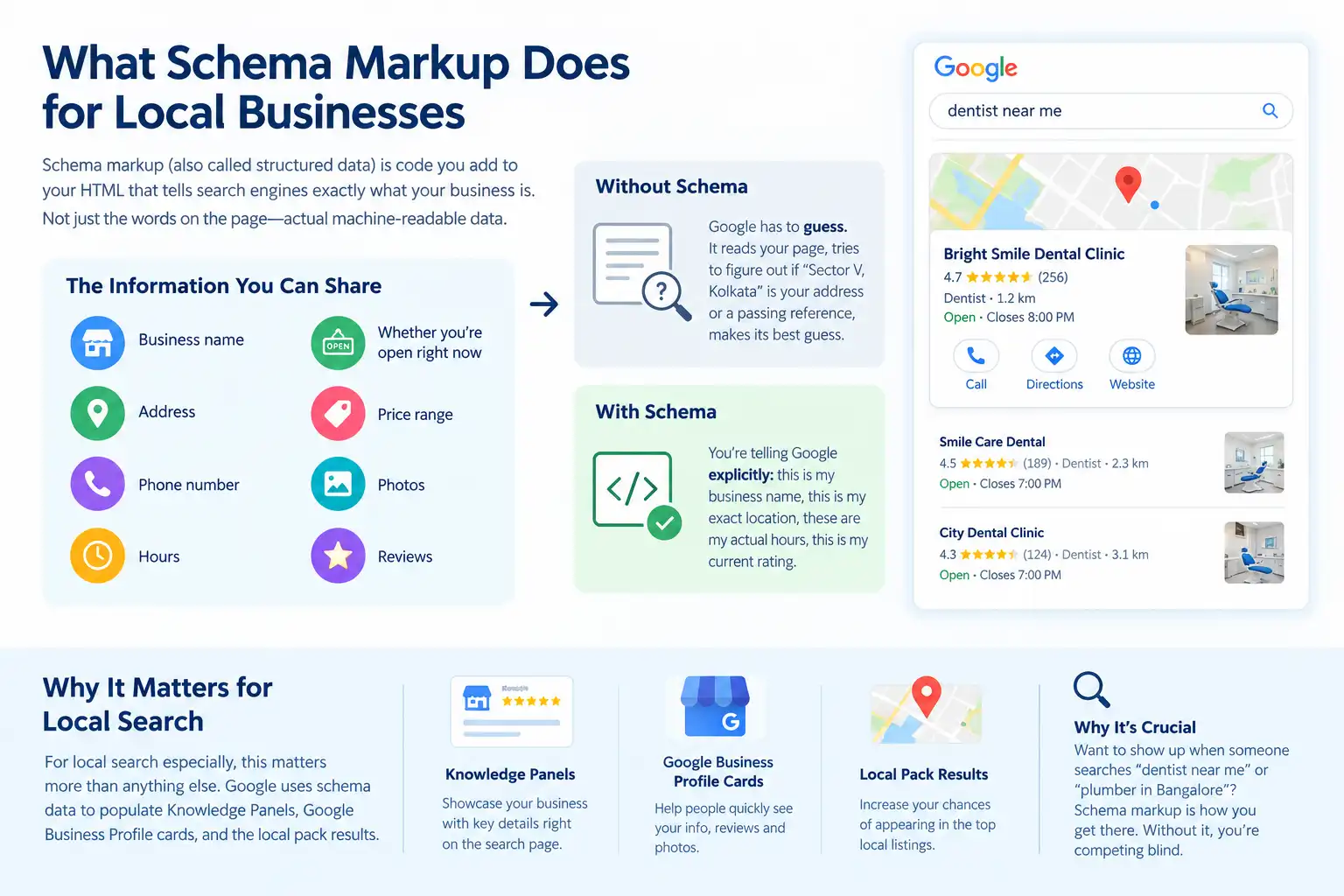
Without it, Google has to guess. It reads your page, tries to figure out if “Sector V, Kolkata” is your address or a passing reference, makes its best guess. With schema? You’re telling Google explicitly: this is my business name, this is my exact location, these are my actual hours, this is my current rating.
For local search especially, this matters more than anything else. Google uses schema data to populate Knowledge Panels, Google Business Profile cards, and the local pack results. You want to show up when someone searches “dentist near me” or “plumber in Bangalore”? Schema markup is how you get there. Without it, you’re competing blind. This is the technical foundation that makes Google My Business optimisation work — your Google Business Profile and your website schema need to speak the same language, because Google cross-references both when deciding what to show in local results.
The LocalBusiness Schema Structure Explained
The core schema comes from schema.org/LocalBusiness. It’s a standard that Google, Microsoft, Yahoo, and Yandex all recognise and process the same way. Here’s what a real, working LocalBusiness schema looks like:
<script type=”application/ld+json”>
{
“@context”: “https://schema.org”,
“@type”: “LocalBusiness”,
“name”: “Delhi Dental Clinic”,
“address”: {
“@type”: “PostalAddress”,
“streetAddress”: “123 Main Road”,
“addressLocality”: “Delhi”,
“postalCode”: “110001”,
“addressCountry”: “IN”
},
“telephone”: “+91-11-12345678”,
“url”: “https://delhidental.com”,
“openingHoursSpecification”: {
“@type”: “OpeningHoursSpecification”,
“dayOfWeek”: “Monday”,
“opens”: “09:00”,
“closes”: “18:00”
},
“aggregateRating”: {
“@type”: “AggregateRating”,
“ratingValue”: “4.5”,
“ratingCount”: “50”
}
}
</script>
Notice the structure. Each field has a specific purpose. The address gets its own object with subfields for street, city, postal code. Hours need opening and closing times in 24-hour format. The rating is nested inside an Aggregate Rating object. This specificity is what Google looks for and trusts. It’s not just about having information—it’s about having it formatted exactly right. Format it correctly, and Google trusts you. Format it wrong, and it ignores the whole thing.
Hours, Address, and Contact: Getting the Details Right
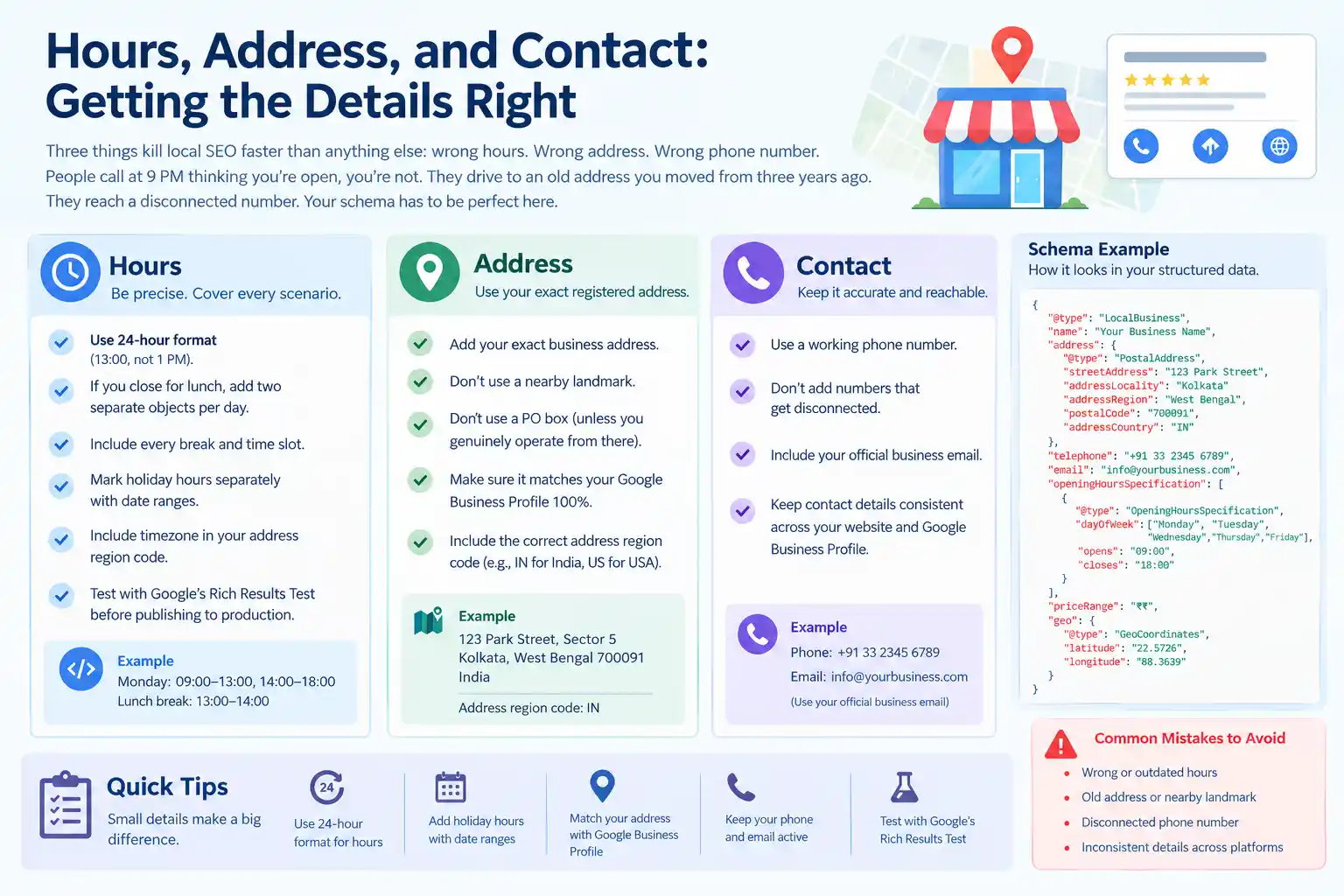
Three things kill local SEO faster than anything else: wrong hours. Wrong address. Wrong phone number. People call at 9 PM thinking you’re open, you’re not. They drive to an old address you moved from three years ago. They reach a disconnected number. Your schema has to be perfect here.
For hours, use 24-hour format (13:00, not 1 PM). If you close for lunch, that’s two separate objects per day. Account for every break. Mark holiday hours separately with date ranges. Include timezone in your address region code. Test everything in Google’s Rich Results Test before publishing to production.
For address, use your exact registered business address. Not a nearby landmark. Not a PO box unless you genuinely operate from there. This has to match your Google Business Profile 100%. Thoda attention to detail here helps maintain local SEO rankings and visibility and prevents customer frustration. One small typo, and your schema becomes a liability instead of an asset. This NAP (Name, Address, Phone) consistency is the same principle behind Google Business Profile optimization — every platform where your business appears must show identical information, because inconsistency across sources tells Google you can’t be trusted as a reliable local result.
Reviews, Ratings, and Local Pack Visibility
Google loves reviews. When you nest an Aggregate Rating into your Local Business schema, you’re telling Google your average rating and review count. This shows up in search results as those little gold stars. People click on those stars more than anything else on the page.
Most businesses miss this critical point: don’t hardcode the review count. Pull it dynamically from wherever you collect reviews. But the aggregate—4.5 stars out of 50 reviews—that goes in your schema. Keep that number fresh. Update it every week. If it says 4.5 stars and you’re actually at 4.2, Google notices the inconsistency. Truth matters here more than anywhere else.
Without proper schema, you’re invisible in local pack results. With schema, you’re at least eligible. With schema plus citations plus genuine reviews, you can actually rank.
Multiple Locations and Avoiding Common Mistakes
If you run three restaurants or five clinics across different cities, each location gets its own dedicated page. Each page gets its own LocalBusiness schema with that specific location’s address, hours, phone, and reviews. Then link them all from a corporate hub page.
The mistake most chain businesses make? One page listing all locations in a table or dropdown. Google then has no idea which location has which hours, which phone belongs to which address, which reviews are from which place. Your schema becomes noise instead of signal. Basically, you’re shouting at Google in a language it doesn’t understand.
Other common errors: mismatched address between your schema and Google Business Profile (schema loses that war). Missing the @context field entirely (whole thing won’t validate). Using 12-hour time format instead of 24-hour format. Forgetting time zone in address. Including fake reviews to inflate your rating. Test everything in Google’s Rich Results Test tool. Most errors are simple formatting issues—a missing comma, wrong quote type, malformed JSON.
Connecting Schema to Local Rankings and Google Business Profile
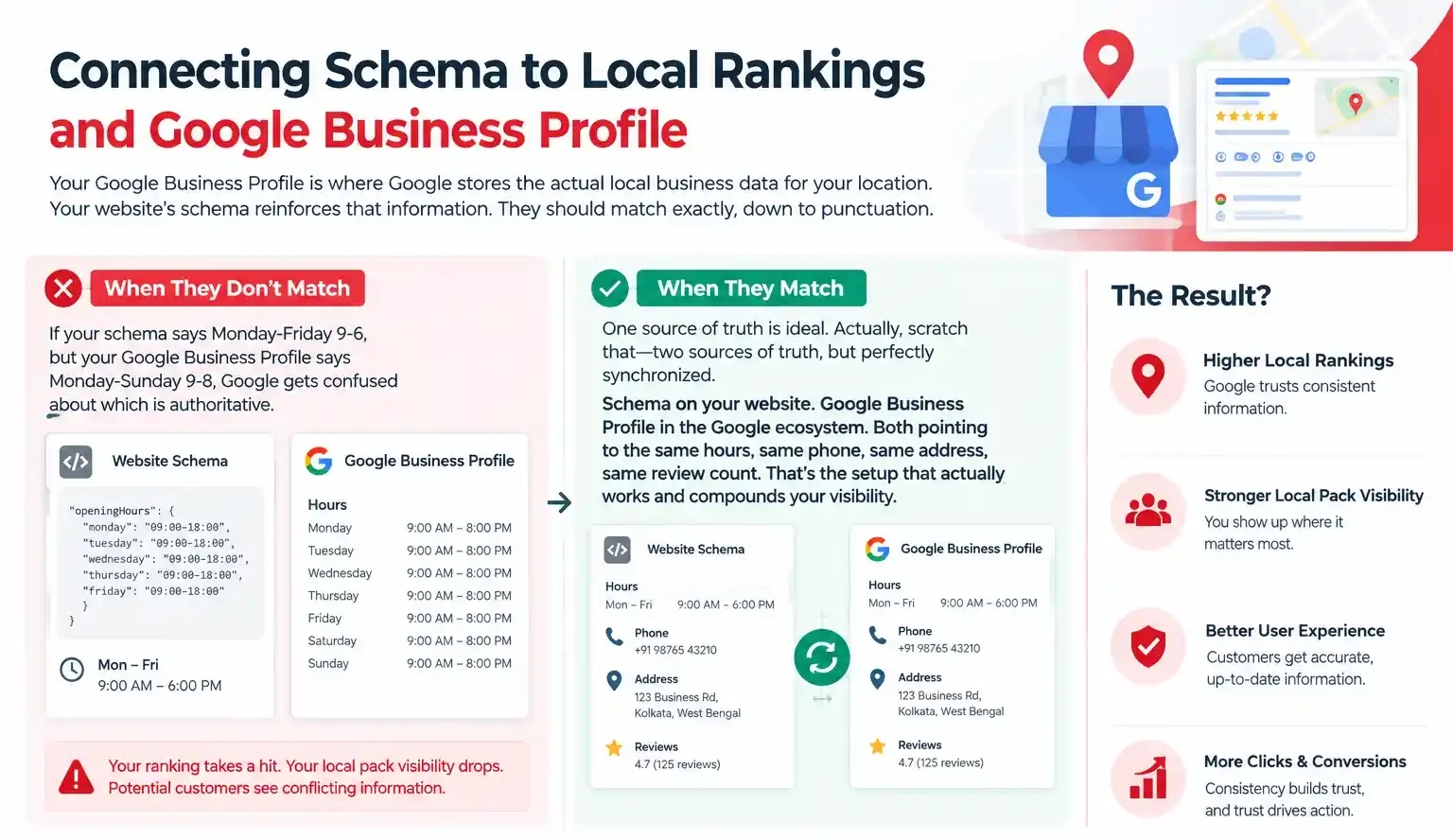
Your Google Business Profile is where Google stores the actual local business data for your location. Your website’s schema reinforces that information. They should match exactly, down to punctuation. If your schema says Monday-Friday 9-6, but your Google Business Profile says Monday-Sunday 9-8, Google gets confused about which is authoritative. Your ranking takes a hit. Your local pack visibility drops. Potential customers see conflicting information.
One source of truth is ideal. Actually, scratch that—two sources of truth, but perfectly synchronized. Schema on your website. Google Business Profile in the Google ecosystem. Both pointing to the same hours, same phone, same address, same review count. That’s the setup that actually works and compounds your visibility.
Testing, Validation, and Ongoing Monitoring
Before you push schema live, validate it completely. Use Google’s Rich Results Test. It’ll parse your JSON-LD, check it against the schema.org standard, and warn you about any issues. If it says “Valid markup detected,” you’re clear to deploy. After you go live? Keep monitoring. Google Search Console shows you if there are any structured data errors on your pages. If the impressions on your local pack results suddenly drop, one of the first things to check is whether your schema broke somewhere—usually during a site redesign or CMS update.
| Approach | Best for | Watch out for |
|---|---|---|
| DIY | Small teams, tight budgets | Slow ramp-up, trial-and-error |
| Freelancer | Specific project bursts | Inconsistency, limited ownership |
| Agency | Ongoing work, senior input | Higher retainer, less control |
Quick checklist before you start:
- Define the one thing you want: leads, sales, awareness — pick one.
- Baseline your numbers: write down where you are today.
- Pick a 90-day window: nothing moves in 2 weeks.
- Agree on success metrics: with whoever is paying the bill.
- Set up proper tracking: GA4, UTMs, call tracking.
- Review monthly: kill what doesn’t work, double down on what does.
The Bottom Line
If you take one thing from this: schema markup local business rewards patience and specificity, not volume or clever tricks. Start small, measure honestly, fix what breaks, and compound what works. The brands doing this well in India aren’t smarter — they’re just consistent. Need a hand with this for your business? Talk to us.
Need help with schema markup for local business?
Struggling to implement Local Business Schema correctly or unsure which details to include? Let’s optimize your schema markup to help search engines better understand your business and improve your visibility in local search results.
FAQs
-
Do I need LocalBusiness schema if I have a Google Business Profile?
Ans.Not strictly required, but it helps significantly. Your GBP is where Google gets local business data by default. Your website's schema reinforces it and helps Google understand your site better for local queries. Skip schema, and you're leaving ranking power on the table. They work together, not as replacements. -
What if my business has multiple locations?
Ans.One schema per location, on separate dedicated pages. Each location page gets its own LocalBusiness schema with that specific address, phone, and hours. Link them all from a corporate hub page for structure. Don't squeeze multiple locations into one schema—it confuses Google's parsing and hurts your visibility. -
Can I hardcode my review count in the schema?
Ans.Yes, but only if you update it regularly—ideally weekly. If you hardcode 50 reviews and you actually have 52, Google notices the inconsistency. Best practice: pull the count dynamically from your review source. That way it stays accurate without manual updates. -
What schema properties matter most for local ranking?
Ans.In priority order: address, telephone, name, openingHoursSpecification. These four are what Google looks at first when evaluating your eligibility for local pack. AggregateRating matters if you have genuine reviews. Image helps with click-through rates. Everything else is nice-to-have. -
How long until schema changes show up in Google search?
Ans.Google crawls websites anywhere from hours to weeks depending on crawl frequency. But schema updates typically process faster than page content changes. Submit your sitemap to Google Search Console after publishing schema changes to speed up indexing. -
Should I use microdata, RDFa, or JSON-LD?
Ans.JSON-LD. It's the current standard. Google prefers it for local business schema. It's easier to maintain than microdata. Unlike RDFa, it doesn't clutter your HTML with extra attributes. If you're implementing new schema, JSON-LD is the only choice that makes sense today. -
What happens if schema address doesn't match Google Business Profile?
Ans.Google gets confused about which source is authoritative. Your local pack ranking suffers as a result. Sometimes you get penalized for conflicting information across properties. The fix is straightforward: sync them exactly. Same format, same spelling, same postal code. This is the single most common issue I fix in local business audits.
Author Details

Latest Posts
-
 21 / Sep
Whatsapp Marketing WhatsApp Marketing for Indian SMBs
21 / Sep
Whatsapp Marketing WhatsApp Marketing for Indian SMBs -
19 / Sep
-
 18 / Sep
Google Ads Google Ads Quality Score: Full Breakdown
18 / Sep
Google Ads Google Ads Quality Score: Full Breakdown -
 17 / Sep
-
 07 / Sep
Content Writing Copywriting vs Content Writing: Which One Actually Wins
07 / Sep
Content Writing Copywriting vs Content Writing: Which One Actually Wins




Related Knowledge