-
Author: Anindita Barik
-
Updated Date: Sep-18-2026
-
Views: 2 Min Read
Google Ads Quality Score measures how relevant and useful your ads, keywords, and landing pages are to users. A higher score can support better ad performance and potentially lower costs. This guide explains the three main Quality Score components: Expected CTR, Ad Relevance, and Landing Page Experience. It also covers common reasons for low scores, practical ways to improve them, how to check Quality Score in Google Ads, and common myths advertisers should avoid when optimizing campaigns.
I watched a client’s CPC jump from Rs. 45 to Rs. 120 in two weeks. No bid change. No market shift. Just a slow bleed on Quality Score. By the time they called us, they’d already burned through half their monthly budget with half the impressions. Sound familiar?
Google Ads Quality Score is that thing everyone talks about but nobody really understands. It sits there in your campaign dashboard showing a 5 or 7 or 9, and most people shrug and move on. Problem is, it’s literally controlling how much you pay per click and whether your ads even show.
What Is Google Ads Quality Score, Actually?
Quality Score is Google’s internal rating of how relevant your ads, keywords, and landing pages are to a user’s search query. It’s a score from 1 to 10, recalculated every time your ad is eligible to show. Honestly, it’s less a permanent grade and more a snapshot.
Here’s the thing—Google doesn’t tell you how it weights each factor. We know Quality Score affects CPC (cost per click) and ad position. A score of 8 might mean you pay 25% less than someone with a score of 5 for the same keyword. But the exact math? Still opaque (actually, scratch that—the math is proprietary, and Google will never release it fully).
Think of it as Google’s way of rewarding good advertisers and punishing sloppy ones.
The Four Components of Quality Score
Google breaks Quality Score into three visible metrics and one hidden one:
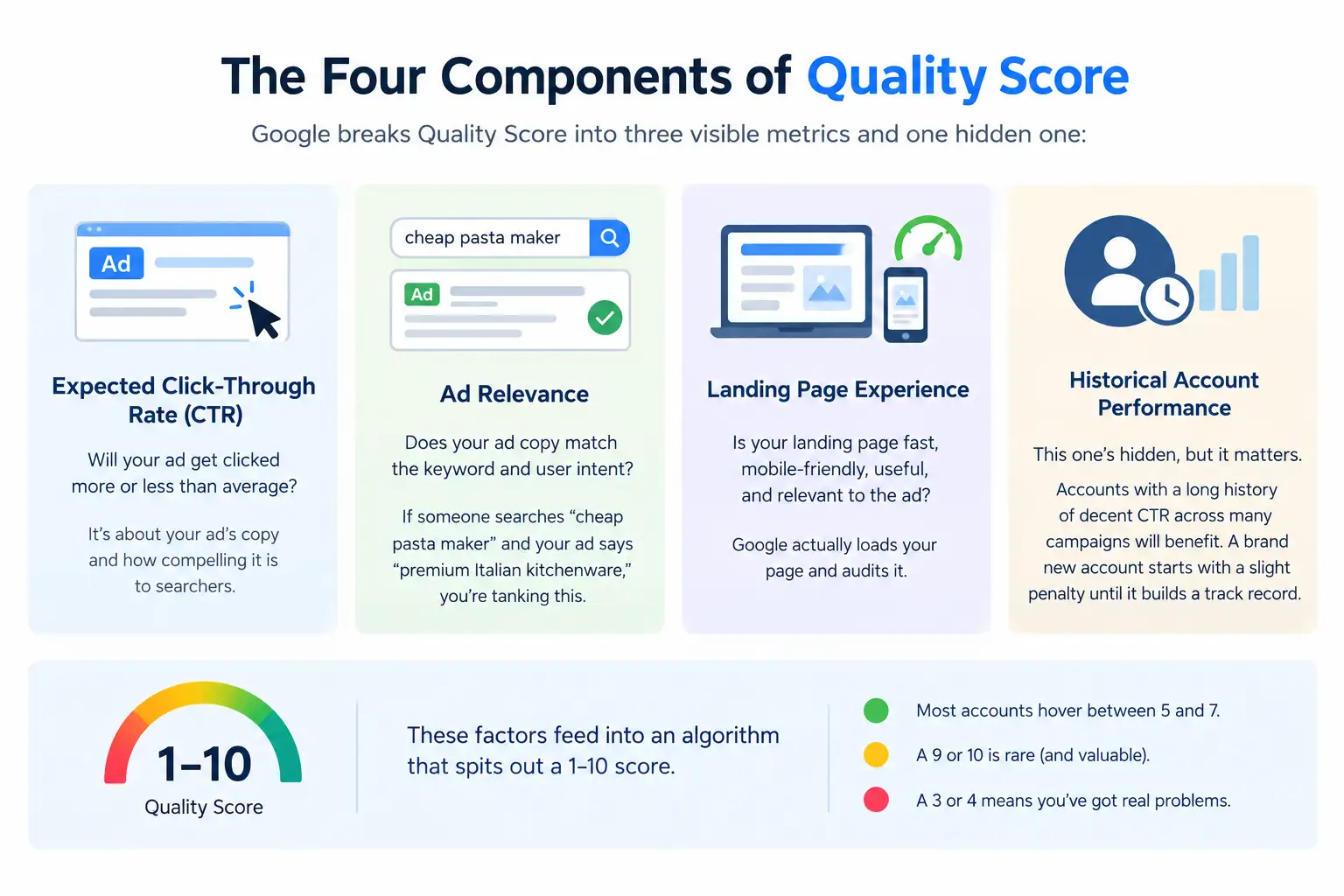
- Expected Click-Through Rate (CTR): Will your ad get clicked more or less than average? Above average, average, or below average. This is about your ad’s copy and how compelling it is to searchers.
- Ad Relevance: Does your ad copy match the keyword and user intent? If someone searches “cheap pasta maker” and your ad says “premium Italian kitchenware,” you’re tanking this.
- Landing Page Experience: Is your landing page fast, mobile-friendly, useful, and relevant to the ad? Google actually loads your page and audits it. The same technical issues that hurt your organic rankings also hurt your Quality Score here — as our technical SEO audit guide covers, page speed, mobile responsiveness, and crawlability affect both your SEO and your paid ad performance simultaneously.
- Historical Account Performance: This one’s hidden, but it matters. Accounts with a long history of decent CTR across many campaigns will benefit. A brand new account starts with a slight penalty until it builds a track record.
These factors feed into an algorithm that spits out a 1–10 score. Most accounts hover between 5 and 7. A 9 or 10 is rare (and valuable). A 3 or 4 means you’ve got real problems.
Why Quality Score Matters More Than You Think
Here’s what most people miss: Quality Score is a cost multiplier.
Let’s say your keyword has a Max CPC bid of Rs. 100 and a Quality Score of 5. Your actual CPC might be Rs. 120 because Google thinks your ad isn’t that great. Same keyword, Quality Score 9, same Rs. 100 Max CPC bid—you might pay Rs. 60 per click. That’s a 50% saving on the exact same traffic.
Over a year, on a budget of Rs. 10 lakhs, that’s the difference between burning Rs. 12 lakhs and burning Rs. 6 lakhs for the same conversions. The jugaad marketers get this early.
Plus, higher Quality Scores mean better ad positions (all else equal). So you’re not just paying less—you’re showing higher up.
How to Check Your Quality Scores
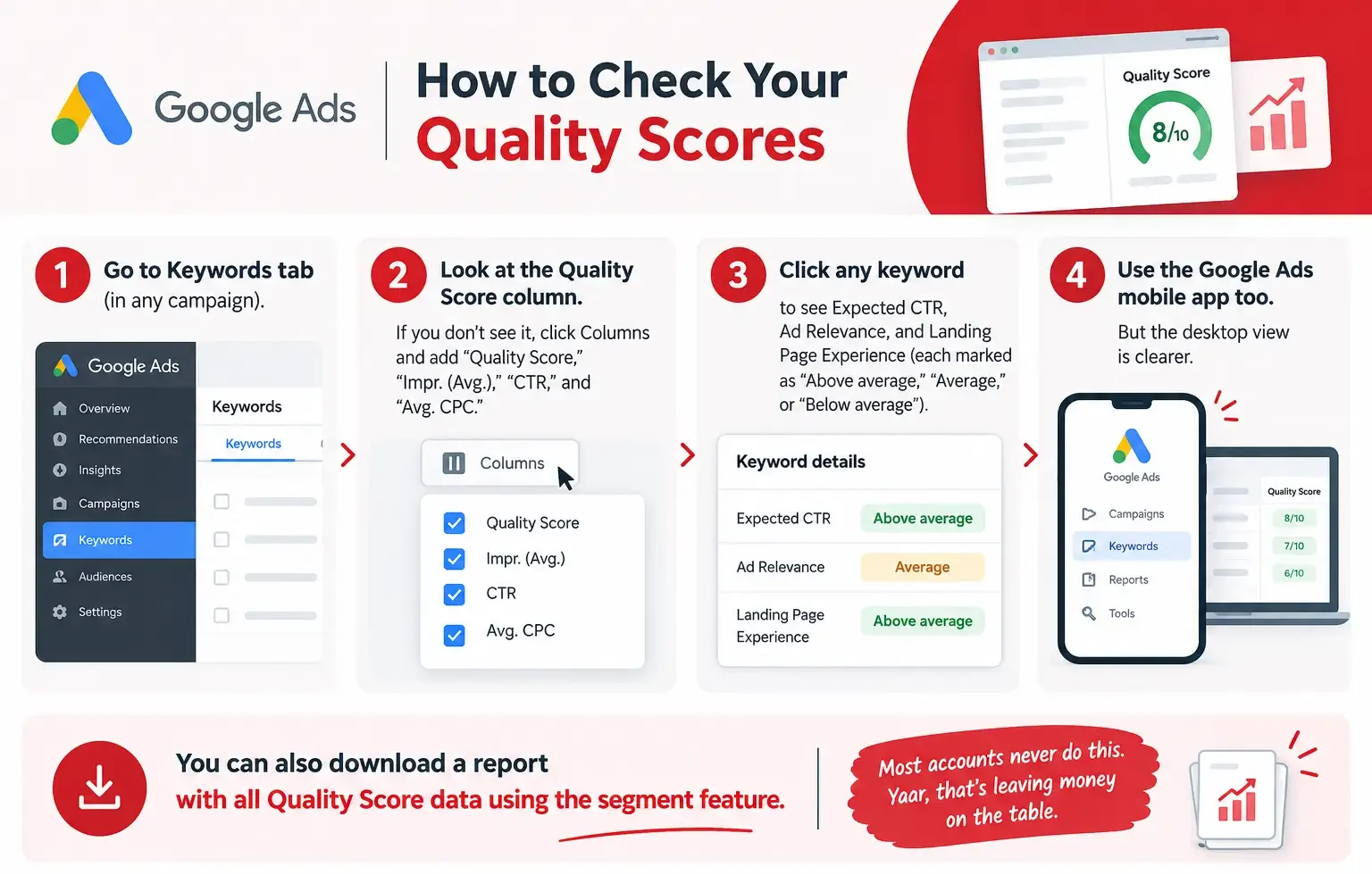
In Google Ads:
- Go to Keywords tab (in any campaign).
- Look at the Quality Score column. If you don’t see it, click Columns and add “Quality Score,” “Impr. (Avg.),” “CTR,” and “Avg. CPC.”
- Click any keyword to see Expected CTR, Ad Relevance, and Landing Page Experience (each marked as “Above average,” “Average,” or “Below average”).
- Google Ads mobile app shows this too, but the desktop view is clearer.
You can also download a report with all Quality Score data using the segment feature. Most accounts never do this. Yaar, that’s leaving money on the table. Setting up proper reporting from the start — so you’re tracking Quality Score trends alongside CPC and conversion rate — is part of the same discipline behind digital marketing KPI metrics. You can’t improve what you don’t measure consistently.
The Three Things Tanking Your Quality Score
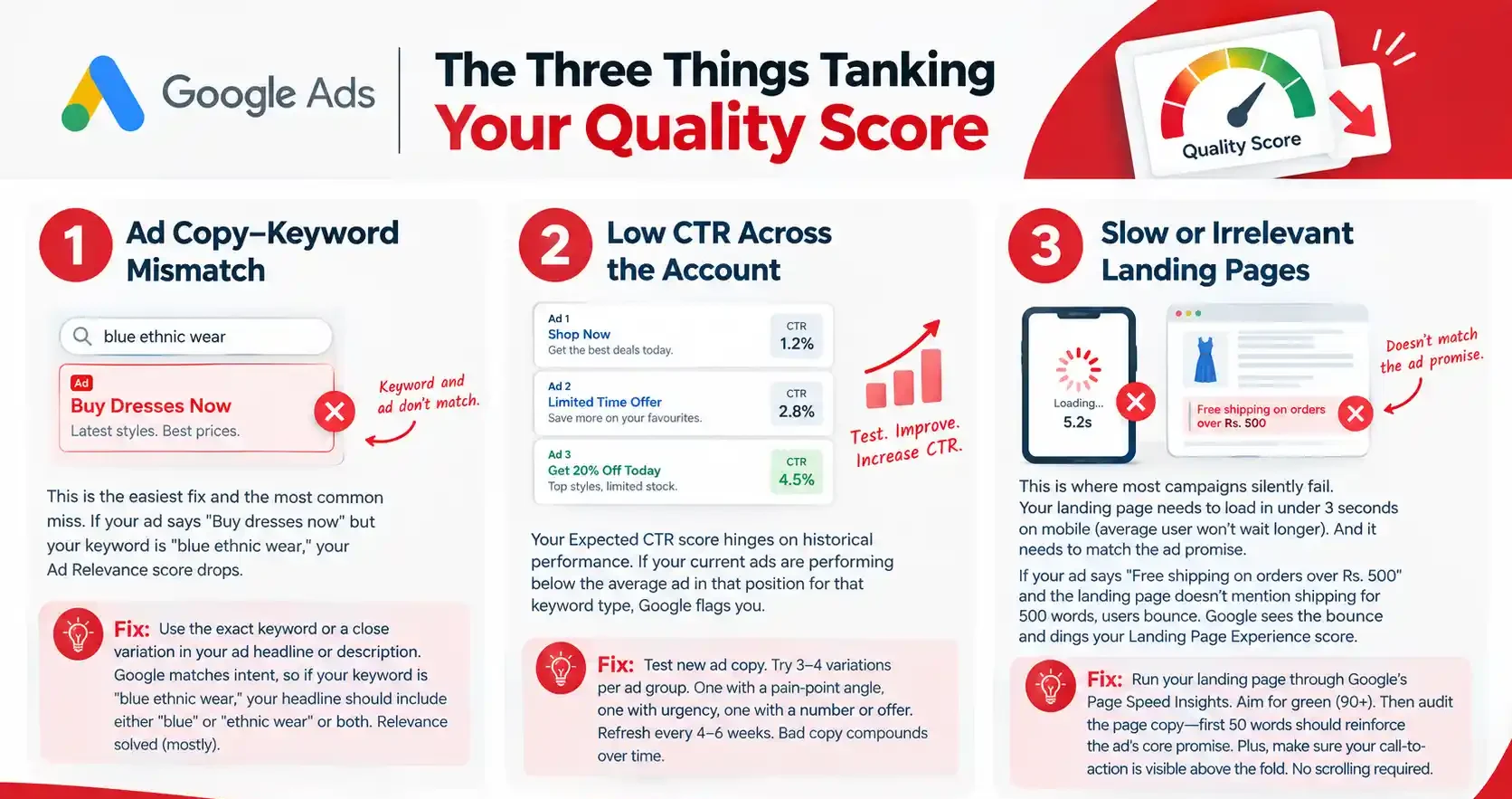
1. Ad Copy–Keyword Mismatch
This is the easiest fix and the most common miss. If your ad says “Buy dresses now” but your keyword is “blue ethnic wear,” your Ad Relevance score drops.
Fix: Use the exact keyword or a close variation in your ad headline or description. Google matches intent, so if your keyword is “blue ethnic wear,” your headline should include either “blue” or “ethnic wear” or both. Relevance solved (mostly).
2. Low CTR Across the Account
Your Expected CTR score hinges on historical performance. If your current ads are performing below the average ad in that position for that keyword type, Google flags you.
Fix: Test new ad copy. Try 3–4 variations per ad group. One with a pain-point angle, one with urgency, one with a number or offer. Refresh every 4–6 weeks. Bad copy compounds over time.
3. Slow or Irrelevant Landing Pages
This is where most campaigns silently fail. Your landing page needs to load in under 3 seconds on mobile (average user won’t wait longer). And it needs to match the ad promise.
If your ad says “Free shipping on orders over Rs. 500” and the landing page doesn’t mention shipping for 500 words, users bounce. Google sees the bounce and dings your Landing Page Experience score.
Fix: Run your landing page through Google’s Page Speed Insights. Aim for green (90+). Then audit the page copy—first 50 words should reinforce the ad’s core promise. Plus, make sure your call-to-action is visible above the fold. No scrolling required.
Quick Wins to Boost Quality Score Fast
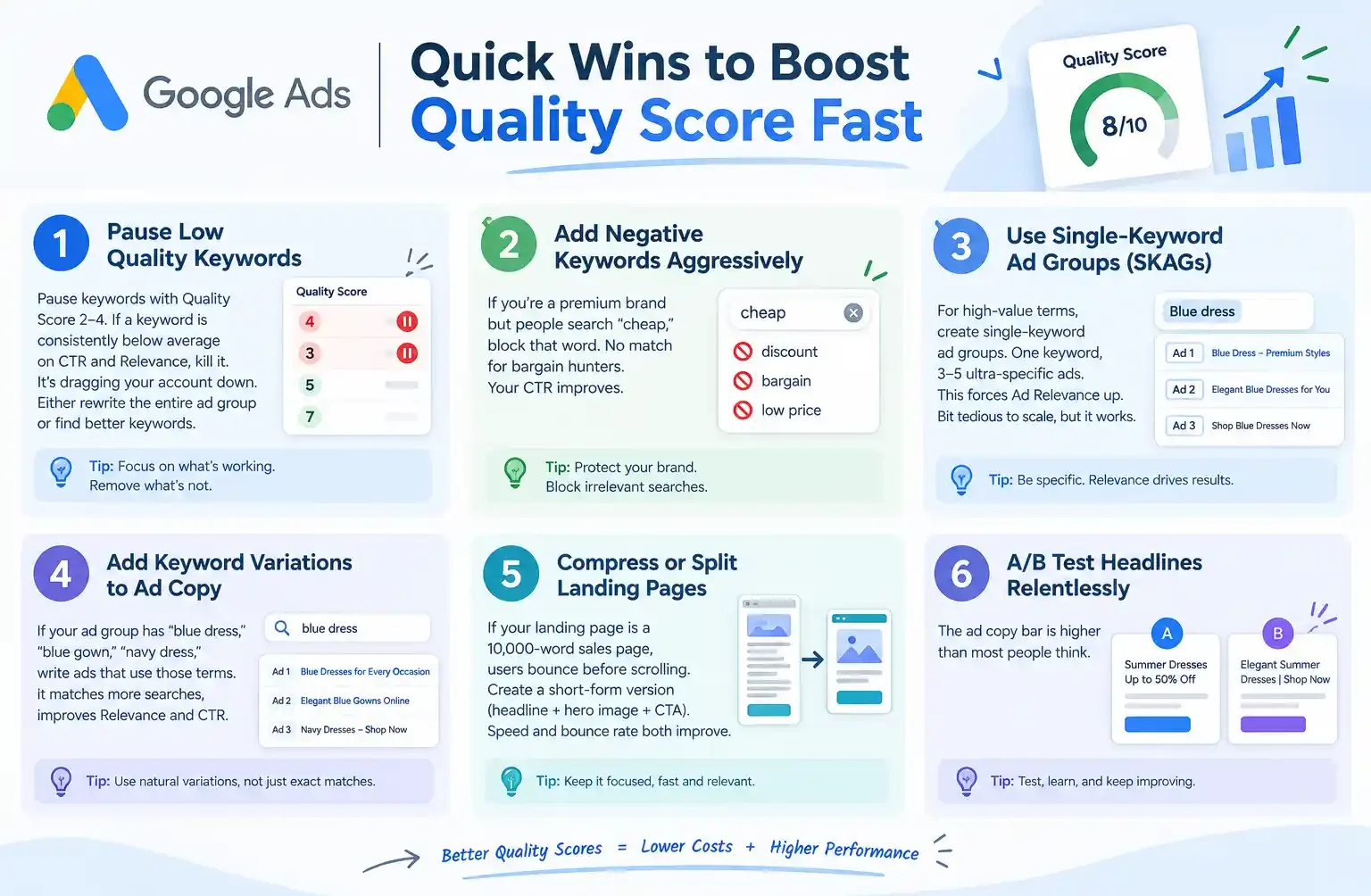
- Pause keywords with Quality Score 2–4. If a keyword is consistently below average on CTR and Relevance, kill it. It’s dragging your account down. Either rewrite the entire ad group or find better keywords.
- Add negative keywords aggressively. If you’re a premium brand but people search “cheap,” block that word. No match for bargain hunters. Your CTR improves.
- Use single-keyword ad groups (SKAGs) for high-value terms. One keyword, 3–5 ultra-specific ads. This forces Ad Relevance up. Bit tedious to scale, but it works.
- Add keyword variations to ad copy. If your ad group has “blue dress,” “blue gown,” “navy dress,” write ads that use those terms.
- Compress landing pages or split them. If your landing page is a 10,000-word sales page, users bounce before scrolling. Create a short-form version (headline + hero image + CTA). Speed and bounce rate both improve.
- A/B test headlines relentlessly. The ad copy bar is higher than most people think.
The Quality Score Myths You Need to Stop Believing
Myth: Quality Score is permanent. False. It recalculates every single time your ad can show. One good week and a 4 can jump to a 6.
Myth: Google penalizes low-Quality-Score accounts. Not directly. But the cost multiplier is real, and over time, low-QS accounts spiral (more budget needed, fewer conversions, less reinvestment).
Myth: You can game Quality Score by setting your Max CPC super high. Nope. CPC and Quality Score are separate. A high bid won’t fix a bad score. This is one of the things we cover in what agencies hide about performance marketing — agencies that optimise only for bid strategy while ignoring Quality Score are spending your budget inefficiently and may not even realise it.
One More Thing to Track
Beyond the 1–10 score, watch your Historical Quality Score in the campaign settings. Google shows a trend (up, down, or flat). If it’s trending down, you’ve got a real problem brewing. Address it this month, not next quarter. Waiting is how a small leak becomes a sinking ship.
| Approach | Best for | Watch out for |
|---|---|---|
| DIY | Small teams, tight budgets | Slow ramp-up, trial-and-error |
| Freelancer | Specific project bursts | Inconsistency, limited ownership |
| Agency | Ongoing work, senior input | Higher retainer, less control |
Quick checklist before you start:
- Define the one thing you want: leads, sales, awareness — pick one.
- Baseline your numbers: write down where you are today.
- Pick a 90-day window: nothing moves in 2 weeks.
- Agree on success metrics: with whoever is paying the bill.
- Set up proper tracking: GA4, UTMs, call tracking.
- Review monthly: kill what doesn’t work, double down on what does.
The Bottom Line
If you take one thing from this: google ads quality score rewards patience and specificity, not volume or clever tricks. Start small, measure honestly, fix what breaks, and compound what works. Once your campaigns are stable, you can focus on scaling success in Google Ads without simply increasing your ad spend. The brands doing this well in India aren’t smarter — they’re just consistent. Need a hand with this for your business? Talk to us.
Need help with google ads quality score?
Struggling with low Quality Scores, high CPCs, or underperforming ads? Let’s optimize your keywords, ad relevance, and landing pages to improve performance and get more value from your Google Ads campaigns.
FAQs
-
Does Quality Score affect search impressions or just cost?
Ans.Both. A very low Quality Score (1–2) can actually prevent your ads from showing. More commonly, low scores hike your CPC and lower your ad position. So fewer impressions, higher cost per impression. Double whammy. -
Can I improve Quality Score without changing my landing page?
Ans.Partially. If your issue is Ad Relevance or Expected CTR, better ad copy and keyword optimization help immediately. But if your landing page is slow or has poor UX, you'll plateau. At least 30% of Quality Score is landing page, so ignore it at your own cost. -
How long does it take to see Quality Score improvements?
Ans.Changes show within 1–3 days once your ads start getting meaningful impressions again. But trends take 2–3 weeks to stabilize. So make your changes, wait a week, assess, and adjust. No point in panicking after 24 hours. -
Should I aim for a score of 10?
Ans.Not necessary. A 7–8 is solid. You're saving 20–30% on CPC compared to a 5. A 9 or 10 is impressive, but the returns diminish. Most teams can't sustain 9+ across 200+ keywords. Focus on getting to 7 first, then optimise from there. -
Does Quality Score change if I change my bid?
Ans.No. Bids and Quality Score are independent. Changing your Max CPC won't move your QS. What moves it: ad copy, landing page relevance, CTR trends, and account history. -
What if all my keywords have low Quality Scores?
Ans.Your account-level history is weak (maybe it's new or has been neglected). Start with one strong campaign: 20–30 highly relevant keywords, 3–4 well-written ads, optimised landing pages. Get that campaign to 7+ average QS. Wins there spill into the rest of the account. -
Can I see Quality Score for display or shopping campaigns?
Ans.Display doesn't get a quality score (yet). Shopping is keyword-less, so no score there either. Quality Score is search-only. Performance Max has a quality score but it's less granular—Google doesn't break it into the three components.
Author Details

Latest Posts
-
 19 / Sep
-
18 / Sep
Google Ads Google Ads Quality Score: Full Breakdown
-
 17 / Sep
-
 07 / Sep
Content Writing Copywriting vs Content Writing: Which One Actually Wins
07 / Sep
Content Writing Copywriting vs Content Writing: Which One Actually Wins -
 26 / Aug
Search Engine Optimization Video SEO: How to Rank Your Videos in Google & YouTube
26 / Aug
Search Engine Optimization Video SEO: How to Rank Your Videos in Google & YouTube


Related Knowledge