As we grow on social media, we are at risk of hacking. Imagine working hours to create a social presence across platforms only to find profiles disappear one fine day. It can feel like all your effort is lost, which is why we need to stay alert and know how to prevent and recover. This blog covers exactly that.
Understanding social media hacking
Hacking is a common threat on social media. Hackers use clever tactics to exploit users’ trust and take over their accounts. One of the most common methods is sending deceptive links. These links appear very urgent. They use messages claiming various scenarios like “your profile is locked” or “urgent security update”. These can trick you into believing the message is from the authentic source.
Look at these screenshots;
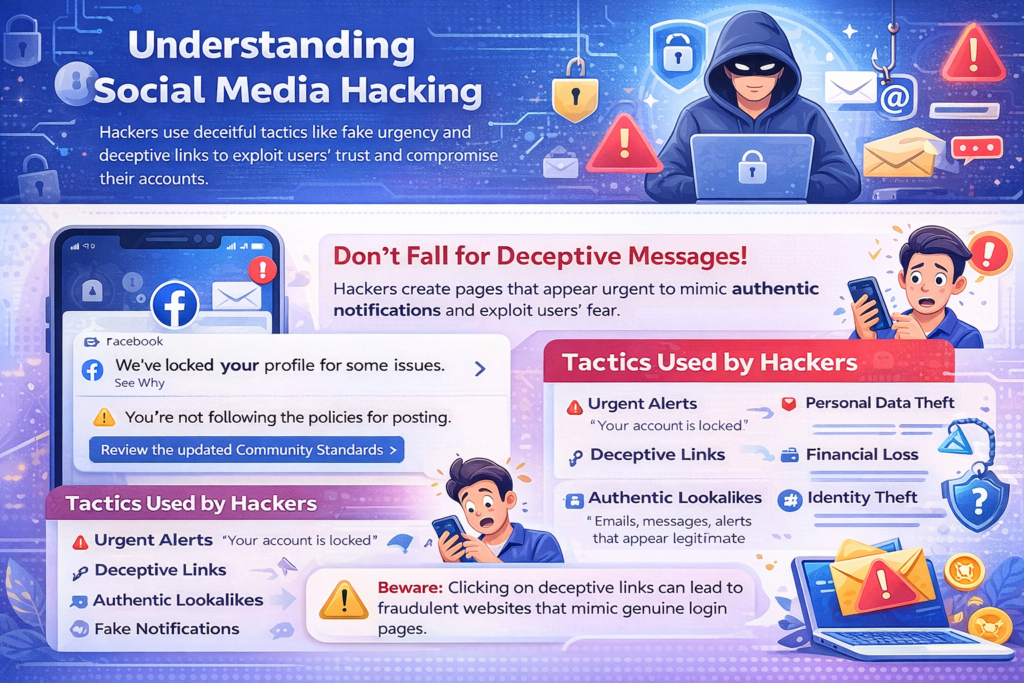
As you can see here, a notification has come from Facebook “We have locked your profile for some issues. See Why” Once you open the notification a message comes up that you are not following the policies of posting.
But how can the notification show your profile is locked when in reality it has not happened? Well, the answer is the page has been created with the profile name “we’ve locked your profile for some issues. See why” with a profile picture of the Facebook. Tap into the enquire section or the three dots near the profile name. You will see the account is of someone with a substantial amount of following and posts.
The intent behind such messages is clear. They instil fear or a sense of urgency in the user. They compel the user to click on the provided link without much thought. Once clicked, these links often redirect users to fraudulent websites or imitation login pages. They are carefully made to look like real platforms.
We have another example;
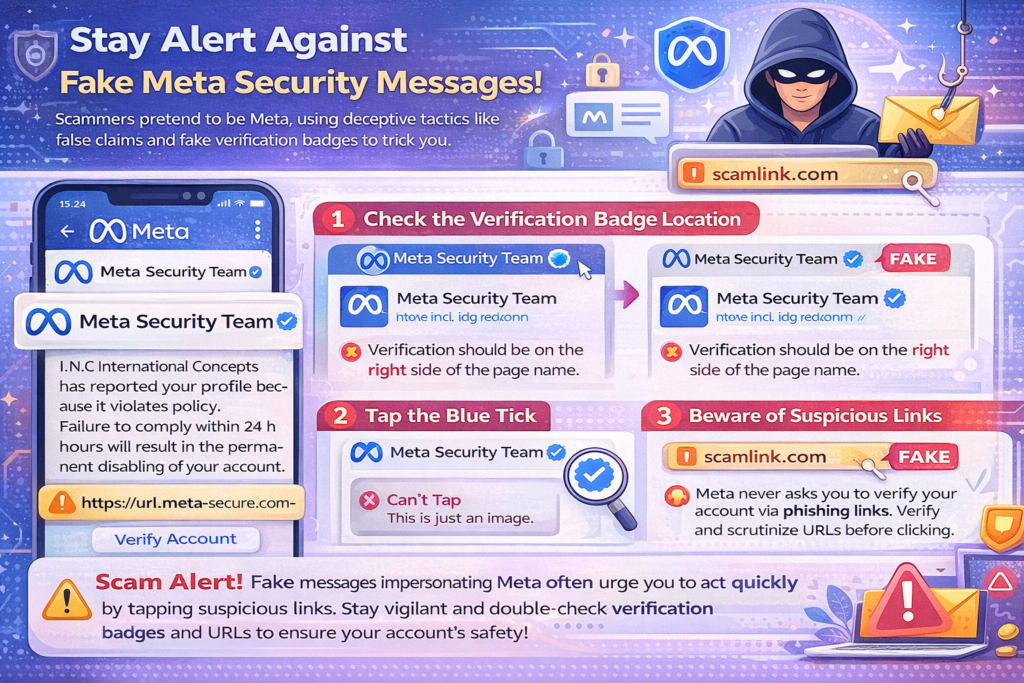
In this example, a scam message has been sent in the name of “Meta Security Team”. The message uses Meta’s branding and logo to look credible and authentic. It claims a company I.N.C International Concepts has reported your profile. It says you violated the company’s policies.
If any action is not taken your account will be disabled within 24 hours.
At one glance, you might think a message from Meta has come, but it is a fake message or we should say a scam message text. How do you identify it?
Firstly, the verify blue tick has to be on the right side.
Secondly, if you tap on the blue tick of any verified account it will take you to the account details page. If it does nothing, it is just an image attached to the name.
Thirdly, Meta never sends any such message or notification. Even if they do, they never ask you to tap on any link to verify your account.
Are you a social media account manager for a digital marketing company? Or do you handle your personal social media account? Either way, be mindful of these suspicious messages. Check URLs before clicking. Verify requests. This can go a long way in stopping hacking attempts.
Recovering social media accounts after being hacked
But what if you already have tapped into one of these links and now your account is hacked, and you cannot access it? What to do and how to recover?
Every other day, you’d find a creator sharing how their account got hacked on Instagram. The hacker wanted thousands of dollars to retrieve it. Contact our social media marketing company for immediate assistance. Do so if you go through a similar situation.
Here is what you can also do to try and retrieve your account that has been hacked and logged out:
Step 1:
Open the app to find the login option. Enter your username and click on ‘Forgot’ instead of adding the old password.
Step 2:
Your screen will redirect to ‘Reset Password,’ and here, you must add the username or the email ID again.
Step 3:
You will get a reCAPTCHA option to type in the words reflected on the screen and then change the password.
Step 4:
You will get an email to continue with the steps to reset the password.
Here is what you can do to retrieve your FB account:
Step 1:
- Click here to redirect to Facebook’s page for hacked account assistance.
- Choose the option ‘My Account Is Compromised’ option.
- Add your email address or phone number to find your account.
- You can also type in your name, but since multiple accounts with the same name might exist, email ID will give you quicker access.
Step 2:
- Once you find the profile, you will get an option to add your password.
- If the account is hacked, the current password will have been changed.
- What you enter will likely show the result as “Sorry. You entered an old password.”
- You need to then click on the “Reset My Password” option.
Step 3:
- Now, as your password is with the hacker, they might also have access to your email ID.
- You need to click on the option that suggests “No Longer Have Access To These?”
- Facebook will allow you to answer, “How Can We Reach You?”
- You need to add a new email ID or phone number.
- You will receive a link in the recovery email.
Follow the instructions to reset the password and retrieve the account.
The platform might ask for identity proof to verify that the person retrieving the account is the real you. Keep your driver’s license or passport handy to share the details promptly.
Here is how you can get your ‘X’ back.
Step 1
- Click on the ‘Password Reset’ option on your logged-out account.
- Twitter asks you to add your email ID and username in the next step.
- If you have access to your ID, click on ‘Continue’.
- Open the link in the email and follow the instructions to change the password.
Step 2
If you don’t have access to email, you need to click on ‘I Don’t Have Access To Any Of These’ below the ‘Continue’ option.
The page will redirect to ‘Login Issues’, where you need to select:
a) Request Help Signing Into Your Account
- Add your username to find your account.
- Add an email ID that Twitter can connect to you, and it cannot be a hacked ID.
- Through the recovery email, you can add texts under the ‘Description Of Problem’ option.
- Explain what happened to your account and type the letters in Google reCAPTCHA.
b) Try Entering A Phone Number Instead
- Add the phone number and find the Country/Region option.
- Add your number to let Twitter text you a code to confirm it is you.
- Follow the instructions you receive via email or text and recover the account.
Conclusion
Hacking is a real risk on social media, so stay alert. Use two-factor authentication. Avoid malicious apps. Add a recovery mail ID. These are some of the ways to keep your social media account safe from hackers. Understanding the deceptive tactics hackers use will also help you protect the account you are handling. We can't do magic alone.
At PromotEdge, we handle social media accounts for clients with safety in mind. Want to improve your social presence? Reach out to us at hello@promotedge.com