-
Author: Anindita Barik
-
Updated Date: Aug-13-2026
-
Views: 2 Min Read
Website speed optimisation improves how fast a site loads and responds, directly impacting conversions, bounce rates, and SEO rankings. Google’s Core Web Vitals — LCP (under 2.5s), FID (under 100ms), and CLS (under 0.1) — measure this. Common fixes include image compression, caching, minifying code, and using a CDN. One e-commerce case study showed a 34% conversion increase after cutting load time from 5.3s to 1.8s, proving speed is a measurable revenue driver, not a technical nice-to-have.
Website speed optimisation is the process of improving how quickly your website loads and responds to users. A slow site can frustrate visitors, increase bounce rates, reduce engagement, and make it harder for potential customers to complete purchases or enquiries. Even a few extra seconds of loading time can affect how users interact with your website.
A faster website creates a smoother user experience while supporting better search visibility, conversions, and overall performance. By optimising images, reducing unnecessary code, improving hosting, enabling caching, and addressing Core Web Vitals, businesses can make their websites faster, more reliable, and more effective at turning visitors into customers. Speed is also one of the first things we flag in a technical SEO audit — it’s the factor that quietly undermines every other SEO and conversion effort when left unaddressed.
The Client Who Lost Half Their Conversions to Slowness
Last year. January. A fashion e-commerce site came to us panicking. Traffic was up. Conversions were… not. Flat. Everything else was working — Google Ads were converting well, social traffic was engaged, email campaigns had solid click-through rates. But site conversions? Stagnant.
First thing I checked: page speed. The homepage loaded in 5.3 seconds. The product pages? Closer to 6 seconds on 4G connections (which is what — conservatively — 60-70% of Indian users are on).
By comparison, their competitors loaded in 2-3 seconds.
We ran the numbers. For every additional second of load time, they were losing 8-12% of potential conversions. At their traffic volume, that was… well, call it a kharcha (waste) of money on ads they were paying for but not converting.
Three months of optimisation — image compression, code splitting, server-side improvements, proper caching strategy — and the homepage got to 1.8 seconds. Product pages to 2.1 seconds.
Conversions went up 34%. Not from one change. Not from magic. From making the site actually usable. This is exactly the kind of gain that makes conversion rate optimisation so powerful when combined with speed improvements — you’re not changing what you’re offering, you’re removing the friction that was stopping people from acting on it.
Why Website Speed Matters More Than It Should
Google says speed matters. That’s true. But the real reason speed matters is simpler: people leave slow sites. They don’t wait. They don’t come back. They go to your competitor.
Here’s the progression: site takes 2 seconds, user waits. Takes 3 seconds, user gets annoyed. Takes 4 seconds, user bounces. Takes 5+ seconds, user is already on a different site.
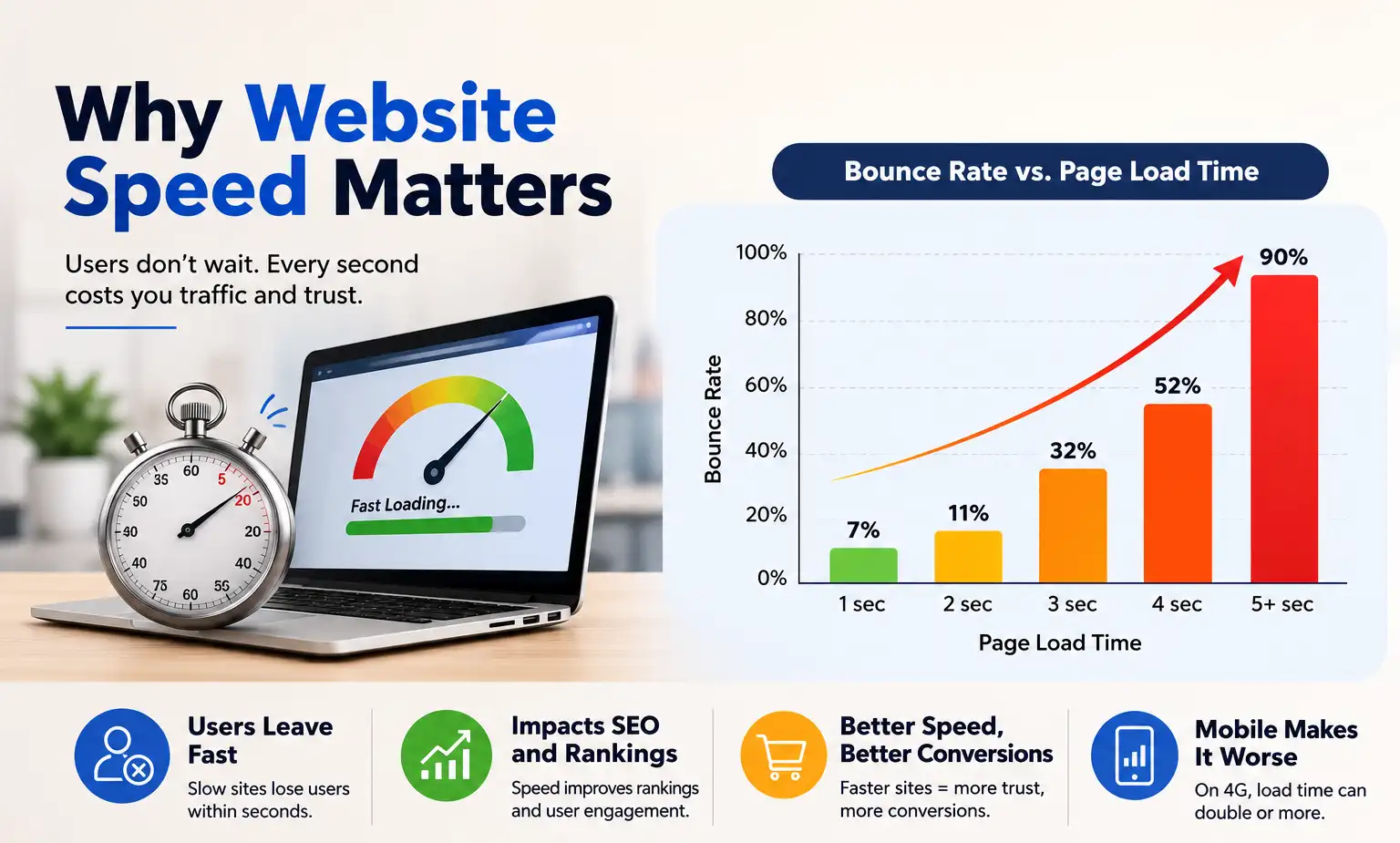
And that’s on a good connection. On 4G — which is India, basically — a site that loads in 3 seconds on desktop loads in 6-7 seconds on mobile. You’ve lost your user before they even see your content.
Speed affects SEO. Google uses it as a ranking factor. But honestly? Speed’s SEO importance is secondary to its impact on user experience and conversions. Fast sites rank better partly because they convert better, users stay longer, all the metrics improve.
The Real Cost of Slowness
Amazon did a study years ago showing that every 100ms of added latency cost them 1% in sales. That was 2006. The numbers have probably gotten worse because user expectations have gotten faster. Your site loads in 4 seconds instead of 2, you’re leaving money on the table.
Core Web Vitals — What Google Actually Cares About
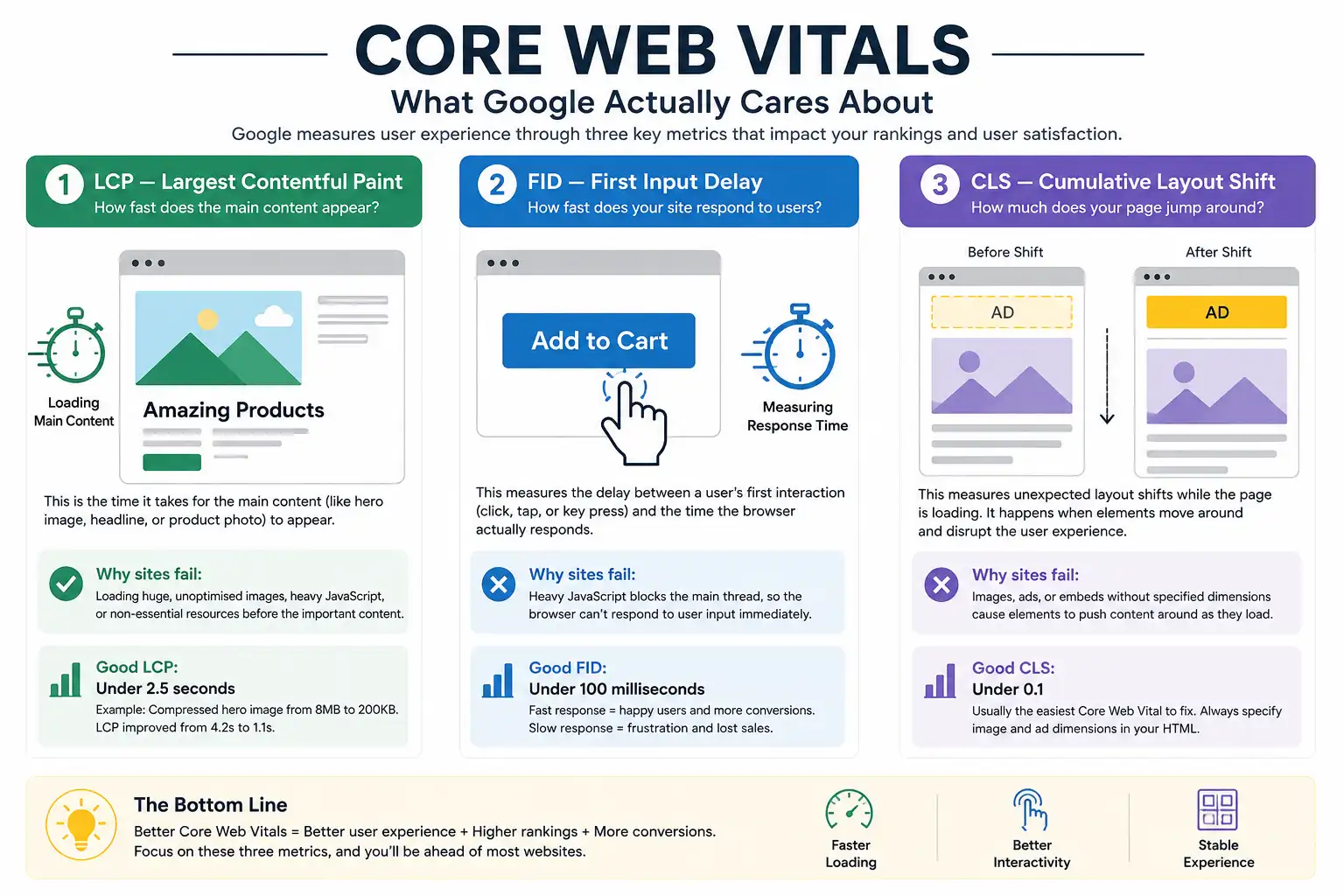
Google doesn’t measure speed as one number. They measure three specific things. They call them Core Web Vitals, which is a fancy term for “user experience metrics we’ve decided matter.”
1. LCP — Largest Contentful Paint
How fast does the main content appear? This is the big thing. The hero image, the main headline, the product photo. If that takes 3-4 seconds, users think the page is broken. Even if the rest of the page loads instantly.
Good LCP is under 2.5 seconds. Most sites miss this because they’re loading massive unoptimised images, heavy JavaScript, stuff that doesn’t matter being loaded before the stuff that does.
We audited a manufacturing site. Hero image was 8MB. Eight megabytes. The image was beautiful, but eight meg is — uh — let’s say excessive. Compressed it to 200KB. Same visual quality, different universe in terms of load time. LCP improved from 4.2 seconds to 1.1 seconds.
2. FID — First Input Delay
How fast does your site respond when someone clicks a button or fills a form? This is about responsiveness. You click “Add to Cart” and there’s a 2-second delay before anything happens. Users think it didn’t register. They click again. Now there are two items in the cart.
Good FID is under 100 milliseconds. Most sites fail this because they’re running heavy JavaScript that blocks the main thread. The browser is busy parsing 300KB of unoptimised JavaScript and can’t respond to user input immediately.
3. CLS — Cumulative Layout Shift
How much does your page jump around as it loads? You’re reading content, then an ad loads, and suddenly the text shifts down. Or an image loads and pushes everything else around. This is annoying. And it happens because developers aren’t specifying dimensions for images or ads.
Good CLS is under 0.1. This is usually the easiest to fix. Specify image dimensions in your HTML so the browser knows how much space to reserve before the image loads.
Where Website Slowness Actually Happens
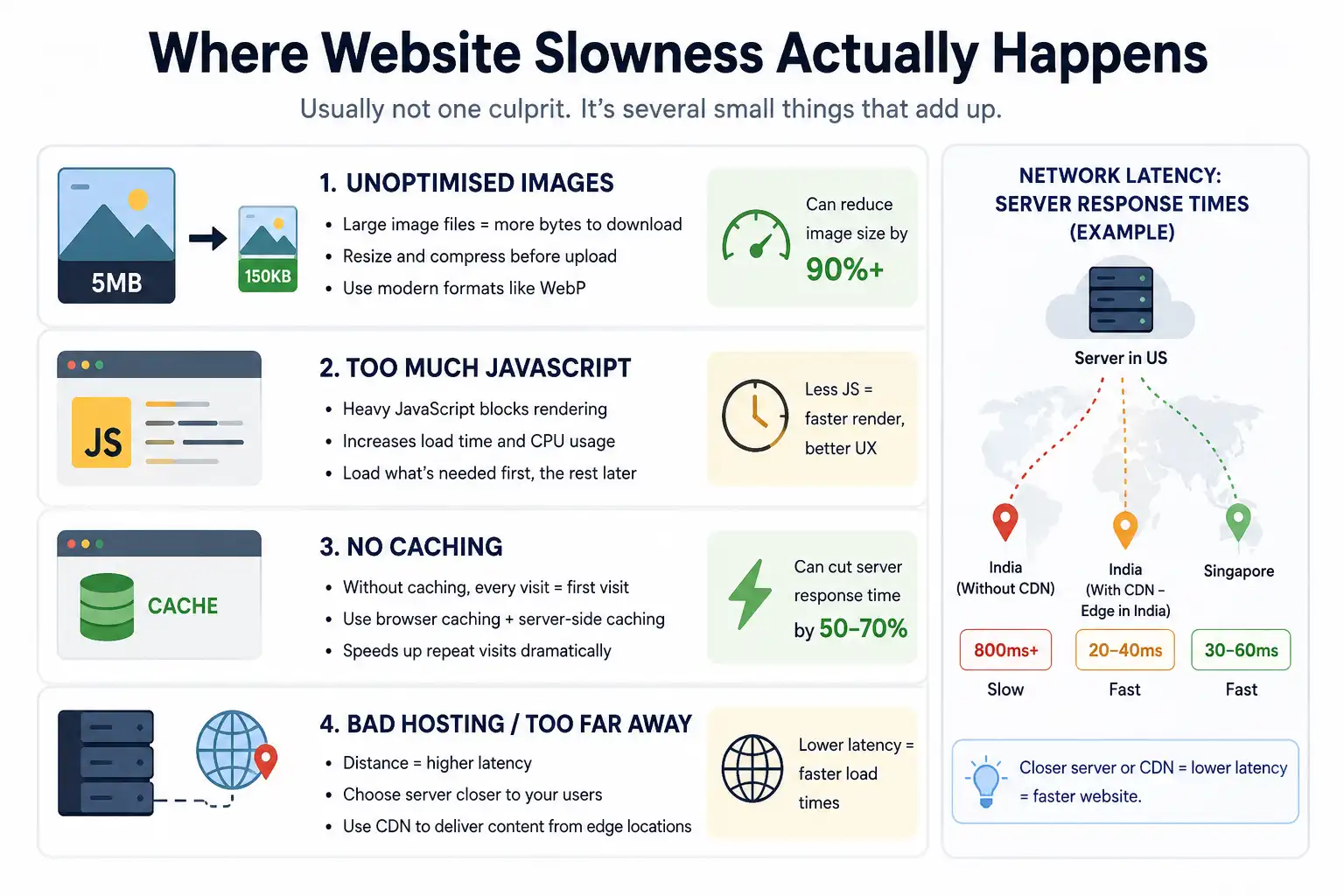
There’s usually not one culprit. It’s usually several small things that add up. Let me run through the common ones.
1. Unoptimised Images
This is the number one offender. A photographer gives you beautiful 6000x4000px images shot in RAW. You upload them directly to your site. No compression, no resizing. The browser downloads these massive files and renders them at 800x600px. You’re wasting bandwidth on pixels the user doesn’t see.
Rule: never upload uncompressed, unan images. Use tools like TinyPNG or ImageOptim. Compress aggressively. A 5MB image can usually become 150KB without visible quality loss. Use modern formats like WebP when the browser supports it (which is… most browsers now).
We did a real estate site that had 50+ high-res images. Compressed everything. Total page weight dropped from 12MB to 2.3MB. Load time improved 5x. Same beautiful photography, different download size.
2. Too Much JavaScript
Developers love adding JavaScript libraries. A few third-party tools here, some analytics there, some ad-related scripts, Google Fonts, tracking pixels. Pretty soon, the browser is loading 500KB of JavaScript before showing the user anything useful.
JavaScript blocks rendering. The browser has to download it, parse it, execute it before it can show your page. More JavaScript = slower page, more CPU usage, shorter battery life for mobile users.
And most of that JavaScript isn’t even necessary on the initial page load. You don’t need to load every possible feature. Load what the user sees first, load the rest after.
3. No Caching
If you’re not using caching, every single visit is like the first visit. The browser downloads everything again. No cache headers, no browser caching, no server-side caching. This is… inefficient.
Proper caching: static assets (images, CSS, JavaScript) get cached for days or weeks. The browser doesn’t re-download them. HTML itself gets cached for shorter periods or not at all (so you can push content updates). Database queries get cached so you’re not hitting the database for every single page view.
A Kolkata e-commerce client wasn’t using caching at all. Implementation of browser caching and server-side caching reduced their average server response time from 1200ms to 300ms. Load times dropped from 4.8 to 2.1 seconds. Just from caching. No code changes.
4. Bad Web Hosting / Too Far Away
Your server is in US. Your users are in India. Every request travels across the internet. Latency adds up. If your server response time is 800ms (which is slow but happens), the user sees that delay before anything loads.
Better hosting: migrate to a server geographically closer to your users. For Indian businesses, that usually means India-based hosting or a CDN. Content Delivery Networks cache your site in multiple locations globally. User in Bangalore? They hit the Bangalore edge node. User in Delhi? The Delhi node. This hosting decision is also part of any solid website design and development brief — choosing the wrong hosting architecture at the start costs far more to fix later than it costs to get right initially.
How to Measure Website Speed Properly
Don’t test on your home WiFi. You have fast internet. Test on 4G. Test on slow 4G specifically. Use tools like PageSpeed Insights, GTmetrix, WebPageTest. These show you actual real-world performance.
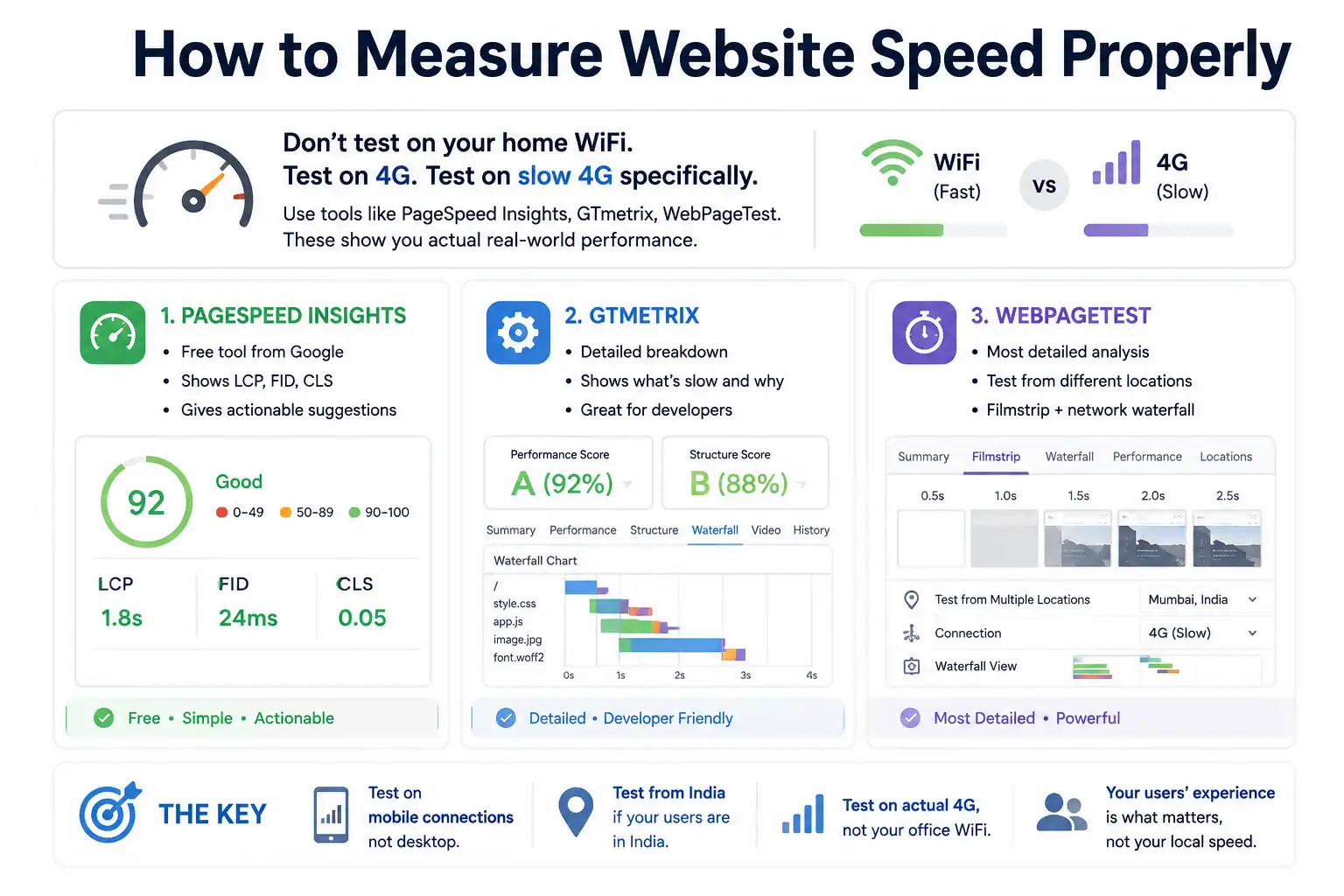
- PageSpeed Insights: it’s free, it’s from Google, it shows you LCP, FID, CLS, and gives you actionable suggestions. Use it.
- GTmetrix: shows more detailed breakdown of what’s slow and why. Good for developers.
- WebPageTest: the most detailed. Shows you a filmstrip of the page loading, lets you test from different locations, shows you the network waterfall. Powerful but honestly overkill for most businesses.
- The key: test on mobile connections. Test from India if your users are in India. Test on actual 4G, not your office WiFi. The speed you see locally doesn’t matter if your users experience something different.
Speed Optimisation Without Getting Weird About It
You don’t need to be a performance engineer to have a fast site. You need to be intentional. Don’t just accept defaults.
Compress images. Use modern formats (WebP with JPEG fallback). Specify dimensions so layout doesn’t shift. Don’t load scripts you don’t need. Use caching — browser caching especially. If you can, use a CDN for static content. Keep animations minimal (animations that cause layout shifts are doubly bad).
On WordPress? Use a caching plugin (WP Super Cache is free and works). Compress images (ShortPixel). Consider using a CDN (Cloudflare is free and good).
On custom sites? Make sure your developers are thinking about performance. Are they code-splitting? Are they lazy-loading images? Are they minifying CSS and JavaScript? These aren’t fancy — they’re basic.
A SaaS client in Bangalore had a developer who was very clever. Too clever. The site looked amazing, had all these interactive animations and transitions, used the newest JavaScript frameworks. It also took 6 seconds to load. We simplified things, removed unnecessary animations, optimised the bundling, and got it to 1.8 seconds. Same functionality, same beauty, different performance profile.
Speed and Everything Else
Speed doesn’t fix a bad site. But a fast site is a better starting point than a slow one.
Slow site + great design = users leave before seeing the design. Fast site + mediocre design = users stay long enough to engage. If you have to choose between perfect design and fast load, choose fast. Users don’t care how beautiful your site is if they bounce before seeing it.
Speed also helps SEO. Google ranks faster sites higher, all else equal. Not hugely, but noticeably. We’ve seen pages that were stuck at position 8-10 move to 5-6 just from speed improvements.
Speed helps conversions. Slower sites convert less. Faster sites convert more. This is the part that matters most for your business. ROI-first — sabse pehle ROI (return on investment first). Speed directly impacts that.
Common Speed Myths
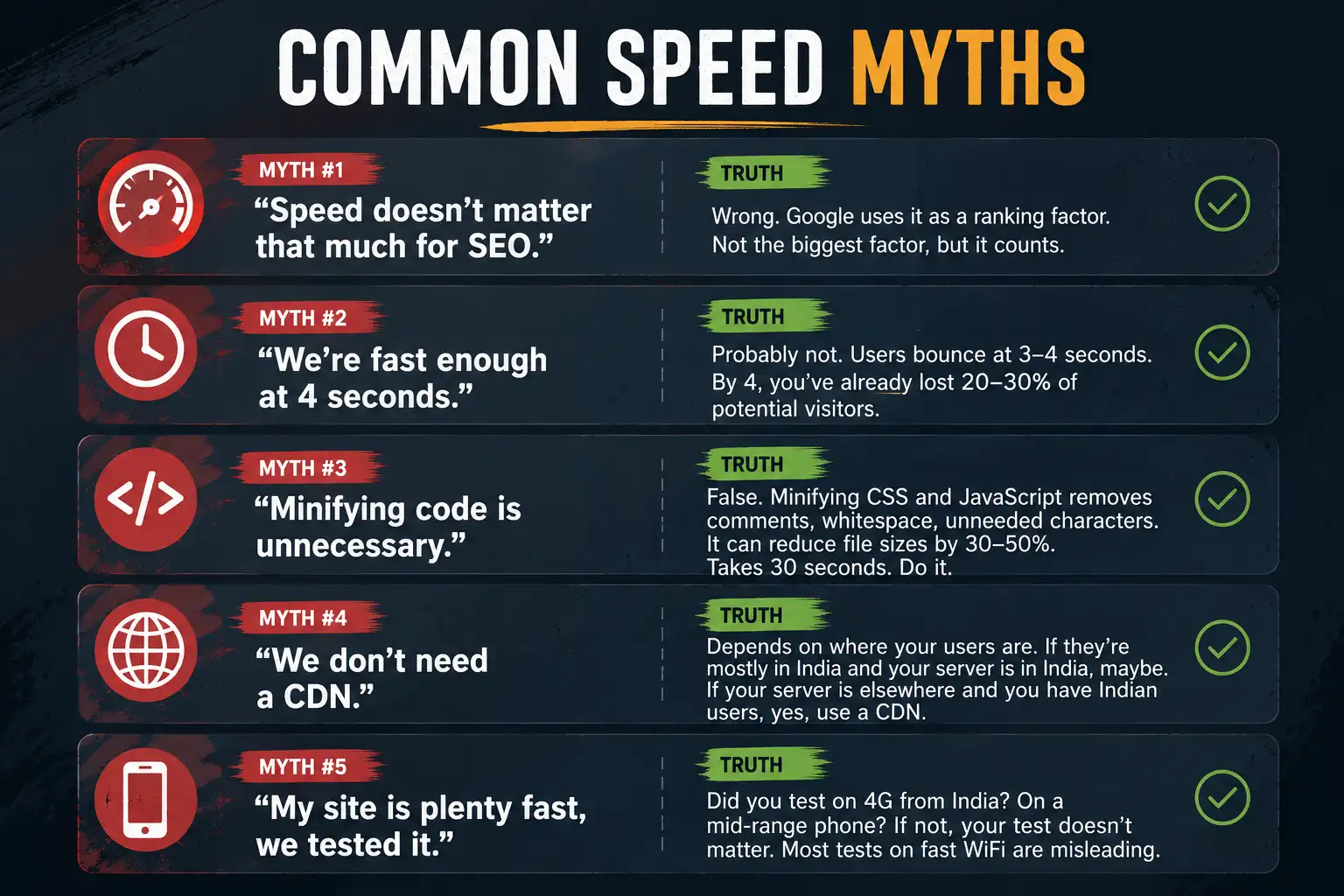
- “Speed doesn’t matter that much for SEO.” Wrong. Google uses it as a ranking factor. Not the biggest factor, but it counts.
- “We’re fast enough at 4 seconds.” Probably not. Users bounce at 3-4 seconds. By 4, you’ve already lost 20-30% of potential visitors.
- “Minifying code is unnecessary.” False. Minifying CSS and JavaScript removes comments, whitespace, unneeded characters. It can reduce file sizes by 30-50%. Takes 30 seconds with any build tool. Do it.
- “We don’t need a CDN.” Depends on where your users are. If they’re mostly in India and your server is in India, maybe. If your server is anywhere else and you have Indian users, yes, use a CDN.
- “My site is plenty fast, we tested it.” Did you test on 4G from India? On a mid-range phone? If not, your test doesn’t matter. Most business owners test on their devices in their offices on their fast WiFi and think that’s representative. It’s not.
Tools and Resources
You don’t need expensive tools. Free and cheap tools can get you 80% of the way.
- PageSpeed Insights — free, from Google, start here
- Lighthouse — built into Chrome DevTools, gives you performance scores
- GTmetrix — free with an account, more detailed than PageSpeed Insights
- Cloudflare — free CDN, free caching, free DDoS protection. It’s genuinely good.
- Imagemin — CLI tool for compressing images in bulk
- TinyPNG/TinyJPG — online image compression, good for quick testing
- WP Super Cache — if you’re on WordPress, literally the easiest caching setup
That’s your toolkit. None of it requires budgets. All of it requires paying attention.
How We Handle This at PromotEdge
Speed is part of our standard web solutions practice. When we build a site, we’re thinking about performance from day one. Image optimisation, code splitting, caching strategies, asset delivery — that’s table stakes.
When we audit existing sites, speed is always part of the conversation. Slow sites get audited, optimised, monitored. We’ve brought sites from 5+ seconds down to 1.5-2 seconds consistently. It requires technical work, but it’s not magic.
We also help clients understand that speed is ongoing. A fast site that gets updated with unoptimised images becomes slow. Speed isn’t a one-time fix. It’s something you maintain.
If your site is slow and you want to fix it — whether it’s an existing site or a new build — that’s something we do regularly. Check out our website solutions, or if you want a free speed audit for your specific site, reach out and we’ll run the numbers. Nothing fancy, just honest assessment of where you stand and what matters most to fix.
| Approach | Best for | Watch out for |
|---|---|---|
| DIY | Small teams, tight budgets | Slow ramp-up, trial-and-error |
| Freelancer | Specific project bursts | Inconsistency, limited ownership |
| Agency | Ongoing work, senior input | Higher retainer, less control |
Quick checklist before you start:
- Define the one thing you want: leads, sales, awareness — pick one.
- Baseline your numbers: write down where you are today.
- Pick a 90-day window: nothing moves in 2 weeks.
- Agree on success metrics: with whoever is paying the bill.
- Set up proper tracking: GA4, UTMs, call tracking.
- Review monthly: kill what doesn’t work, double down on what does.
The Bottom Line
If you take one thing from this: website speed optimisation why your slow site is costing you rewards patience and specificity, not volume or clever tricks. Start small, measure honestly, fix what breaks, and compound what works. The brands doing this well in India aren’t smarter — they’re just consistent. Need a hand with this for your business? Talk to us.
Is Your Site Speed Costing You Money?
Let’s audit it and find out. We’ll test on real Indian connections and give you a specific plan to improve. No sales pitch — just data.
FAQs
-
How fast should a website be?
Ans.Under 2 seconds for initial load. That's the psychological threshold. Past 3 seconds, bounce rates jump dramatically. We had a real estate client at 4.2 seconds. After optimisation? 1.8 seconds. Conversion rate went up 31%. Not purely from speed, but partly — users stayed long enough to actually explore. Faster sites = more engaged visitors = better results across the board. -
What are Core Web Vitals?
Ans.Three metrics Google cares about. LCP (how fast main content appears) — under 2.5 seconds is good. FID (how fast your site responds to clicks) — under 100ms is good. CLS (how much does the page jump around) — under 0.1 is good. Missing these doesn't kill you immediately, but it means users bounce and conversions drop. It's physics, not punishment. -
Should I use a CDN?
Ans.If you're in India with users elsewhere, maybe not critical. If you're elsewhere with Indian users, absolutely. A CDN with Indian nodes dramatically reduces latency. We moved an e-commerce client to CDN and their Bangalore users went from 3.8 seconds to 1.2 seconds load time. Costs 2,000-5,000 rupees monthly. For the conversion lift? Cheap.
Author Details

Latest Posts
-
 18 / Aug
Brand Identity Design Kapferer Brand Identity Prism: Build a Consistent Brand Identity That Resonates
18 / Aug
Brand Identity Design Kapferer Brand Identity Prism: Build a Consistent Brand Identity That Resonates -
 14 / Aug
-
13 / Aug
-
 12 / Aug
-
 11 / Aug