-
Author: Anindita Barik
-
Updated Date: Jun-23-2026
-
Views: 2 Min Read
Choosing the right social media management tools can save your team weeks of manual effort each month. This guide covers what these platforms actually do — scheduling, analytics, audience insights, team collaboration — how to compare them beyond feature lists, and which tier fits your team size and budget. Real brand examples included. Learn how to build a content system that’s consistent, data-driven, and built to scale.
Social media management tools save time by letting you schedule posts, monitor engagement, track performance, and manage multiple social accounts from a single dashboard. The best platforms combine easy scheduling, meaningful analytics, collaboration features, and audience insights, helping brands stay consistent while making data-driven decisions. Whether you’re a solo creator, growing business, or agency, the right tool should match your current workflow, team size, and marketing goals—not just offer the longest feature list.
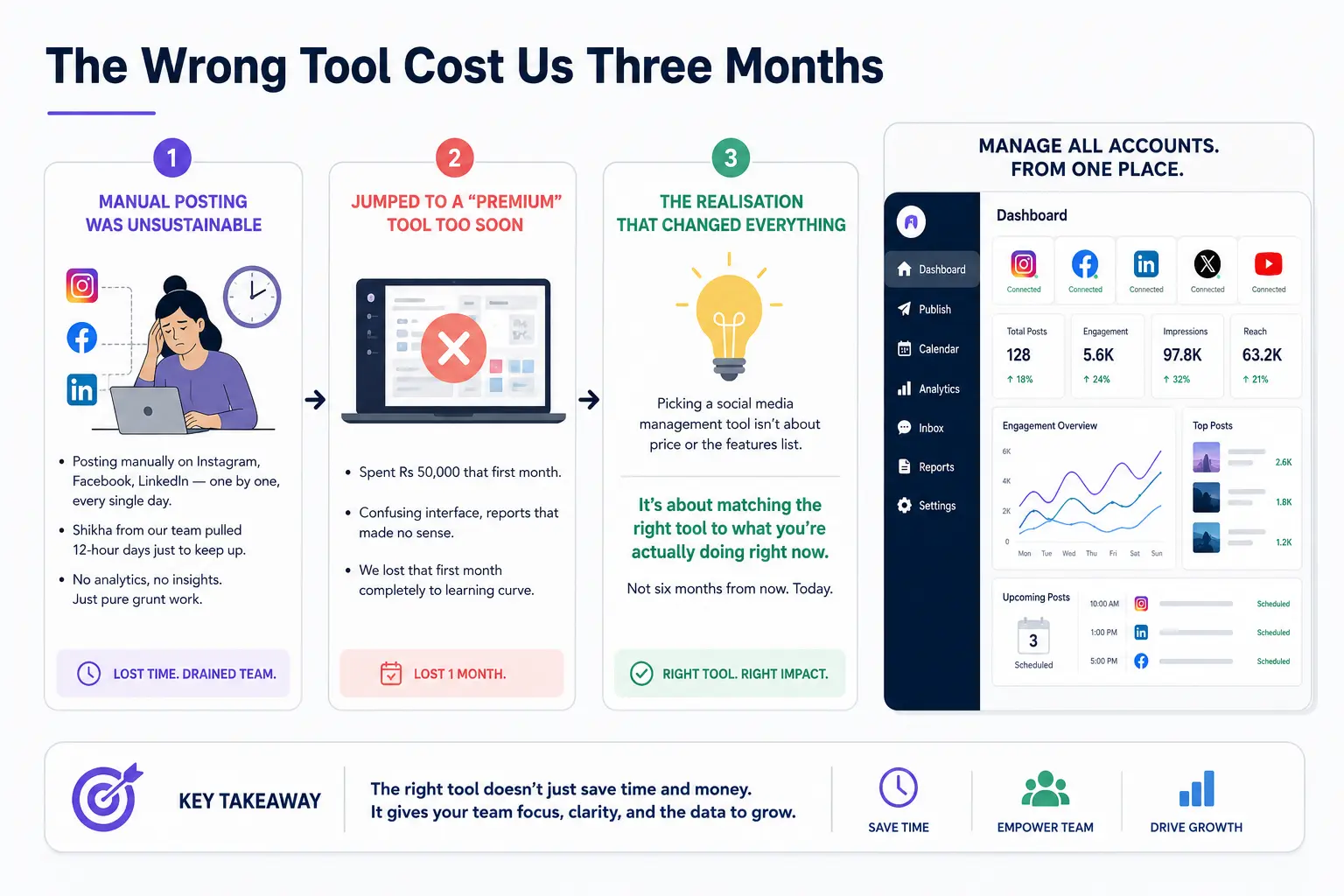
The Wrong Tool Cost Us Three Months
We were posting manually back then. Instagram, Facebook, LinkedIn — one by one, every single day. It was ridiculous. I remember Shikha from our team pulling 12-hour days just to keep up. No analytics, no insights. Just pure grunt work.
Then we jumped straight to one of the “premium” options everyone was raving about. Spent Rs 50,000 that first month. Hated it. Confusing interface, reports that made no sense. We lost that first month completely to learning curve.
That’s when we realised: picking a social media management tool isn’t about price or the features list. It’s about matching the right tool to what you’re actually doing right now. Not six months from now. Today.
Why Manual Posting Destroys Your Time
You can post directly on each platform. Five minutes per platform if you’re fast.
But you’re losing everything else. No visibility into what competitors post. No sentiment tracking in comments. Can’t schedule content three weeks ahead. You’re always in “what do we post today” mode. Analytics? Buried in each platform’s dashboard. Useless for comparing performance across channels.
A management tool centralises this. One dashboard. All accounts. One place to schedule. One place to see results.
Is it necessary? Technically, no. You could manage 20 accounts manually if you’re stubborn enough. Will it destroy your bandwidth? Absolutely.
What These Tools Actually Do
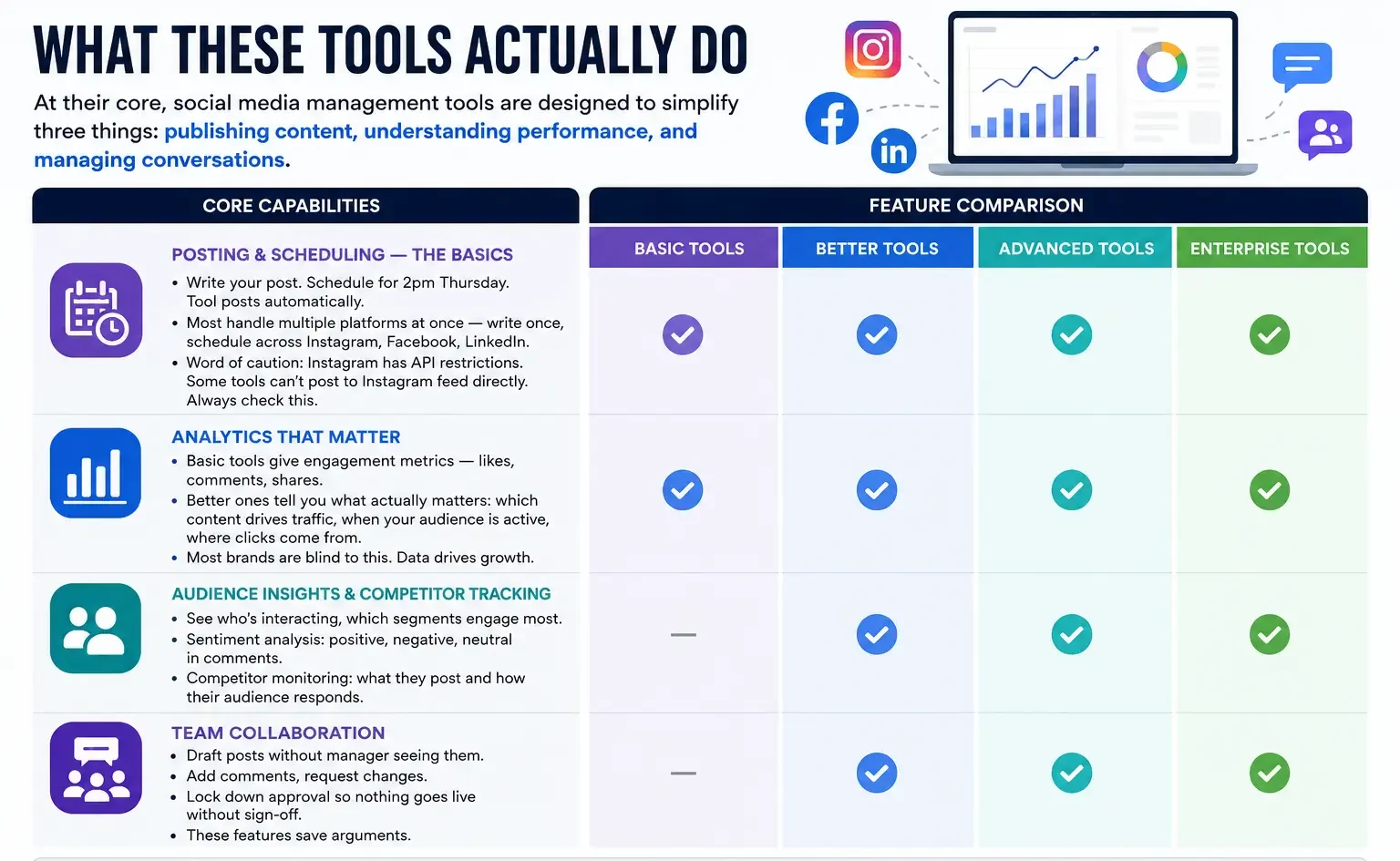
At their core, social media management tools are designed to simplify three things: publishing content, understanding performance, and managing conversations. The best platforms help you spend less time on repetitive tasks and more time creating content that actually delivers results.
Posting & Scheduling — The Basics
Write your post. Schedule for 2pm Thursday. Tool posts automatically. Most handle multiple platforms at once — write once, schedule across Instagram, Facebook, LinkedIn simultaneously. Word of caution though: Instagram has API restrictions. Some tools can’t post to Instagram feed directly. Always check this.
Analytics That Matter
Basic tools give engagement metrics — likes, comments, shares. Better ones tell you what actually matters: which content drives traffic, when your audience is active, where clicks come from.
Most brands are blind to this. They post what feels good, not what works. A fashion e-commerce client was posting carousel posts constantly because their creator thought they looked nice. The data showed video reels were getting 5x more engagement. We flipped the strategy. Traffic to their site jumped 40% in two months. None of that happens if you’re not looking at the data. Understanding digital marketing KPI metrics is what separates brands that grow from brands that just post.
Audience Insights & Competitor Tracking
Better tools show who’s interacting with your content. Which audience segments engage most. Sentiment analysis (positive, negative, neutral in comments). Competitor monitoring so you know what they’re posting and how their audience responds.
Fancy? Yes. Essential for community-focused brands? Absolutely. Just broadcasting messages? Not critical.
Team Collaboration
If it’s just you, this doesn’t matter. If you’re a team, it matters enormously. Can social staff draft posts without the manager seeing them? Can she add comments and request changes? Can you lock down approval so nothing goes live without sign-off?
These features save arguments.
Categories of Tools (Pick The Right One For You)
The key is choosing a tool that matches your current needs rather than paying for features you’ll never use.
For Solo Creators & Beginners
Need scheduling, basic analytics, maybe a calendar view. Look for platforms that make posting frictionless — no 15-step process. Speed matters because you’re experimenting. You don’t want the tool slowing you down. Most free tools let you schedule 50-100 posts monthly. Enough to test.
For Growing Teams
Need collaboration now. Multiple people drafting content. Approval workflows. Permission levels. Better analytics because you’re making decisions based on data. Expect Rs 20,000-40,000 monthly for solid mid-tier. Pays for itself managing 4+ brand accounts.
For Agencies & Multi-Brand Work
Need a proper platform. Separate workspaces per client, client-specific reporting, team role management, advanced scheduling. Expect Rs 50,000-100,000+ monthly. If you’re managing 10 brands, that’s Rs 5,000-10,000 per brand monthly — reasonable when you consider time saved and client reporting.
How To Actually Compare Tools
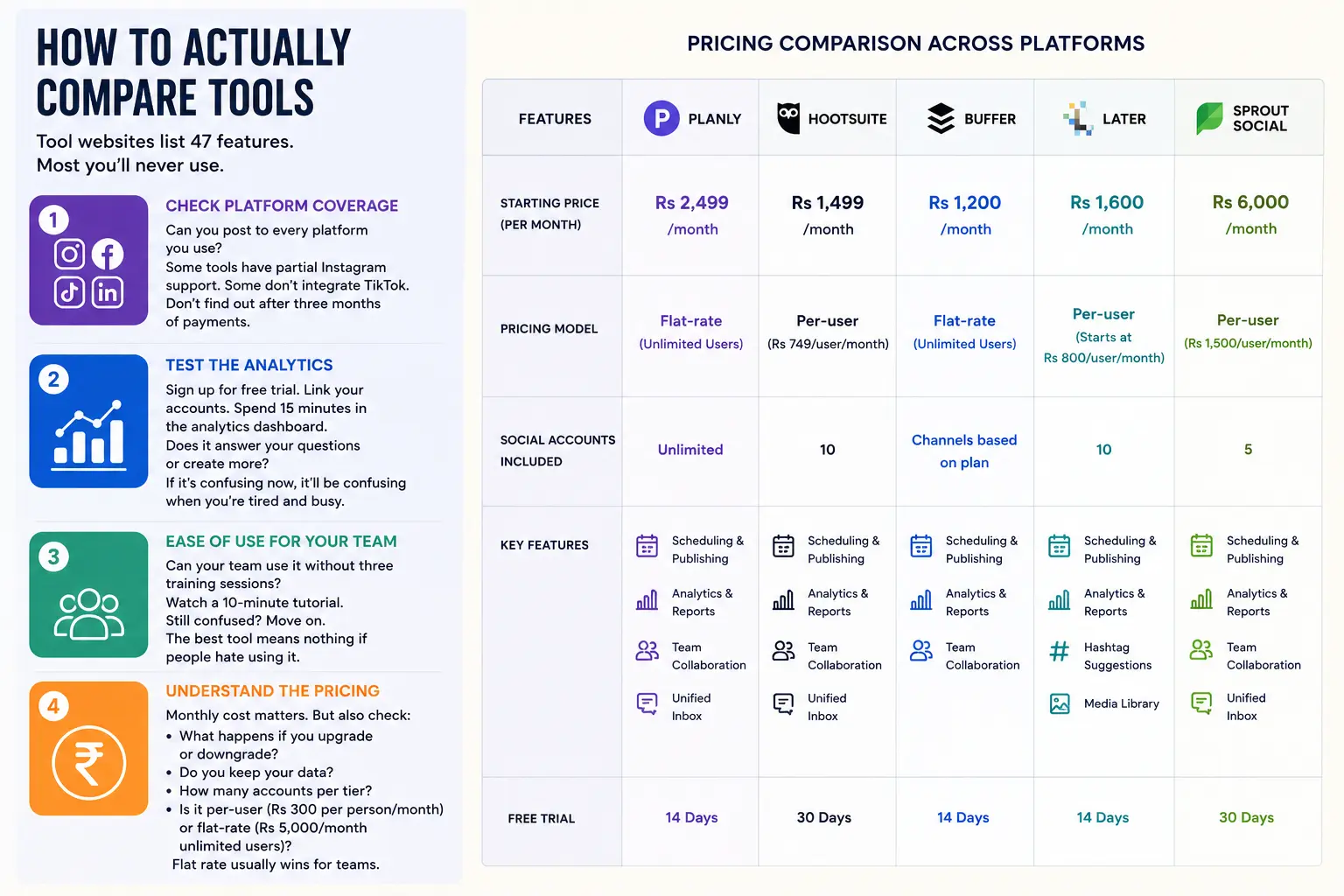
Tool websites list 47 features. Most you’ll never use.
First check: can you post to every platform you use? Some tools have partial Instagram support. Some don’t integrate TikTok. Don’t find out after three months of payments.
Second: do the analytics actually tell you what you need? Sign up for free trial. Link your accounts. Spend 15 minutes in the analytics dashboard. Does it answer your questions or create more? If it’s confusing now, it’ll be confusing when you’re tired and busy.
Third: can your team use it without three training sessions? Watch a 10-minute tutorial. Still confused? Move on. The best tool means nothing if people hate using it.
Fourth: pricing structure. Monthly cost matters. But also check: what happens if you upgrade or downgrade? Do you keep your data? How many accounts per tier? Is it per-user (Rs 300 per person monthly) or flat-rate (Rs 5,000/month unlimited users)? Flat rate usually wins for teams.
Scheduling Isn’t Automation
People confuse these. Scheduling means distribution. Automation means what happens after.
Your post goes out. Then the conversation starts in comments. That’s where the real work begins. A batch of scheduled posts doesn’t mean you can disappear for a week. You still respond to comments. You still engage. The tool handles distribution, not engagement.
We had an FMCG client who scheduled three weeks upfront. Smart for consistency. Terrible execution because nobody monitored comments. Fifty comments on a post. Brand nowhere to be found. Felt like talking to a wall. People stopped coming back.
Use scheduling for consistency. Use the dashboard to monitor conversations happening beneath those posts. Respond when people comment. That’s real engagement.
Free Versus Paid: When’s It Worth It?
Free tools are good for learning. That’s it.
Free tiers come with limits — fewer posts monthly, basic analytics, no collaboration, no competitor tracking. You’ll hit these limits within 60 days if you’re serious.
Real question: can you afford not to do this professionally? If social media strategy drives your marketing, you need a real tool. If it’s “nice to have,” free might work.
For most brands we work with — Rs 5 crore revenue or higher — they’re wasting Rs 50,000 monthly in inefficiency managing manually. One tool costing Rs 20,000/month saves that overhead immediately. It’s not expense. It’s leverage.
Analytics That Actually Move The Needle
Most tools show vanity metrics. Reach. Impressions. Follower count. Important? Not really.
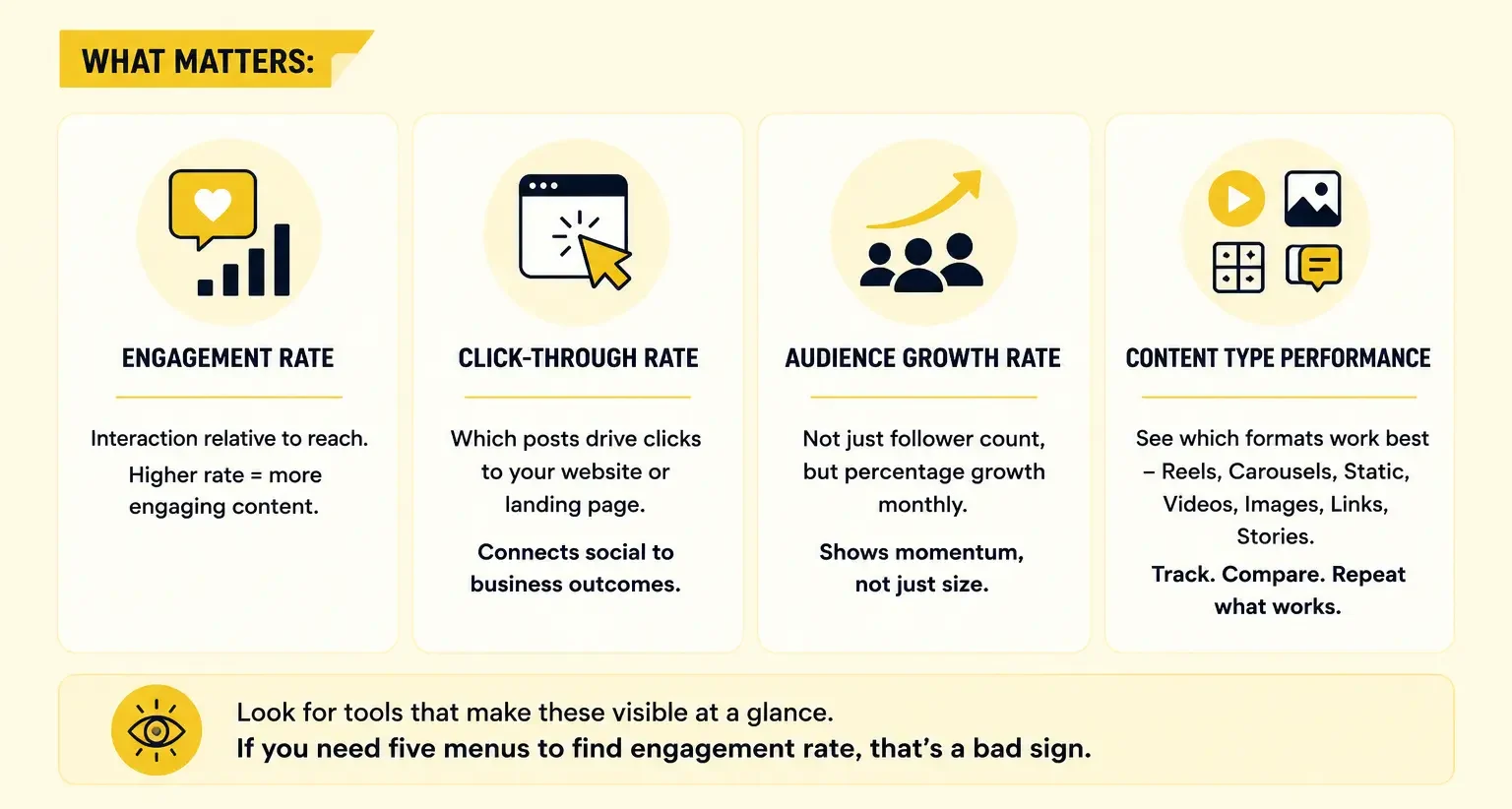
What matters:
- Engagement rate — interaction relative to reach. Five thousand impressions with 50 likes? 1% engagement. Not great. Five thousand impressions with 500 likes? 10% engagement. Worth repeating.
- Click-through rate — if you’re driving traffic from social to website or landing page, which posts actually drive clicks. This connects social to business outcomes. Critical if you’re running performance marketing.
- Audience growth rate — not just follower count, but percentage growth monthly. Are you gaining momentum or losing relevance?
- Content type performance — which formats work. Reels versus carousels versus static posts. Video versus images. Link posts versus stories. Most brands never look at this. The ones that do, dominate. The rise of short-form video content has made this especially critical — if you’re not tracking format performance, you’re likely underinvesting in the formats that actually work.
- Look for tools that make these visible at a glance. If you need five menus to find engagement rate, that’s a bad sign.
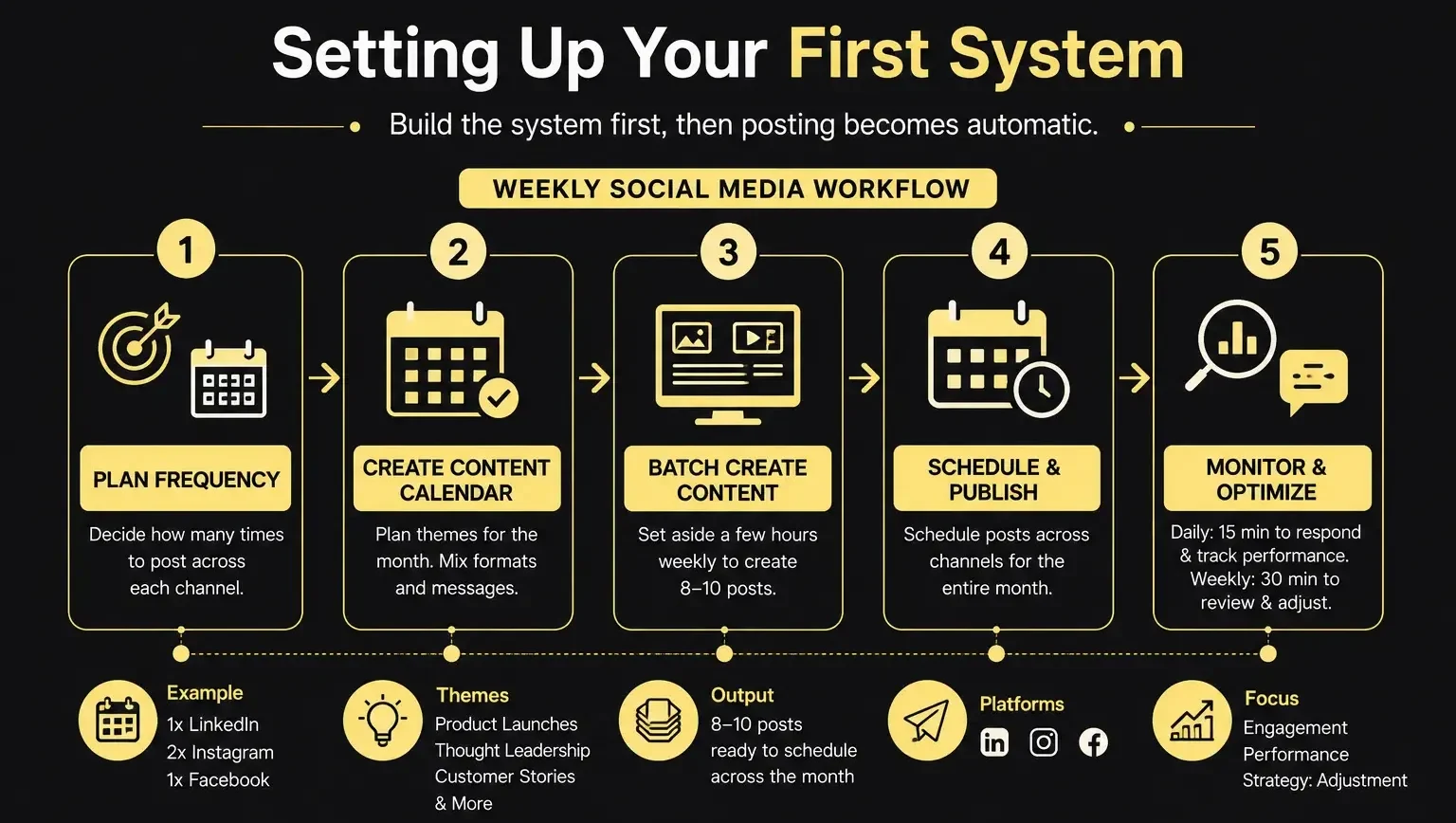
Setting Up Your First System
Don’t just pick a tool and start posting. Build a system first.
Pehle system banana padta hai (you need to build the system first), then posting becomes automatic.
Step one: decide posting frequency. How many times daily across channels? Most brands do 1x LinkedIn, 2x Instagram (including stories), 1x Facebook. Adjust based on your audience.
Step two: create a content calendar. What themes for next month? Product launches? Thought leadership? Customer stories? Mix it up. Don’t just push messages constantly. A proper content strategy built in advance is what makes scheduling tools actually worth it.
Step three: batch-create content. Don’t schedule one post at a time. Set aside few hours weekly to create 8-10 posts. Then schedule across the month. This saves the most time.
Step four: set monitoring routines. Check dashboard daily — maybe 15 minutes — to respond to comments and track what’s working. Weekly, spend 30 minutes reviewing analytics and adjusting strategy.
The tool makes all possible. The system makes it actually work.
Analytics Without Action Equals Waste
You’ve got reports. You can see which posts performed best. Now what?
Most teams stop there. Celebrate the viral post. Go back to posting randomly.
Real next step: reverse-engineer what worked. Look at top three posts last month. What do they have in common? Time posted? Format? Topic? Tone? Once you identify the pattern, replicate it. Not copy it — replicate it. Same energy, different angle.
A fashion brand noticed styling tips (what-not-to-wear content) vastly outperformed product promotions. Instead of 80/20 promotion-to-education split, we flipped to 20/80. Their engagement tripled. They almost missed this entirely because they weren’t reviewing data. The tool gave numbers. Their team did the thinking.
Tools are mirrors. They show what’s working. But you need a human brain to decide what to do about it.
Mistakes That Waste Your Investment
- Scheduling everything and disappearing : Posts go out. You’re nowhere to be found. Comments sit unanswered 24 hours. People feel ignored. Your brand dies in the comment section.
- Never reviewing analytics : You get access to 50 metrics. Look once during onboarding. Then… never again. The tool becomes just a “post scheduler.”
- Blaming the tool for bad content : “Our engagement is low.” Could be tool. More likely, your content isn’t interesting. Bad post scheduled with great tool is still a bad post. Tool can’t fix that.
- Over-automating : Schedule 90 days of posts at once. Everything on timetable with zero flexibility. Then breaking news happens. You can’t react because you’re locked into automation. Real-time social matters. Automation matters. You need both — which means flexibility to override when it matters.
Our Honest Recommendation
Depends entirely on your situation. No honest person says same tool works for solo consultant and 50-person e-commerce team.
Solo or tiny team with tight budget: start free. Spend three months understanding your audience and what content resonates. Upgrade to mid-tier once you’ve got traction. At that point, a paid tool becomes leverage.
Running social media marketing for multiple brands: invest in proper platform immediately. Time savings and collaboration features pay for themselves within weeks.
Always run 30-day trial before committing. Judge based on actual usage, not website. If you hate it by day 25, move on. There are dozens of decent options. Your time is worth more than sunk cost fallacy.
IMAGE: Tool selection flowchart based on team size, budget, and business needs
| Approach | Best for | Watch out for |
|---|---|---|
| DIY | Small teams, tight budgets | Slow ramp-up, trial-and-error |
| Freelancer | Specific project bursts | Inconsistency, limited ownership |
| Agency | Ongoing work, senior input | Higher retainer, less control |
Quick checklist before you start:
- Define the one thing you want: leads, sales, awareness — pick one.
- Baseline your numbers: write down where you are today.
- Pick a 90-day window: nothing moves in 2 weeks.
- Agree on success metrics: with whoever is paying the bill.
- Set up proper tracking: GA4, UTMs, call tracking.
- Review monthly: kill what doesn’t work, double down on what does.
The Bottom Line
If you take one thing from this: social media management tools best platforms for scheduling rewards patience and specificity, not volume or clever tricks. Start small, measure honestly, fix what breaks, and compound what works. The brands doing this well in India aren’t smarter — they’re just consistent. Need a hand with this for your business? Talk to us.
Need Help Setting Up Your Social Media Workflow?
We’ve helped 100+ brands build efficient social systems. From picking the right tool to creating the content engine that actually delivers results.
FAQs
-
What is the best social media management tool?
Ans.Depends. Running five accounts and posting daily? Buffer or Later work fine. Multiple brands with approval workflows? Sprout Social. Free tools to start. Upgrade when hitting their limits. -
Are free social media tools enough?
Ans.No. Not if you are serious about growth. Free tools give posting and basic analytics. Missing: sentiment tracking, competitor monitoring, real reporting. A real estate brand we worked with was completely blind to competitor activity until we switched platforms. Start free if budget's tight. But upgrade within three months. -
Which tool is best for managing multiple brands?
Ans.Sprout Social or Hootsuite. Both let you manage separate accounts, set different teams, apply brand-specific workflows. Sprout is cleaner for agencies but costs more. Hootsuite integrates better if you're already in HubSpot ecosystem.
Author Details

Latest Posts
-
 26 / Aug
Search Engine Optimization Video SEO: How to Rank Your Videos in Google & YouTube
26 / Aug
Search Engine Optimization Video SEO: How to Rank Your Videos in Google & YouTube -
 25 / Aug
Video Production Corporate Video Production: A Practical Guide for Indian Brands
25 / Aug
Video Production Corporate Video Production: A Practical Guide for Indian Brands -
 24 / Aug
-
21 / Aug
Catalogue Design Catalogue Design: How to Create Catalogues That Actually Sell
-
 20 / Aug
Related Knowledge