-
Author: Anindita Barik
-
Updated Date: Jul-29-2026
-
Views: 2 Min Read
Google Business Profile optimization helps local businesses improve visibility in Google Search and Maps, attract nearby customers, and generate more calls, visits, and enquiries. This guide explains how to set up, verify, and optimize your Google Business Profile, choose the right categories, manage reviews, add photos, publish posts, track insights, and avoid common mistakes. Follow these best practices to strengthen your local SEO, outperform competitors, and drive consistent business growth through local search.
Google Business Profile optimization is the process of improving your business listing on Google Search and Google Maps to increase local visibility, attract nearby customers, and generate more calls, website visits, and direction requests. A fully optimized profile includes accurate business information, the right categories, high-quality photos, customer reviews, regular posts, and updated business hours.
This complete guide explains how to set up, verify, and optimize your Google Business Profile using proven local SEO best practices. You’ll learn how to improve your local rankings, manage reviews, use Google Business Profile features effectively, avoid common mistakes, and turn your listing into a consistent source of leads and customers.
Why Your Local Business Is Invisible (And It’s Probably Google’s Fault)
Not really Google’s fault, but you’d be forgiven for thinking so. A salon owner in Delhi. Restaurant in Pune. Dental clinic in Hyderabad. They all come to us saying the same thing: “We’re not showing up on Google Maps. People can’t find us.”
Then we ask: “Do you have a Google Business Profile?”
Blank stare. Sometimes a “We have a website, isn’t that enough?”
Nope. Your website doesn’t get you on the map. Google Business Profile does. And if you’re not there, you’re losing customers every single day to competitors who are.
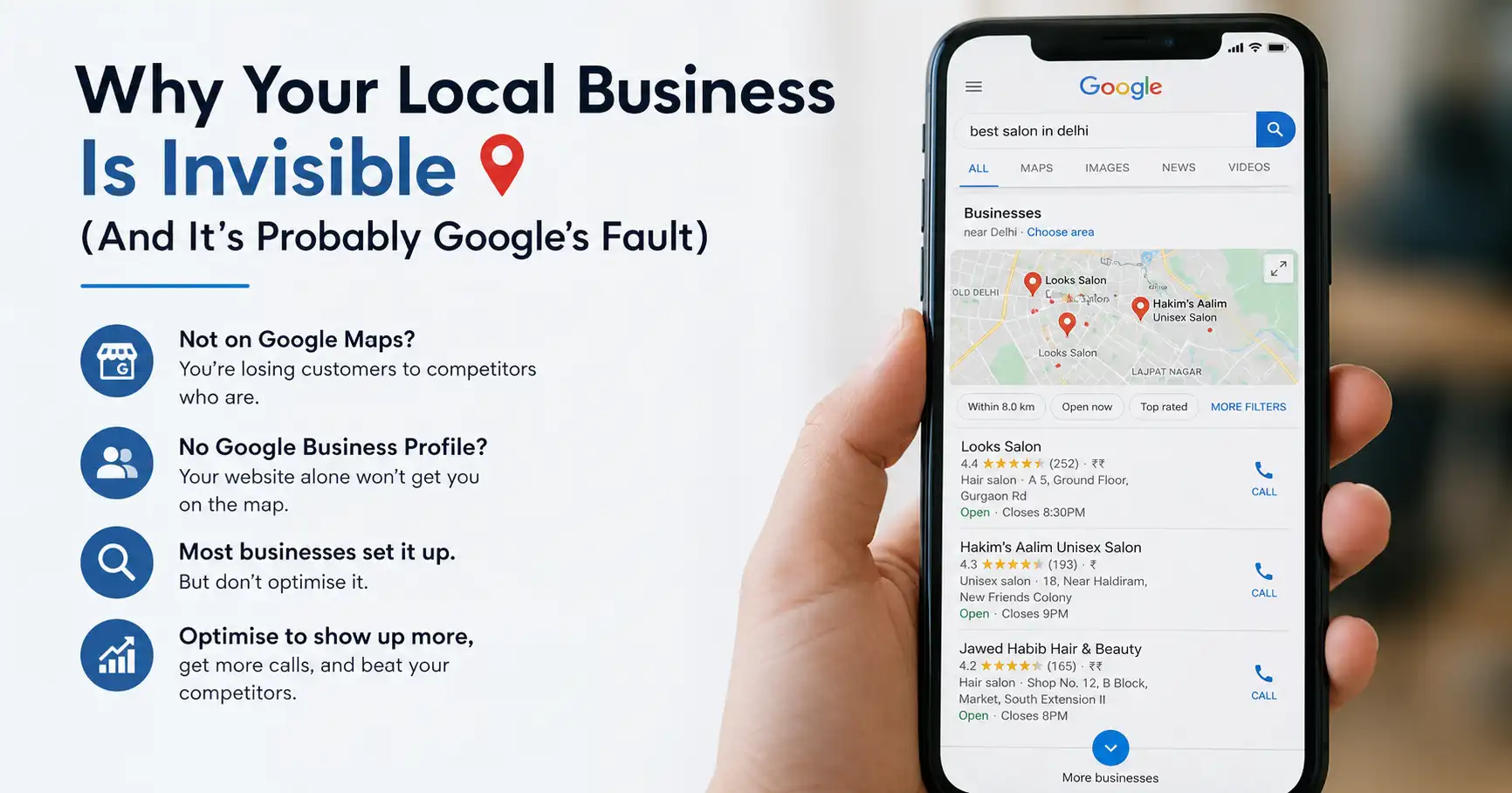
This guide covers everything you need to actually optimise your profile. Not just set it up — most people do that. Actually optimise it so you show up in more searches, get more calls, and beat your competitors in your own neighbourhood.
What Is Google Business Profile
Google Business Profile — used to be called Google My Business, but they renamed it in 2021 because apparently “My Business” confused people — is essentially your business’s presence on Google. When someone searches for “pizza near me” or “plumber Bangalore” or “best eyewear shop in Salt Lake”, Google pulls from Business Profiles, not websites.
It’s the free listing service that puts your business on Google Search and Google Maps. That little box that shows up with your address, hours, phone number, customer reviews, photos. That’s your Business Profile.
Why does this matter more than your website? Because when someone is searching locally, they’re usually ready to buy. They’re not in research mode. They want the nearest good option, and they’re looking for directions or a phone number to call. Your website sits in the background. Your Google Business Profile gets the action. This is the core distinction between SEO vs SEM for local businesses — someone searching “dentist near me” on Google Maps has already decided they need a dentist. Your only job is to be visible and credible in that exact moment.
We’ve seen local businesses get 30%, sometimes 40% of their leads straight from Google Maps. Not from their website. Not from ads. Just from showing up properly in Maps.
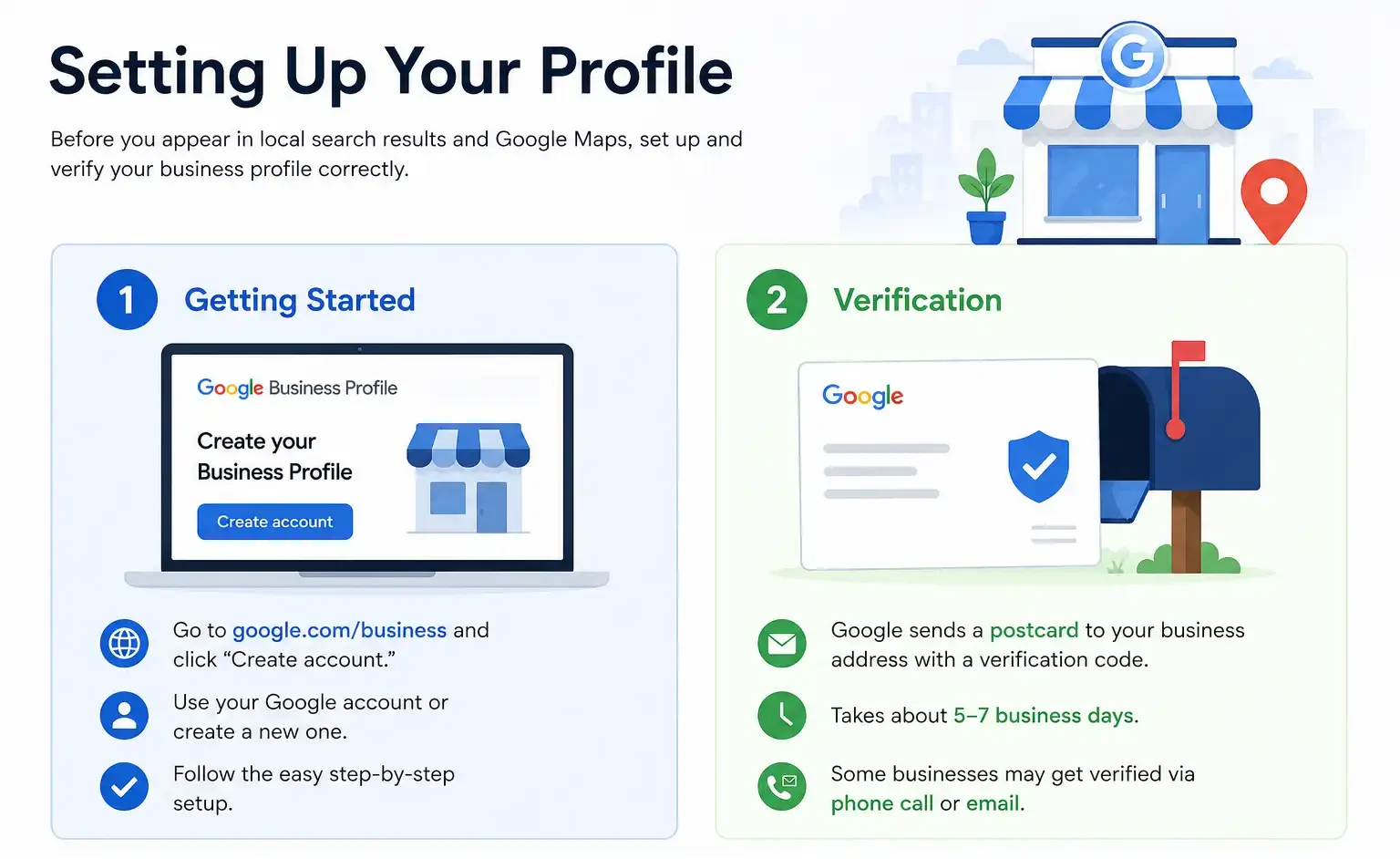
Setting Up Your Profile
Before you can appear in local search results and Google Maps, you need to set up and verify your business profile correctly. Here’s how to do it.
1. Getting Started
Go to google.com/business and click “Create account.” You’ll need a Google account — if you don’t have one, Google will walk you through creating one first. It’s… not complicated. The painful part is the next step.
2. Verification
Google needs to confirm you actually own or manage this business. They do this by sending a postcard to your registered business address with a verification code. Takes about 5-7 business days. Some businesses get verified via phone call. If you’re in a specific category — healthcare provider, lawyer, something like that — you might get email verification instead.
This is the step where people get impatient. We have clients who created their profile on Monday and wanted results by Thursday. The postcard hasn’t even arrived yet. So… patience required.
Complete Your Business Information
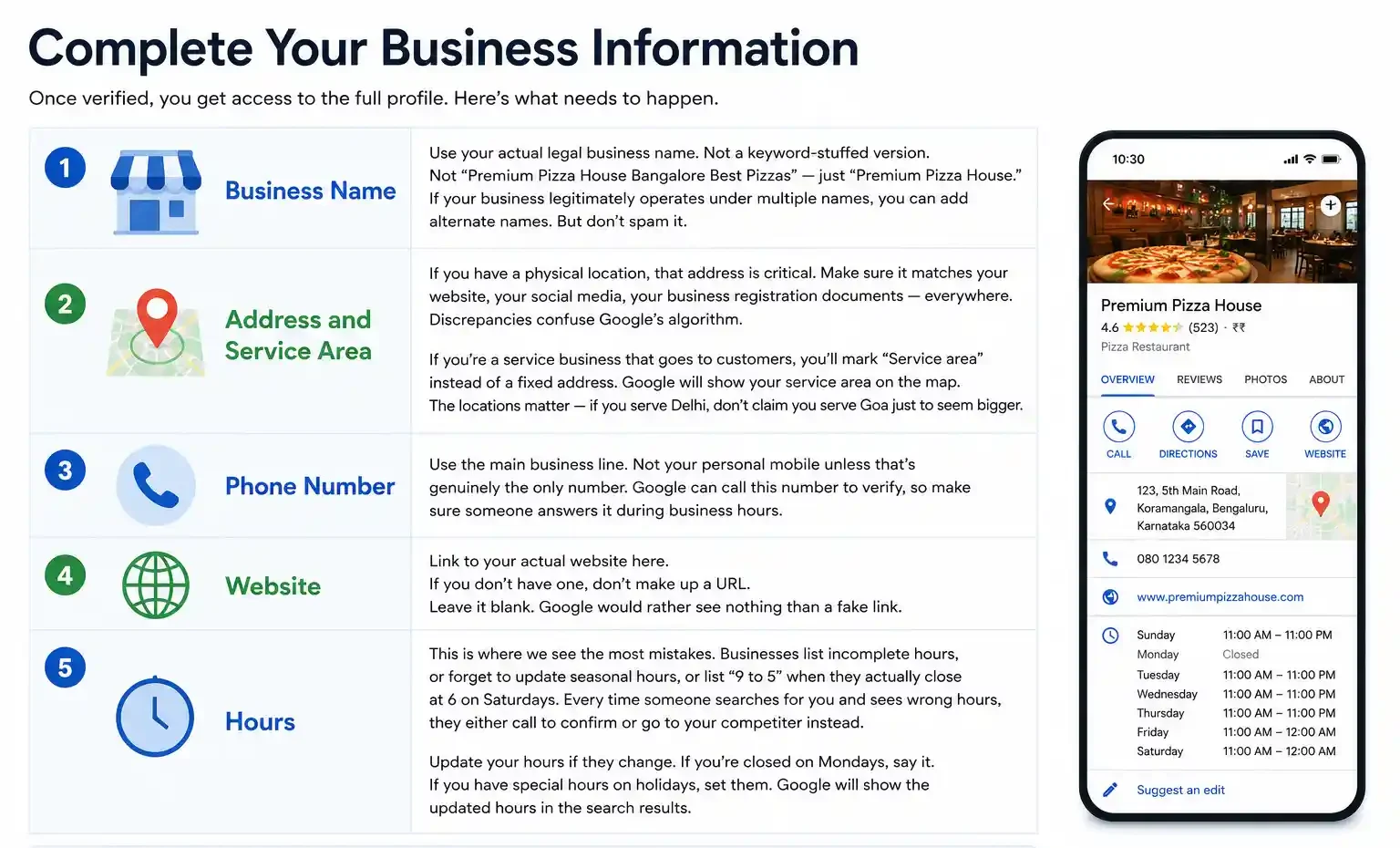
Once verified, you get access to the full profile. Here’s what needs to happen. And yes, we’re going to be specific.
1. Business Name
Use your actual legal business name. Not a keyword-stuffed version. Not “Premium Pizza House Bangalore Best Pizzas” — just “Premium Pizza House.” If your business legitimately operates under multiple names (some restaurants have a legal name and a trading name), you can add alternate names. But don’t spam it.
2. Address and Service Area
If you have a physical location, that address is critical. Google uses this to determine local relevance. Make sure it matches your website, your social media, your business registration documents — everywhere. Discrepancies confuse Google’s algorithm. This NAP consistency (Name, Address, Phone) is the same principle covered in our guide on Google My Business optimisation — Google rewards signals that match across every online property, and penalises inconsistency.
If you’re a service business that goes to customers (electrician, plumber, home repair), you’ll mark “Service area” instead of a fixed address. Google will show your service area on the map. The locations matter — if you serve Delhi, don’t claim you serve Goa just to seem bigger.
3. Phone Number
Use the main business line. Not your personal mobile unless that’s genuinely the only number. Google can call this number to verify, so make sure someone answers it during business hours.
4. Website
Link to your actual website here. If you don’t have one, don’t make up a URL. Leave it blank. Google would rather see nothing than a fake link.
5. Hours
This is where we see the most mistakes. Businesses list incomplete hours, or forget to update seasonal hours, or list “9 to 5” when they actually close at 6 on Saturdays. Every time someone searches for you and sees wrong hours, they either call to confirm or go to your competitor instead.
Update your hours if they change. If you’re closed on Mondays, say it. If you have special hours on holidays, set them. Google will show the updated hours in the search results.
Categories and Description
Pick your primary category carefully. You get one primary and a bunch of secondary ones. If you’re a restaurant, your primary is “Restaurant.” You can add “Indian Restaurant”, “Vegetarian Restaurant”, etc. as secondaries. Google uses these to understand what you do and when to show you in searches.
The description is your one chance to explain what makes you different. 750 characters. Don’t waste it on generic stuff like “Welcome to our business.” Write something actual customers would find useful. “Family-run Bengali restaurant, no MSG, traditional recipes, dine-in and home delivery available.” That tells Google what you do and tells customers why they should care.
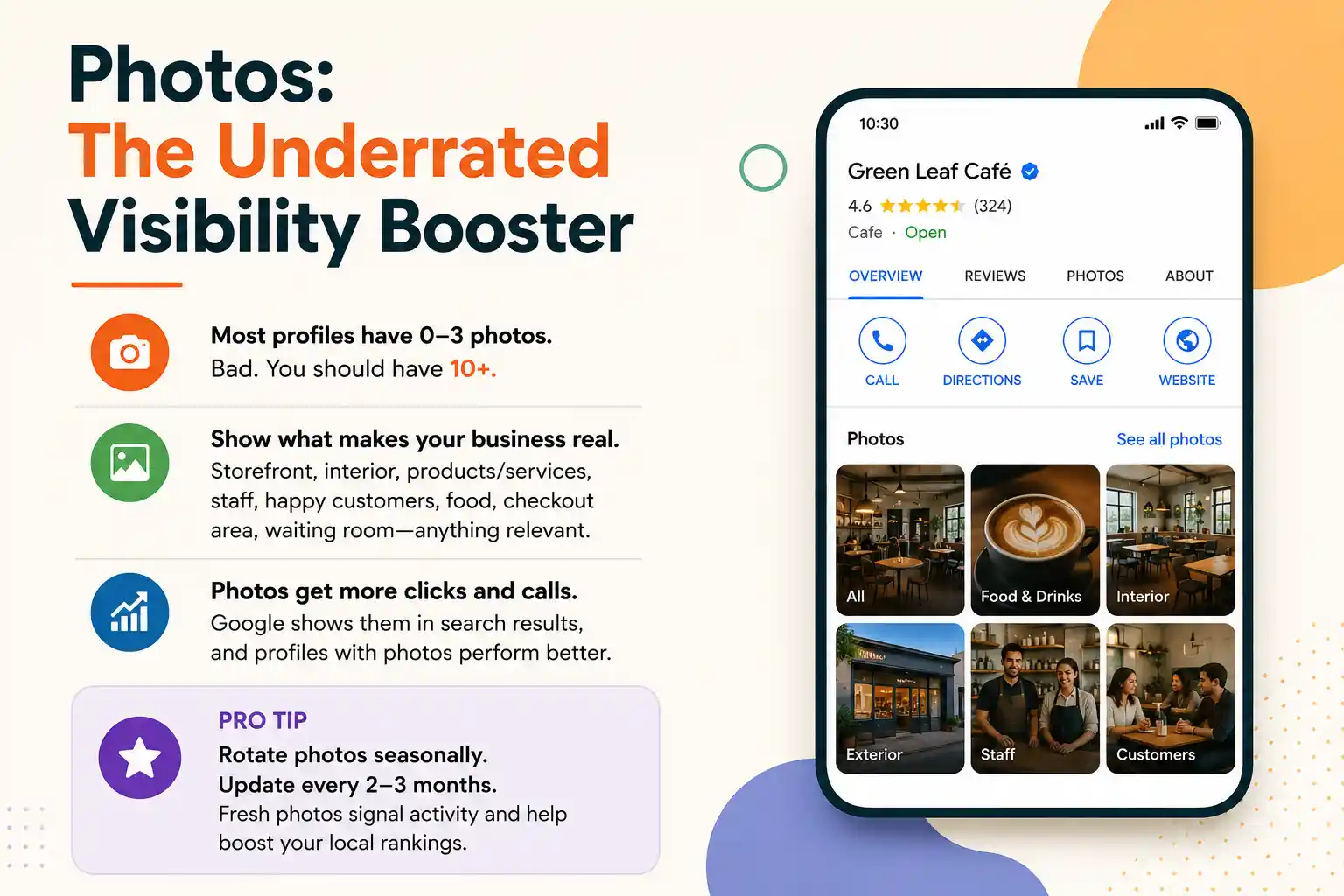
Photos: The Underrated Visibility Booster
Most profiles have 0-3 photos. Bad. You should have 10+. At minimum.
Photos of your storefront. Interior. Your products or services in action. Staff. Happy customers if you can. Food photos if you’re a restaurant. Checkout area. Waiting room if it’s a clinic. Google shows these photos in search results, and studies consistently show profiles with photos get more clicks and calls than those without.
Pro tip: Rotate photos seasonally. Update them every 2-3 months if it makes sense for your business. Google shows profiles with recent activity higher in rankings. Fresh photos signal activity.
Managing Reviews
Reviews are huge. Literally — they show up prominently on your profile. And they matter to Google’s algorithm. Profiles with more reviews rank higher for local searches. A 4.2-star profile with 150 reviews beats a 4.8-star profile with 12 reviews. For a more focused breakdown of the optimisation tactics that move the needle specifically on review volume and profile completeness, our Google My Business optimisation tips guide goes deeper on each lever.
Responding to Reviews
This is non-negotiable. Someone left a review? Respond. Good review — say thank you. Bad review — don’t get defensive, but explain your perspective. “We’re sorry you had that experience. We’d love to make it right. Please call us directly at [number].”
Ignoring reviews makes you look like you don’t care. Responding to all of them — good and bad — tells Google and customers you’re actively managing the business.
Getting More Reviews
You can’t demand reviews. You can ask. After a good experience, mention it. “If you had a good experience, we’d love a review on Google. Here’s the link.” Some businesses put a QR code linking directly to their review page. Others send a follow-up email or text after a purchase.
The key: make it easy. The harder someone has to work to leave a review, the fewer reviews you’ll get. Streamline it.
Posts: The Way Nobody Uses Business Profiles
Google lets you post directly on your Business Profile. Updates, promotions, new product announcements, event info. Most businesses never use this feature. Which means if you do, you’re already ahead.
Post at least once every 1-2 weeks. Something relevant. A holiday discount. A new service line. An event. Google shows these posts in the search results and on your profile. Fresh posts signal activity. And they sometimes get clicked.
Keep posts short — no need for essays. “Monsoon special: 30% off all water-resistant coatings this week. Valid till [date].” That’s enough. Link to your website if it’s relevant, but most posts don’t need to.
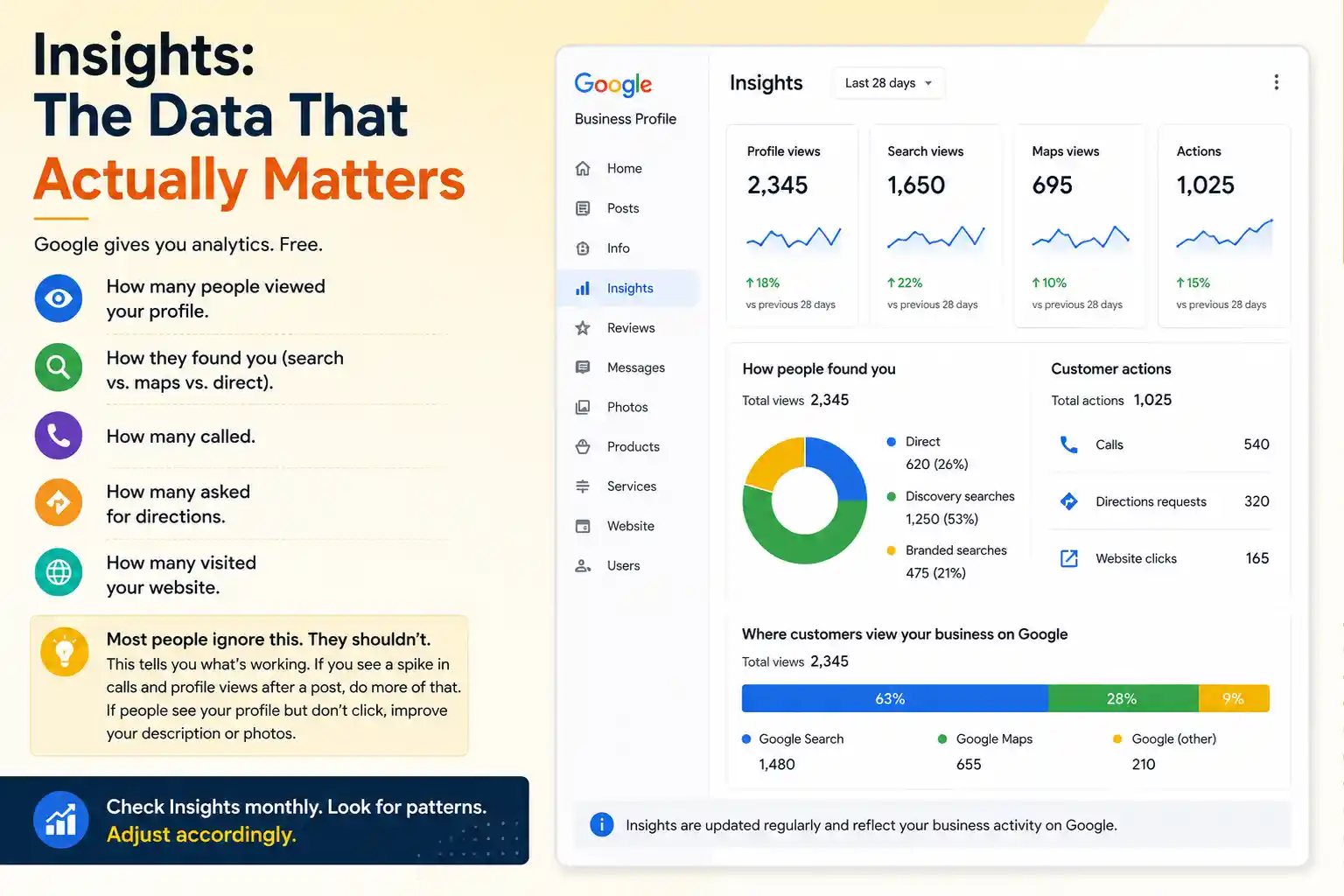
Insights: The Data That Actually Matters
Google gives you analytics. Free. How many people viewed your profile. How they found you (search vs. maps vs. direct). How many called. How many asked for directions. How many visited your website.
Most people ignore this. They shouldn’t. This tells you what’s working. If you posted about a monsoon special and you see a spike in calls and profile views, do more of that. If your profile sits in someone’s search results but they never click, maybe your description or photos need work.
Check Insights monthly. Look for patterns. Adjust accordingly.
Best Practices to Beat Local Competition
Ranking higher in local search isn’t just about creating a Google Business Profile—it requires consistent optimization and ongoing maintenance to stay ahead of competitors.
-
Keep Information Updated
This happens naturally if you stay on top of things. But it’s the most common failure point. Business address changes. Hours shift seasonally. Phone number changes. Website gets a new domain. If you update Google first, things stay synced. If you update your website and forget Google, now you have conflicting information, and Google gets confused.
-
Consistency Across the Web
Your business name, address, phone number should be identical everywhere. Business registration. Website. Social media. Google Business. Directory listings. Inconsistencies tell Google something’s wrong. A salon listed as “Salon XYZ” on Google, “Salon XYZ Studio” on Instagram, and “XYZ Salon” on their website confuses the algorithm and might split your visibility.
-
Encourage Repeat Customer Reviews
It’s not about quantity alone. A review from a long-time customer carries more weight than a one-time buyer. People who review you regularly tell Google you have a loyal base. That’s valuable.
-
Use All Available Features
Google keeps adding features to Business Profiles. Q&A section — answer questions about your business proactively. Attribute section for restaurants — list special diets you serve. Menu section. Booking integration. Use what’s relevant to your business.
-
Track Mobile Search Visibility
Most of your local searches happen on mobile. Someone’s on their phone, searching “gym near me” while walking. Google Business Profile shows you directly in that moment. If your profile isn’t optimised, you don’t exist in that search.
Common Mistakes
- Duplicate profiles : This happens. You create one, someone else on your team creates another, old profiles from before Google rebranded. Google sees duplicates as spam sometimes and might suppress both. Claim all your profiles, verify them, and if there are true duplicates, delete the extras.
- Missing business type : If you’re a doctor but don’t select “Doctor” as your category, Google can’t show you in “doctors near me” searches. The category isn’t just ornamental — it determines your visibility.
- No photos or outdated photos : A 3-year-old photo of your salon tells customers you haven’t updated anything in three years. Fresh photos matter. They tell Google you’re active, and they attract more clicks.
- Ignoring the verification postcard : It gets lost in mail sometimes. If you don’t get it after 10 days, request a new one. Unverified profiles show up in Google Search but not Maps. You’re leaving visibility on the table.
Multiple Locations?
If you have two salons in Mumbai and one in Bangalore, you need four separate profiles. Each location gets its own. Google Business Profile management tool lets you manage all of them from one dashboard. Add team members, set permissions, track metrics across locations.
This gets complex if you have many locations. A chain with 50+ shops might need an agency to handle it. But for 2-5 locations, Google’s management tool works fine.
Integration with Your Broader Digital Strategy
Google Business Profile doesn’t exist in isolation. It works best as part of a bigger approach. Your local SEO strategy should include optimised Google Business Profile, yes, but also a mobile-friendly website, consistent NAP information, local backlinks, and location-specific content on your website.
We typically recommend this stack for local businesses: strong Google Business Profile, good website, consistent directory listings (like JustDial), management of review sites in your industry, and targeted local ads when budget allows. Google Business Profile is the foundation, but it’s part of a system.
For technical questions on how your profile connects to your website’s SEO, our technical SEO guide covers the deeper aspects.
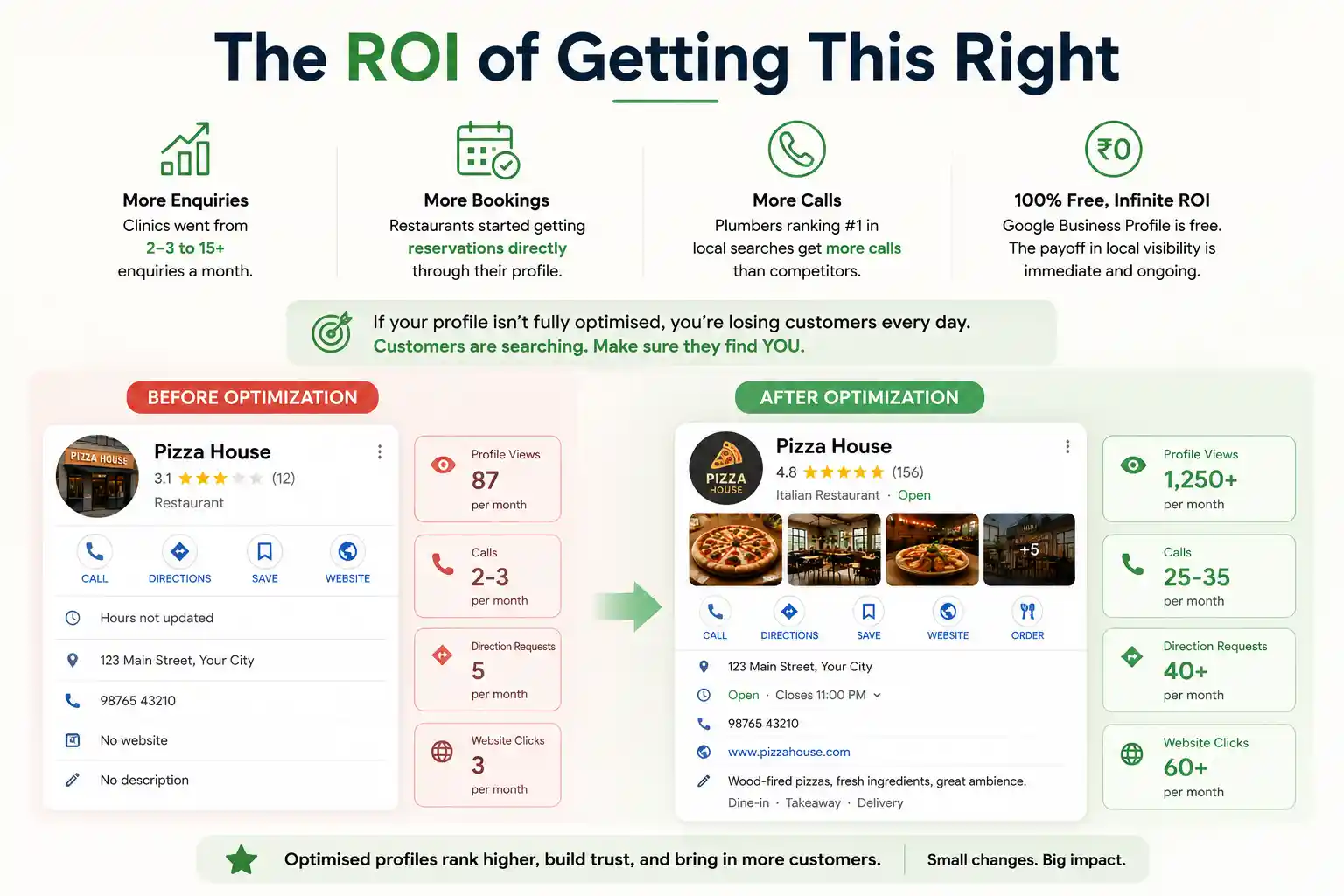
The ROI of Getting This Right
We’ve managed profiles for clinics that went from 2-3 patient enquiries a month to 15+ just from optimization. Restaurant that didn’t have reservations online suddenly got bookings directly through their Google profile. Plumber showing up first in local searches — and not just showing up, but with solid reviews and recent posts — gets more calls than competitors who didn’t bother with optimization.
The thing is: Google Business Profile is free. So the ROI is essentially infinite. You invest time (or money hiring someone like us to do it), and the payoff in local visibility is immediate and ongoing.
If you’re a local business and you’re not fully optimised on Google Business Profile, that’s probably costing you real money every month. Customers searching for what you sell, but not finding you because your profile is incomplete or ignored.
| Approach | Best for | Watch out for |
|---|---|---|
| DIY | Small teams, tight budgets | Slow ramp-up, trial-and-error |
| Freelancer | Specific project bursts | Inconsistency, limited ownership |
| Agency | Ongoing work, senior input | Higher retainer, less control |
Quick checklist before you start:
- Define the one thing you want: leads, sales, awareness — pick one.
- Baseline your numbers: write down where you are today.
- Pick a 90-day window: nothing moves in 2 weeks.
- Agree on success metrics: with whoever is paying the bill.
- Set up proper tracking: GA4, UTMs, call tracking.
- Review monthly: kill what doesn’t work, double down on what does.
The Bottom Line
If you take one thing from this: google business profile optimization complete guide for loca rewards patience and specificity, not volume or clever tricks. Start small, measure honestly, fix what breaks, and compound what works. The brands doing this well in India aren’t smarter — they’re just consistent. Need a hand with this for your business? Talk to us.
Want Expert Help Optimising Your Local Presence?
We’ve optimised profiles for clinics, restaurants, salons, and service businesses across India. Local visibility is our thing. Let’s talk about getting your business found.
FAQs
-
Is Google Business Profile free?
Ans.Completely free. Google doesn't charge you anything to create, manage, or list your business. That's one reason it's so critical for local businesses — maximum visibility with zero cost on the profile itself. -
How do I verify my business?
Ans.Google sends a postcard to your business address with a verification code. Takes about 5-7 business days. Some categories get phone verification. Once verified, you have full access to edit and post. -
Can I manage multiple locations?
Ans.Yes. Each location gets its own separate profile, but you can manage all of them from one dashboard using Google's management tool. Add team members, set specific permissions for each location.
Author Details

Latest Posts
-
 24 / Sep
GMB Optimisation Google Business Profile Optimization Guide 2026
24 / Sep
GMB Optimisation Google Business Profile Optimization Guide 2026 -
 23 / Sep
Search Engine Optimization Programmatic SEO: Template + Data Model Explained
23 / Sep
Search Engine Optimization Programmatic SEO: Template + Data Model Explained -
 22 / Sep
Conversion Rate Optimization Conversion Rate Optimization: A Practical Guide
22 / Sep
Conversion Rate Optimization Conversion Rate Optimization: A Practical Guide -
 21 / Sep
Whatsapp Marketing WhatsApp Marketing for Indian SMBs
21 / Sep
Whatsapp Marketing WhatsApp Marketing for Indian SMBs -
 19 / Sep


Related Knowledge