-
Author: Anindita Barik
-
Updated Date: Jul-03-2026
-
Views: 2 Min Read
Planning 30 days of social media content starts with choosing 3-5 recurring themes and mapping them onto a weekly rhythm, not posting randomly. This guide covers building a content calendar template, picking pillar categories by industry, batching content creation, and avoiding common mistakes like sales-heavy posts or ignoring analytics. It also compares tools — from free Google Sheets to Buffer and Hootsuite — so you know which are worth paying for. Consistency, not volume, drives real engagement.
To plan 30 days of social media posts, start by choosing 3-5 recurring content themes (educational, behind-the-scenes, promotional, engagement, testimonials) so you’re never starting from scratch. Next, map these themes onto a weekly template — for example, Monday for tips, Wednesday for promotions, Friday for engagement posts — and repeat that rhythm across all four weeks, adjusting for holidays or launches. Batch-create your captions, graphics, and videos in one or two sitting rather than daily, then load everything into a scheduling tool like Buffer, Later, or Meta Business Suite so posts publish automatically. This approach typically takes 2-3 hours upfront and keeps your feed consistent without daily effort.
The Brand That Posted Random Things Every Day (And Lost Their Audience)
Last year, a fashion brand came to us desperate. Instagram engagement was dying. They’d been posting every day — which sounds good until you look closer. Monday they’d post an outfit photo. Tuesday a random motivational quote. Wednesday a closeup of stitching. Thursday something about their founder. No pattern. No rhythm. Their audience didn’t know what to expect.
Their followers stopped showing up.
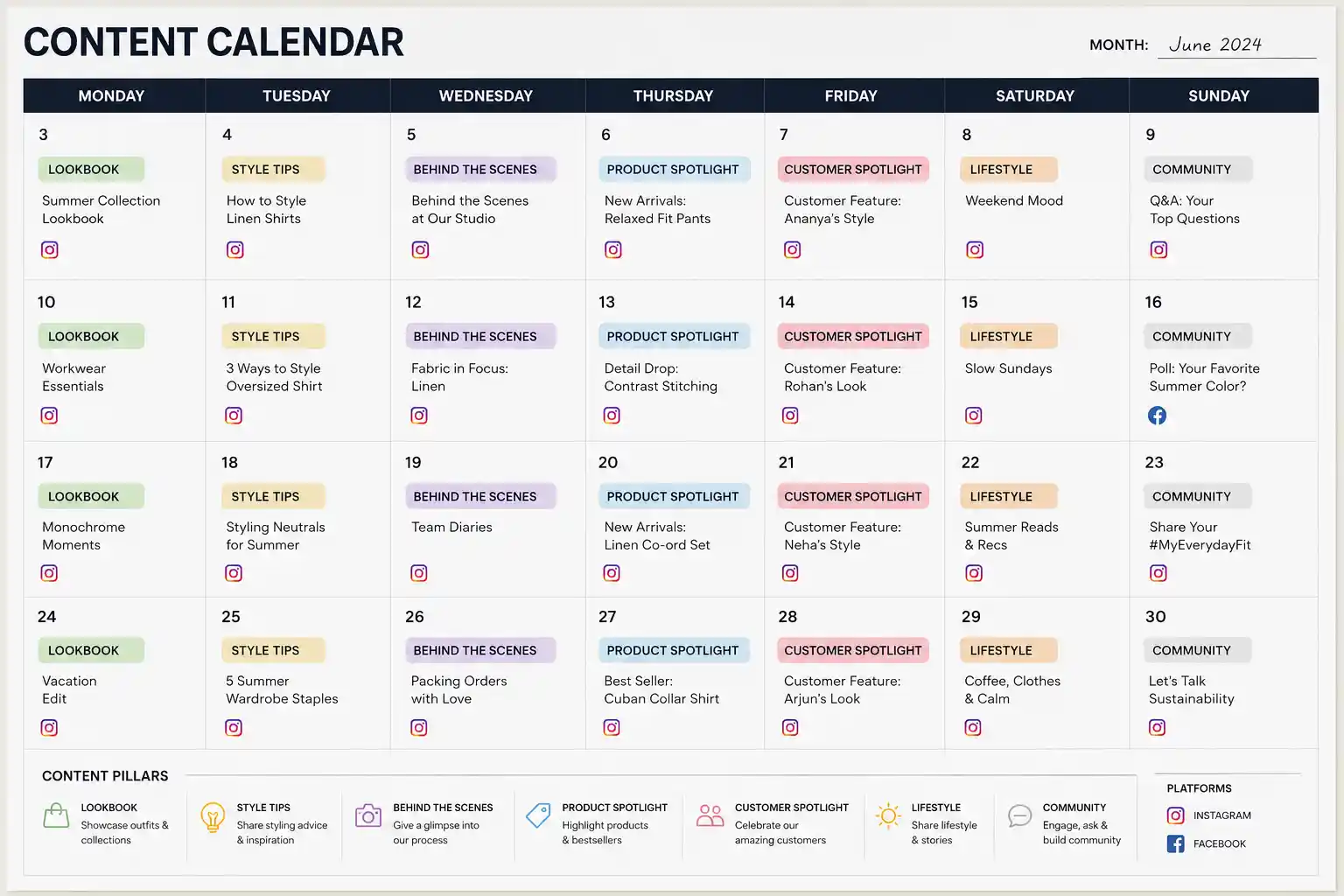
We built them a content calendar. Three months of planned posts. Not rigid — flexible — but structured. Specific content types on specific days. Monday: lookbook. Wednesday: behind-the-scenes. Friday: customer spotlight. Suddenly their audience knew when to check back. Engagement came back.
Consistency beats sporadic brilliance on social media. And consistency requires planning.
Why You Actually Need a Content Calendar (Not Just Vibes-Based Posting)
I get it. Planning feels restrictive. Content marketing should feel authentic, right? Spontaneous. Real.
Here’s the problem: spontaneity without structure turns into chaos. You end up posting when you remember. Or when you’re in the mood. Your audience never knows when to expect you. The algorithm penalises inconsistency.
A good content calendar isn’t about being robotic. It’s about creating predictable rhythm while leaving space for real-time posts and trending moments. Think of it like… a daily routine. You have breakfast at roughly the same time every day. But if your friend calls with exciting news at 9 am instead of your usual 11 am coffee, you adjust.
A calendar gives you the rhythm. You still have room for flexibility.
More practically: planning ahead means you can batch-create content. Film 10 Instagram Reels in one afternoon instead of grinding every single day. Get approvals ahead of time instead of rush-approving at 5 pm. Catch mistakes before they go live. Build real strategy instead of posting random stuff and hoping something sticks. — this is exactly where a structured social media management service approach pays off.
Building Your Calendar: The Actual Process
Here’s how we actually build calendars at PromotEdge. Not the fancy theoretical version. The real version with actual constraints.
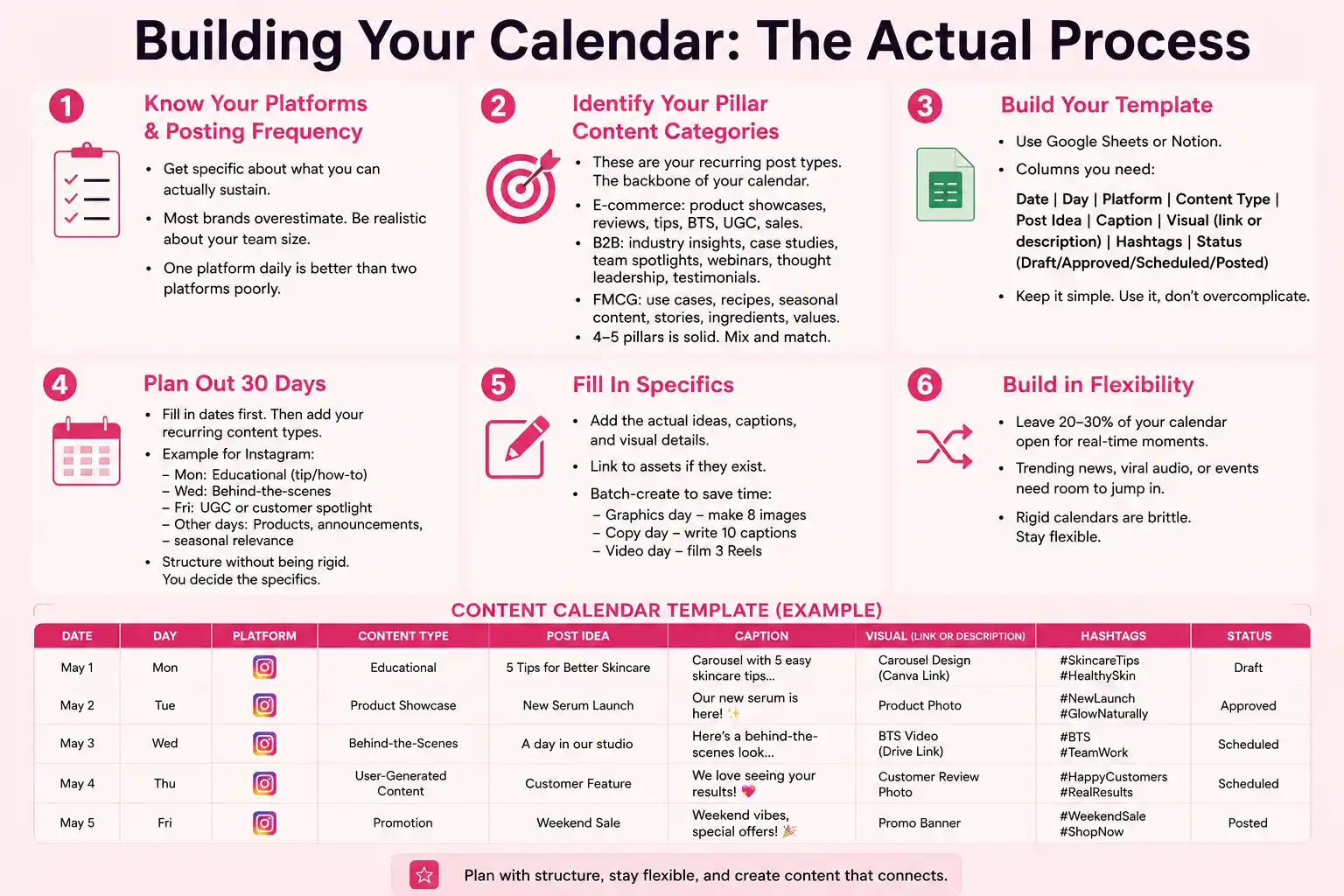
Step 1: Know Your Platforms and Posting Frequency
Instagram daily? LinkedIn 3x a week? Twitter multiple times daily? YouTube once a week? Get specific about what you can actually sustain.
Most brands overestimate. “We’ll post twice daily on Instagram!” By week three, you’re stressed and skipping days. Be honest about what’s realistic with your team size.
For a small team: one platform daily is better than two platforms poorly. A B2B company posting meaningful LinkedIn content 3x a week outperforms one posting random stuff daily on 5 platforms.
Step 2: Identify Your Pillar Content Categories
These are your recurring post types. The backbone of your calendar.
For an e-commerce brand: product showcases, customer reviews, educational tips, behind-the-scenes, user-generated content, sales/promotions.
For a B2B service company: industry insights, case studies, team spotlights, webinar announcements, thought leadership, client testimonials.
For an FMCG brand: product use cases, recipe content, seasonal content, customer stories, educational content about ingredients, brand values.
You don’t need 10 categories. Four or five pillar types is solid. Mix and match across your month.
Step 3: Build Your Template
Grab a Google Sheet or Notion template. Columns you need:
Date | Day of Week | Platform | Content Type | Post Idea | Caption | Visual (link or description) | Hashtags | Status (Draft/Approved/Scheduled/Posted)
Keep it simple. The fancier your system, the more you’ll avoid using it.
Step 4: Plan Out 30 Days
Go calendar by calendar. Fill in dates first. Then add your recurring content types.
Example for Instagram (daily posts):
Monday: educational post (tip, how-to, carousel).
Wednesday: behind-the-scenes or process content.
Friday: user-generated content or customer spotlight.
Remaining days: product showcases, announcements, seasonal relevance.
This gives you structure without being rigid. You still decide exactly what educational content hits on Monday. But you know you’re covering that pillar.
Step 5: Fill In Specifics
Now the actual ideas. Write the captions. Describe the visuals. Link to assets if they exist.
This is where you batch-create if possible. “Graphics day” — make 8 images. “Copy day” — write 10 captions. “Video day” — film 3 Reels. Save time.
Step 6: Build in Flexibility
Leave 20-30% of your calendar open. If India wins a big cricket match on day 15 and you’re a sports brand, you want to post about it. If a trending audio hits TikTok and you can adapt it, you want room to jump in.
Rigid calendars are brittle. They break when real life happens.
Content Categories That Actually Drive Engagement
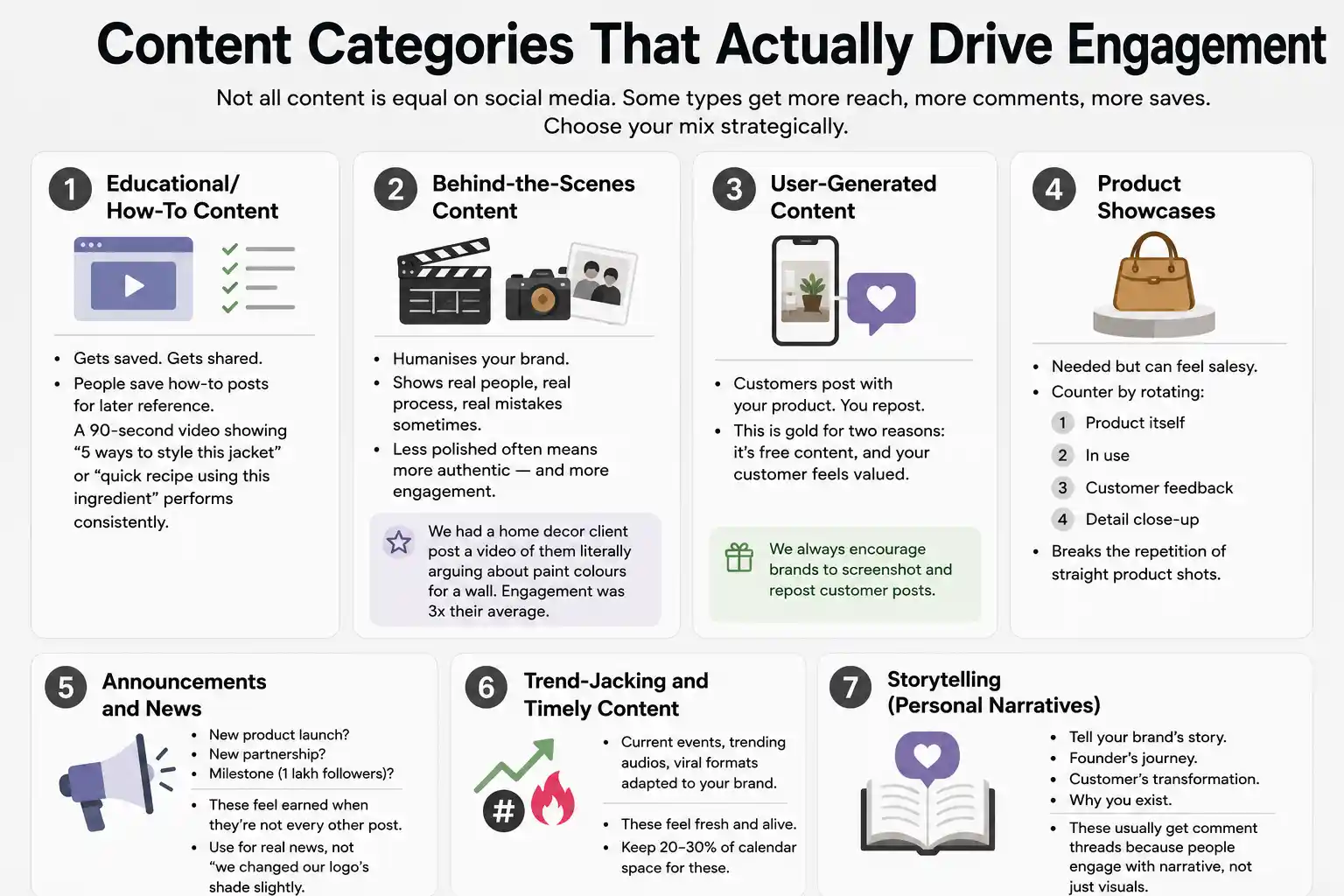
Not all content is equal on social media. Some types get more reach, more comments, more saves. Choose your mix strategically.
1. Educational/How-To Content
Gets saved. Gets shared. People save how-to posts for later reference. A 90-second video showing “5 ways to style this jacket” or “quick recipe using this ingredient” performs consistently.
2. Behind-the-Scenes Content
Humanises your brand. Shows real people, real process, real mistakes sometimes. Less polished often means more authentic — and more engagement.
We had a home decor client post a video of them literally arguing about paint colours for a wall. Engagement was 3x their average. People connected with the realness.
3. User-Generated Content
Customers post with your product. You repost. This is gold for two reasons: it’s free content, and your customer feels valued. We always encourage brands to screenshot and repost customer posts.
4. Product Showcases
Needed but can feel salesy. Counter by rotating: one post shows the product itself, next post shows it in use, next post shows customer feedback, next post shows a detail close-up. Breaks the repetition of straight product shots.
5. Announcements and News
New product launch? New partnership? Milestone (1 lakh followers)? These feel earned when they’re not every other post. Use for real news, not “we changed our logo’s shade slightly.”
6. Trend-Jacking and Timely Content
Current events, trending audios, viral formats adapted to your brand. These feel fresh and alive. Keep 20-30% of calendar space for these.
7. Storytelling (Personal Narratives)
Tell your brand’s story. Founder’s journey. Customer’s transformation. Why you exist. These usually get comment threads because people engage with narrative, not just visuals.
Common Calendar Mistakes
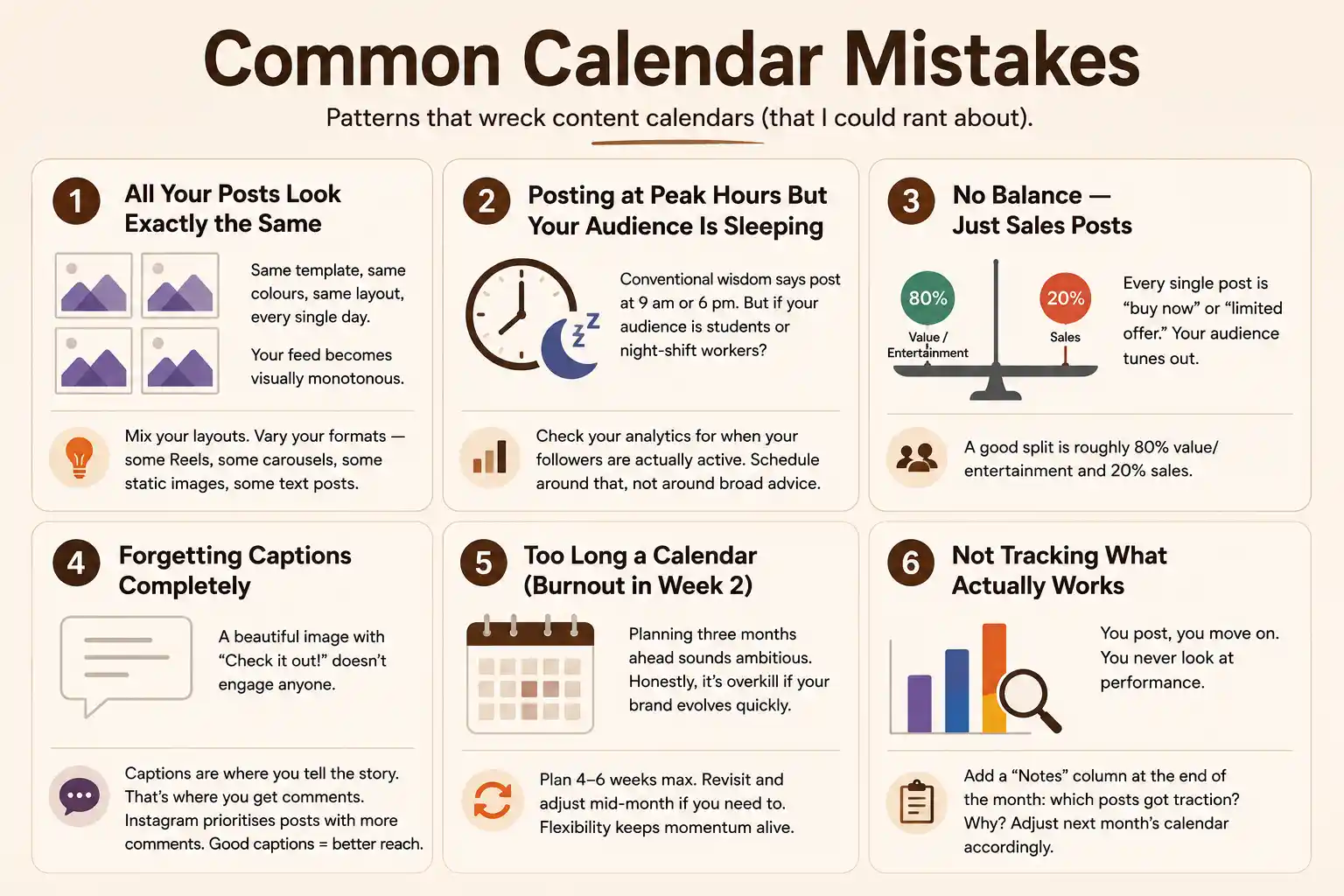
Patterns that wreck content calendars, that I could rant about…
1.All Your Posts Look Exactly the Same
Same template, same colours, same layout, every single day. Your feed becomes visually monotonous. Mix your layouts. Vary your formats — some Reels, some carousels, some static images, some text posts.
2. Posting at Peak Hours But Your Audience Is Sleeping
Conventional wisdom says post at 9 am or 6 pm. But if your audience is students or night-shift workers? Post when they’re awake. Check your Instagram analytics for when your followers are actually active. Schedule around that, not around broad advice.
3. No Balance — Just Sales Posts
Every single post is “buy now” or “limited offer.” Your audience tunes out. A good split is roughly 80% value/entertainment and 20% sales. That ratio changes if you’re a direct-to-consumer brand, but the principle holds.
4. Forgetting Captions Completely
A beautiful image with “Check it out!” doesn’t engage anyone. Captions are where you tell the story. That’s where you get comments. Instagram prioritises posts with more comments. Good captions = better reach.
5. Too Long a Calendar (Burnout in Week 2)
Planning three months ahead sounds ambitious. Honestly, it’s overkill if your brand evolves quickly. Plan 4-6 weeks max. Revisit and adjust mid-month if you need to. Flexibility keeps momentum alive.
6. Not Tracking What Actually Works
You post, you move on. You never look at performance. Educational posts might be your star performers but you don’t realise it because you never checked. Add a “Notes” column at the end of the month: which posts got traction? Why? Adjust next month’s calendar accordingly.
Tools That Actually Help (And Which Ones Are Overkill)
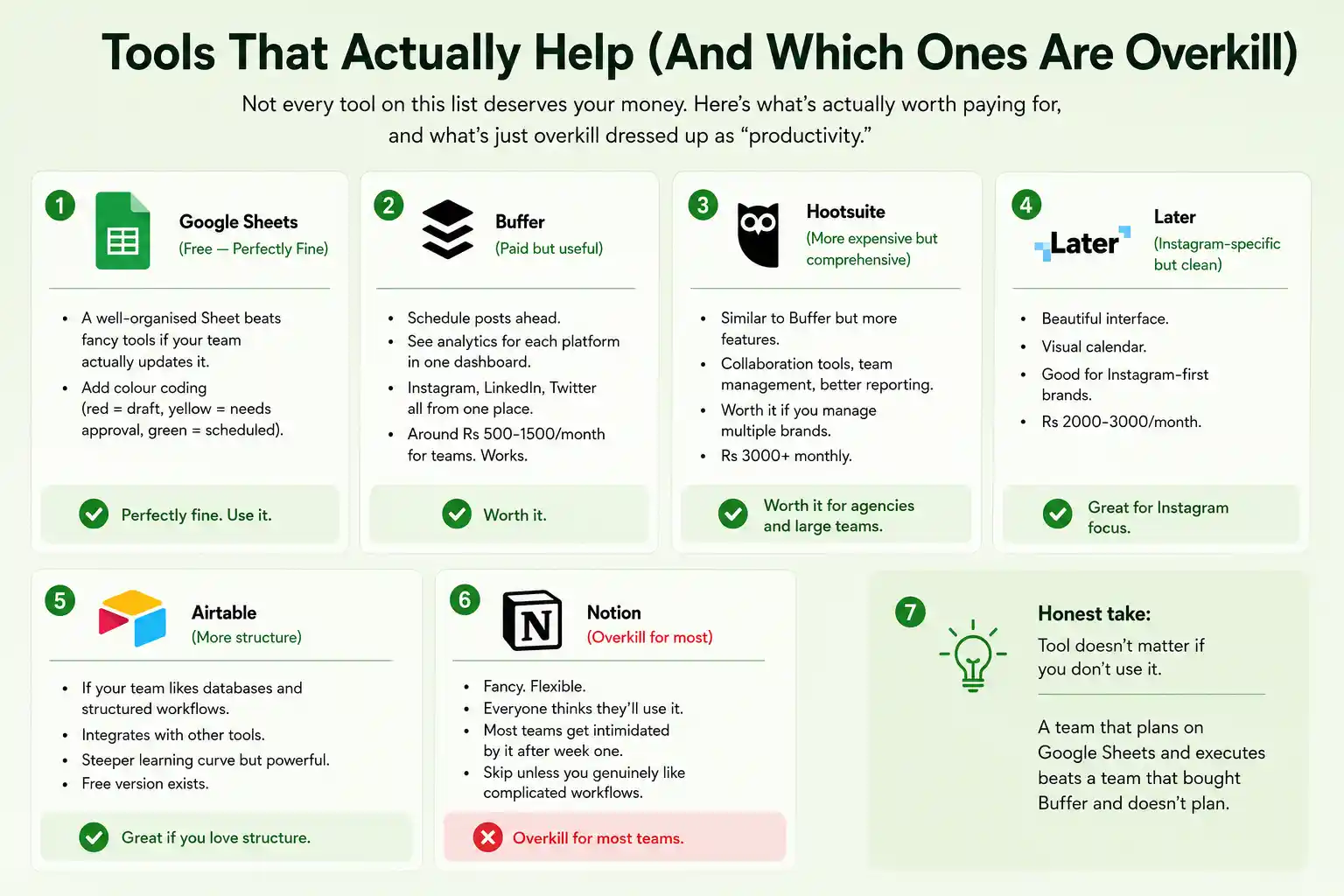
Not every tool on this list deserves your money. Here’s what’s actually worth paying for, and what’s just overkill dressed up as “productivity.”
-
Google Sheets (Free — Perfectly Fine)
Honestly? A well-organised Sheet beats fancy tools if your team actually updates it. Add colour coding (red = draft, yellow = needs approval, green = scheduled). Done.
-
Buffer (Paid but useful)
Schedule posts ahead. See analytics for each platform in one dashboard. Instagram, LinkedIn, Twitter all from one place. Around Rs 500-1500/month for teams. Works.
-
Hootsuite (More expensive but comprehensive)
Similar to Buffer but more features. Collaboration tools, team management, better reporting. Worth it if you manage multiple brands. Rs 3000+ monthly.
-
Later (Instagram-specific but clean)
Beautiful interface. Visual calendar. Good for Instagram-first brands. Rs 2000-3000/month.
-
Airtable (More structure)
If your team likes databases and structured workflows. Integrates with other tools. Steeper learning curve but powerful. Free version exists.
-
Notion (Overkill for most)
Fancy. Flexible. Everyone thinks they’ll use it. Most teams get intimidated by it after week one. Skip unless you genuinely like complicated workflows.
Honest take: tool doesn’t matter if you don’t use it. A team that plans on Google Sheets and executes beats a team that bought Buffer and doesn’t plan.
The Real-World Implementation
Planning is one thing. Actually sticking to it is another.
Assign responsibility. One person owns the calendar. They don’t post everything, but they track what’s posted, what’s scheduled, what’s missing.
Weekly check-in. Monday morning: “what’s posting this week?” Make sure assets exist. Approvals are done. Nothing is scrambled at 4 pm Thursday.
Monthly review. Last day of month: which content performed? What should we do more of? What flopped? Adjust next month’s calendar.
Batching saves your life. One day a month: create assets. One day a month: write captions. One day: review and schedule everything. The other days? You’re executing, not creating from scratch.
This rhytham — plan, create, review, execute, track, adjust — turns social media from something that feels chaotic into something that feels manageable.
| Approach | Best for | Watch out for |
|---|---|---|
| DIY | Small teams, tight budgets | Slow ramp-up, trial-and-error |
| Freelancer | Specific project bursts | Inconsistency, limited ownership |
| Agency | Ongoing work, senior input | Higher retainer, less control |
Quick checklist before you start:
- Define the one thing you want: leads, sales, awareness — pick one.
- Baseline your numbers: write down where you are today.
- Pick a 90-day window: nothing moves in 2 weeks.
- Agree on success metrics: with whoever is paying the bill.
- Set up proper tracking: GA4, UTMs, call tracking.
- Review monthly: kill what doesn’t work, double down on what does.
The Bottom Line
If you take one thing from this: social media content calendar how to plan 30 days of posts rewards patience and specificity, not volume or clever tricks. Start small, measure honestly, fix what breaks, and compound what works. The brands doing this well in India aren’t smarter — they’re just consistent. Need a hand with this for your business? Talk to us.
Ready to Build Your Content Calendar?
Our team at PromotEdge has built content calendars for brands across fashion, FMCG, B2B, and e-commerce. We know which content types drive engagement, how to batch-create efficiently, and how to keep calendars flexible while maintaining consistency.
FAQs
-
How do I create a social media content calendar?
Ans.Open a spreadsheet or use a tool like Buffer. Add columns for date, platform, content type, caption, and visual. Plan 30-45 days ahead. Start with recurring content types (educational, behind-the-scenes, product posts) on specific days. Fill in specific ideas, captions, and visuals. Keep 20-30% of the calendar flexible for trending content. The format matters less than the discipline of planning. -
How far in advance should I plan content?
Ans.Minimum 2-3 weeks. Ideal is 4-6 weeks. This gives time for batch-creating (filming multiple videos one day instead of daily), getting approvals, scheduling, and adjusting if needed. Don't plan 3 months ahead unless your brand never changes. That much rigidity usually breaks by week four. -
What tools should I use?
Ans.Google Sheets if you are starting. Buffer or Later if you want to schedule posts directly. Airtable if your team likes structure. Notion if you enjoy complexity. The tool itself matters less than whether your team actually uses it. We have seen amazing execution on Google Sheets and abandoned premium tools.
Author Details

Latest Posts
-
 26 / Aug
Search Engine Optimization Video SEO: How to Rank Your Videos in Google & YouTube
26 / Aug
Search Engine Optimization Video SEO: How to Rank Your Videos in Google & YouTube -
 25 / Aug
Video Production Corporate Video Production: A Practical Guide for Indian Brands
25 / Aug
Video Production Corporate Video Production: A Practical Guide for Indian Brands -
 24 / Aug
-
21 / Aug
Catalogue Design Catalogue Design: How to Create Catalogues That Actually Sell
-
 20 / Aug

Related Knowledge