-
Author: Anindita Barik
-
Updated Date: Jun-20-2026
-
Views: 2 Min Read
Choosing the right CMS depends on your business goals, not trends. WordPress suits content-heavy sites needing flexibility and low costs. Shopify excels for standard eCommerce — fast to launch, built for selling. Custom development fits complex business logic, unique integrations, or models neither platform supports — but costs Rs 15–30 lakhs and months of build time. The real question isn’t which platform is best; it’s which constraints your business can live with.
The right CMS depends on your business goals, budget, and scalability needs. WordPress is ideal for businesses that need flexibility, content-driven websites, and strong SEO capabilities at a relatively low cost. Shopify is the better choice for businesses focused on eCommerce, offering an easy-to-manage platform with built-in payment, inventory, and sales features. Custom-built solutions are best suited for enterprises or businesses with unique functionality requirements, advanced integrations, and long-term scalability needs.
In short, choose WordPress for versatility and content marketing, Shopify for a streamlined online store experience, and a custom CMS when your business requires complete control, tailored features, and the ability to scale beyond the limitations of off-the-shelf platforms.
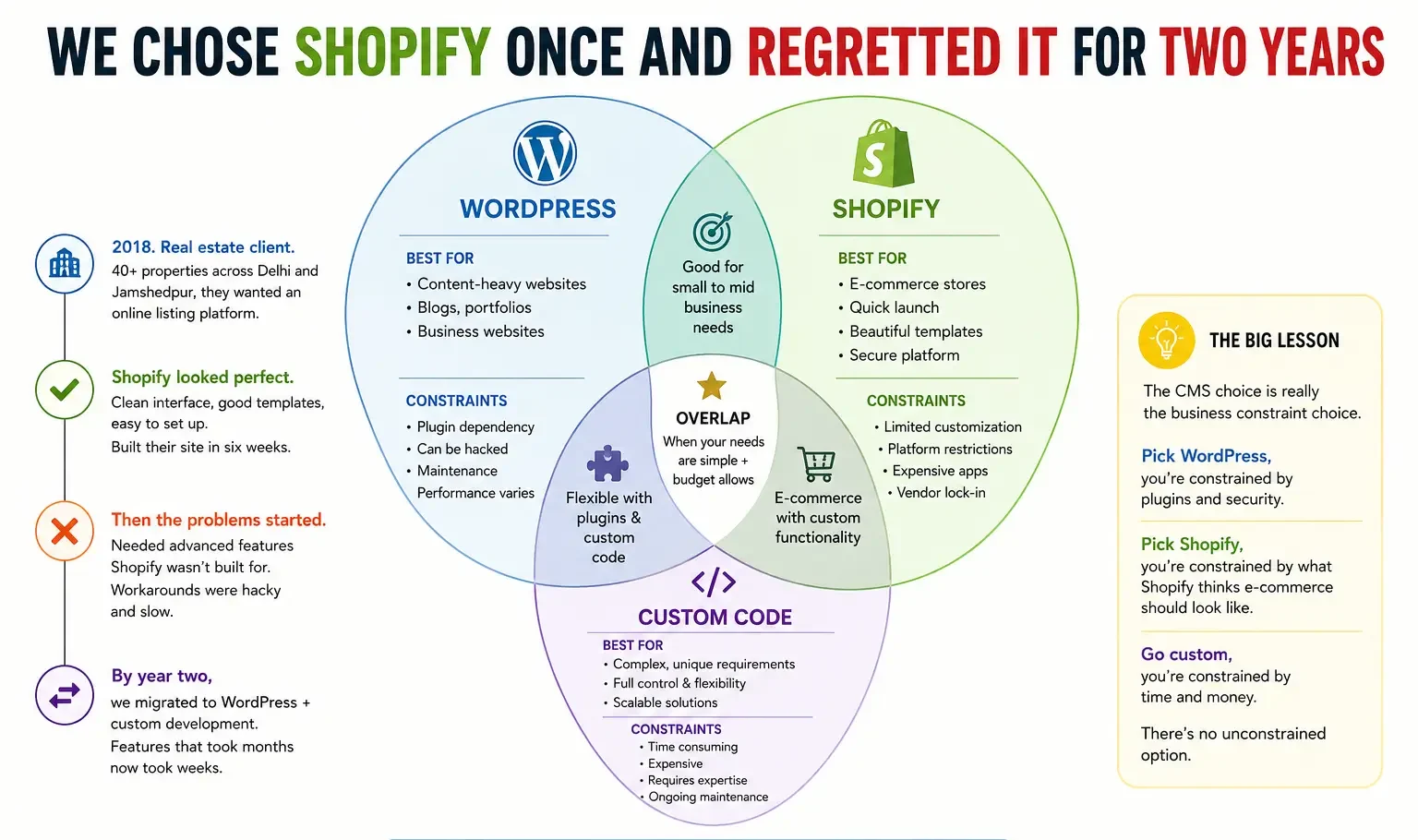
We Chose Shopify Once and Regretted It For Two Years
2018. Real estate client. 40+ properties across Delhi and Jamshedpur, they wanted an online listing platform.
Shopify looked perfect. Clean interface, good templates, easy to set up. We built their site in six weeks. Client was happy — initially.
Then they wanted to let agents upload properties directly. Shopify… doesn’t really do that without custom code. Then they wanted a mortgage calculator embedded. Then lead routing based on geography. Feature by feature, Shopify became the wrong tool.
By year two we were fighting the platform constantly. Building workarounds that were hacky and slow. Finally migrated them to WordPress + custom development, and suddenly those features took weeks instead of months.
That project taught me something obvious in hindsight: the CMS choice is really the business constraint choice. Pick WordPress, you’re constrained by plugins and can be hacked. Pick Shopify, you’re constrained by what Shopify thinks e-commerce should look like. Go custom, you’re constrained by time and money. There’s no unconstrained option.
So the question isn’t “which is best.” It’s “which constraints can I live with?”
WordPress: The Kitchen Sink That Actually Works
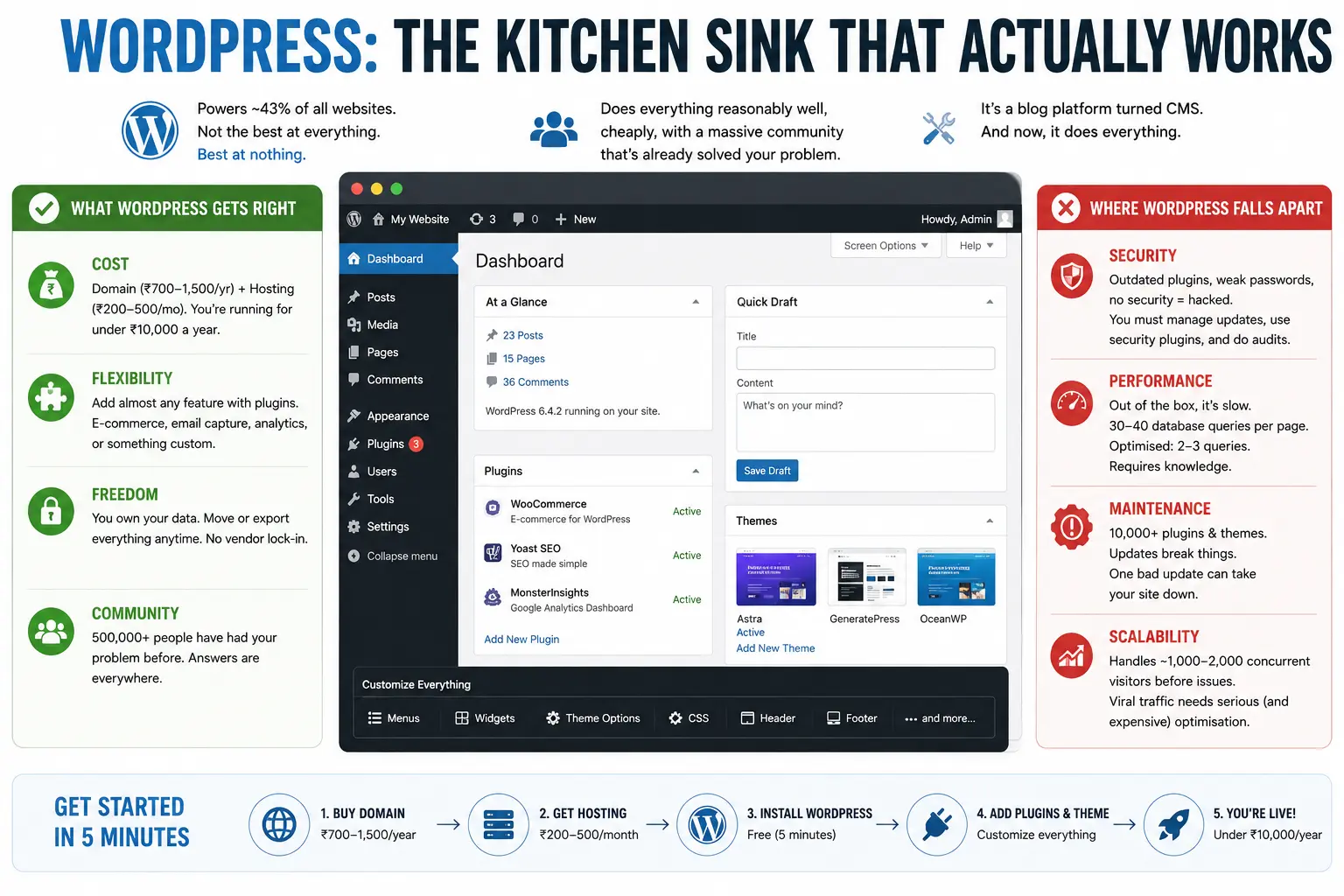
WordPress powers about 43% of all websites on the internet. That’s not because it’s the best at everything. It’s best at nothing, actually. It’s a blog platform that someone decided to turn into a CMS, and now it does everything.
But — and this matters — it does everything reasonably well, cheaply, and with an absolutely massive community of people who’ve already solved your problem.
What WordPress Gets Right
Cost. A WordPress site costs almost nothing to start. Buy a domain (Rs 700-1500 a year), get hosting (Rs 200-500 monthly for small sites), install WordPress (free, 5-minute process). You’re running for under Rs 10,000 a year.
Flexibility. Through plugins, you can add almost any feature. E-commerce? WooCommerce. Email capture? OptinMonster. Analytics? Monsterinsights integrates Google Analytics right in. You want something custom? There’s a plugin. Or if there isn’t, you hire a developer to write one.
Freedom. You own your data. Your database lives on your hosting, not on some company’s servers. Want to export everything and move to another platform? You can. Try doing that with Shopify.
Community. If you get stuck, 500,000 people have had your problem before. StackOverflow, WordPress forums, Reddit — answers are everywhere. My support team handles maybe 5% of WordPress issues without looking something up.
Where WordPress Falls Apart
Security. By default, WordPress is about as secure as leaving your car running with the keys in the ignition. Outdated plugins? Vulnerable. Weak passwords? Hacked within days. We’ve cleaned up WordPress hacks — it’s not fun. You need to manage updates, use security plugins, do regular audits. It’s an ongoing burden.
Performance. WordPress out of the box is slow. A standard WordPress site does maybe 30-40 database queries to load a single page. With caching plugins and optimisation, you get it down to 2-3, but it requires knowledge. Many WordPress sites are just… slow. Unusably slow.
Maintenance. Because there are 10,000+ plugins and themes, updates happen constantly. One bad plugin update breaks your site, and you’re scrambling to figure out which one. We’ve seen sites go down at 2am because of a plugin incompatibility nobody anticipated. WordPress doesn’t break itself — your plugins do.
Scalability. WordPress can handle maybe 1,000-2,000 concurrent visitors before things get rough, unless you’re running serious infrastructure. If your site goes viral, WordPress won’t keep up without expensive optimisation.
Shopify: The Opinionated E-Commerce Machine
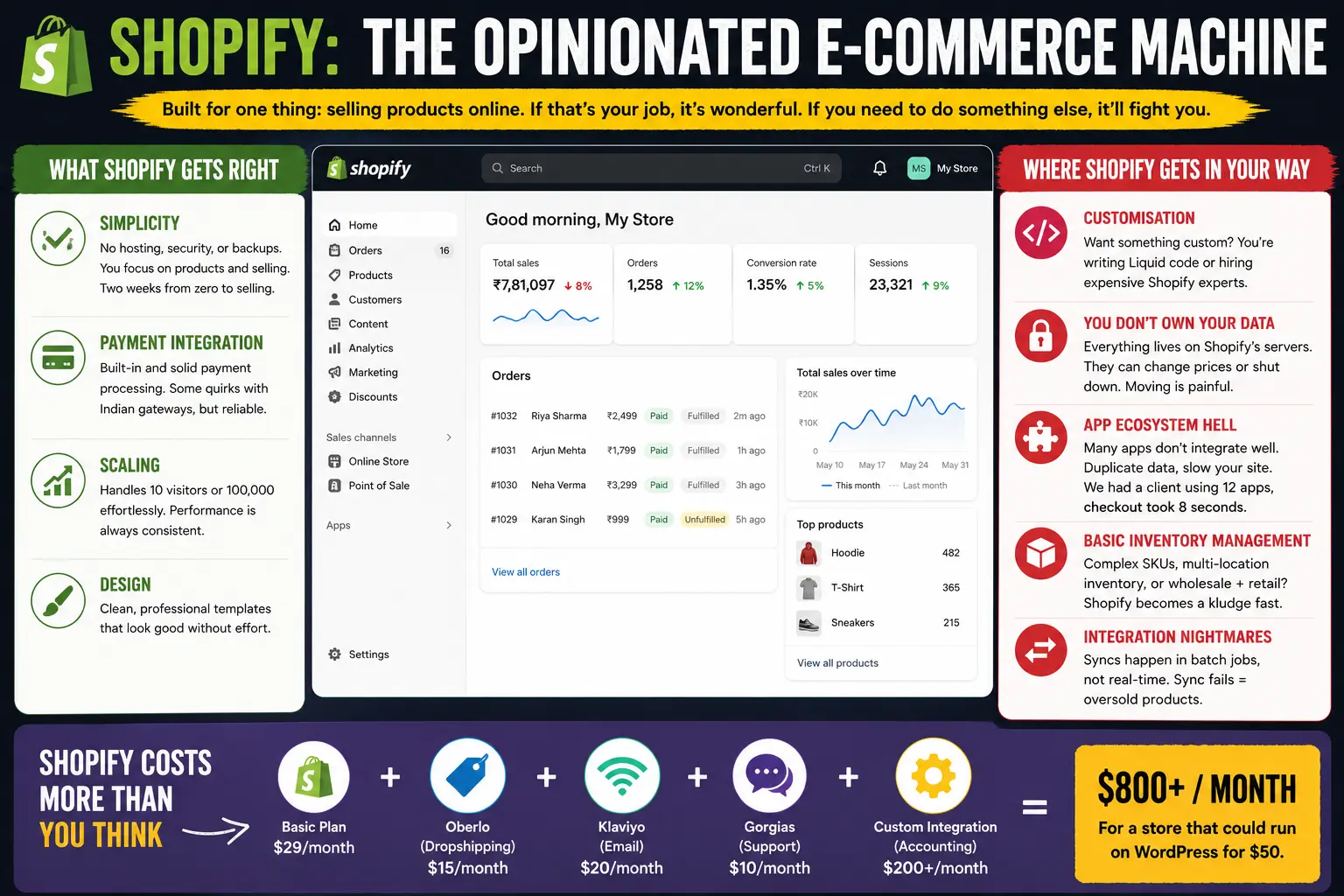
Shopify is built for one thing: selling products online. If that’s your job, it’s wonderful. If you need to do something else, it’ll fight you.
What Shopify Gets Right
Simplicity. You don’t need to think about hosting, security, or backups. Shopify handles it. You focus on products and selling. Two weeks from zero to selling is reasonable.
Payment integration. Shopify’s payment processing is built-in and solid. Not perfect — it still has some quirks with Indian payment gateways — but mostly reliable.
Scaling. Shopify handles traffic effortlessly. Whether you get 10 visitors a month or 100,000, the performance is consistent.
Design. The default templates are clean. Not custom, not beautiful, but professional-looking without effort.
Where Shopify Gets In Your Way
Customisation. Want to change something that Shopify doesn’t allow? You’re writing Liquid code (Shopify’s templating language) or hiring a Shopify specialist, who are expensive. A simple feature request can become a multi-week project because Shopify’s constraints are so rigid.
You don’t own your data. Your customer list, your sales history, everything lives on Shopify’s servers. They can change their pricing anytime. They can shut down. You can’t switch platforms without serious pain.
App ecosystem hell. Shopify’s app store looks great until you actually use it. Many apps don’t integrate cleanly. They duplicate data. They slow your site. We had a client using 12 apps and their checkout took 8 seconds to load because each app was adding overhead.
Inventory management is basic. If you have complex SKUs, variable inventory across locations, or wholesale operations alongside retail, Shopify becomes a kludge (bad makeshift solution) real fast.
Integration nightmares. Want to sync inventory with your wholesale channel? Or pull customer data into your CRM? These integrations exist, but they’re fragile. Data syncs at midnight batch jobs, not in real-time. We had a client oversell products because the sync failed silently.
Shopify Costs More Than You Think
The basic plan starts at $29/month. Sounds cheap. Then you add Oberlo for dropshipping ($15), Klaviyo for email ($20), Gorgias for customer service ($10), and a custom integration to your accounting software ($200). Suddenly you’re at $800+/month for a store that could run on WordPress for $50.
Custom Development: When You Need Something They Don’t Have
Sometimes WordPress and Shopify just don’t fit. You have a weird business model. Unusual technical requirement. Specific industry constraint that no platform anticipated.
That’s when you build custom.
The Real Cost of Custom
Money. A custom web application starts at Rs 5-10 lakhs minimum. More realistically, Rs 15-30 lakhs. Timeline? 4-9 months. If you need something with complex features and integrations, add another 6 months and another 20 lakhs.
Risk. You’re not using a proven platform. You’re building something unique. What if we miscalculated the requirements? What if the architecture doesn’t scale? These are real possibilities.
Maintenance burden. Unlike WordPress or Shopify, your custom platform is your responsibility. You need a developer on retainer for ongoing support, feature updates, security patches. WordPress breaks once a month. Your custom platform can break if you sneeze at it wrong.
Team knowledge. If your developer leaves, their knowledge leaves. Custom code is hard to document. The next person has to reverse-engineer how things work. We’ve inherited custom platforms where literally nobody understood why a particular function worked a certain way — but removing it would break everything.
When Custom Actually Makes Sense
You have a specific business model that neither WordPress nor Shopify support, AND the custom development cost pays for itself in 18-24 months through operational efficiency or revenue generation.
Example: We built a custom platform for a textile trading company (Tiruppur — the fabric town) who needed real-time price updates based on commodity markets, inventory allocation across 200+ distributors, and dynamic margin calculations. That’s not WordPress or Shopify territory. Custom made sense.
Another example: A food delivery aggregator model where you need matching algorithms, real-time order status, and payment splits across restaurants and drivers. Can’t do that with either platform. Need custom.
But here’s what I see more often: a business that could run fine on WordPress deciding to build custom because it sounds impressive. Building a luxury furniture store on a custom platform? Terrible decision. Should’ve used Shopify, saved Rs 20 lakhs.
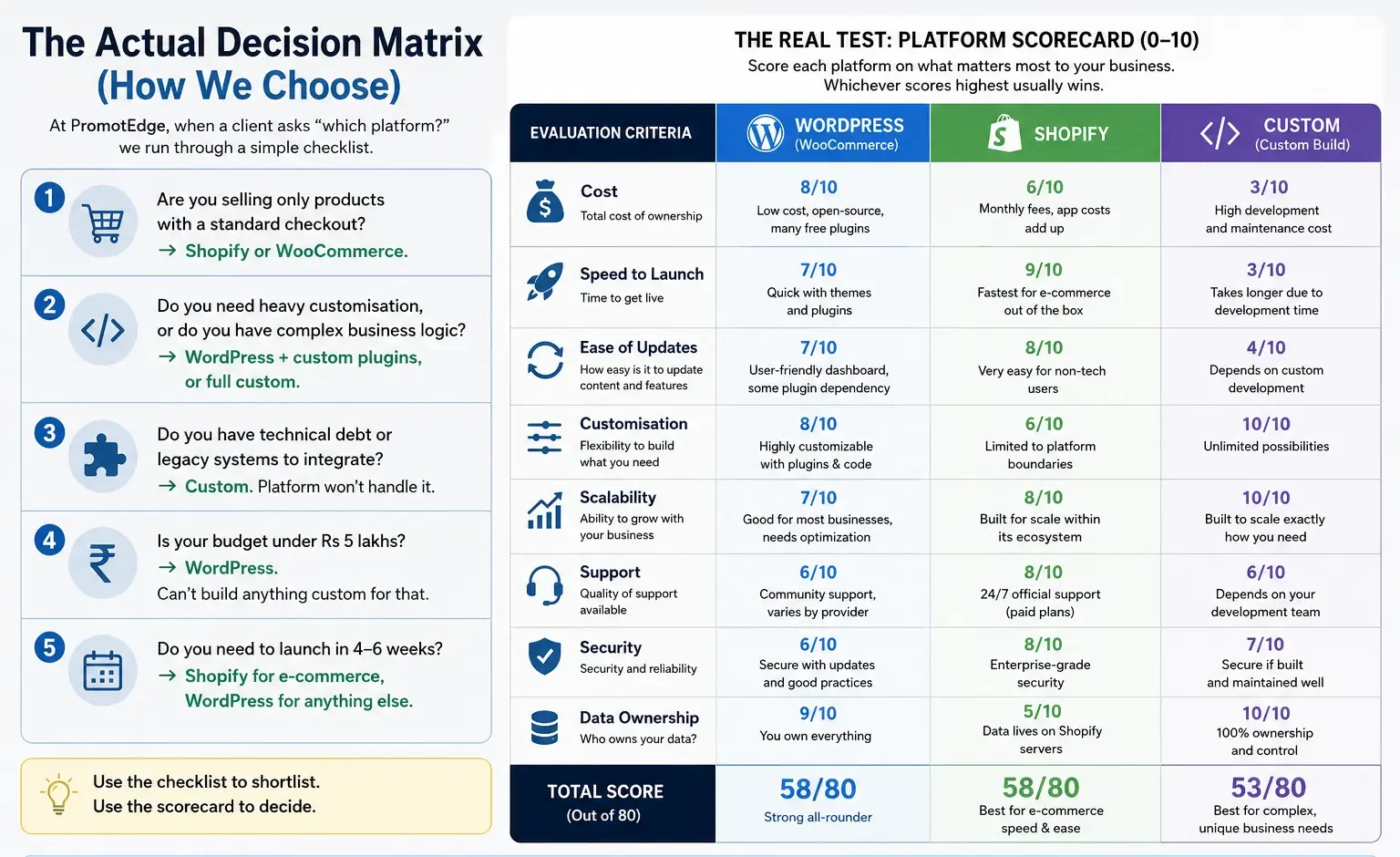
The Actual Decision Matrix (How We Choose)
At PromotEdge, when a client asks “which platform?” we run through a simple checklist.
Are you selling only products with a standard checkout? → Shopify or WooCommerce.
Do you need heavy customisation, or do you have complex business logic? → WordPress + custom plugins, or full custom.
Do you have technical debt or legacy systems to integrate? → Custom. Platform won’t handle it.
Is your budget under Rs 5 lakhs? → WordPress. Can’t build anything custom for that.
Do you need to launch in 4-6 weeks? → Shopify for e-commerce, WordPress for anything else.
The real test: What breaks your business if it’s missing? Build a quick scorecard. Score each platform (0-10) on: cost, speed to launch, ease of updates, customisation, scalability, support, security, data ownership.
Whichever scores highest usually wins.
Real Indian Businesses, Real Platform Choices
Let me walk through three examples to show how this works in practice.
A Jamshedpur Steel Distributor
They sell sheet metal, tubes, angles — building materials. Inventory is massive. They have 15 regional sales reps who take orders offline, but they wanted an online catalogue and order process.
Could they use Shopify? Technically yes. But they needed pricing to change based on order volume (bulk discounts), and they needed integration with their ERP system for real-time inventory. Shopify would require custom apps and integrations — expensive, fragile.
WordPress + WooCommerce + custom development. The custom bit was inventory sync with their ERP (real-time updates) and dynamic pricing. Cost Rs 8 lakhs, took 3 months, and now they handle 400+ orders a month without manual entry. Getting the digital marketing strategy right alongside the platform choice is what made this work end-to-end.
A Pune Fashion Brand (D2C)
Selling clothing online directly to consumers. Standard product catalogue, payment processing, customer email campaigns.
Shopify was the obvious choice. They launched in 8 weeks, integrated with Instapage for ads, used Klaviyo for email automation. Cost about Rs 2 lakhs for the initial setup including paid traffic. Now they’re profitable at Rs 12 lakhs revenue monthly.
Would they be better on WordPress? Maybe in terms of cost savings (Shopify apps add up), but they’d lose 6 months of time-to-market and would need a developer for ongoing support. For them, Shopify’s premiums are worth it.
A Bangalore SaaS Company
Building a project management tool (their core product). They needed a website, blog, knowledge base, and authentication system that ties into their app.
WordPress wouldn’t work — they needed custom auth, API integrations, and features WordPress doesn’t support. Shopify was irrelevant. Full custom using React frontend and Node backend — Rs 25 lakhs, 6 months, ongoing support.
Worth it? Yes — their product needs a professional tech infrastructure anyway. Building their website on WordPress would’ve looked cheap and fragmented. Pairing this with a strong performance marketing services helped them acquire users faster once the platform was live.
WordPress or Shopify — But Which Version?
A tactical note: WordPress.com vs WordPress.org, and Shopify Plus vs regular Shopify, change the math.
WordPress.com (hosted version) is safer and more managed, but less flexible and more expensive. You can’t install custom plugins or themes. Good for blogs and small businesses. WordPress.org (self-hosted) gives you full control but requires technical know-how or a developer.
Shopify Plus is for high-volume businesses doing $10M+ revenue. It’s custom-configurable but costs Rs 1-3 lakhs monthly. For most Indian businesses, regular Shopify is fine.
The Dirty Truth About Platform Migrations
You pick the wrong platform, realise it in year two, now what?
Migrating from Shopify to WordPress is messy. You export products, but all your product descriptions, images, variants lose formatting. Customisation you paid for doesn’t move. You essentially rebuild. We’ve done this three times. Budget Rs 3-5 lakhs and 2-3 months. Expect 20% data loss you have to manually fix.
Migrating from WordPress to Shopify is cleaner but still painful. Your custom plugins don’t exist on Shopify. Features you built need to be reimplemented as Shopify apps or workarounds. One client spent Rs 2 lakhs rebuilding something that cost them Rs 1 lakh originally, just because they moved platforms.
Custom to anything else is basically a rebuild. You’re starting over.
That’s why the initial choice matters so much. Get it wrong and you’re paying twice.
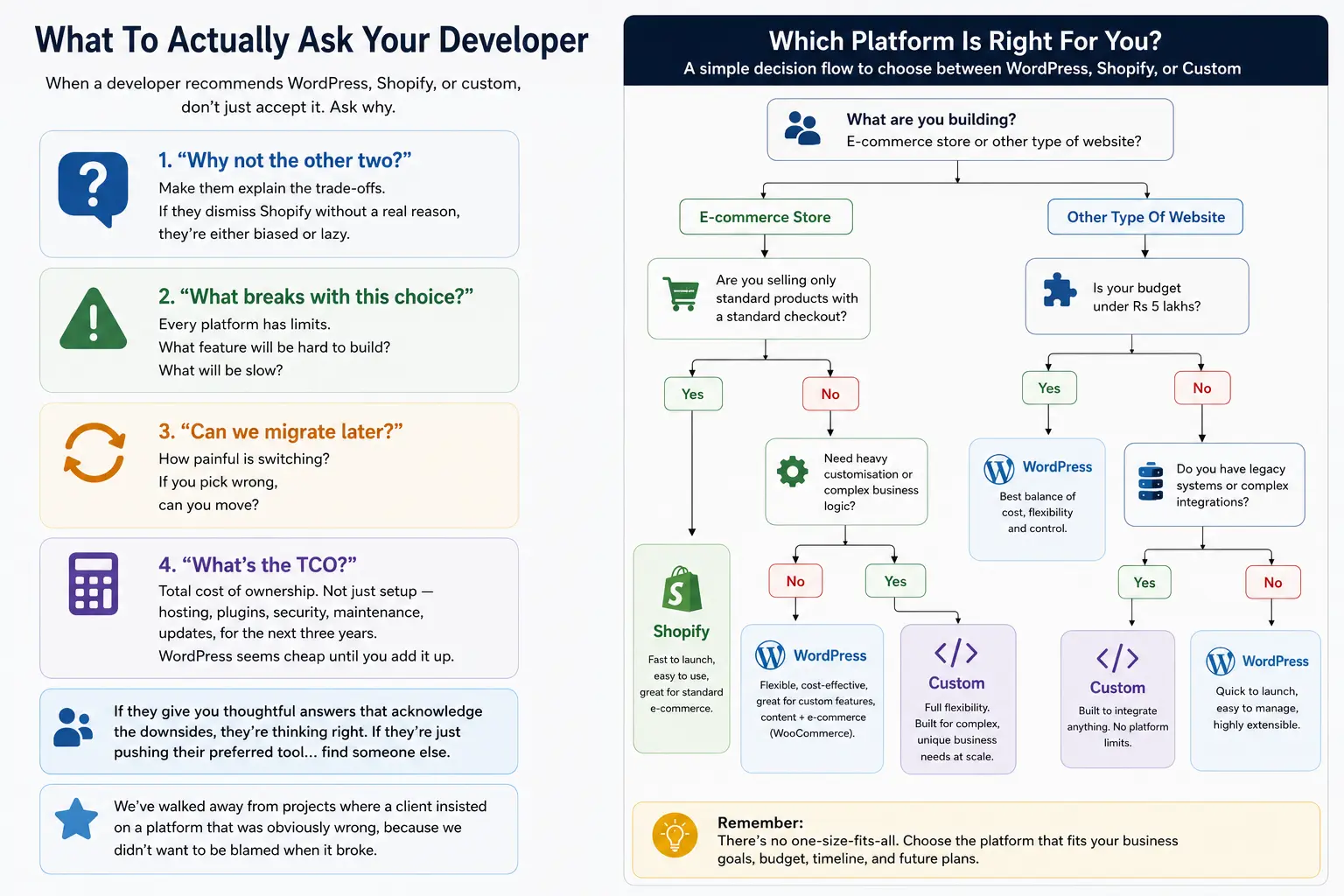
What To Actually Ask Your Developer
- When a developer recommends WordPress, Shopify, or custom, don’t just accept it. Ask why:
- “Why not the other two?” Make them explain the trade-offs. If they dismiss Shopify without a real reason, they’re either biased or lazy.
- “What breaks with this choice?” Every platform has limits. What feature will be hard to build? What will be slow?
- “Can we migrate later?” How painful is switching? If you pick wrong, can you move?
- “What’s the TCO?” Total cost of ownership. Not just setup — hosting, plugins, security, maintenance, updates, for the next three years. WordPress seems cheap until you add it up.
If they give you thoughtful answers that acknowledge the downsides, they’re thinking right. If they’re just pushing their preferred tool… find someone else. We’ve walked away from projects where a client insisted on a platform that was obviously wrong, because we didn’t want to be blamed when it broke.
Why This Matters For Business (Not Just Geeks)
Platform choice isn’t a technical decision. It’s a business decision. It affects your costs, your speed to market, your ability to scale, even your team’s sanity.
Pick WordPress when you need flexibility and are comfortable managing tech. Pick Shopify when you’re purely selling products and want something that handles operations for you. Go custom only when the math clearly favours it.
We’ve shipped sites on all three. The decision isn’t about which platform is “best” — it’s about which constraints fit your reality. Wrong choice cascades down into budget overruns, missed launch dates, and frustrated teams fighting the platform instead of serving customers.
If you’re standing at this decision point with a specific business problem, we work through this pretty regularly as part of Web Solutions. Not selling you a platform — figuring out what actually solves your problem, then building it right.
| Approach | Best for | Watch out for |
|---|---|---|
| DIY | Small teams, tight budgets | Slow ramp-up, trial-and-error |
| Freelancer | Specific project bursts | Inconsistency, limited ownership |
| Agency | Ongoing work, senior input | Higher retainer, less control |
Quick checklist before you start:
- Define the one thing you want: leads, sales, awareness — pick one.
- Baseline your numbers: write down where you are today.
- Pick a 90-day window: nothing moves in 2 weeks.
- Agree on success metrics: with whoever is paying the bill.
- Set up proper tracking: GA4, UTMs, call tracking.
- Review monthly: kill what doesn’t work, double down on what does.
The Bottom Line
If you take one thing from this: cms comparison wordpress vs shopify vs custom which is right rewards patience and specificity, not volume or clever tricks. Start small, measure honestly, fix what breaks, and compound what works. The brands doing this well in India aren’t smarter — they’re just consistent. Need a hand with this for your business? Talk to us.
Not Sure Which Path Your Business Should Take?
We help Indian businesses make this exact decision. No pitch, no pushing a particular platform. Just honest assessment of what makes sense for your situation.
FAQs
-
Which CMS is best for small business?
Ans.WordPress. Low cost, high flexibility, millions of tutorials online. Get live in 2-3 weeks, add features as you go. Shopify only if you're purely e-commerce. -
Is WordPress better than Shopify?
Ans.Depends. For straightforward e-commerce with standard products, Shopify's better — faster to launch, better payment handling. For anything else, WordPress wins. They're built for different things. -
When should I go custom?
Ans.When existing platforms create real operational friction AND the math shows custom pays for itself in 18-24 months. If you're building custom just because it sounds impressive, save the money and use WordPress.
Author Details

Latest Posts
-
 24 / Sep
GMB Optimisation Google Business Profile Optimization Guide 2026
24 / Sep
GMB Optimisation Google Business Profile Optimization Guide 2026 -
 23 / Sep
Search Engine Optimization Programmatic SEO: Template + Data Model Explained
23 / Sep
Search Engine Optimization Programmatic SEO: Template + Data Model Explained -
 22 / Sep
Conversion Rate Optimization Conversion Rate Optimization: A Practical Guide
22 / Sep
Conversion Rate Optimization Conversion Rate Optimization: A Practical Guide -
 21 / Sep
Whatsapp Marketing WhatsApp Marketing for Indian SMBs
21 / Sep
Whatsapp Marketing WhatsApp Marketing for Indian SMBs -
 19 / Sep




Related Knowledge