-
Author: Anindita Barik
-
Updated Date: Sep-24-2026
-
Views: 2 Min Read
Google Business Profile optimization is essential for businesses that want stronger visibility in Google Search and Maps online. This 2026 guide explains how to claim and verify a profile, maintain accurate NAP details, select relevant categories, add fresh photos, publish weekly posts, manage Q&A, encourage genuine reviews, and update products or services. It also covers suspension risks and regular maintenance. For Indian SMBs, consistent Google Business Profile optimization can improve local visibility, customer trust, calls, visits, and enquiries regularly.
Your Google Business Profile is sitting there, half-filled, three old photos from 2023, zero posts this month. Meanwhile, your competitor down the street posted yesterday and is picking up 40% more calls. Sound familiar?
Google Business Profile optimization isn’t about tweaking a few fields. It’s the difference between showing up in Local Pack results and vanishing entirely. For Indian SMBs—restaurants in Park Street Kolkata, digital agencies in Sector V, clinics in T Nagar—this single asset drives foot traffic, calls, and actual revenue. And yet, most businesses treat it like a one-time checkbox.
Let’s break down what actually moves the needle in 2026.
What Google Business Profile Optimization Really Is
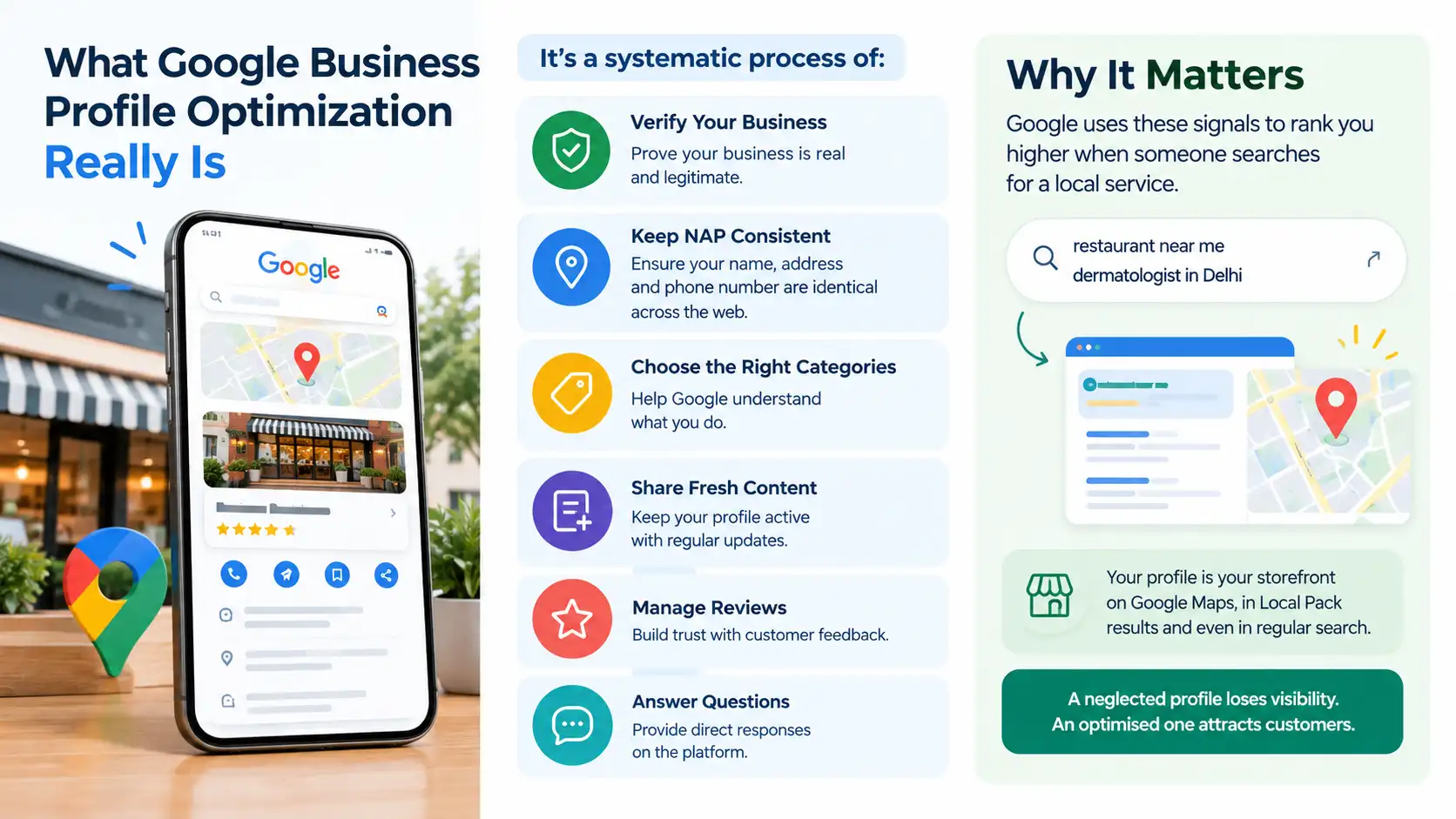
It’s not just “fill out your profile.” Google Business Profile optimization is the systematic process of verifying your business, keeping your NAP (name, address, phone) identical across the web, choosing the right categories, feeding it fresh content every week, managing reviews, and answering customer questions directly on the platform.
Think of it as local SEO’s closest cousin. You’re telling Google: “Here’s who we are, here’s where we are, here’s proof we’re real, and here’s what customers are saying about us.” Google uses that signal to rank you higher when someone searches “restaurant near me” or “dermatologist in Delhi.” That’s the entire game. This is the core of what we cover in our guide on Google My Business optimisation — rank higher in local search — the profile is not a directory listing, it’s an active ranking asset that rewards consistent maintenance.
The profile is your storefront on Google Maps, in Local Pack results, and even in regular search. A neglected profile loses visibility. An optimised one attracts customers.
Claim, Verify, and Nail Your NAP Consistency
Start here. If you don’t own your profile, you’re not in control—someone else (or a bot) might be.
Go to Google Business Profile help, sign in with your business Google account, and claim the listing. Verify ownership via postcard (4–10 days), phone call (instant), or email (instant if you have admin access to the domain).
Once you’re in, obsess over NAP consistency. Your business name, address, and phone number must be identical everywhere: your website, Google, Facebook, local directories, industry-specific sites, and your invoice headers. One digit wrong in your phone number? Google thinks you’re a different business. One spelling variation in your address? Same problem.
Use a tool to audit your NAP across 50+ citation sources (actually, scratch that—use a proper local SEO audit tool; most manual spot-checks miss things). Kolkata-based restaurant that moved from Camac Street to Park Street? You need to update the address everywhere simultaneously.
Categories, Photos, and the Cadence That Works
Pick 3–5 categories that actually describe what you do. Don’t stuff unrelated categories hoping for reach—Google penalizes it. If you run a coffee shop that also does light meals, pick “Coffee Shop” + “Restaurant.” Don’t add “Cafe & Bakery” and “Fast Food” just because they exist.
Your primary category should be the one where customers most likely search for you. Everything else is secondary.
Photos matter more than you think. But not in the way you think. Don’t upload 50 photos of the same thing. Upload variety: storefront, interior, menu items (for F&B), team, work-in-progress, happy customers (with permission). Quality over quantity. And yes, add a logo.
Cadence: Add 4–8 new photos every month. Not all at once. Spread them. Google’s algorithm seems to reward profiles that get fresh visual content consistently—it signals an active, real business.
GBP Posts—Your Weekly Content Engine
This is where most SMBs fail. They’re available but ignored.
Google Business Profile posts appear in the Knowledge Panel (the box that shows up on the right side of Google Search and in Maps). Posts expire after 7 days, but they matter for engagement. Use them to:
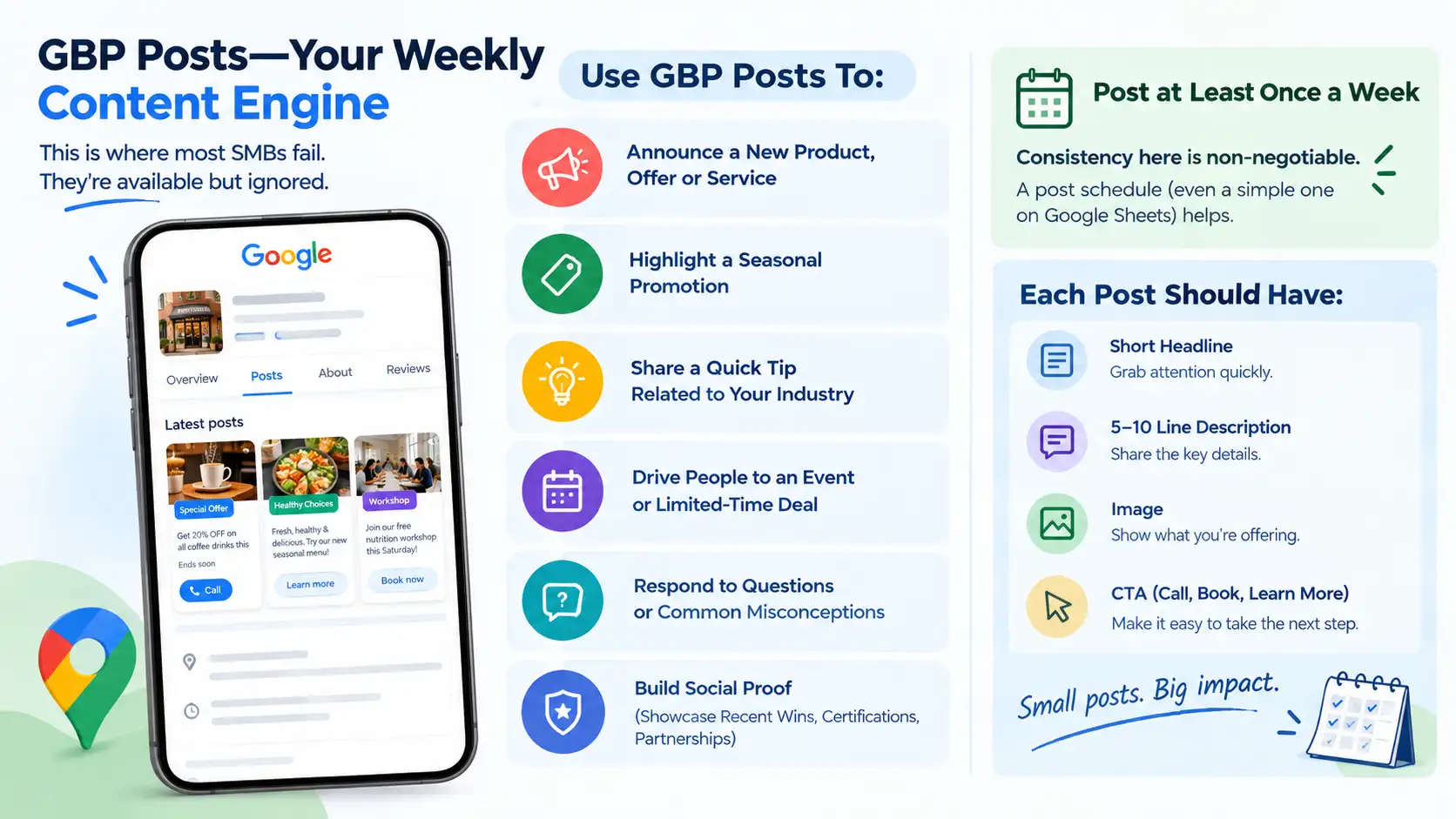
- Announce a new product, offer, or service
- Highlight a seasonal promotion (Diwali special, monsoon discount)
- Share a quick tip related to your industry
- Drive people to an event or limited-time deal
- Respond to questions or common misconceptions (for service businesses)
- Build social proof (showcase recent wins, certifications, partnerships)
Post at least once a week. Yaar, consistency here is non-negotiable. A post schedule (even a simple one on Google Sheets) helps. Format: short headline + 5–10 line description + image + CTA (call, book, learn more).
The Q&A Section—Seed It Yourself
Google lets customers ask questions directly on your profile. The problem: most businesses wait for customers to ask. Better strategy? Ask yourself.
Log in to your profile, go to Q&A, and post the 10 most common questions you hear:
- What are your hours?
- Do you offer home delivery?
- What’s your cancellation policy?
- Are you certified / licensed?
- Do you offer consultations?
Answer them immediately (as the business owner or manager). This does three things: (1) builds trust for potential customers, (2) gives you control of the narrative, (3) signals to Google that your profile is actively maintained.
Update Q&A monthly. Add new questions as the season changes or as you introduce new services.
Review Generation and Reply Discipline
Reviews are a ranking factor. More reviews = higher rank. But there’s a twist: Google cares more about recency and consistency than total count.
A profile with 12 reviews from the last 30 days beats one with 50 reviews from last year.
Ask customers for reviews at the point of transaction: after they’ve paid, received the item, or left your location. Provide a direct link (your Google Business Profile has a shareable review link; use it). Make it one-click easy. The same trust-building principle behind user-generated content applies directly to GBP reviews — a real customer’s honest words carry more weight with both Google’s algorithm and potential customers than anything the business itself can say.
Reply to every review—positive and negative. Positive reviews get a quick “thank you for the love” or specific mention of what they praised. Negative reviews? Respond professionally within 48 hours, offer to resolve offline, and always ask for a follow-up conversation. Never argue publicly. This signals to Google (and to potential customers reading reviews) that you care.
Review velocity matters. If you go 3 months with no new reviews, your profile loses momentum in the algorithm. Even one review every 2 weeks keeps the signal alive.
Products and Services Tab—For Ecommerce and Service Businesses
If you sell products (Sector V tech companies selling services, restaurants with packaged goods), Google’s Products tab lets you showcase individual offerings with photos, prices, and descriptions.
Same logic: one-click, useful, updated. A restaurant might list signature dishes with prices. A salon might list haircut types with prices. An agency might list core service packages.
This tab doesn’t move mountains alone, but it reduces friction. A customer sees your profile, checks the products tab, finds what they want, and calls or books immediately. That’s the conversion funnel right there.
Why Profiles Get Suspended
Google suspends profiles for a few reasons. Know them so you don’t accidentally trigger it.
Incorrect business information is the biggest one. Wrong address, fake phone number (or someone else’s), mismatched NAP—suspension. Incomplete verification. Multiple profiles for the same business (Google consolidates them; if you’re creating duplicates to game visibility, you’ll get caught). Prohibited content. Hate speech, misleading claims, or spam in photos, posts, or Q&A. Reviews that seem fake—mass purchases or bot reviews trigger manual reviews and sometimes suspension. Violating Google’s policies. This includes promoting illegal services, medical misinformation, or financial schemes.
Prevention is dead simple: be honest, keep data current, and don’t try to cheat the system.
Your Implementation Checklist
Here’s what to do this week:
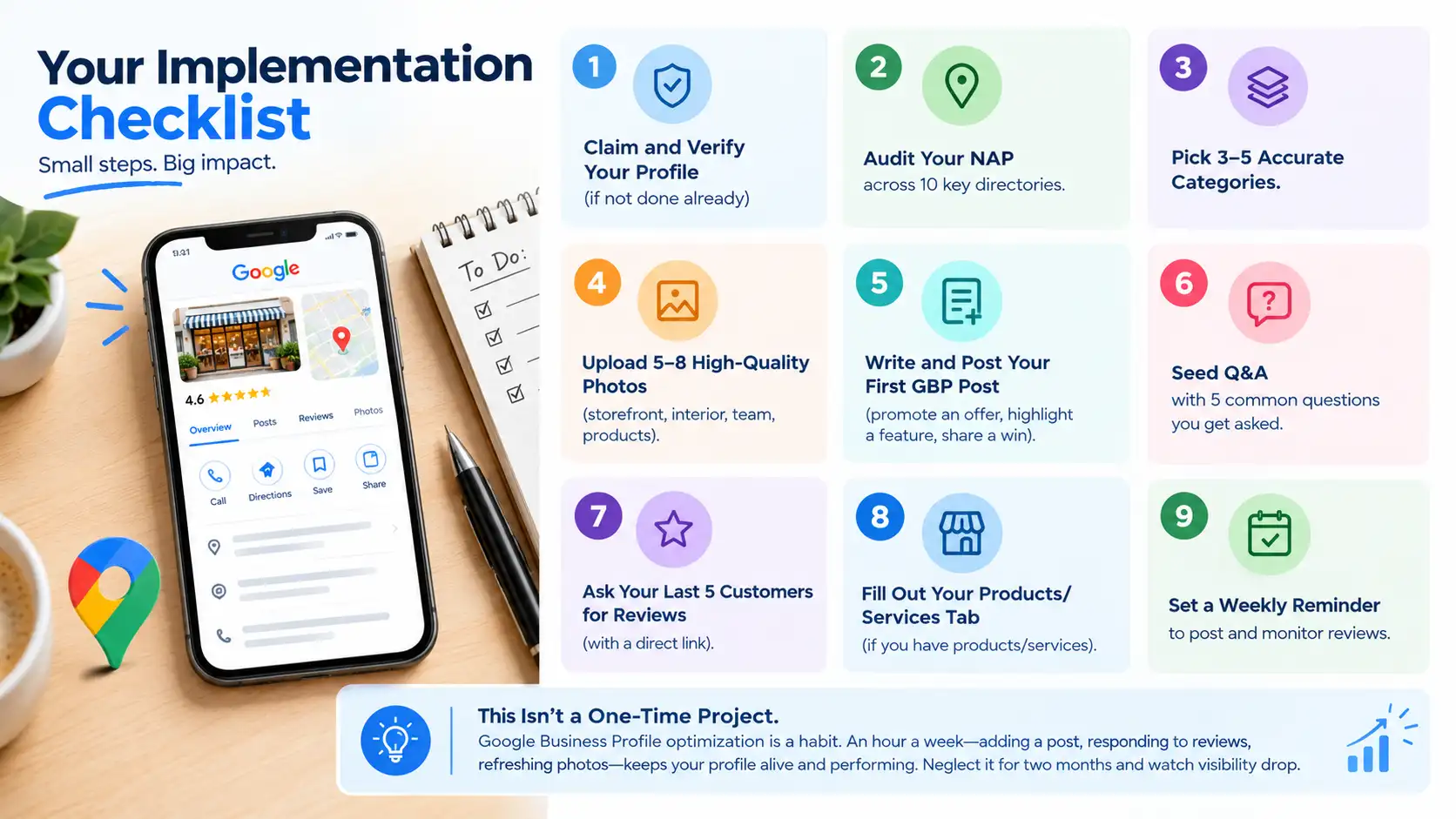
- Claim and verify your profile (if not done already)
- Audit your NAP across 10 key directories
- Pick 3–5 accurate categories
- Upload 5–8 high-quality photos (storefront, interior, team, products)
- Write and post your first GBP post (promote an offer, highlight a feature, share a win)
- Seed Q&A with 5 common questions you get asked
- Ask your last 5 customers for reviews (with a direct link)
- If you have products/services, fill out that tab
- Set a calendar reminder to post once a week and monitor reviews
This isn’t a one-time project. Google Business Profile optimization is a habit. An hour a week—adding a post, responding to reviews, refreshing photos—keeps your profile alive and performing. Neglect it for two months and watch visibility drop.
| Approach | Best for | Watch out for |
|---|---|---|
| DIY | Small teams, tight budgets | Slow ramp-up, trial-and-error |
| Freelancer | Specific project bursts | Inconsistency, limited ownership |
| Agency | Ongoing work, senior input | Higher retainer, less control |
Quick checklist before you start:
- Define the one thing you want: leads, sales, awareness — pick one.
- Baseline your numbers: write down where you are today.
- Pick a 90-day window: nothing moves in 2 weeks.
- Agree on success metrics: with whoever is paying the bill.
- Set up proper tracking: GA4, UTMs, call tracking.
- Review monthly: kill what doesn’t work, double down on what does.
The Bottom Line
If you take one thing from this: google business profile optimization rewards patience and specificity, not volume or clever tricks. Start small, measure honestly, fix what breaks, and compound what works. The brands doing this well in India aren’t smarter — they’re just consistent. Need a hand with this for your business? Talk to us.
Need help with google business profile optimization?
Improve your local visibility and attract more customers. Our local SEO experts optimize your Google Business Profile to help you rank higher in local searches, build trust, and generate more calls, visits, and enquiries.
FAQs
-
What's the difference between Google Business Profile and Google My Business?
Ans.Google My Business was rebranded to Google Business Profile in late 2021. It's the same platform—just a new name. If you're using it, you're already on the current system. -
How long does it take to see results after optimising my profile?
Ans.Initial improvements show up within 1–2 weeks (better visibility in Local Pack searches). Significant ranking boosts—moving from position 8 to position 3, for example—usually take 4–8 weeks of consistent optimization (posts, photos, reviews). The key is doing something every week, not doing everything once. -
Can I have multiple Google Business Profiles for one business?
Ans.No. Google will merge duplicate profiles or suspend the duplicates if they detect the same business. If you have multiple locations, create a profile for each location separately—that's allowed and encouraged. But one business name = one profile. -
Is buying reviews or using a review service a good idea?
Ans.No. Fake reviews get flagged by Google's algorithms (and customer reports) and removed. Worse, if Google detects a pattern of artificial reviews, they'll suspend or penalize your profile. The risk isn't worth the short-term bump. Ask real customers instead. -
What happens if my business closes?
Ans.Keep the profile open for 2–3 months so customers don't show up to a closed door. Then request permanent closure through Google Business Profile settings. This is cleaner than just abandoning the profile (which confuses customers and wastes their time). -
Should I add all my services to the Services tab or wait until I'm bigger?
Ans.Add them now. The Services tab helps local customers understand your full range. You don't need 50 services—just the core ones you actively promote. Update it quarterly as your offerings evolve. -
How often should I post to Google Business Profile?
Ans.Minimum: once a week. Ideal: 1–3 times a week if you're a high-volume business (restaurant, retail, salon). Less frequent (twice a month) still works if it's consistent. The recency signal matters; Google favours active profiles. The consistency signal matters more—don't post 10 times one week and then nothing for a month. -
Can I optimise my Google Business Profile myself or do I need an agency?
Ans.You can do it yourself. It's not rocket science—claim the profile, add accurate info, post weekly, respond to reviews, and ask for new reviews. If you don't have time or want professional oversight (competitor analysis, category strategy, content calendar), an agency helps. But the baseline? You can handle it with an hour a week. -
What's the impact of Google Business Profile optimization on my main website's SEO?
Ans.Indirect but real. A strong GBP improves local SEO signals, which builds authority and trust for your domain. Customers who find you via Maps and leave reviews create social proof that affects click-through rates from organic search. Local optimizations (NAP consistency, categories, structured data) also support your main site's local relevance. It's interconnected, not siloed.
Author Details

Latest Posts
-
24 / Sep
GMB Optimisation Google Business Profile Optimization Guide 2026
-
 23 / Sep
Search Engine Optimization Programmatic SEO: Template + Data Model Explained
23 / Sep
Search Engine Optimization Programmatic SEO: Template + Data Model Explained -
 22 / Sep
Conversion Rate Optimization Conversion Rate Optimization: A Practical Guide
22 / Sep
Conversion Rate Optimization Conversion Rate Optimization: A Practical Guide -
 21 / Sep
Whatsapp Marketing WhatsApp Marketing for Indian SMBs
21 / Sep
Whatsapp Marketing WhatsApp Marketing for Indian SMBs -
 19 / Sep