-
Author: Anindita Barik
-
Updated Date: Sep-23-2026
-
Views: 2 Min Read
Programmatic SEO helps businesses create large numbers of useful, search-focused pages by combining a reusable page template with structured data. This guide explains how the template and dataset model works, where Programmatic SEO delivers value, and what can cause it to fail. It covers practical use cases, common mistakes, no-code setup options, keyword research, content quality, and ways to start with a small set of pages before expanding your strategy.
Your competitor just published 10,000 pages. Not through a content mill. Not by hiring an army of writers. They built a system. One template. A dataset. Maybe a CMS that stitches them together. And now they rank for searches you didn’t even know existed.
That’s programmatic SEO. It’s not new. Google’s been cool with it for years as long as the pages aren’t thin content spam. But most Indian marketing teams still haven’t heard of it. And the ones who have think it’s only for giant tech companies with developer budgets.
It isn’t. Your business—whether you’re a B2B SaaS outfit, an EdTech brand, or a market aggregator—can build programmatic SEO today. This blog covers what it actually is, why it works so well, where it tanks, and exactly how to start small without hiring an engineer.
What Programmematic SEO Actually Is
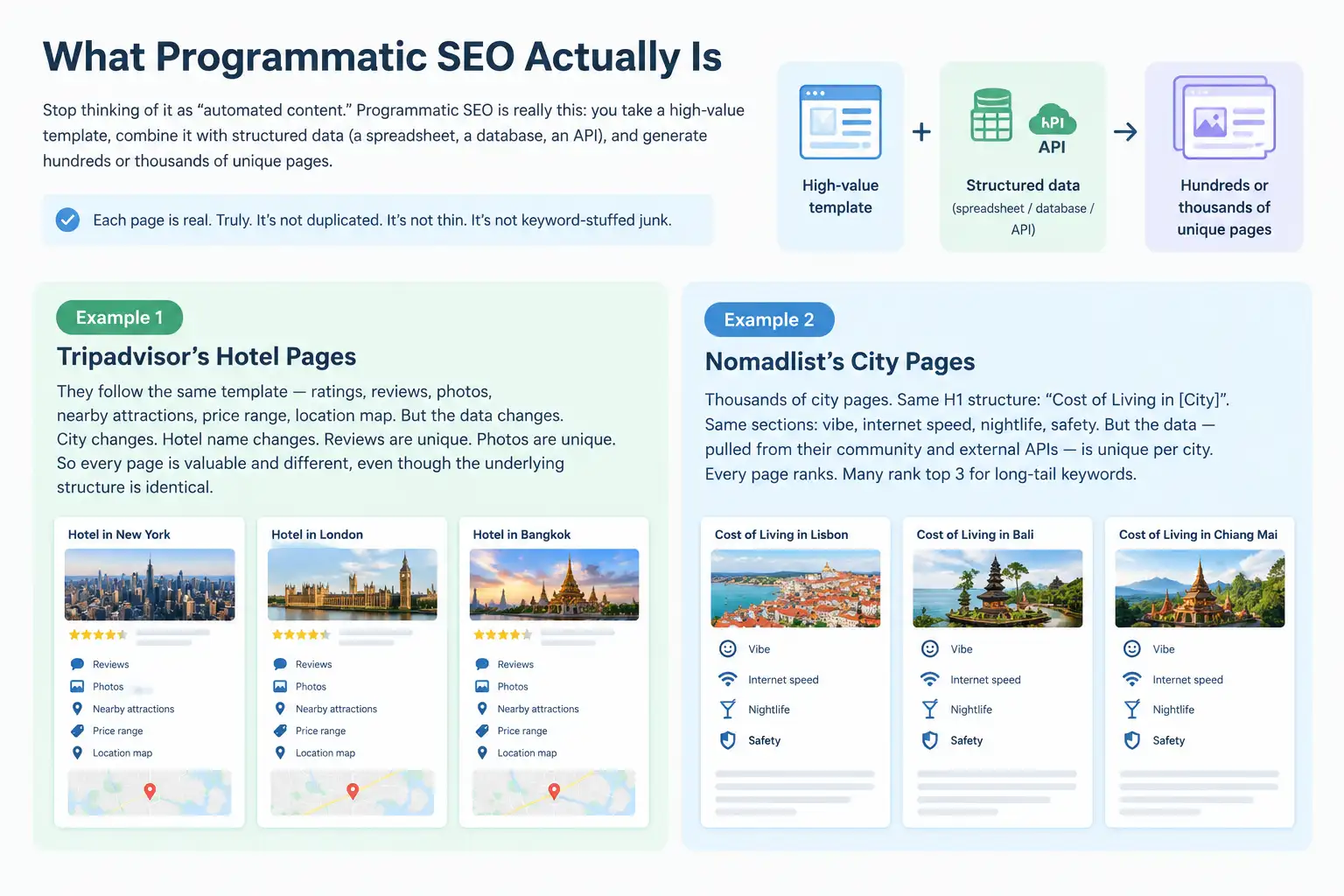
Stop thinking of it as “automated content.” That phrase makes it sound soulless. Programmematic SEO is really this: you take a high-value template, combine it with structured data (a spreadsheet, a database, an API), and generate hundreds or thousands of unique pages.
Each page is real. Truly. It’s not duplicated. It’s not thin. It’s not keyword-stuffed junk.
Example. Tripadvisor’s hotel pages. They follow the same template—ratings, reviews, photos, nearby attractions, price range, location map. But the data changes. City changes. Hotel name changes. Reviews are unique. Photos are unique. So every page is valuable and different, even though the underlying structure is identical.
Another example: Nomadlist. Thousands of city pages. Same H1 structure: “Cost of Living in [City]”. Same sections: vibe, internet speed, nightlife, safety. But the data—pulled from their community and external APIs—is unique per city. Every page ranks. Many rank top 3 for long-tail keywords.
Programmatic SEO is one of the more advanced applications of search engine optimisation — it doesn’t replace foundational SEO work, it multiplies it by applying the same keyword and content principles across thousands of pages simultaneously.
The Template + Dataset Model That Actually Works
Here’s what you need to understand. Programmematic SEO has two parts. Non-negotiable.
The first: a reusable template. This is your HTML/page structure. The H1, the sections, the layout. Think of it as the skeleton. You design it once—with SEO best practices baked in—and then you replicate it.
The second: a dataset. A CSV. A Google Sheet. A database. Anything that holds the unique data that fills that template. City names. Price points. Reviews. Product specs. Metadata.
Here’s the yaar moment (sorry, hindi slipping in)—you need both. A template without data is useless. Data without a template is just a spreadsheet. Together? They become thousands of pages.
Let’s say you’re a B2B SaaS platform that aggregates freelancers. Template: [Freelancer Name] – [Service] – PromotEdge Vetted. Same H1 structure every time. Sections: about, past work, hourly rate, reviews. Data: pull from your freelancer database. Generate 500 pages. Each ranks for “[freelancer name] + [service] near me”—traffic you never would’ve captured manually.
Where You’ve Seen It Work
Zapier. They have thousands of integration pages. “Zapier + Slack”. “Zapier + HubSpot”. Same template. Different APIs, different workflows. Every page ranks because every page is genuinely useful—it shows you how two tools work together.
Yelp. Restaurant pages. Template stays the same. Photos, ratings, hours, address, reviews, menu snippets. But thousands of unique locations. Thousands of unique data sets.
TripAdvisor. Airbnb. LinkedIn (job pages). All of them use this model. It’s not a hack. It’s a legitimate SEO strategy that Google explicitly allows.
Why does it work? Because scale. You’re covering long-tail keywords you didn’t know existed. You’re answering search queries with actual pages. You’re not hoping for traffic—you’re architecting it.
The Thin Content Trap: When It Tanks
But here’s the dark side. And it’s real.
If your template is thin or your data is thin, Google will absolutely penalize you. Not always immediately. But you’ll notice a collapse.
Thin content = no real value. A page that says “[City] Hotels” and then just lists hotel names with no reviews, no comparisons, no context. That’s thin. Google has gotten much smarter at detecting it.
The second killer: duplicate data. If your dataset isn’t actually unique, you’re done. Example: you scrape the same reviews from another site and republish them across 1000 pages. Google will catch it. You’ll get a manual action.
The third killer: no keyword research. You generate 5000 pages but you didn’t validate that the keyword variations actually exist in search volume. You’re making noise, not traffic.
This is why most programmatic SEO attempts fail. Teams get excited about the scale and skip the hard part: ensuring each page is genuinely valuable.
How to Start Small (No Engineer Required)
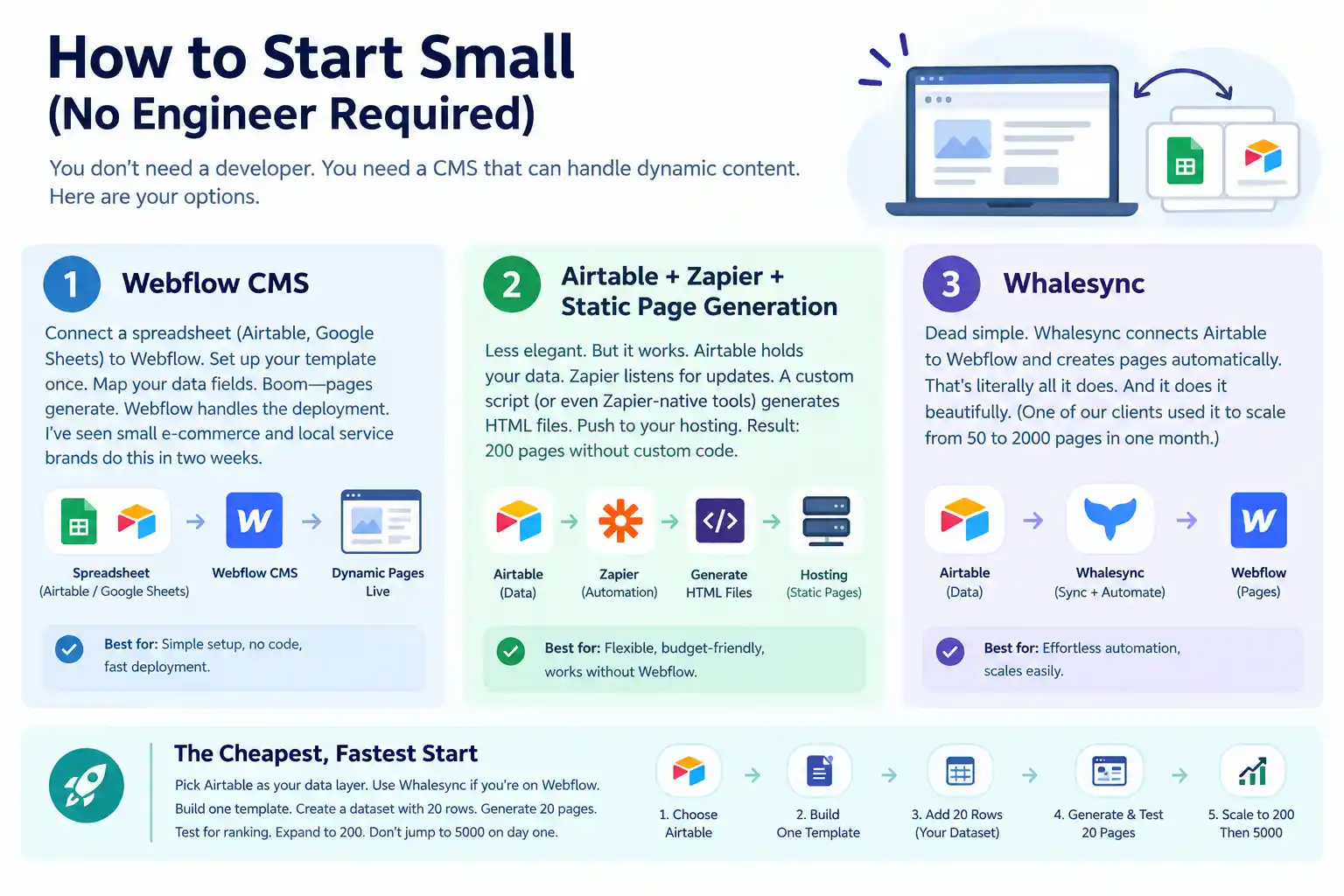
You don’t need a developer. You need a CMS that can handle dynamic content. Here are your options.
Webflow CMS : Connect a spreadsheet (Airtable, Google Sheets) to Webflow. Set up your template once. Map your data fields. Boom—pages generate. Webflow handles the deployment. I’ve seen small e-commerce and local service brands do this in two weeks.
Airtable + Zapier + static page generation : Less elegant. But it works. Airtable holds your data. Zapier listens for updates. A custom script (or even Zapier-native tools) generates HTML files. Push to your hosting. Result: 200 pages without custom code.
Whalesync : Dead simple. Whalesync connects Airtable to Webflow and creates pages automatically. That’s literally all it does. And it does it beautifully. (One of our clients used it to scale from 50 to 2000 pages in one month.)
The cheapest, fastest start: pick Airtable as your data layer. Use Whalesync if you’re on Webflow. Build one template. Create a dataset with 20 rows. Generate 20 pages. Test for ranking. Expand to 200. Don’t jump to 5000 on day one.
Zapier, Tripadvisor, and the Execution Gap
Why can Zapier generate 10,000 pages and get away with it, but you can’t? Because they earned the trust. Their pages are deep. They have affiliate data, API documentation, user reviews, workflow templates, and custom case studies baked into every page.
You can’t replicate that overnight. So don’t try. Your MVP should be 50–200 pages that genuinely answer a search query. Real reviews (or honest metadata). Real photos (or diagrams). Real comparisons. Then expand methodically.
Zapier started with integrations people actually wanted. Tripadvisor started with cities people actually visited. Nomadlist started with a community that actually lived in places. Each dataset had value built in.
The Messy Middle: When to Use It, When to Skip It
Programmematic SEO works brilliantly for:
- Marketplace platforms (freelancers, services, local businesses)
- Comparison engines (price, features, reviews)
- Location-based services (city guides, restaurant reviews, property listings)
- Specification pages (products with variants, SaaS + integration combos)
- Case studies or use case pages (templated but data-driven)
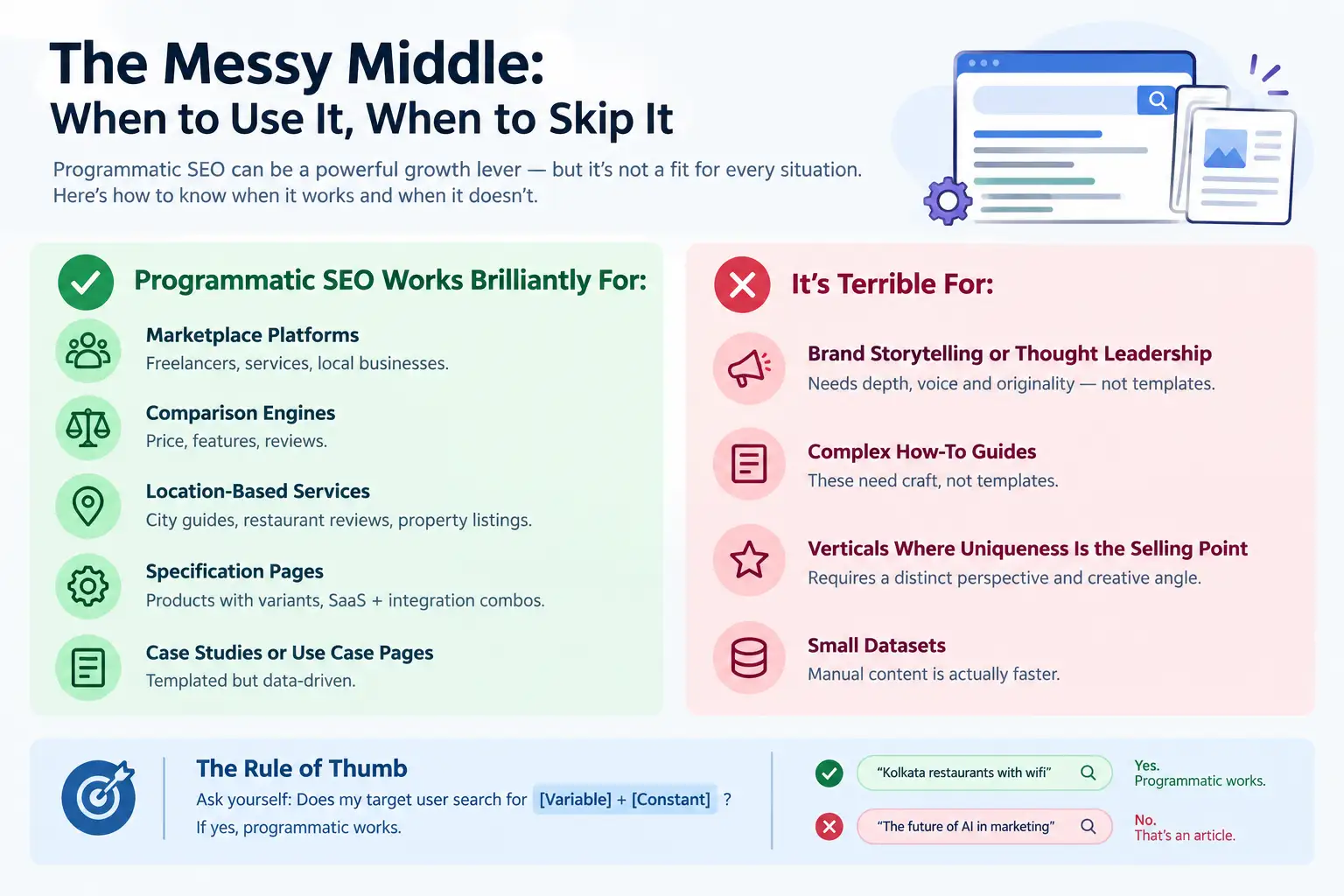
It’s terrible for:
- Brand storytelling or thought leadership
- Complex how-to guides (these need craft, not templates)
- Verticals where uniqueness is the selling point
- Small datasets where manual content is actually faster
Ask yourself: Does my target user search for “[Variable] + [Constant]”? If yes, programmatic works. “[Kolkata] restaurants with wifi”? Yes. “The future of AI in marketing”? No. That’s an article. This is templates. Different animals.
Tools to Make It Happen
You don’t need an expensive stack.
Airtable (free tier up to 100 records). Hold your data. Version it. Invite team members to edit.
Webflow CMS (50/month if you’re on Webflow). Native dynamic content. Clean, not janky.
Whalesync (free for small datasets, $50–200/month for bigger ones). Syncs Airtable to Webflow automatically. You change the data, pages update instantly.
Ahrefs (to validate keyword volume before you build). Check that “[City] + keyword” has actual search volume. Don’t guess.
That’s your stack. Total cost under 150 per month. Seriously. The limitation isn’t money. It’s time and clarity on your dataset.
Three Mistakes to Avoid
Build too fast. Teams see the potential and generate 2000 pages in week one. Then Google’s crawler gets confused. Then they get a manual action. Pace matters. Start with 50, validate, expand to 200, then go bigger.
Assume thin templates are okay. “We’ll fill in the details later.” Nope. Each page must be useful on day one. If your template is [Name] + [Price], that’s not enough. Add reviews, comparisons, related items. This is the same principle behind on-page SEO that actually works — a template that passes the on-page fundamentals check (clear H1, unique meta, sufficient content depth, internal links) will outperform a thin one at any scale.
Ignore cannibalization. If your template matches your existing content too closely, you’ll have two pages competing for the same keyword. Plan your keyword strategy first. Make sure each page targets a distinct search intent.
| Approach | Best for | Watch out for |
|---|---|---|
| DIY | Small teams, tight budgets | Slow ramp-up, trial-and-error |
| Freelancer | Specific project bursts | Inconsistency, limited ownership |
| Agency | Ongoing work, senior input | Higher retainer, less control |
Quick checklist before you start:
- Define the one thing you want: leads, sales, awareness — pick one.
- Baseline your numbers: write down where you are today.
- Pick a 90-day window: nothing moves in 2 weeks.
- Agree on success metrics: with whoever is paying the bill.
- Set up proper tracking: GA4, UTMs, call tracking.
- Review monthly: kill what doesn’t work, double down on what does.
The Bottom Line
If you take one thing from this: programmatic seo rewards patience and specificity, not volume or clever tricks. Start small, measure honestly, fix what breaks, and compound what works. The brands doing this well in India aren’t smarter — they’re just consistent. Need a hand with this for your business? Talk to us.
FAQs
-
Is programmatic SEO the same as auto-generated content?
Ans.No. Auto-generated content is usually thin, spammy, and keyword-stuffed. Programmematic SEO uses templates + real data to create genuinely useful pages. Google allows it. Think Zapier, not content mills. The difference is in the execution—is each page adding value, or just filling a quota? -
How many pages should I generate before checking if they rank?
Ans.Start with 20–50. Generate them, index them (submit sitemap to Google Search Console), and wait 2–4 weeks. Check which ones rank, which ones get clicks, which ones fall flat. Learn from the pattern, then expand. This beats generating 5000 and discovering 4500 are useless. -
Can a small business actually do this without hiring a developer?
Ans.Yes. Whalesync + Webflow is genuinely no-code. Airtable + Zapier can work too. The investment is a few hundred rupees per month in tools and a solid day of setup. The hard part isn't coding—it's designing a template that's valuable and sourcing clean data. -
If Google ever kills programmatic SEO, what do I do?
Ans.It won't, because it's legitimate. Zapier, Tripadvisor, and Amazon all use it. Google's issue is with thin content and spam, not with templates + data. As long as each page adds value, you're safe. The risk isn't the strategy—it's executing it poorly. -
How do I know my dataset is big enough to justify programmatic SEO?
Ans.If you have 50+ unique data points (cities, freelancers, products, whatever), it's worth exploring. Under 50, manual content is faster. The ROI flips around 100+ data points. Beyond 500? Programmematic becomes essential. Check Ahrefs' programmatic SEO guide for more math on this. -
What if my data changes frequently? Does programmatic SEO still work?
Ans.Yes, actually better. If you're syncing Airtable to Webflow via Whalesync, changes publish automatically. Restaurant hours change? Update the sheet, page updates instantly. Stock prices change? Same thing. This is where programmatic shines—it scales updates as well as generation. Manual content can't compete. -
Can programmatic SEO work for B2B SaaS?
Ans.Absolutely. Integration pages. Customer use case pages. Feature comparisons. Location-based landing pages. All of these can be templated. Zapier, HubSpot, and dozens of SaaS companies do this at scale. Start with a smaller subset—maybe 100 integration pages—and measure. -
Is there a risk of Google penalizing me for duplicate meta descriptions?
Ans.If your descriptions are actually duplicated, yes. But your template should dynamically generate unique descriptions per page using your data. "[Freelancer] - [Service] - PromotEdge Vetted" is unique. "[Service]" across 1000 pages is thin. Make sure your template varies the metadata. It usually should.
Author Details

Latest Posts
-
 24 / Sep
GMB Optimisation Google Business Profile Optimization Guide 2026
24 / Sep
GMB Optimisation Google Business Profile Optimization Guide 2026 -
23 / Sep
Search Engine Optimization Programmatic SEO: Template + Data Model Explained
-
 22 / Sep
Conversion Rate Optimization Conversion Rate Optimization: A Practical Guide
22 / Sep
Conversion Rate Optimization Conversion Rate Optimization: A Practical Guide -
 21 / Sep
Whatsapp Marketing WhatsApp Marketing for Indian SMBs
21 / Sep
Whatsapp Marketing WhatsApp Marketing for Indian SMBs -
 19 / Sep