
-
Author: Anindita Barik
-
Updated Date: Jul-02-2026
-
Views: 2 Min Read
Most websites look great but rank poorly because nobody ran a proper technical SEO audit. This guide explains what to check — indexation, Core Web Vitals, mobile responsiveness, redirects, and structured data — using real examples from Indian businesses that lost traffic to preventable issues. It includes a tool comparison, a prioritization framework for fixes, and guidance on when to DIY versus hire help. (69 words)
A technical SEO audit is a systematic check of a website’s infrastructure — crawlability, page speed, mobile responsiveness, HTTPS, sitemaps, redirects, and schema markup — to ensure Google can properly find, crawl, and rank its pages. It answers one core question: can search engines actually access and understand your content, regardless of how good that content is?
For Indian websites specifically, a technical SEO audit means addressing issues like crawl errors, slow load times on 4G networks, broken redirect chains, and missing structured data before investing further in content or backlinks — since technical problems cap how well even high-quality content can rank, no matter how much effort goes into everything else.
The Website That Looked Perfect But Ranked Nowhere
Three months ago, we got a call from a manufacturing export company in Kolkata. Beautiful website. Real web development firm built it. Responsive design, clean code, the works.
They were getting maybe 40 organic visits a month. For a B2B company with actual search demand in their vertical, that’s… rough.
We ran a technical audit. Found 47 crawl errors, uncompressed images that took forever to load, no schema markup, redirect chains, broken internal links scattered across 3,000+ pages.
Their web team had optimised everything for aesthetics and user experience. Nobody had optimised it for Google.
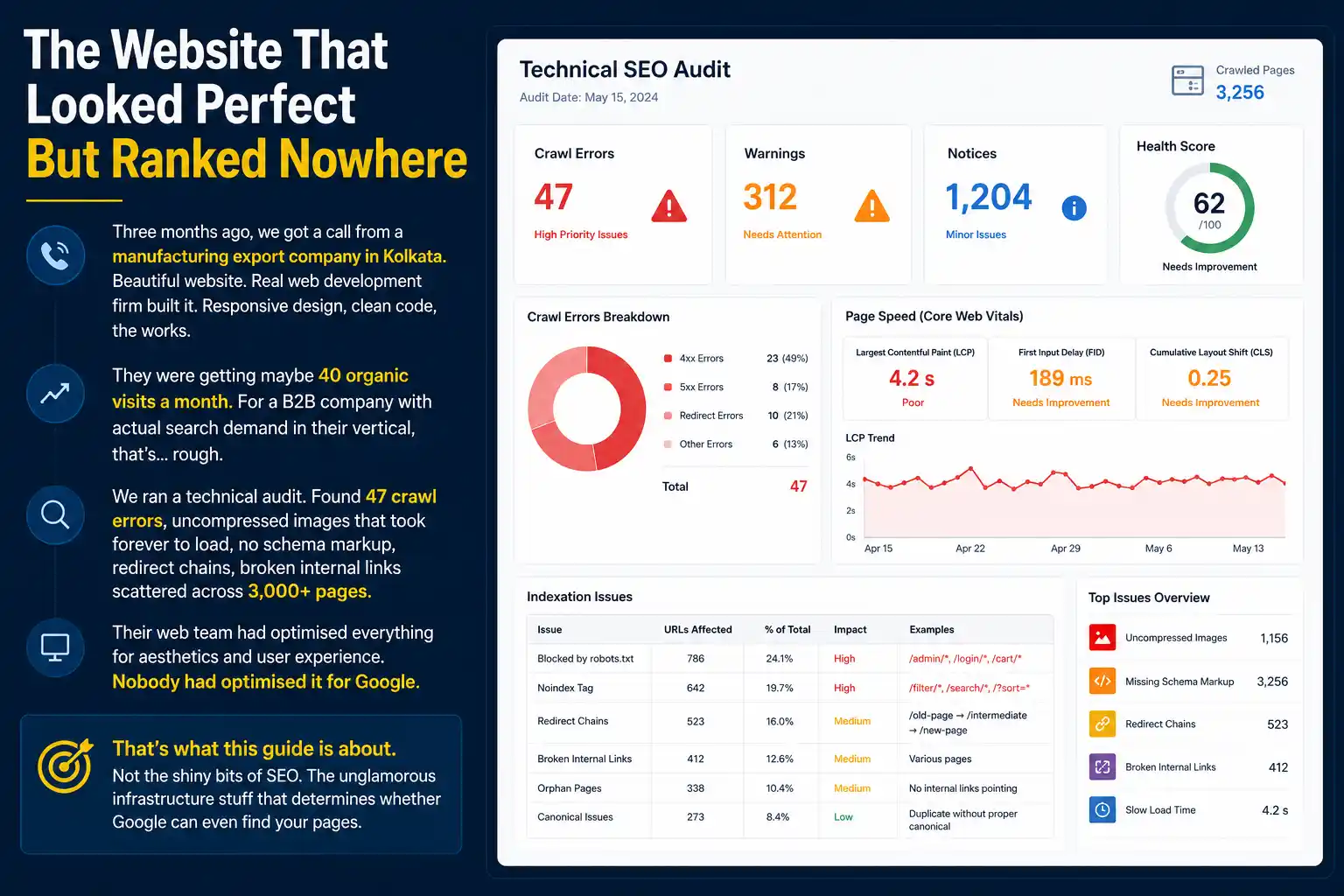
That’s what this guide is about. Not the shiny bits of SEO. The unglamorous infrastructure stuff that determines whether Google can even find your pages.
What Is a Technical SEO Audit
A technical audit checks whether your website’s infrastructure is set up properly for search engines. Speed. Mobile compatibility. Crawlability. Indexation. HTTPS security. Redirects. Sitemaps. Schema markup. All the plumbing that most people ignore until something breaks.
Here’s the bit that frustrates me: brands invest heavily in content and backlinks, then ignore the foundation. It’s like building a house with an excellent interior design but the roof leaks.
Google’s algorithm can’t rank a page it can’t find. It can’t rank fast content if the page loads in 8 seconds. It can’t understand what your page is about without proper schema. Technical SEO is the prerequisite for everything else working. It works alongside on-page SEO and off-page SEO — all three have to work together before rankings move.
Not the flashy prerequisite. The boring, essential one.
The Core Audit Checklist
I’ll break down what we actually test when we audit a site. These are the categories that directly impact rankings and crawl efficiency.
1. Crawlability and Indexation
Can Google actually find all your important pages? Start by checking Google Search Console’s Coverage report. You’ll see how many pages Google has found, and more importantly, which ones it can’t.
Common issues: robots.txt blocking entire sections, noindex tags on pages you want to rank, redirect chains, soft 404s (pages that look like they exist but send weird error codes).
One client in the textile industry had their entire product catalogue set to noindex because someone added it when the site launched as a test environment. Never removed it. Three years of lost traffic.
2. Page Speed and Core Web Vitals
Google’s ranking algorithm penalises slow pages. Not heavily — other factors matter more. But enough that a slow site will lose to a faster competitor with similar content.
The metrics: Largest Contentful Paint (how fast the main content loads), First Input Delay (how snappy the page feels), Cumulative Layout Shift (does the layout jiggle around while loading). Test these in Google PageSpeed Insights or Search Console’s Core Web Vitals report.
For Indian businesses specifically — many of your users are on 4G, not 5G. A 5MB image load time that barely matters to a Delhi office worker on fibre matters a lot to a customer on Airtel 4G in tier-2 cities.
Optimise accordingly. Compress images. Defer non-critical JavaScript. Use a CDN if possible.
3. Mobile Responsiveness
Google indexes the mobile version of your site first now. If your mobile version is broken or slow, your entire site’s ranking potential is compromised.
Check the Mobile-Friendly Test in Search Console. Look for rendering issues, text too small to read, buttons too close together. Test on actual phones if possible — not just Chrome’s device emulation.
4. HTTPS and Security
Google prefers secure sites. Not a massive ranking boost, but it’s one of hundreds of factors. More importantly, unsecured sites look sketchy to users. Fix it if you haven’t already.
A Surat-based FMCG company was losing leads because visitors saw the “Not Secure” warning and bounced. After switching to HTTPS, their form submissions went up 18%.
5. XML Sitemap and Robots.txt
Your XML sitemap tells Google “here are all my important pages.” It doesn’t guarantee ranking, but it helps Google discover pages that might not be linked from elsewhere.
Check that your sitemap exists (usually at yoursite.com/sitemap.xml), that it’s valid, and that it includes your important pages. Robots.txt tells Google what it can and can’t crawl.
Common mistake: robots.txt is configured too restrictively. We’ve seen sites with images, stylesheets, and JavaScript files blocked by robots.txt. Google can’t render the page properly if it can’t load those resources.
6. Redirects and Canonicals
Redirect chains (page A redirects to B redirects to C) slow down crawling and waste your crawl budget. Keep redirects to one hop. Remove old redirects after 6 months.
Canonical tags tell Google “if there are multiple versions of this page, this is the main one.” Helps prevent duplicate content issues. Use them if you have session parameters, tracking codes, or multiple versions of the same page.
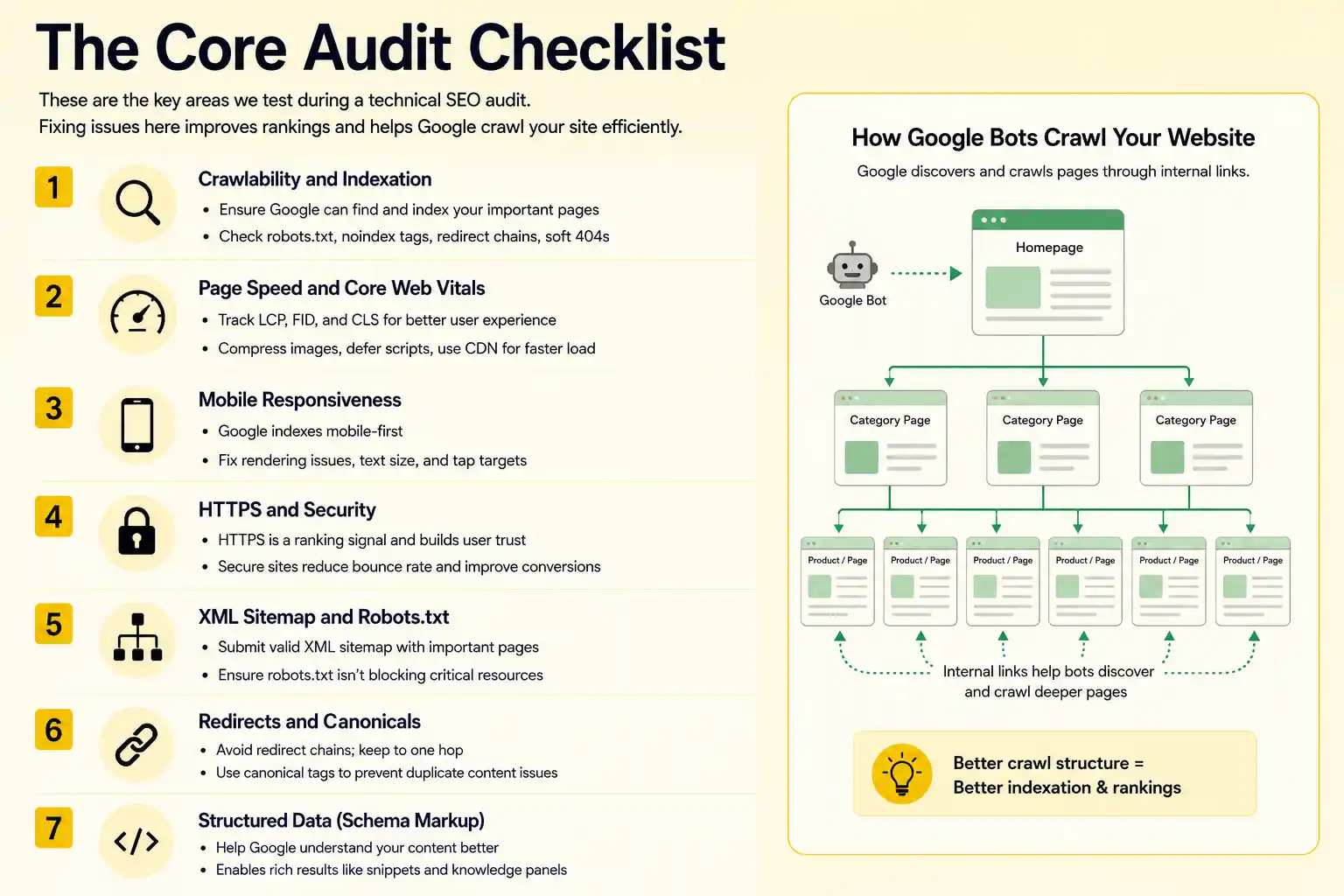
7. Structured Data (Schema Markup)
Schema tells Google what your content is actually about. Product pages, articles, reviews, FAQs, events. Proper schema can get you featured snippets, rich snippets, and knowledge panels.
Most Indian websites skip this entirely. Or implement it incorrectly. We’ve seen sites with product schema that claims a product is simultaneously priced at Rs 500 and Rs 5000.
It’s worth doing right. Not optional anymore.
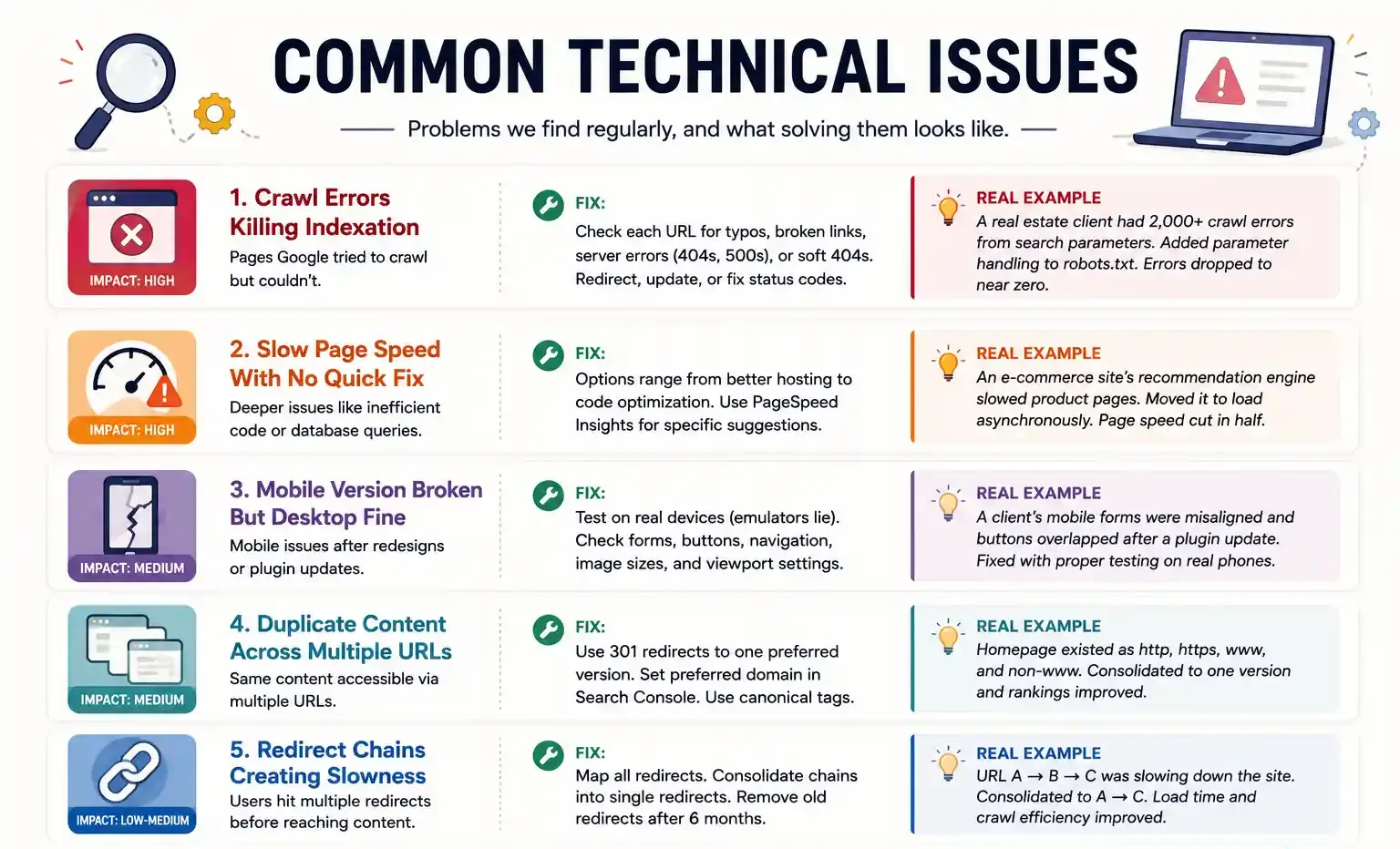
Common Technical Issues
Let me walk through problems we find regularly, and what solving them looks like.
-
Crawl Errors Killing Indexation
You’ll see these in Google Search Console under Coverage. Pages Google tried to crawl but couldn’t.
Fix: Check each URL. Look for typos, broken links, server errors (404s, 500s). For 404s, redirect them to a relevant page or delete the sitemap entry. For 500 errors, investigate your server logs. For soft 404s (page looks like it works but returns a weird status code), fix the status code.
One real estate client had 2,000+ crawl errors from search parameters. Google was trying to crawl things like “property?filter_1=&filter_2=&filter_3=” infinitely. Added parameter handling to robots.txt. Errors dropped to near zero.
-
Slow Page Speed With No Quick Fix
Sometimes the issue is deeper than image compression. We’ve seen sites with inefficient database queries that make every page load take 6 seconds.
Fix options range from “swap web hosts” (nuclear) to “defer JavaScript loading” (surgical). Work with your web team on this. If you don’t have one, tools like Google PageSpeed Insights give specific suggestions.
One e-commerce site in Bangalore found that their recommendation engine was slowing down product pages. They moved it to load asynchronously instead of blocking the main page load. Page speed cut in half.
-
Mobile Version Broken But Desktop Fine
Usually happens after a redesign where mobile wasn’t tested. Or a plugin update broke something on mobile only.
Fix: Test everything on actual mobile phones. Emulators lie sometimes. Check forms, buttons, navigation, image sizes. Fix viewport settings if text is too small.
-
Duplicate Content Across Multiple URLs
Your homepage appears as yoursite.com and www.yoursite.com. Or http and https versions both exist. Google sees these as different pages and dilutes your ranking authority.
Fix: Use 301 redirects to consolidate to one version. Also set your preferred domain in Search Console settings. Use canonical tags as backup.
-
Redirect Chains Creating Slowness
URL A redirects to B, B redirects to C. Every visitor hits three servers before reaching content.
Fix: Map all your redirects. Consolidate chains into single redirects. Remove redirects older than 6 months (users bookmarks are expired anyway).
Tools We Actually Use (And Which Ones Justify the Cost)
You don’t need all of them. Start with the free ones. Add paid tools only if you hit limitations.
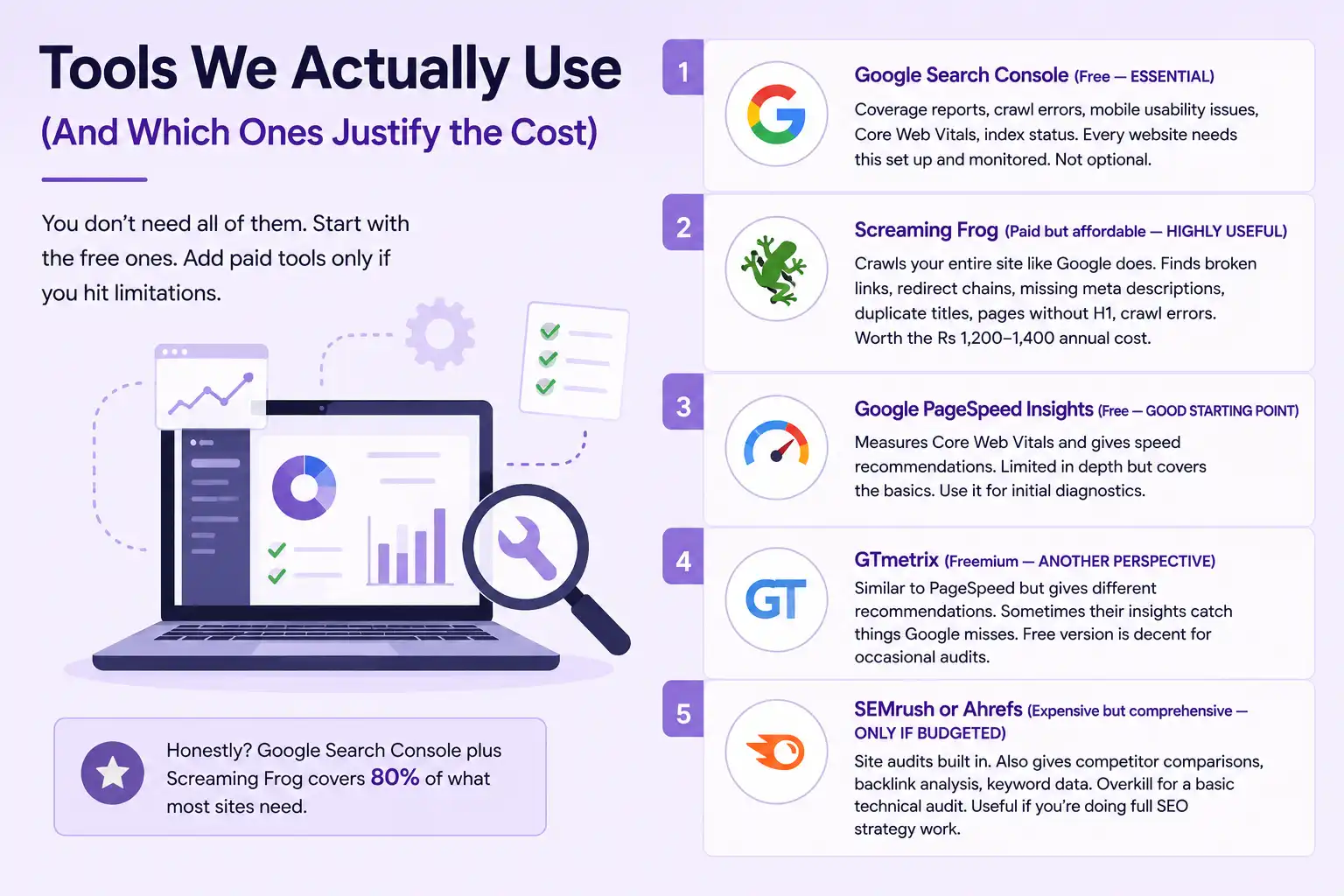
1. Google Search Console (Free — ESSENTIAL)
This is your baseline. Coverage reports, crawl errors, mobile usability issues, Core Web Vitals, index status. Every website needs this set up and monitored. Not optional.
2. Screaming Frog (Paid but affordable — HIGHLY USEFUL)
Crawls your entire site like Google does. Finds broken links, redirect chains, missing meta descriptions, duplicate titles, pages without H1, crawl errors. Worth the Rs 1,200-1,400 annual cost if you audit sites regularly.
3. Google PageSpeed Insights (Free — GOOD STARTING POINT)
Measures Core Web Vitals and gives speed recommendations. Limited in depth but covers the basics. Use it for initial diagnostics.
4. GTmetrix (Freemium — ANOTHER PERSPECTIVE)
Similar to PageSpeed but gives different recommendations. Sometimes their insights catch things Google misses. Free version is decent for occasional audits.
5. SEMrush or Ahrefs (Expensive but comprehensive — ONLY IF BUDGETED)
Site audits built in. Also gives competitor comparisons, backlink analysis, keyword data. Overkill for a basic technical audit. Useful if you’re doing full SEO strategy work.
Honestly? Google Search Console plus Screaming Frog covers 80% of what most sites need.
How Often Should You Actually Audit
Depends on your site size, traffic, and change frequency.
Small sites (under 500 pages, light traffic): Annual audit is fine. Quarterly monitor of Search Console.
Medium sites (500-5,000 pages, solid traffic): Semi-annual audits. Monthly Search Console checks. Immediate investigation if traffic drops.
Large sites (5,000+ pages, significant traffic): Quarterly audits. Weekly monitoring of key metrics. Dedicated person watching for issues.
After any major change — redesign, migration, server switch, CMS update — audit within two weeks.
We had a client migrate from Shopify to Magento. They didn’t audit for three months. By then, 30% of their product pages had broken redirects. Recovery took a month and cost them traffic.
The Technical Audit Workflow (How We Actually Do This)
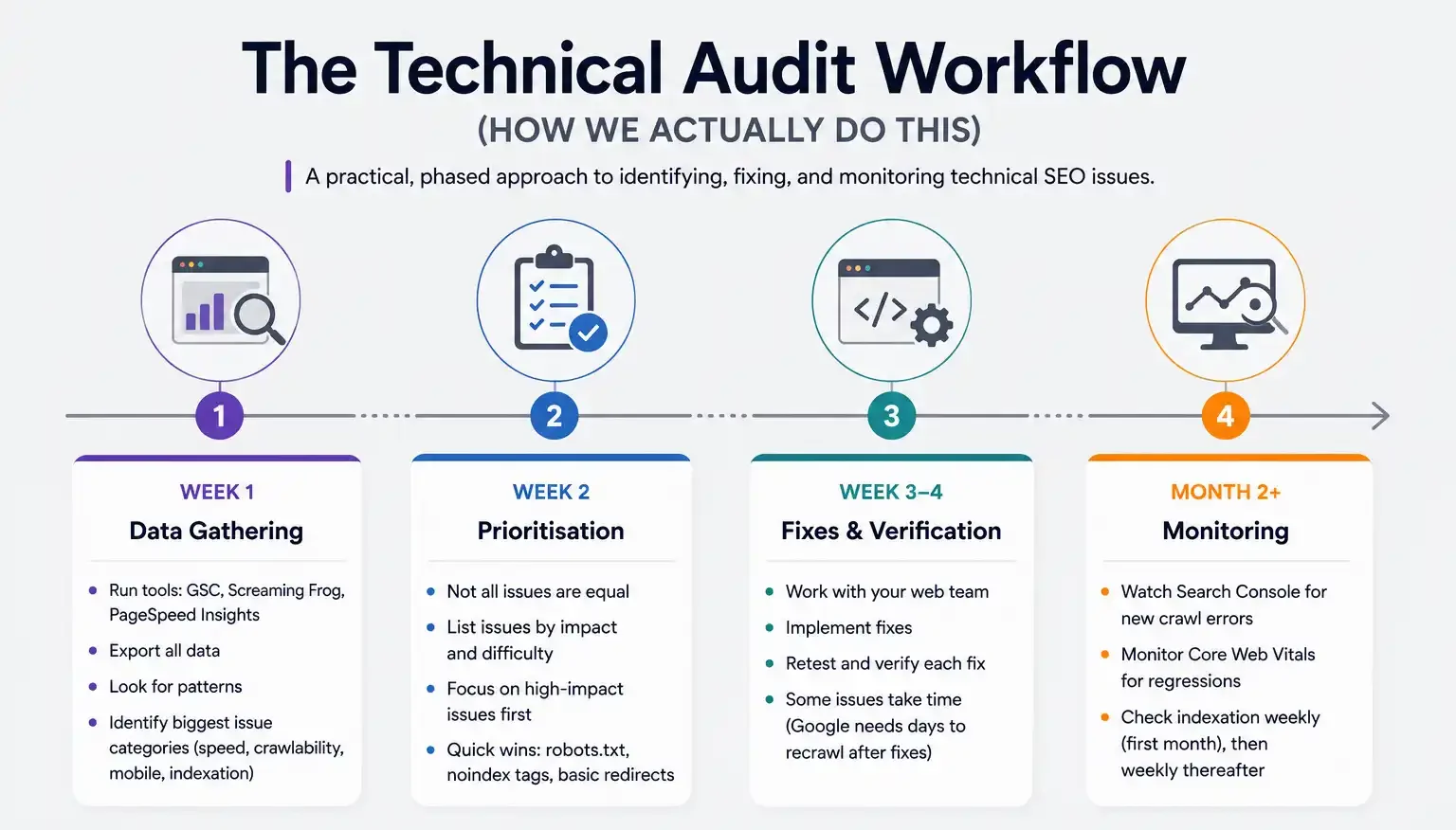
If you want to audit your own site, here’s roughly the process:
Week 1: Data gathering. Run your site through Google Search Console, Screaming Frog, PageSpeed Insights. Export all the data. Look for patterns. What’s the biggest issue category — speed, crawlability, mobile, indexation?
Week 2: Prioritisation. Not all issues are equal. A crawl error affecting 3,000 pages matters more than a missing alt text on one image. List issues by impact and difficulty. Quick wins first — usually robots.txt issues, noindex tags, basic redirects.
Week 3-4: Fixes and verification. Work with your web team. Implement fixes. Retest each one. Some issues take time — Google needs days to recrawl after you fix a redirects.
Month 2+: Monitoring. Watch Search Console for new crawl errors. Monitor Core Web Vitals for regressions. Check indexation weekly for the first month, then weekly thereafter.
Why Most Agencies Skip Technical SEO
Here’s an uncomfortable truth: a lot of digital marketing agencies in India don’t properly understand technical SEO. They focus on keywords, content, and backlinks because that’s easier to explain to clients and easier to show results for.
Technical work is harder to showcase. You can’t say “we reduced crawl errors by 47%” the same way you say “we ranked you for 12 new keywords.” So agencies often brush over it or outsource it to some random freelancer.
But technical issues are the foundation. Bad technical health will tank even great content. We’ve seen it repeatedly.
At PromotEdge, we treat technical SEO as non-negotiable. Benjamin and his team dig into this stuff because we’ve learned the hard way that skipping it costs clients months of lost traffic recovery later.
When to Call in Help vs DIY
Be honest with yourself about your technical skills.
You can probably handle: setting up Search Console, running free audit tools, reading reports, spotting obvious issues like missing mobile responsiveness.
You probably shouldn’t attempt: modifying robots.txt on a live site without a backup, implementing schema markup incorrectly, changing redirect structures without proper mapping, migrating servers.
If you’re not 100% confident, get help. A bad technical fix can break your site faster than you’d think. We once had a client’s freelancer accidentally block the entire site from Google. Recovery took a week.
Worth the investment to get it right the first time. Whether that’s hiring an agency like us, finding a good freelancer, or skilling up your in-house team.
| Approach | Best for | Watch out for |
|---|---|---|
| DIY | Small teams, tight budgets | Slow ramp-up, trial-and-error |
| Freelancer | Specific project bursts | Inconsistency, limited ownership |
| Agency | Ongoing work, senior input | Higher retainer, less control |
Quick checklist before you start:
- Define the one thing you want: leads, sales, awareness — pick one.
- Baseline your numbers: write down where you are today.
- Pick a 90-day window: nothing moves in 2 weeks.
- Agree on success metrics: with whoever is paying the bill.
- Set up proper tracking: GA4, UTMs, call tracking.
- Review monthly: kill what doesn’t work, double down on what does.
The Bottom Line
If you take one thing from this: technical seo audit complete guide for indian websites rewards patience and specificity, not volume or clever tricks. Start small, measure honestly, fix what breaks, and compound what works. The brands doing this well in India aren’t smarter — they’re just consistent. Need a hand with this for your business? Talk to us.
Need Help With Your Technical Audit?
Our web team at PromotEdge has fixed over 100+ sites’ technical foundations. We’ll identify what’s broken, prioritise fixes by impact, and make sure your site’s infrastructure is ready for the SEO work that comes after.
FAQs
-
What is a technical SEO audit?
Ans.It is basically a checkup for your website's infrastructure. We look at page speed, mobile responsiveness, crawl errors, HTTPS, XML sitemaps, schema markup, redirects, and how easily Google can find all your pages. Nothing about the words you have written — that is a different audit. This is about whether your website's foundation is solid. -
How often should I do a technical SEO audit?
Ans.At minimum, twice a year. More realistically? Every quarter if your site gets significant traffic, or if you have made major changes like switching servers or redesigning. For smaller sites with minimal updates, annual audits might work. But you should have ongoing monitoring between audits using Google Search Console. -
Can I do a technical audit myself?
Ans.Partially, yes. Free tools like Google Search Console, Screaming Frog, and GTmetrix cover a lot. But they give you data, not always the full picture of what to do about it. A real audit requires experience understanding which issues matter for your specific goals, and which are noise.
Author Details

Latest Posts
-
 26 / Aug
Search Engine Optimization Video SEO: How to Rank Your Videos in Google & YouTube
26 / Aug
Search Engine Optimization Video SEO: How to Rank Your Videos in Google & YouTube -
 25 / Aug
Video Production Corporate Video Production: A Practical Guide for Indian Brands
25 / Aug
Video Production Corporate Video Production: A Practical Guide for Indian Brands -
 24 / Aug
-
21 / Aug
Catalogue Design Catalogue Design: How to Create Catalogues That Actually Sell
-
 20 / Aug





Related Knowledge