-
Author: Anindita Barik
-
Updated Date: Jul-23-2026
-
Views: 2 Min Read
Website security isn’t optional — it protects revenue, SEO rankings, and customer trust. This guide covers the real threats hitting Indian business sites (brute force, malware, SQL injection), why SSL and HTTPS are non-negotiable, and how firewalls, security plugins, and regular audits work together. It also breaks down backup strategy, incident response steps, and a practical 10-point checklist you can implement today to eliminate most attack vectors on your business website.
Website security means protecting your business site from hacking, malware, data theft, and downtime through a combination of encryption, access controls, monitoring, and backups. It matters because a compromised site doesn’t just get hacked — it loses its Google rankings almost overnight, damages customer trust if data leaks, and can trigger legal liability under laws like GDPR or India’s DPDP Act. Every hour a site stays down also means lost leads and lost revenue, which makes security a business concern, not just a technical one.
Protecting a business site comes down to a few core practices: enabling HTTPS with an SSL certificate, using strong passwords with two-factor authentication, installing a firewall and security plugin (like Wordfence or Cloudflare), keeping software and plugins updated, and running automated, off-site backups tested regularly. Pairing these with quarterly security audits and a clear incident-response plan covers roughly 95% of the threats small and medium business websites actually face — brute force attacks, malware injections, and SQL injection — without requiring a large security budget.
The Call at 4 AM
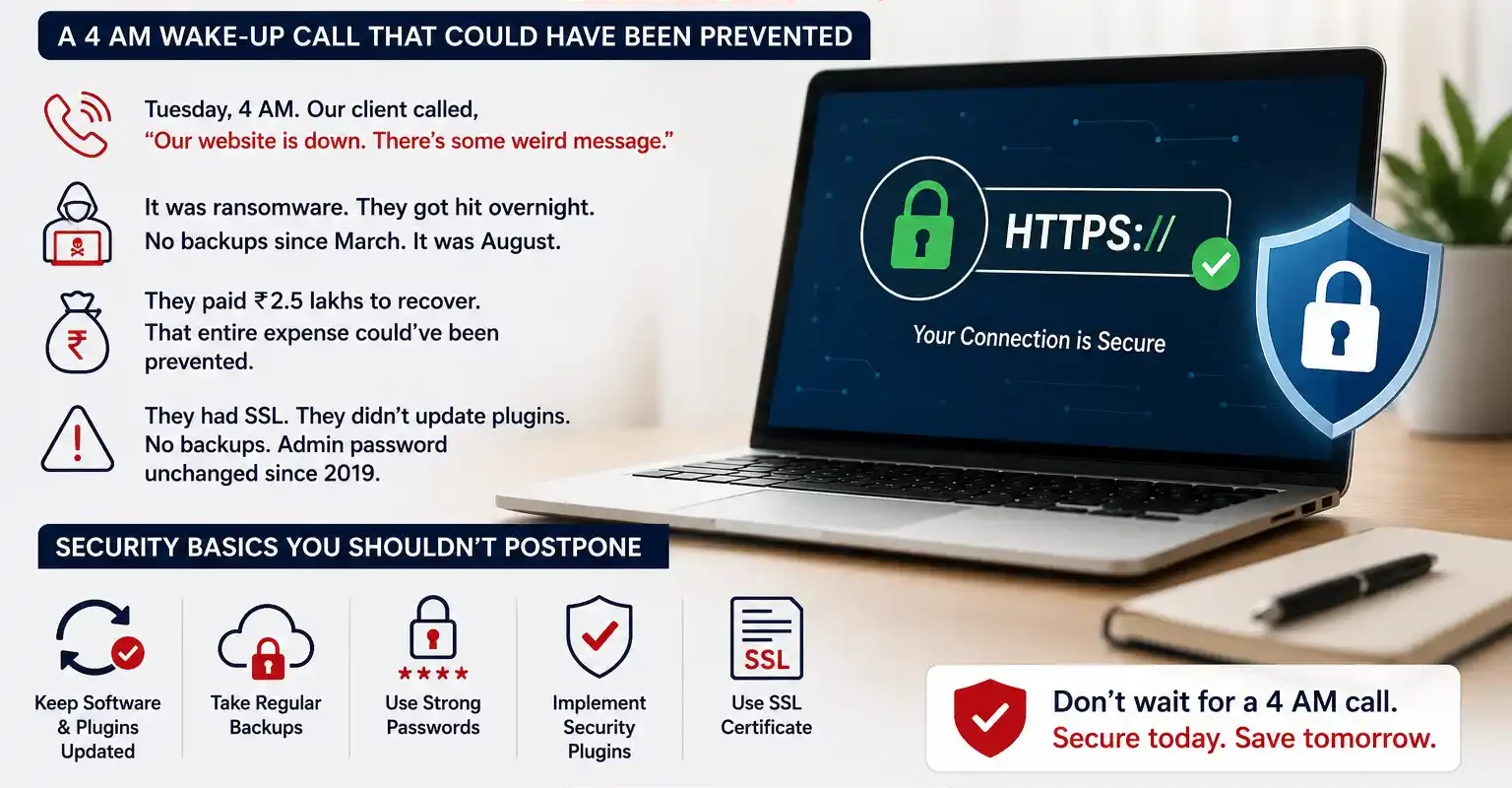
Tuesday morning. 4 AM. My phone rang. One of our manufacturing clients, voice shaking.
“Benjamin, our website is down. There’s some weird message. Everything was fine yesterday. We don’t know what to do.”
I checked. Ransomware. They got hit overnight. No backups since March. It was August.
They paid 2.5 lakhs to recover. That entire expense could’ve been prevented with basic security practices they kept postponing. They had SSL. They didn’t update plugins. Nobody had backups set up. Their admin password was unchanged since 2019.
That conversation changed how I think about security conversations with businesses. Most owners don’t think about website security until something breaks. And by then, you’re scrambling.
So let’s talk about this properly. Not to scare you — okay, maybe a little — but mostly to give you a roadmap for actually protecting your business site.
Why Security Actually Matters
Most people think “website security” means preventing attacks. That’s part of it. But the real damage is broader than that.
A compromised website tanks your SEO overnight. Google blacklists infected sites immediately. Your search rankings vanish. Some sites take months to recover ranking-wise even after the malware is cleaned up. That means months without organic traffic.
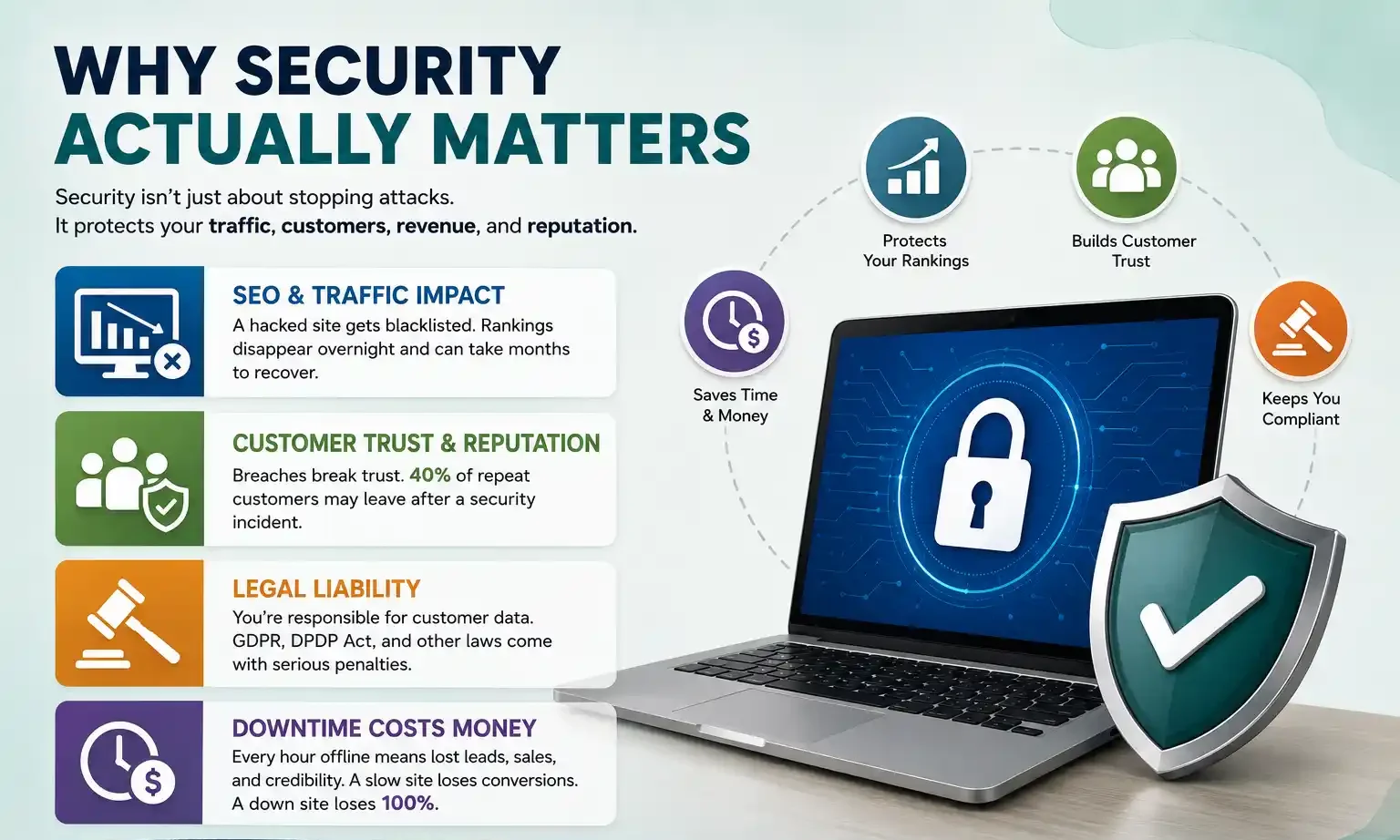
Then there’s customer trust. Your site gets breached, customer data leaks — whether they were actually harmed or not — and your reputation takes a hit that’s harder to recover from than the technical problem itself. We’ve seen small e-commerce stores lose 40% of repeat customers after a breach. Not because the security was uniquely weak. But because the owner delayed announcing it and customers found out from other sources first.
There’s also legal liability now. If you collect customer emails, phone numbers, payment details — you’re responsible for their safety. GDPR applies to European customers. India’s DPDP Act just came into effect. Data protection violations can mean penalties.
And the simplest reason: downtime costs real money. Every hour your site is offline, you lose leads, transactions, credibility. A website that loads in 5 seconds instead of 2 seconds? You lose 7% of conversions just from slowness. A completely down site? You lose 100%.
Security doesn’t sound exciting. But it’s foundational.
Common Threats and Which Ones Actually Hit Your Site
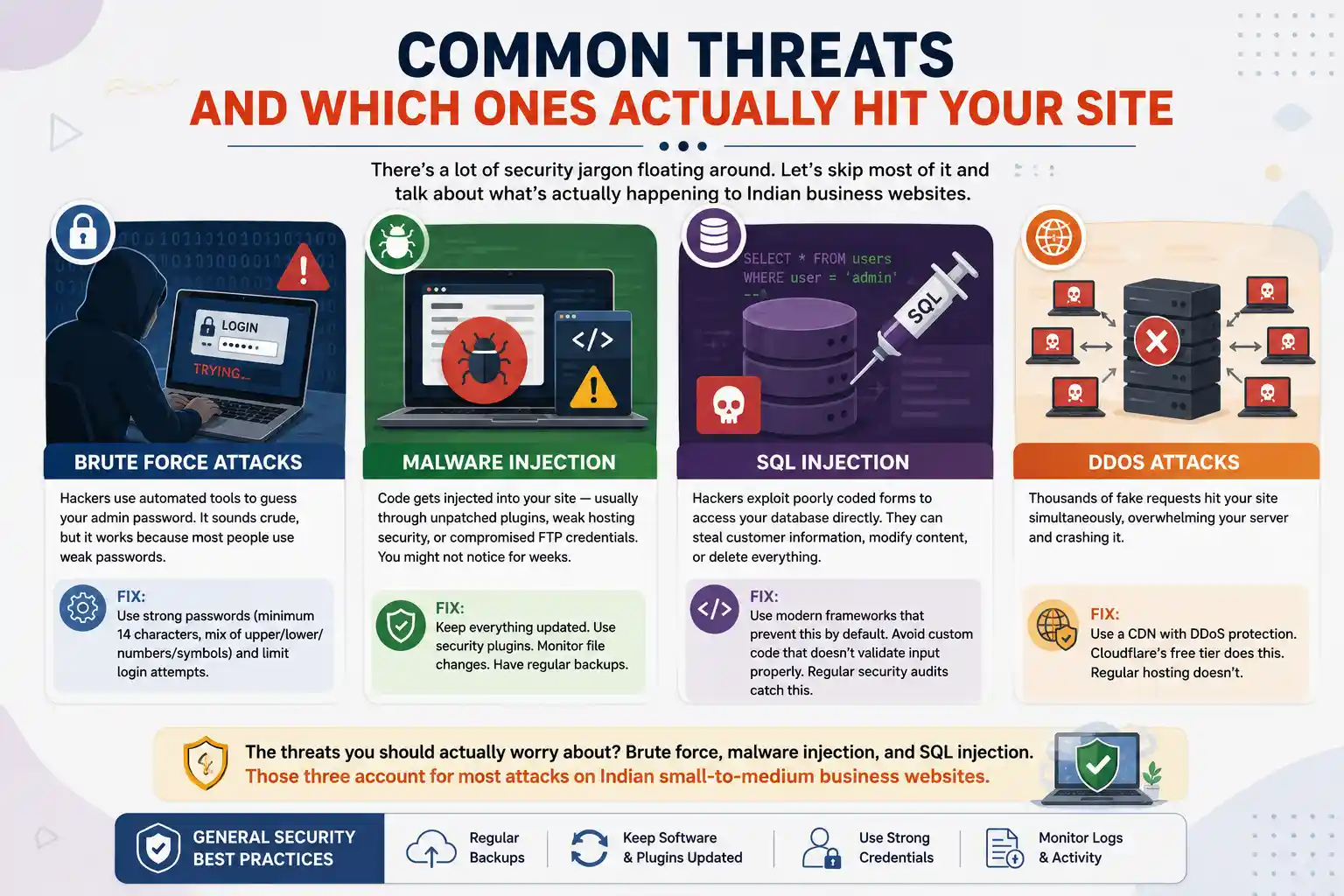
There’s a lot of security jargon floating around. Let’s skip most of it and talk about what’s actually happening to Indian business websites.
Brute Force Attacks
Hackers use automated tools to guess your admin password. It sounds crude, but it works because most people use weak passwords. “123456,” “password,” “admin123,” your business name in lowercase. Hackers don’t try to be clever — they run through the most common password list first. Takes minutes.
Fix: Use strong passwords (minimum 14 characters, mix of upper/lower/numbers/symbols) and limit login attempts.
Malware Injection
Code gets injected into your site — usually through unpatched plugins, weak hosting security, or compromised FTP credentials. Once it’s in, it either steals data, redirects visitors to scam sites, or mines cryptocurrency using your server. You might not notice for weeks.
Fix: Keep everything updated. Use security plugins. Monitor file changes. Have regular backups.
SQL Injection
Hackers exploit poorly coded forms — contact forms, search boxes, login pages — to access your database directly. They can steal customer information, modify content, or delete everything. Happens silently. No warning signs unless you’re monitoring logs.
Fix: Use modern frameworks that prevent this by default. Avoid custom code that doesn’t validate input properly. Regular security audits catch this.
DDoS Attacks
Thousands of fake requests hit your site simultaneously, overwhelming your server and crashing it. Usually random — you’re not being targeted specifically. Just happened to be on someone’s botnet list.
Fix: Use a CDN with DDoS protection. Cloudflare’s free tier does this. Regular hosting doesn’t.
The threats you should actually worry about? Brute force, malware injection, and SQL injection. Those three account for most attacks on Indian small-to-medium business websites.
SSL and HTTPS: Not Optional Anymore
SSL certificates encrypt the connection between your visitor’s browser and your server. Data in transit gets scrambled. Even if a hacker intercepts it, they can’t read it.
Here’s what matters: you already need this. Google made HTTPS mandatory for SEO ranking. It’s a ranking factor. Browsers show warnings on non-HTTPS sites. It affects trust. And it costs almost nothing — most hosting includes free SSL now.
HTTPS is one of the baseline checks in any on-page SEO review — without it, you’re telling both Google and your visitors that security wasn’t worth your time.
Self-Signed vs. Trusted Certificates
Self-signed SSL is free and technically secure. But browsers don’t trust it, so visitors see scary red warnings. Don’t use this for business sites.
Let’s Encrypt SSL is free, browser-trusted, and good enough for 95% of websites. It auto-renews. Use this by default.
Paid SSL (EV, OV, Wildcard) offers additional identity validation. Looks more professional. Cost is Rs 5,000-50,000 per year depending on type. For most Indian businesses running WordPress, Let’s Encrypt is fine.
HTTP vs HTTPS
HTTP is the old, unencrypted standard. HTTPS has the S for secure. Your site should exclusively use HTTPS. All traffic should redirect from HTTP to HTTPS automatically. Check this in your hosting control panel.
Firewalls and Security Plugins
A firewall sits between your site and the internet, blocking suspicious traffic before it reaches your server. It’s like a bouncer checking IDs at the club entrance.
Web Application Firewall (WAF)
Cloudflare and Sucuri both offer affordable WAF services. Free or paid options available. They catch most common attacks — malicious scripts, brute force patterns, DDoS traffic. Worth implementing even for small sites.
WordPress Security Plugins
If you run WordPress, you have several options.
Wordfence is the most popular choice. Free version covers login protection, malware scanning, firewall basics. Paid version (Rs 2,000-3,000 per year) includes IP blocking, login alerts, premium support.
Sucuri is more comprehensive. Includes WAF, malware removal, DDoS protection. Cost is Rs 4,000-12,000 per year.
iThemes Security is lighter weight. Good for basic protection. Rs 1,500-4,000 per year depending on features.
For most small-to-medium businesses on WordPress, Wordfence plus Cloudflare Free is a solid combination. Total cost: zero rupees. Handles 80% of what you need.
Server-Level Security
Even better than plugins: security at the hosting level. Good providers offer:
- Automatic malware scanning
- File integrity monitoring (alerts if someone modifies files)
- Intrusion detection systems
- Hardware firewalls
Managed WordPress hosting (like Kinsta, WP Engine) includes most of this by default. It costs more (Rs 4,000-15,000 per month vs Rs 200-1,000 on shared hosting) but you get security and performance bundled together. For brands running e-commerce portals, managed hosting isn’t optional — when transactions are happening 24/7, server-level security is the only level that actually protects customer payment data reliably.
Regular Security Audits (The Thing Everyone Skips)
A security audit is a systematic check of every vulnerability on your site. Think of it like a building inspection — you find weak spots before they cause damage.
What Gets Checked
Outdated software: WordPress version, all themes, all plugins. One old plugin with a known vulnerability is enough to get hacked.
User accounts: Who has admin access? Are there dormant accounts? Default credentials changed? Inactive users can become security holes.
File permissions: Are file permissions set correctly? Can the web server modify files it shouldn’t? Can visitors read sensitive files?
Database security: Are database credentials strong? Are backups protected? Is the database user restricted to necessary permissions?
SSL configuration: Is the certificate valid? Does everything redirect to HTTPS properly? Any mixed content warnings?
Malware scanning: Automated tools scan your entire site for known malware signatures.
Audit Frequency
Quarterly (every 3 months) is the minimum for business sites. Monthly is better if you can manage it. Annually is better than nothing but not ideal. WordPress updates happen monthly. Security vulnerabilities are discovered weekly. You need to stay current.
Many hosting providers offer built-in scanning. Use it. If they don’t, run free tools like Sucuri or VirusTotal as a baseline. For comprehensive audits, hire someone (or talk to your web agency — that’s literally our job). This is part of what a proper website design and development engagement should include from the start, not something bolted on after a breach.
Backup Strategy (The Insurance You Actually Need)
Backups are your ultimate security net. Get hacked? Restore from backup. Ransomware hits? Restore. Upgrade goes wrong? Restore. Delete something by accident? Restore.
But here’s what everyone misses: you don’t need one backup. You need multiple backups. Off-site. Automated. Tested regularly.
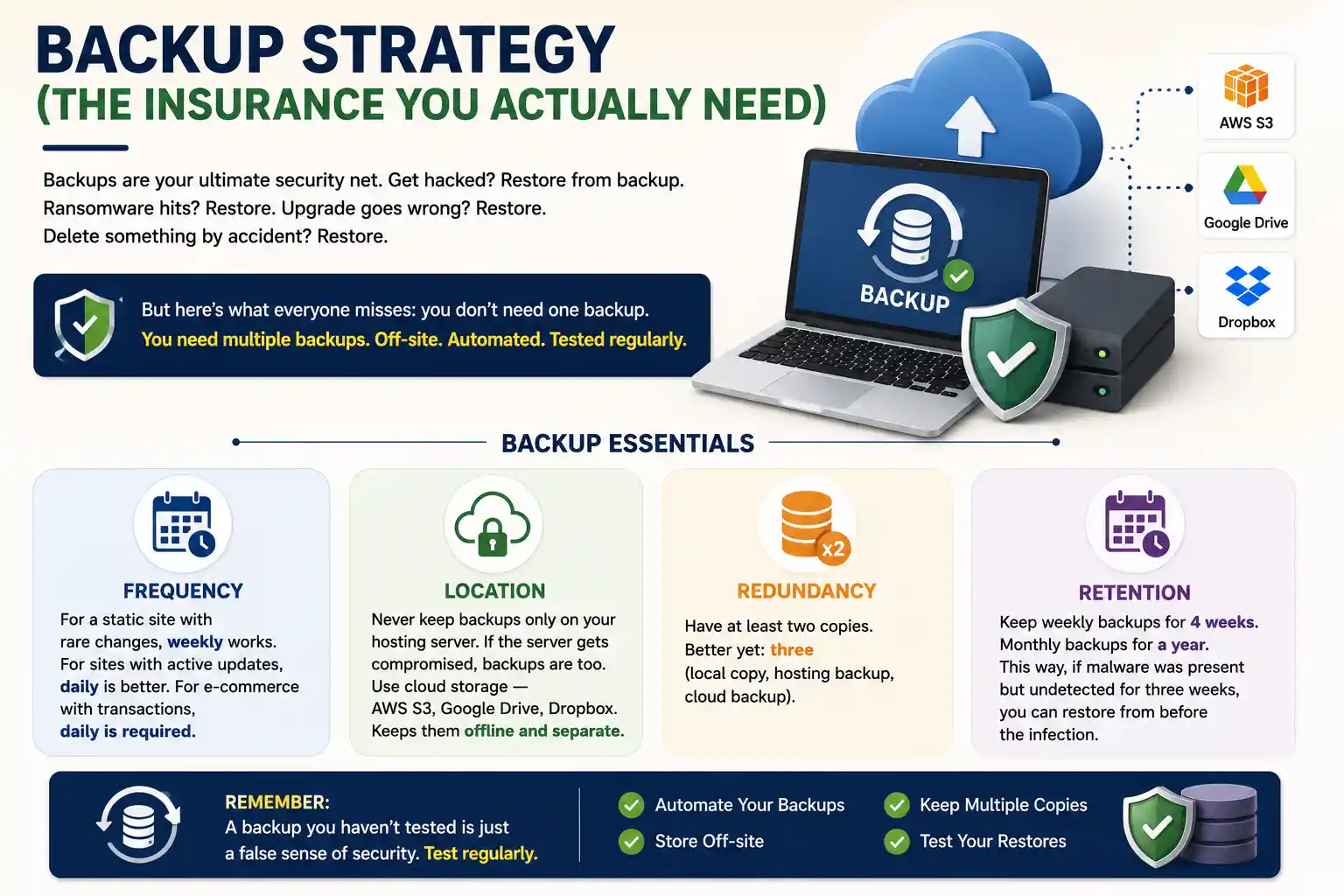
Backup Essentials
Frequency: For a static site with rare changes, weekly works. For sites with active updates, daily is better. For e-commerce with transactions, daily is required.
Location: Never keep backups only on your hosting server. If the server gets compromised, backups are too. Use cloud storage — AWS S3, Google Drive, Dropbox. Keeps them offline and separate.
Redundancy: Have at least two copies. Better yet: three (local copy, hosting backup, cloud backup).
Retention: Keep weekly backups for 4 weeks. Monthly backups for a year. This way, if malware was present but undetected for three weeks, you can restore from before the infection.
Tools and Services
UpdraftPlus (WordPress) — Automatic backups, stores them on cloud. Free version is good. Paid is Rs 2,500-5,000 per year.
Backblaze — Backs up your entire server daily. Rs 600-1,200 per month.
Manual backups — Download website files and database via FTP/phpMyAdmin monthly. Low cost, requires discipline.
The best backup is the one you test. Once a quarter, restore a backup to a test environment and verify everything works. Most people never do this. Then when they need to restore, they discover the backup is corrupted. Don’t be that person.
Incident Response: When Things Go Wrong
Despite your best efforts, something will eventually go wrong. Site gets infected. You get hacked. A plugin breaks. Here’s how to respond.
First 24 Hours
Step 1: Take the site offline if needed. If you’re under active attack (DDoS, ransomware with a countdown), taking the site offline is better than letting attackers keep access. Most hosting providers let you do this quickly.
Step 2: Assess the damage. What’s compromised? Data stolen? Malware injected? Search your hosting logs and admin logs for suspicious activity. Look at file modification timestamps.
Step 3: Isolate and secure. Change all passwords immediately — hosting, FTP, database, admin accounts. This prevents attackers from maintaining access while you clean up.
Step 4: Notify stakeholders. If customer data was breached, you’re legally required to disclose it. Better to get ahead of the news than have customers find out from social media.
Recovery (24-72 Hours)
Option A: Clean the site — Use security tools to find and remove malware. Works for simple infections. Takes time.
Option B: Restore from backup — Find the last clean backup (before infection) and restore. Faster, more reliable. You lose content added after the backup, but that’s usually worth it.
Option C: Rebuild from scratch — Nuclear option. If infection is deep or old, rebuilding is sometimes faster than cleaning. Re-upload files fresh, change all code, reconfigure everything.
Most professionals recommend Option B for medium infections, Option C if Option B fails.
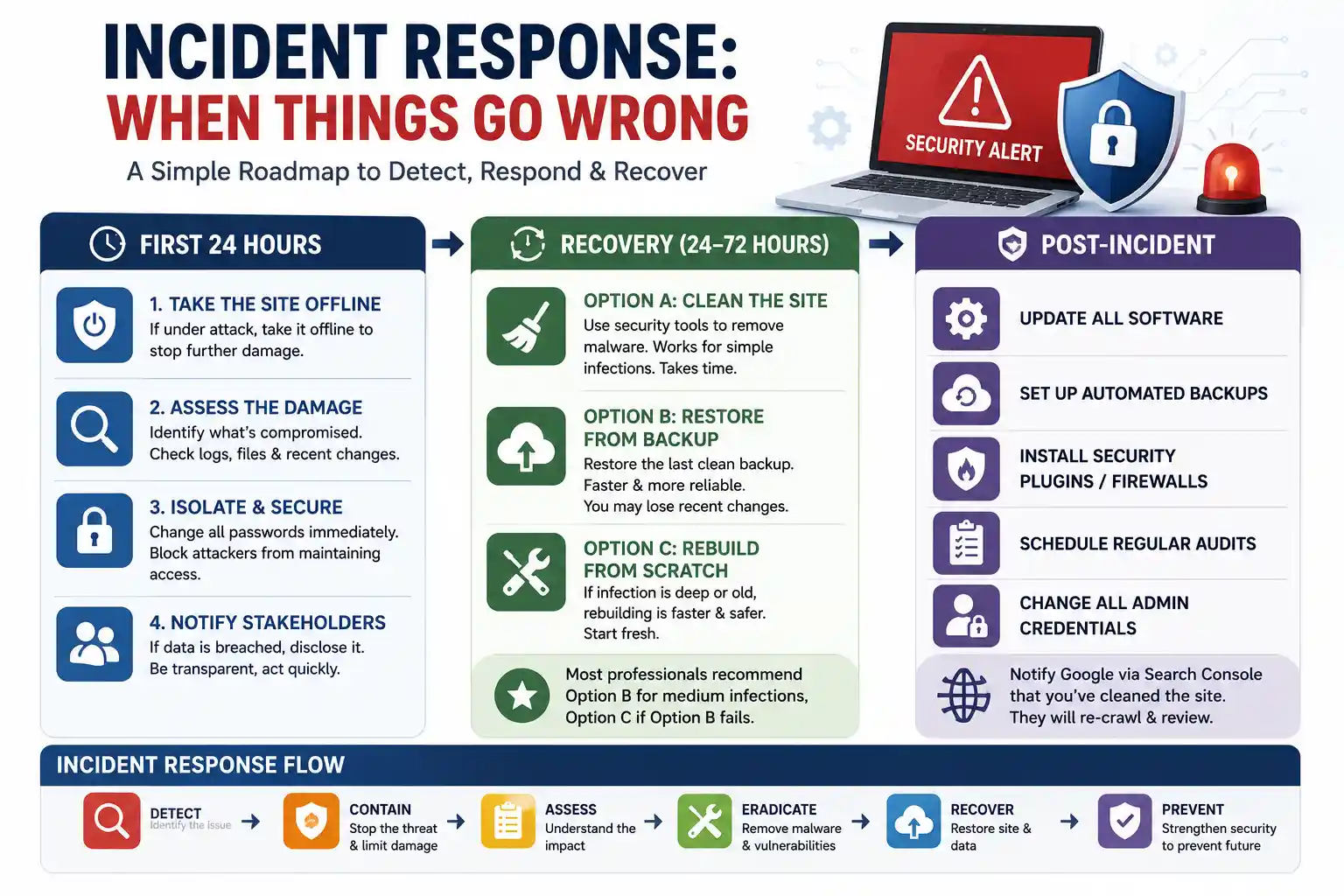
Post-Incident
Once the site is clean, implement what was missing:
- Update all software
- Set up automated backups
- Install security plugins/firewalls
- Schedule regular audits
- Change all admin credentials
Then notify Google through Search Console that you’ve cleaned the site. They’ll re-crawl and hopefully remove the security warning.
The Practical Security Checklist for Your Business Site
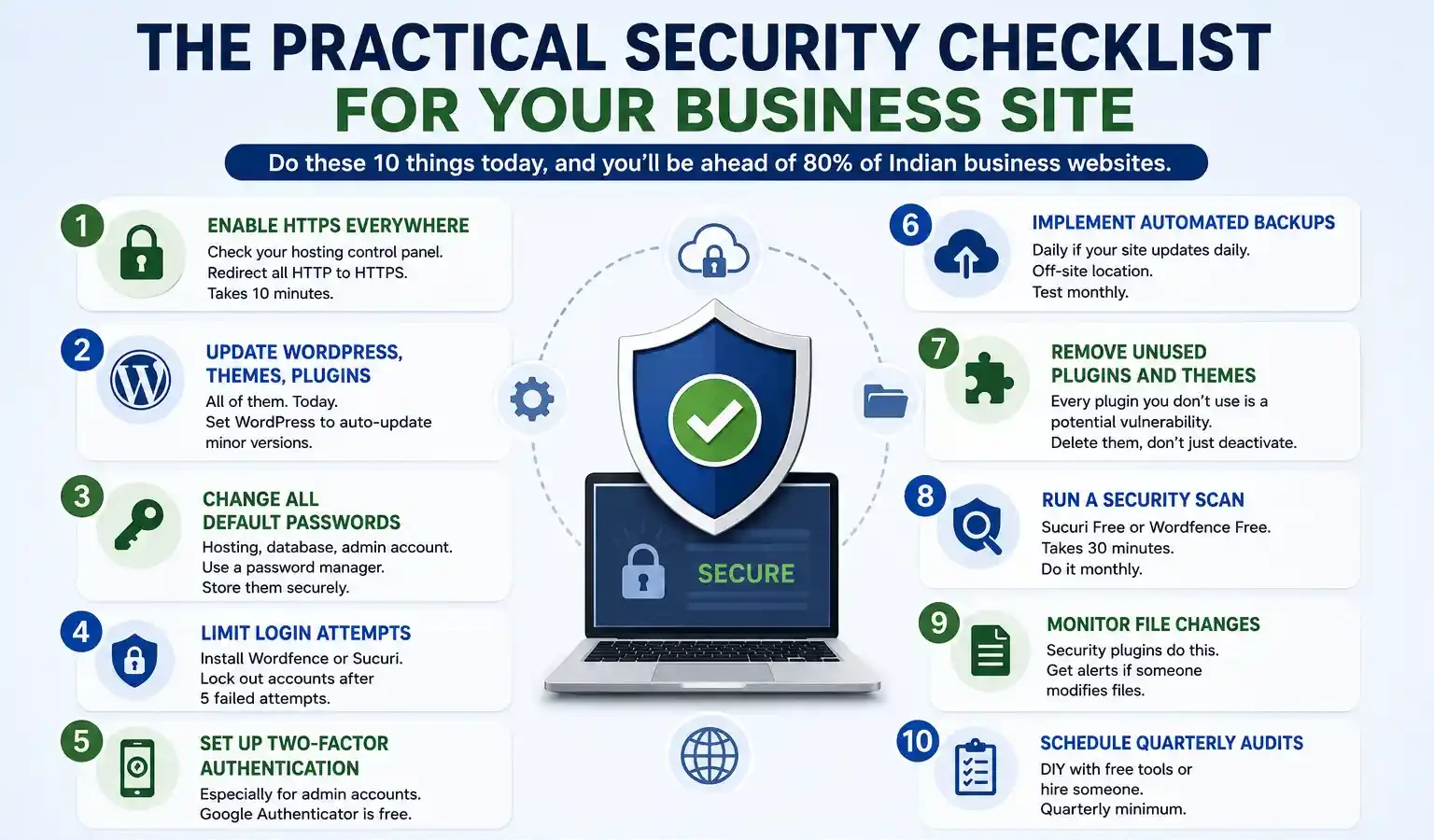
Do these 10 things today, and you’ll be ahead of 80% of Indian business websites.
1. Enable HTTPS everywhere : Check your hosting control panel. Redirect all HTTP to HTTPS. Takes 10 minutes.
2. Update WordPress, themes, plugins : All of them. Today. Set WordPress to auto-update minor versions.
3. Change all default passwords : Hosting, database, admin account. Use a password manager. Store them securely.
4. Limit login attempts : Install Wordfence or Sucuri. Lock out accounts after 5 failed attempts.
5. Set up two-factor authentication : Especially for admin accounts. Google Authenticator is free.
6. Implement automated backups : Daily if your site updates daily. Off-site location. Test monthly.
7. Remove unused plugins and themes : Every plugin you don’t use is a potential vulnerability. Delete them, don’t just deactivate.
8. Run a security scan : Sucuri Free or Wordfence Free. Takes 30 minutes. Do it monthly.
9. Monitor file changes : Security plugins do this. Get alerts if someone modifies files.
10. Schedule quarterly audits : DIY with free tools or hire someone. Quarterly minimum.
Do these 10 things and you’ve eliminated 95% of attack vectors. The remaining 5% are rare enough that you don’t need to lose sleep over them.
When to Get Professional Help
Your site is a business asset. Would you skip getting your building inspected to save money? Probably not. Same logic applies.
Hire a web security professional if:
- You’ve been hacked before (ongoing vulnerability)
- You collect sensitive customer data (legal requirement)
- You take payments online (compliance requirement)
- You have more than 10 regular contributors/admins (complexity)
- You don’t have time to stay on top of updates
- You want industry-specific compliance (HIPAA, ISO, etc.)
The cost of professional security — Rs 2,000-10,000 per month depending on scope — is way cheaper than recovery costs from a breach.
We audit sites regularly, set up security stacks, and monitor for threats. It’s not glamorous work. But it keeps businesses operational.
| Approach | Best for | Watch out for |
|---|---|---|
| DIY | Small teams, tight budgets | Slow ramp-up, trial-and-error |
| Freelancer | Specific project bursts | Inconsistency, limited ownership |
| Agency | Ongoing work, senior input | Higher retainer, less control |
Quick checklist before you start:
- Define the one thing you want: leads, sales, awareness — pick one.
- Baseline your numbers: write down where you are today.
- Pick a 90-day window: nothing moves in 2 weeks.
- Agree on success metrics: with whoever is paying the bill.
- Set up proper tracking: GA4, UTMs, call tracking.
- Review monthly: kill what doesn’t work, double down on what does.
The Bottom Line
If you take one thing from this: website security essential guide to protecting your business rewards patience and specificity, not volume or clever tricks. Start small, measure honestly, fix what breaks, and compound what works. The brands doing this well in India aren’t smarter — they’re just consistent. Need a hand with this for your business? Talk to us.
FAQs
-
How do I know if my website is secure?
Ans.First sign: your browser shows a padlock icon and says "Secure" — that's HTTPS working. Second: run your domain through free scanners like Sucuri Security Check or Wordfence. They'll flag any known malware. Third: check your hosting dashboard for file modification alerts or suspicious activity logs. Fourth: look for admin accounts you don't recognise. If you find something odd, that usually means something's wrong and you need help. -
Is SSL enough to protect my website?
Ans.Not even close. SSL encrypts data in transit — data travelling between your visitor's browser and your server gets scrambled. But it doesn't protect from malware injections, weak passwords, unpatched plugins, or server vulnerabilities. Think of SSL like a locked car. Important? Yes. But you still need an alarm, secure parking, and regular maintenance. -
How often should I update my website?
Ans.WordPress core, themes, and plugins should update as soon as updates are available. Most updates are security patches. Waiting even a few days puts you at risk. For custom code, critical security updates need immediate attention. Backups should run daily minimum. Reason: vulnerabilities hackers actively exploit are in old, known-broken software that gets fixed but then not updated by site owners. If you're running old WordPress from two years ago, you're inviting attacks.
Author Details

Latest Posts
-
 07 / Sep
Content Writing Copywriting vs Content Writing: Which One Actually Wins
07 / Sep
Content Writing Copywriting vs Content Writing: Which One Actually Wins -
 26 / Aug
Search Engine Optimization Video SEO: How to Rank Your Videos in Google & YouTube
26 / Aug
Search Engine Optimization Video SEO: How to Rank Your Videos in Google & YouTube -
 25 / Aug
Video Production Corporate Video Production: A Practical Guide for Indian Brands
25 / Aug
Video Production Corporate Video Production: A Practical Guide for Indian Brands -
 24 / Aug
-
21 / Aug
Catalogue Design Catalogue Design: How to Create Catalogues That Actually Sell




Related Knowledge