-
Author: PromotEdge
-
Updated Date: Feb-09-2026
-
Views: 2 Min Read
If your business has a website, it is important for you to keep track of your users. It helps in marketing, sales, and even drafting content strategies.
But the question is how to track it correctly?
Tracking methods you use can cost you money and will depend on several factors. This includes declining attribution windows, increasing advertising cost and compliance issues related to privacy laws.
Part of this cost is being driven by tighter restrictions on browsers and deteriorating reliability of older tracking technologies. As a result, more companies are transitioning from using client-side tracking to server-side tracking.
So, here we are to assist you in making your decision about how you want to track your clients’ activity. We will provide you with everything necessary to evaluate both tracking options to finalize the one that will best suit your needs. Read on.
What is Client-Side Tracking?
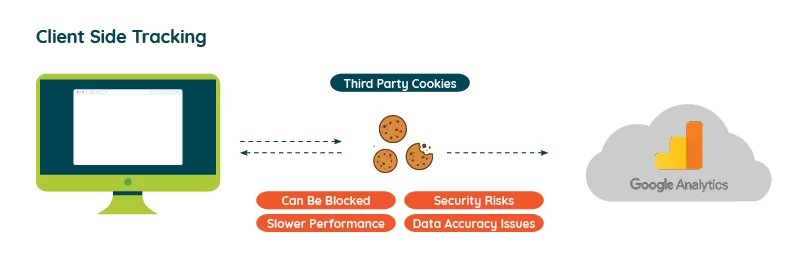
Client-side tracking is a method of monitoring user behavior that utilizes JavaScript within a user’s web browser. It allows analytics companies to collect data about each user action, including page views or clicks.
Solely relying on this approach leads to 30% missing analytics data.
Key Attributes of Client-Side Tracking
Below are some of the essential attributes that come along with client-side tracking. Check it out:
- Browser-Dependent Data Capture: The method of capturing browser-dependent data works by calling tags from the user’s device. The information retrieved by these tag calls includes data used for campaign analytics.
- Ease of Setup: The setup process can be accomplished easily through the provision of code samples. This ease of setup allows non-technical teams to perform A/B testing to their webpages without any server-level changes.
- Performance Trade-Offs: The performance trade-offs associated with using multiple tags on one web page can have a negative effect on page load timings. As a result, it will increase bounce rates as well as dilute SEO signals associated with website loading speed.
What is Server-Side Tracking?
Backend processing of user events via server-side tracking allows the tracking process to occur at your company’s location. By routing all user activity through your back-end logic, server-side tracking gives you greater control over the tracking of events.
Key Attributes of Server-Side Tracking
This type of model leads to more accurate tracking since there is no interference from a user’s device, such as ad blockers. Take a look at the essential attributes it brings into play:
- Event Flow: When someone clicks on something on your website, a request will be sent from a web browser to your backend server to log the event and store that as an enriched event. At the backend, your server will store the validated data using server-side event tracking.
- Data Processing: Servers allow you to filter out any unnecessary information and only collect the minimum data required to comply with regulations. This is done while still retaining the minimum information necessary for processing and analysis.
- First-Party Control: Cookies created on your backend will be stored longer than those generated by a user’s device. So, it is circumventing the limitations placed on third-party trackers by tools such as Safari ITP.
- Better Performance: Websites enhance their loading speed due to server-side tracking, and it often results in improved rankings. Optimizing these factors is what we do best. Our experts at PromotEdge.com will make sure that your tracking increases visibility and does not negatively impact your SEO.

When to Use Server-Side vs Client-Side Tracking
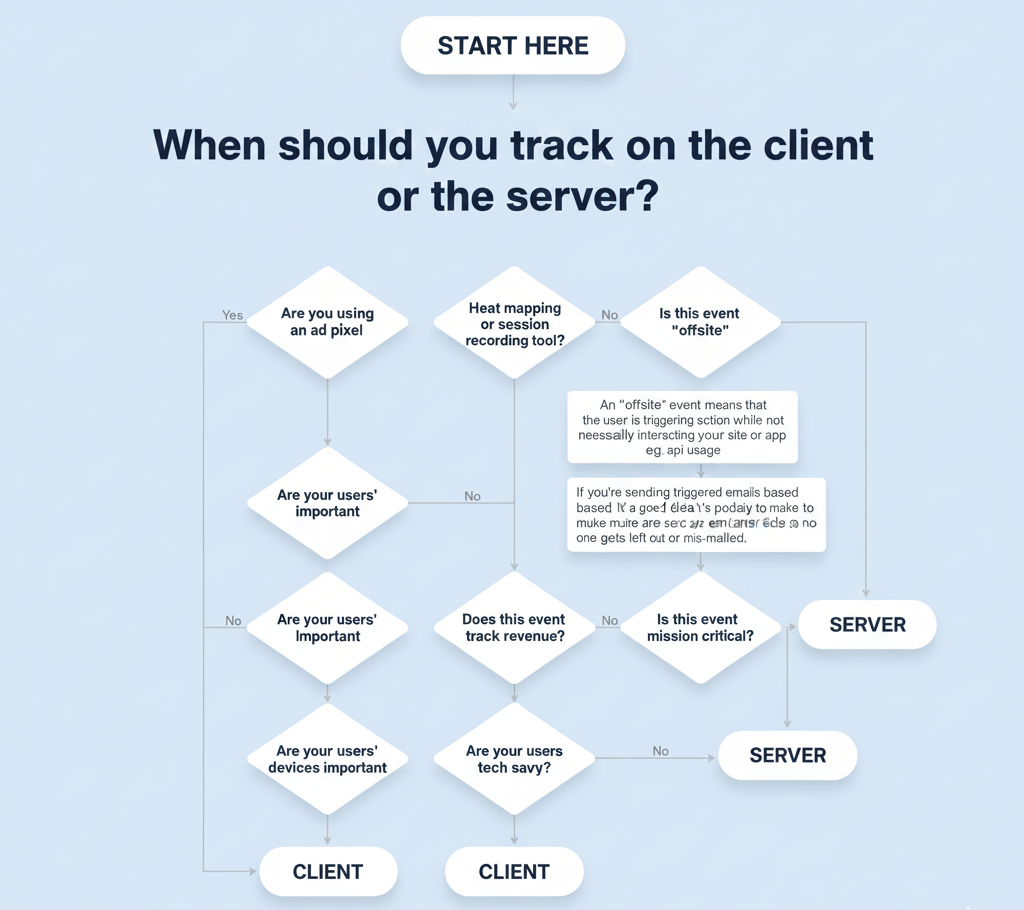
When implementing analytics, you need to consider 3 primary factors of the users you’re trying to track to understand when to use server-side vs client-side:
Analytics Objectives
There are certain types of tools that require client-side implementation because of the nature of those tools. The amount of data a tool collects is usually too large for it to be replicated on the server side.
Engineering Resources
Most of the things that can be tracked on the client side can also be accessed on the server side. But, when it comes to tracking on the server side, it uses more engineering resources than if you were tracking it client-side.
Privacy Concerns
Privacy concerns are usually indicated by the presence of AdBlock. It prevents any analytics data from leaving your users’ browsers, meaning that you may be missing data from certain segments of your user base.
Server-Side vs Client-Side: Core Differences
Below are a few ways in which both methods can differ, each of which will, ultimately, impact how effective your tracking will be:
| Aspect | Client-Side Tracking | Server-Side Tracking |
| Data Source | Browser (cookies, UTM, user agent) | Server requests (headers, body) |
| Reliability | Prone to ad blockers, interruptions | Bypasses blockers for higher accuracy |
| Implementation Effort | Simple tag paste | Requires backend setup |
| Page Speed Impact | Tags slow loading | Offloads to server, faster UX |
| Privacy Handling | Exposed to browser policies | Centralized consent control |
What Makes Most Companies Shift To Server-Side Tracking?
A shift to server-side tracking has been significant. As per Gartner Insights, 70% of marketers are more inclined towards server-side tracking in 2024 to maintain data accuracy and privacy compliance. There are many more reasons that are making this shift a must for all, check it out:
- The movement away from client-side to server-side is due to many of the significant changes browsers have made to limit the use of cookies.
- It is also because of how general business practices have been altered by new legislation with respect to privacy.
- With tools like Server-Side Google Tag Manager (sGTM) in your toolbox, you can easily set up your events using our integrations at PromotEdge to optimize your stack.
- It is a challenge for marketers to properly attribute sales to their marketing campaigns and optimize their marketing efforts. This is where server-side tracking makes the job easier.
- The main reason organizations are seeing a decline in their marketing performance metrics is that they are not collecting as much data.
- The attribution window has narrowed, conversion tracking is now less accurate, and building an audience has become more difficult.
Key Takeaways
In conclusion, the choice between server-side and client-side tracking will depend on your priorities, whether it be tracking accuracy versus ease of implementation. Server-side tracking tools will ensure that your analytics will continue to work during periods of privacy changes and provide you with control over your data using server-side Google Tag Manager (sGTM) and server-side event tracking.
For more reliable and privacy-compliant data flows, adopt server-side analytics tracking. Ready to implement robust server-side tracking? Contact us today for expert guidance.
FAQs
What is server-side tracking vs. client-side tracking:
When it comes to server-side tracking, it is all about data processed on your server with complete reliability. Client-side tracking, on the other hand, uses browser scripts to process data that leads to blockages through ad-block software, etc.
How does server-side tracking improve the accuracy of data?
Since server-side tracking will bypass any potential ad blocker with its tracking accuracy, it will have access to all events that occurred on that user’s visit. In fact, there will not be as many problems created due to the differences between browsers and operating systems.
Can I use both server-side tracking and client-side tracking together?
Yes! Hybrid methods combine the contextual information supplied by client-side tracking and the reliability supplied by server-side tracking.
What tools should I use for server-side tracking?
There are several popular tools to help you with the ability to perform server-side tracking, including: Server-Side Google Tag Manager (sGTM), Matomo SDKs, Tealium (for tracking server events), and more.
Can server-side tracking slow down a website or affect SEO?
Using Server-Side Tracking can also increase the speed of your website loading, which ultimately helps improve your LCP (Largest Contentful Paint) metrics. Eventually, it will positively contribute to your SEO and assist you in your positioning online.
Latest Posts
-
 19 / Mar
-
18 / Feb
Web Solution 12 Website Redesign Mistakes to Avoid Losing SEO
-
11 / Feb
Digital Marketing What is 7P and 7C of Digital Marketing?
-
22 / Jan
-
22 / Dec
Digital Marketing Google December 2025 Core Update


Blogs